

The Uncanny Continuing Education Credits plugin records the credits a learner earns and shows them on a transcript. Paired with Uncanny Automator, it can award credits for almost anything. A LearnDash course completion is the usual case, but LearnDash is not required: the same action works with Tutor LMS, LifterLMS, a purchase, a form submission, or any other trigger. This article covers the Uncanny Continuing Education Credits action, its three fields, and the triggers and tokens the integration adds.
The integration is part of the free Uncanny Automator plugin and appears in the recipe builder once the Uncanny Continuing Education Credits plugin is installed and active. The action awards credits to the user the recipe runs for, so use a Logged-in users recipe, or in an Everyone recipe set Run actions as so Automator knows which user to credit (see Recipes for Everyone).
Awarding credits with a recipe
- Go to Automator > Add new recipe, choose the recipe type, and click Confirm. Add the trigger that should earn the credit, such as a course completion.
- Click the + at the end of the flow. The picker opens on its Integration step.
- Search for Continuing Education or CEU and select Uncanny Continuing Education Credits. With Ready-to-use only switched on, the integration is listed only while the Uncanny Continuing Education Credits plugin is active; see Finding integrations in the recipe builder.
- Choose Award a number of custom CEUs to the user. In the Set up step the sentence highlights a number, the part you set. If you renamed credits in the plugin’s settings, the sentence and the field labels use your label instead of CEUs.
- In the Set up step, complete the three fields described below, then click Save. The action has no Test step, so Save finishes it.
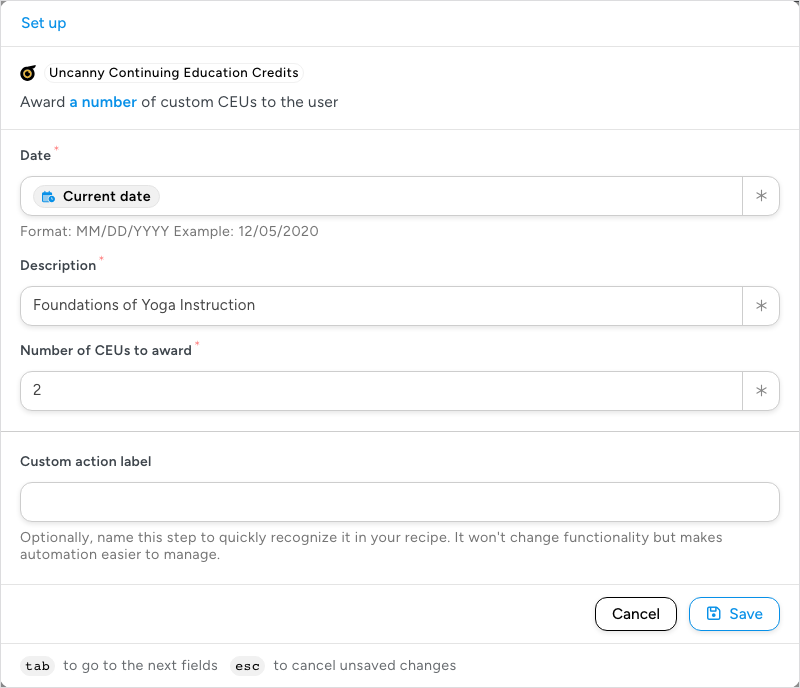
The action’s fields
All three fields are required. The action fails, and the failure is recorded in the recipe log, when any of them is empty or in the wrong format.
- Date — the date the credit is recorded as earned. The field’s hint asks for MM/DD/YYYY (for example 12/05/2020). In most cases, insert the Current date token with the ∗ button (type “Current date” in the token picker’s search box) so every award is stamped with the day the recipe ran. The token is written in the Date Format set under Settings > General, not as MM/DD/YYYY, and the action converts the date before recording it: WordPress’s default format, such as October 30, 2026, converts correctly, but a day-first format with slashes, such as 30/10/2026, does not. If you type a date or pass one from a trigger token, use MM/DD/YYYY, because a date written with slashes is read month first.
- Description — the name of the credit as it appears on the learner’s transcript. Make it unique to the recipe: a description that matches an existing record updates that record instead of adding a new one, and in some recipes causes an error.
- Number of CEUs to award — how many credits the record is worth.
Important: Set up each recipe so that it awards a particular credit once. Set Times per user in the recipe’s Settings panel to 1 so a learner who completes the trigger again does not receive the same credit twice; see Recipe settings: times per user, total times and throttling.
Triggers and tokens
The integration also adds three triggers, so a recipe can react when credits are earned: A user earns a number of CEUs, A user earns a number or more CEUs, and The total number of CEUs earned by a user is greater than or equal to a specific number. Each provides tokens for the number of credits awarded, the course or credit title, the date awarded, and the credit label, which you can use in a follow-up action such as a congratulations email or a Slack message. See Managing tokens for how to insert them.
Related: Managing actions, Recipe settings: times per user, total times and throttling, Managing tokens

Comments (0)