

AI website management is changing WordPress: AI page builders, AI assistants, and MCP servers that…
Uncanny Automator vs Zapier: Which Is Better for WordPress in 2026?
Uncanny Automator vs Zapier—which is better for WordPress automation? An honest comparison of cost, integrations, AI, and fit.
TLDR? Get the highlights:
- Zapier is a general-purpose SaaS automation tool that connects 9,000+ apps from the cloud; Uncanny Automator is a WordPress-native plugin that connects 220+ apps and runs automations inside your site
- For WordPress-centric workflows, Automator is dramatically cheaper at scale—flat annual pricing vs. Zapier’s per-task billing that climbs quickly
- Zapier wins on app breadth (especially for SaaS-to-SaaS workflows that don’t touch WordPress); Automator wins on WordPress depth, data ownership, and bundled AI (Uncanny Agent)
- Most WordPress site owners actually need a handful of integrations, not thousands—and Automator covers the popular ones plus webhooks for everything else
- Choose Uncanny Automator if your operations run through WordPress and you want flat-rate pricing, deeper WordPress data access, and an AI assistant that already knows your site; choose Zapier if your workflows live primarily between SaaS apps that barely touch WordPress, or if you need a niche SaaS integration.
Get some first-hand experience—install Uncanny Automator Lite (it’s free).
You’ve got a WordPress site, and you’ve got a problem. A form submission needs to create a new user, add them to your CRM, tag and segment them, send a welcome email, and maybe enroll them in a course or trigger an order. You don’t want to glue this together with code (if you’re like me, you don’t know how). You start Googling. Two names keep coming up: Zapier and Uncanny Automator.
On the surface, they look like the same kind of tool—visual builders, triggers, actions, “no code required” badges. So you’d be forgiven for assuming the choice between them is mostly about price or app count. It isn’t.
These two products are built on fundamentally different architectures, and that single architectural choice ripples out into everything else: how much you pay, how fast your workflows run, how deeply they can read your WordPress data, where that data lives, and how effectively you can use AI on your site and in your business.
The aim of this guide is to provide an honest, side-by-side comparison written from the perspective of a WordPress site owner, admin, or developer trying to choose between the two. I’ll cover the dimensions that actually matter—pricing, integrations, ease of use, performance, AI, data ownership—and at the end I’ll give you a clear “choose this if…” binary so you can pick the tool that’s right for you right now.
I should be upfront: we make Uncanny Automator. I’ve still done my best to be fair. Where Zapier is genuinely the better tool, I’ll say so.
Uncanny Automator vs Zapier at a Glance
If you’re pressed for time and just looking for the headlines, here’s the comparison in one table:
| Zapier | Uncanny Automator | |
|---|---|---|
| Platform | External SaaS (cloud) | Inside your WordPress site |
| Pricing | Per-task, monthly | Flat annual, unlimited runs |
| Integrations | 9,000+ apps; broad SaaS coverage, generic WordPress access | 254+; native WordPress depth + webhooks for anything else |
| Addons | Tables, Forms, Canvas (priced separately) | Custom User Fields, User Lists, Restrict Content, Dynamic Content (included with Pro Plus and Elite) |
| AI Features | Copilot, Agents, Chatbots (priced separately) | Uncanny Agent (included with Pro) |
| Data Privacy | Round-trips through Zapier servers | Stays on your server unless an action sends it out |
| Best For… | SaaS-to-SaaS workflows | WordPress-centric automation |
One-sentence verdict: if your business and workflows revolve around WordPress, Uncanny Automator is the better default. If you’re orchestrating dozens of SaaS apps that happen to touch your site, Zapier earns its keep.
Now let’s get into why.
What Are Uncanny Automator and Zapier?
Quick intros for context, in case one of these is new to you.
Zapier Explained in 60 Seconds
Zapier launched in 2011 as a way to connect cloud apps without writing code. It has since grown into the largest general-purpose automation platform on the market, with 9,000+ app integrations. Workflows are called Zaps—a Zap has one or more triggers and one or more actions, and Zapier’s servers run the workflow in the cloud.
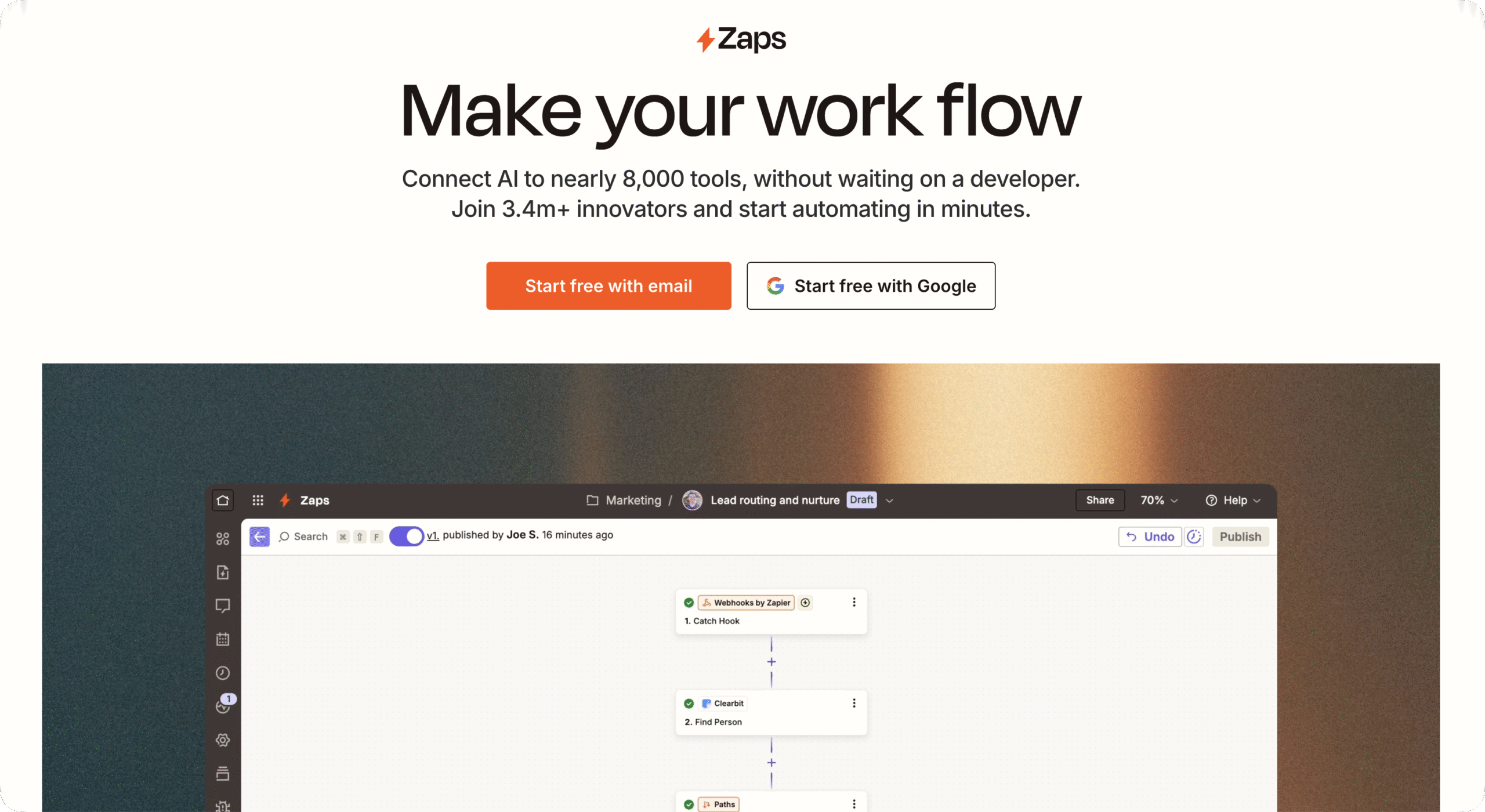
In the last couple of years, Zapier expanded well beyond Zaps. The platform now includes:
- Tables (data storage),
- Forms (custom forms that feed Zaps),
- Canvas (workflow mapping with AI),
- Copilot (an AI assistant for building Zaps),
- Agents (AI teammates for completing tasks),
- Chatbots, and
- Zapier MCP (Model Context Protocol, which lets external AI agents reach Zapier’s integration library).
Pricing for Zapier is:
- Free: $0/month (100 tasks/month)
- Professional: $19.99/month (750 tasks/month, per-task billing after that)
- Team: $69/month (2,000 tasks/month, per-task billing after that)
- Enterprise: custom pricing
*All prices are listed in USD as of May 22, 2026 and reflect monthly pricing for annual subscriptions without addons.
Uncanny Automator Explained in 60 Seconds
Uncanny Automator is the #1 WordPress AI and automation plugin trusted by 50,000+ websites. The core of Automator is the recipe builder. In Automator, recipes are automations that chain together triggers and actions to execute workflows without code.
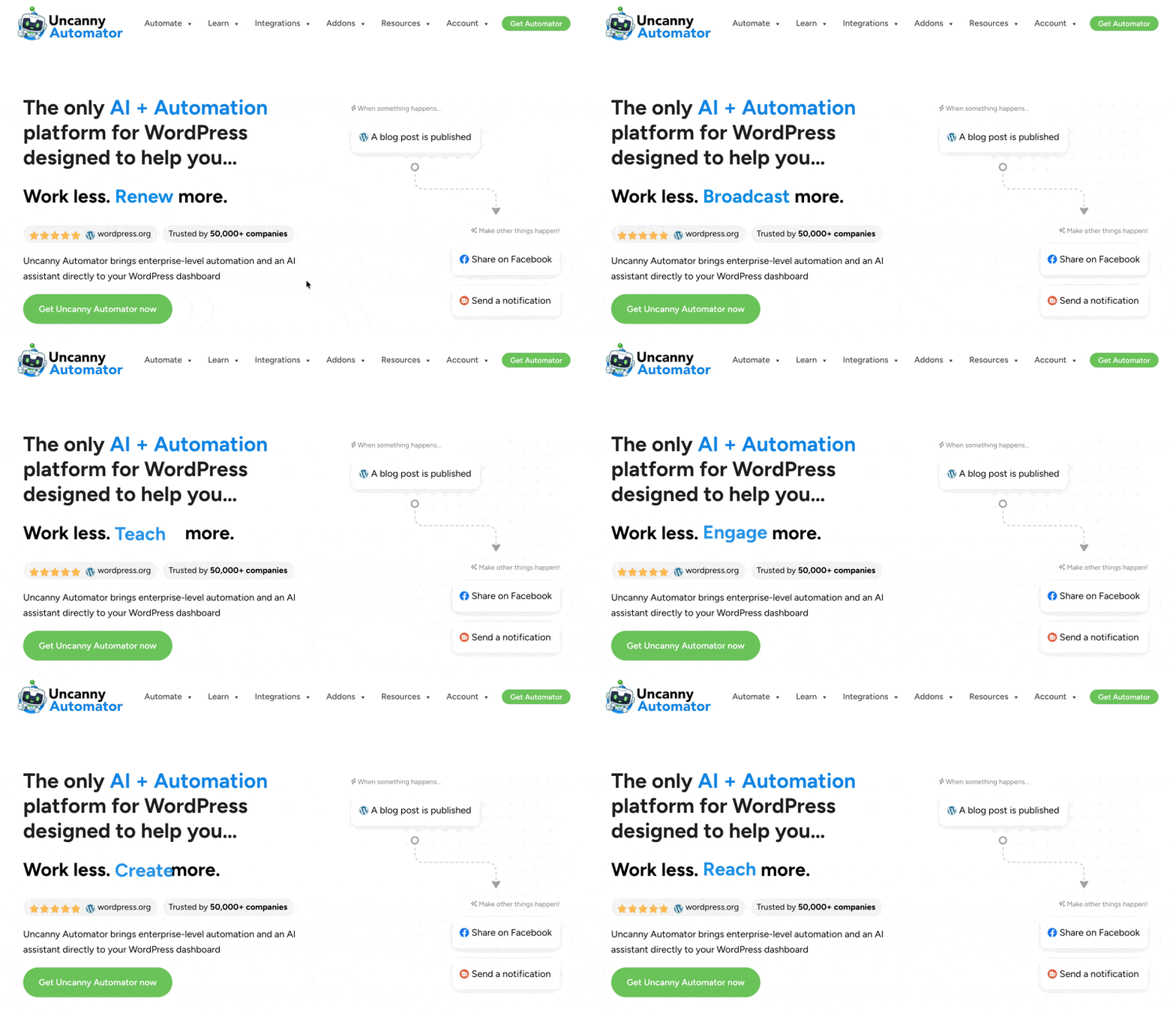
Because Automator runs inside WordPress, your recipes can tap directly into your site’s data: user and post metadata along with plugin data, and more. Automator puts this data at your fingertips in the form of tokens (easily accessible dynamic data such as form field contents or billing email or address).
Beyond the recipe builder, Automator includes Uncanny Agent—a WordPress-native AI assistant that understands your content, users, and settings. This means that Automator’s AI platform can answer questions, draft content, build recipes from a description, and complete tasks for you with the full context of your actual site and business data.
Pricing for Automator is:
- Lite: $0/month (unlimited recipes)
- Basic: $25/month (unlimited recipes + unlimited app credits + Uncanny Agent)
- Plus: $40/month (everything in Basic + 10 site license + addons)
- Elite: $60/month (everything in Plus + 50 site license + Elite addons)
*All prices are listed in USD as of May 22, 2026 and reflect monthly pricing for annual subscriptions of an AI + Automation plan. Legacy Automator plans (without access to Uncanny Agent) are also available.
The Core Architectural Difference: In-Site Plugin vs External SaaS
Here’s the difference that drives every other comparison in this post: Zapier is a SaaS that sits outside your WordPress site; Uncanny Automator is a plugin that runs inside it.
That single fact changes everything downstream:
- Where your data lives. Zapier round-trips your data through their external servers as part of normal operation. Automator keeps data on your server unless an action explicitly sends it elsewhere.
- How you pay. Zapier meters per-task because every action hits their infrastructure. Automator charges a flat annual fee because the work happens on your server—there’s no per-task cost to pass on to you.
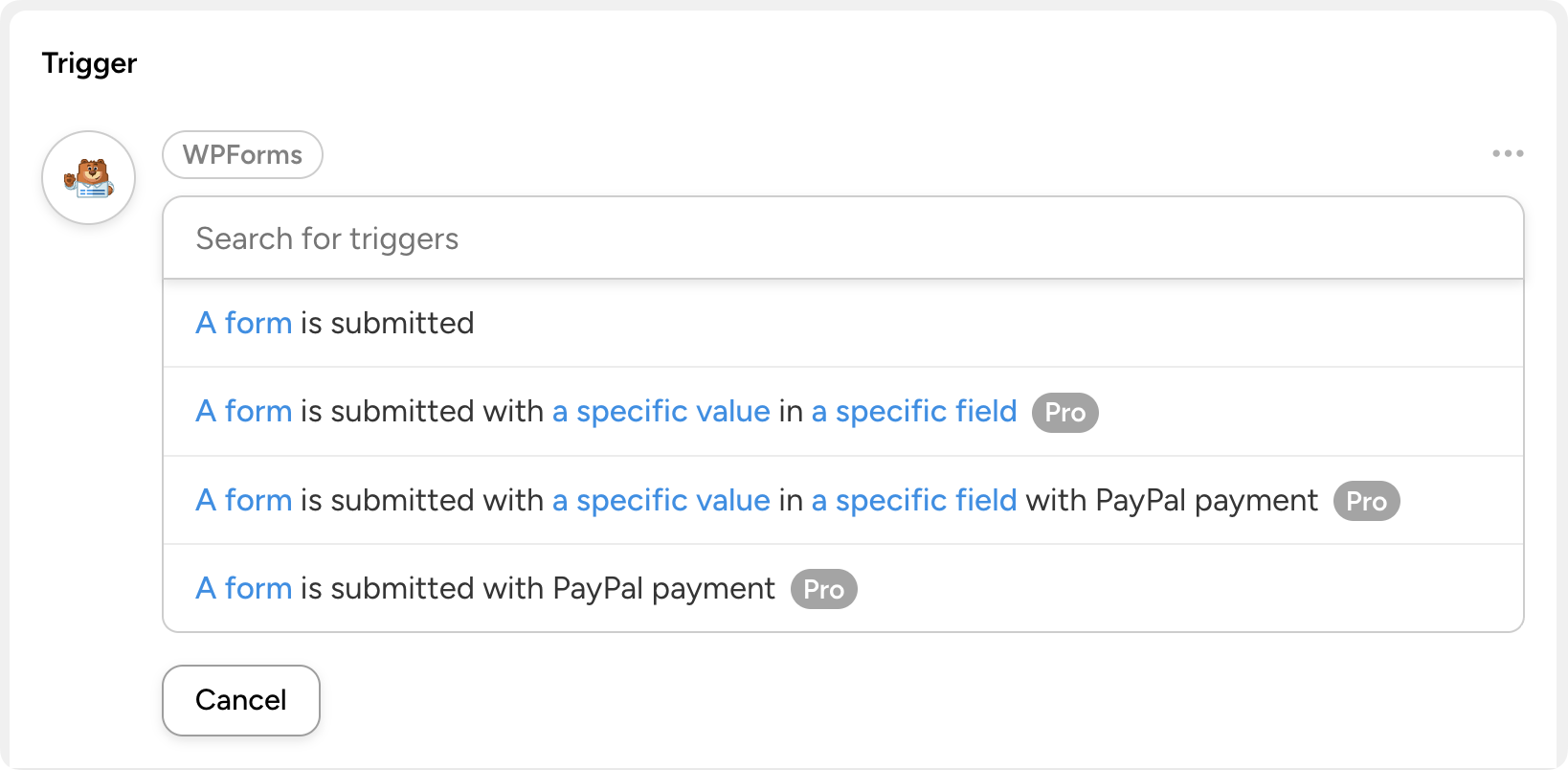
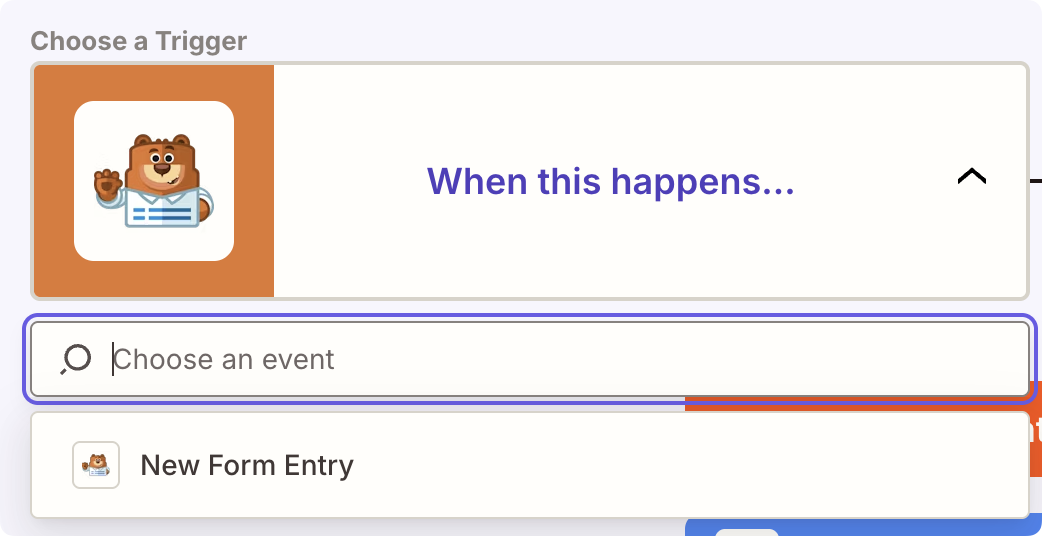
- How rich the WordPress data access can be. Zapier integrates with WordPress and with many WordPress plugins, but as an external tool it can only access what each connector exposes. Automator runs inside WordPress, so all of your WordPress data, from custom user fields to post meta is at your fingertips, surfaced through tokens for no-code use. This is why, for example, Automator offers more WPForms triggers, actions, and finer-grained field access than Zapier—same plugin, deeper data access.
vs.
- What “breadth” really means. Zapier wins on raw app count. Automator wins on the depth of data available for the WordPress integrations most WP sites actually use.
If your workflows live inside WordPress, an in-site plugin is structurally a better fit than an external SaaS.
That’s the high-level comparison. Let’s get into the specifics.
Uncanny Automator vs Zapier Pricing: Per-Task vs Flat-Rate
Pricing is where you’ll feel the differences in the architecture between Automator and Zapier.
Zapier prices by the task
Each Zapier pricing plan has a limit on the number of tasks you can run before incurring additional expenses. The Free plan gives you 100 tasks/month, Professional gives you 750 tasks/month, and Team gets you 2,000 tasks/month. If you exceed your plan’s task limit, Zapier switches you to pay-per-task billing at 1.25x the base task rate.
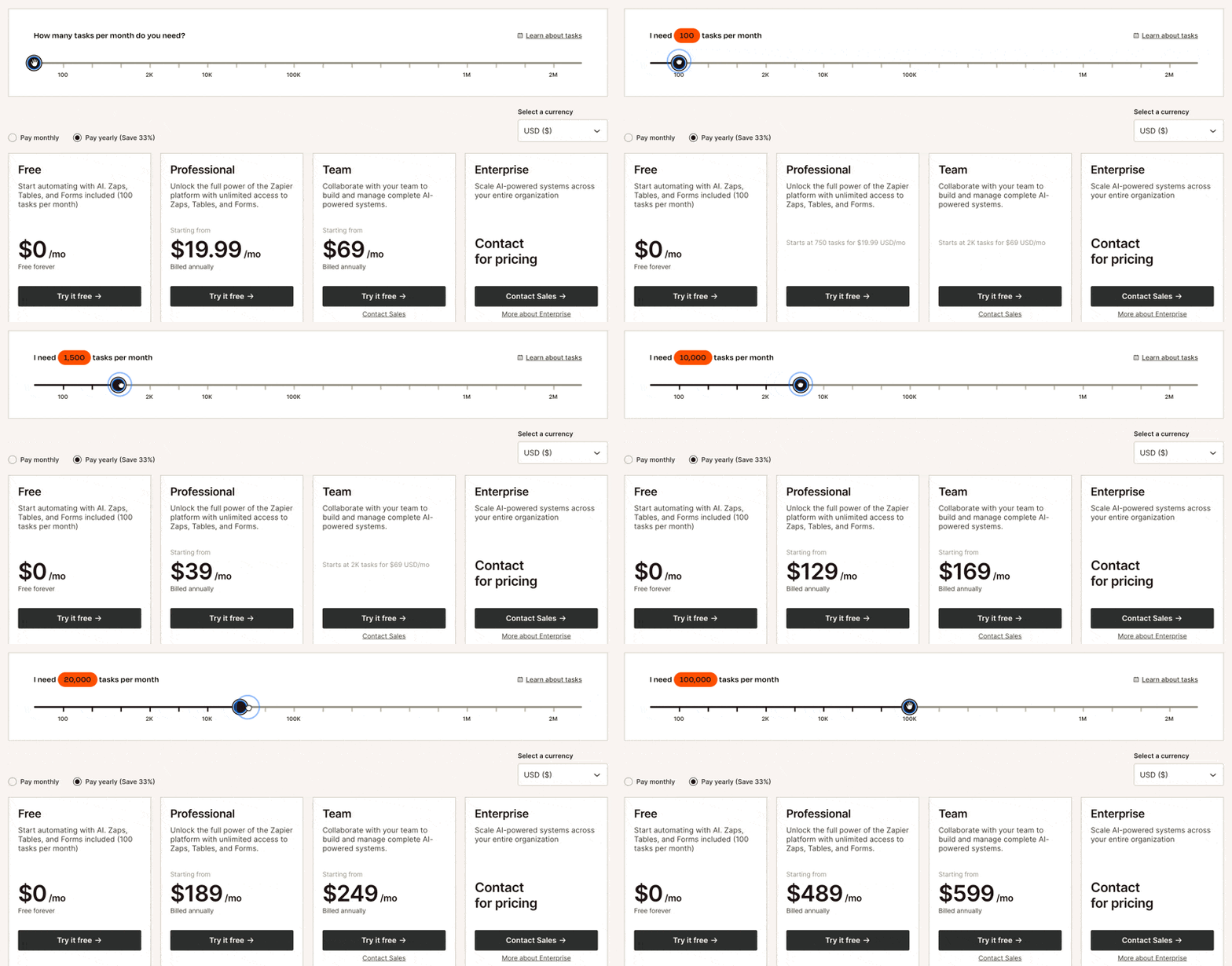
To give you an idea of what that actually looks like in practice, every successful action a Zap completes counts as one task. So, one simple form submission that creates a user and adds them to your CRM consumes 2 tasks. If you’re getting 20-50 contact form submissions per month, that’s all or most of your Free plan tasks consumed by a single form.
While you can, technically, run an unlimited number of tasks with any Zapier plan, you will end up paying for it. This can impact seasonal businesses that see monthly variations in site traffic. Similarly, some annual or semi-annual admin tasks such as financial reporting or cleaning your email list can eat up monthly task allotments quickly.
To Zapier’s credit, the model has gotten more user-friendly recently. Filter, Formatter, and Path steps no longer count as tasks, and Tables and Forms come bundled with all paid plans. But the underlying truth remains: the more your automations run, the more you pay.
Uncanny Automator charges a flat fee
Similar to Zapier, each Automator plan (Lite, Basic, Plus, and Elite) gives users access to additional features and addons. However, when it comes to automations, each plan is unlimited—even the free one.
What changes from plan to plan—apart from the added fixed cost, of course—is the number of site licenses you get, the addons you can access, and the amount of AI usage you have.
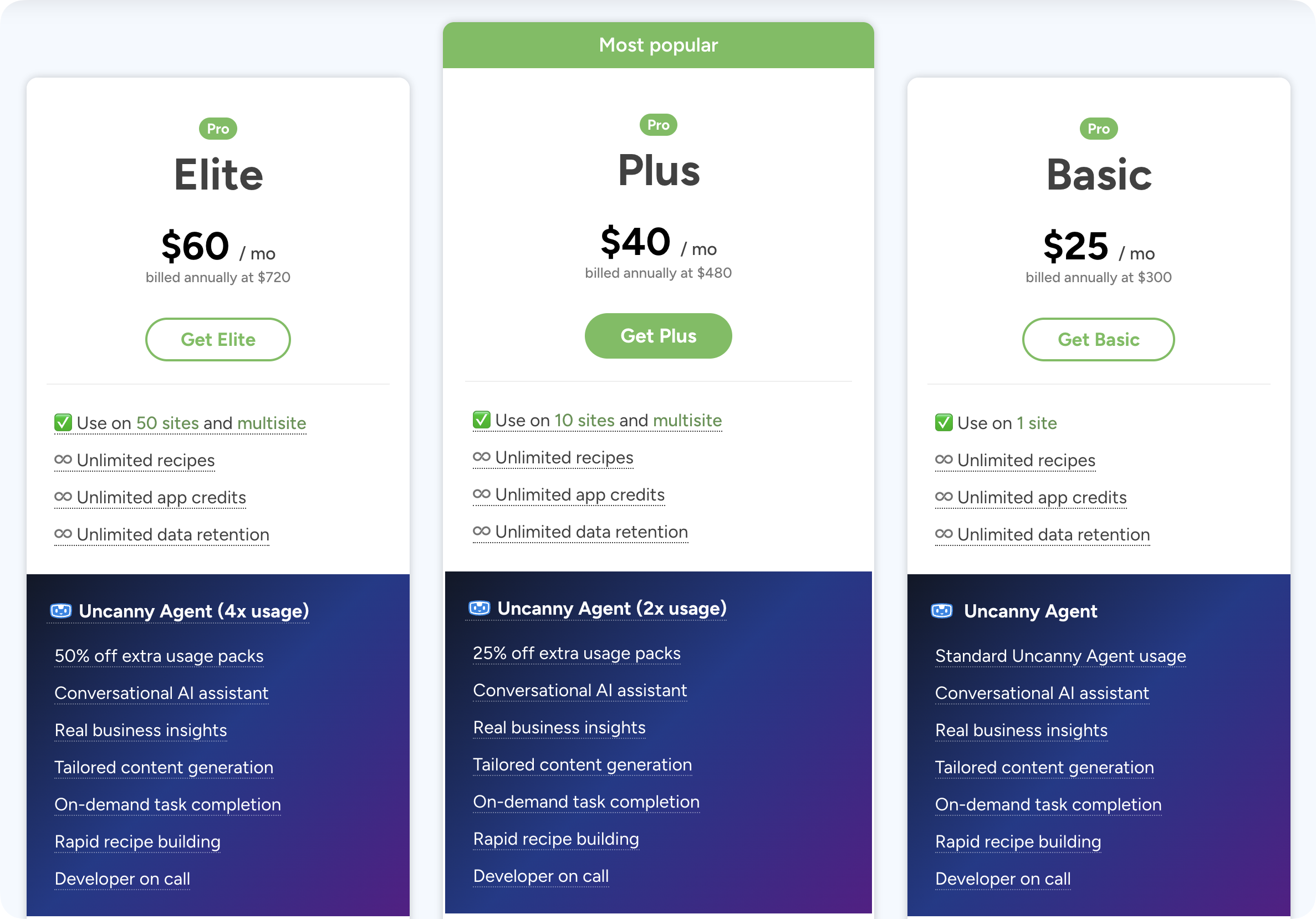
What that means in practice, on the pure process automation side of things, is that you can create recipes without thinking about limits. You don’t have to sacrifice one automated workflow this month to cover another one, or worry about when another form submission is going to incur additional charges.
If you’re running a WooCommerce business, for example, with a WordPress-native email platform like Groundhogg or FluentCRM, then you could automate many of your workflows with Automator Lite—paying $0/month forever.
Even if you’re running a WordPress-external CRM like Mailchimp, HubSpot, or Klaviyo, Automator gives free users 250 complimentary app credits. So, you can actually get some, albeit limited, access to Pro features.
But here’s the honest caveat: both Uncanny Automator and Zapier offer generous free plans for businesses just starting out or for those testing out AI and automation platforms. Try them both, see which one gets your job done.
Uncanny Automator vs Zapier Integrations: Breadth vs Depth
In comparing Automator and Zapier, this is the dimension where nuance matters most.
Zapier has more integrations than Automator. A lot more. But, Automator has all of the most popular app integrations with webhooks for everything else and added integration depth for WordPress plugins.
Whether you prefer Zapier’s breadth or Automator’s depth depends entirely on your tech stack and what you’re automating.
When Zapier’s 9,000+ Integrations Actually Matter
Let me say this clearly: if your workflow is “Salesforce → Slack → HubSpot → Notion” with WordPress nowhere in the picture, Zapier is the better tool. Full stop.
Breadth is Zapier superpower: it supports nearly everything, even if only with a few triggers or actions. If your business runs on a dozen cloud services and you need them talking to each other, Zapier’s 9,000+ catalog is real, valuable, and very hard to match.
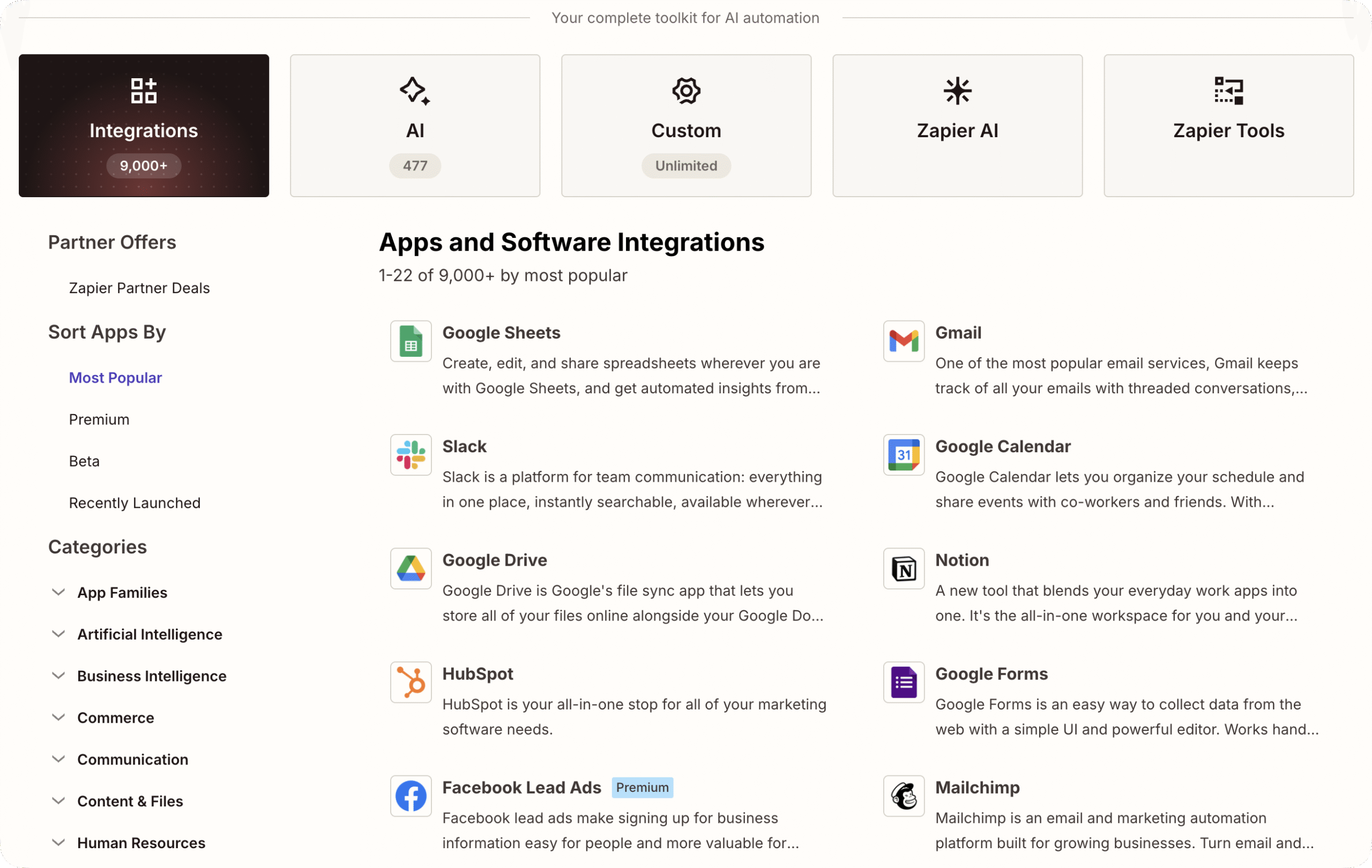
For a business whose center of gravity is outside WordPress and whose typical workflows include some niche products, Zapier is the clear choice.
Why Most WordPress Sites Don’t Need 9,000 Integrations
When it comes to integrations, the WordPress-site-owner reality is that you probably use a handful of services.
- Your form plugin (WPForms, Gravity Forms, Formidable, or similar)
- Your eCommerce platform (WooCommerce, Easy Digital Downloads)
- Your CRM (FluentCRM, HubSpot, Mailchimp)
- Your LMS or membership plugin (LearnDash, Tutor LMS, MemberPress, etc.)
- Your external productivity apps (Slack, Google Sheets, Airtable, Asana, etc.)
- Your AI subscription (OpenAI, Anthropic, Perplexity, etc.)
- Your social media platforms (Facebook, X, LinkedIn, etc.)
That’s somewhere between 10 and 20 apps and plugins—far short of Automator’s 220+ integrations, and nowhere near Zapier’s 9,000+.
Both Zapier and Automator have integrations for niche SaaS apps or plugins you’ve probably never even heard of, far less use as part of your tech stack. So, when comparing Zapier’s 9,000+ app integration catalog to Automator’s 254+, the key that matters isn’t, “I get access to 9,000 apps,” so much as it is, “This tool supports my tech stack.”
Uncanny Automator covers all of the essential and most popular integrations. Moreover, Automator Pro gives you an AI platform and access to addons (Restrict Content, Customer User Fields, etc.) that allow you to consolidate your tools and replace single-use subscriptions.
And then there’s depth. Where Zapier’s WordPress-side coverage is broad but generic, Automator’s integrations are intentionally deep.
A typical Automator WordPress integration has hundreds of plugin-specific triggers, actions, filters (conditional logic that controls when actions run), and tokens. In practical terms, that means you can create automations that are granular and tailored to your specific needs.
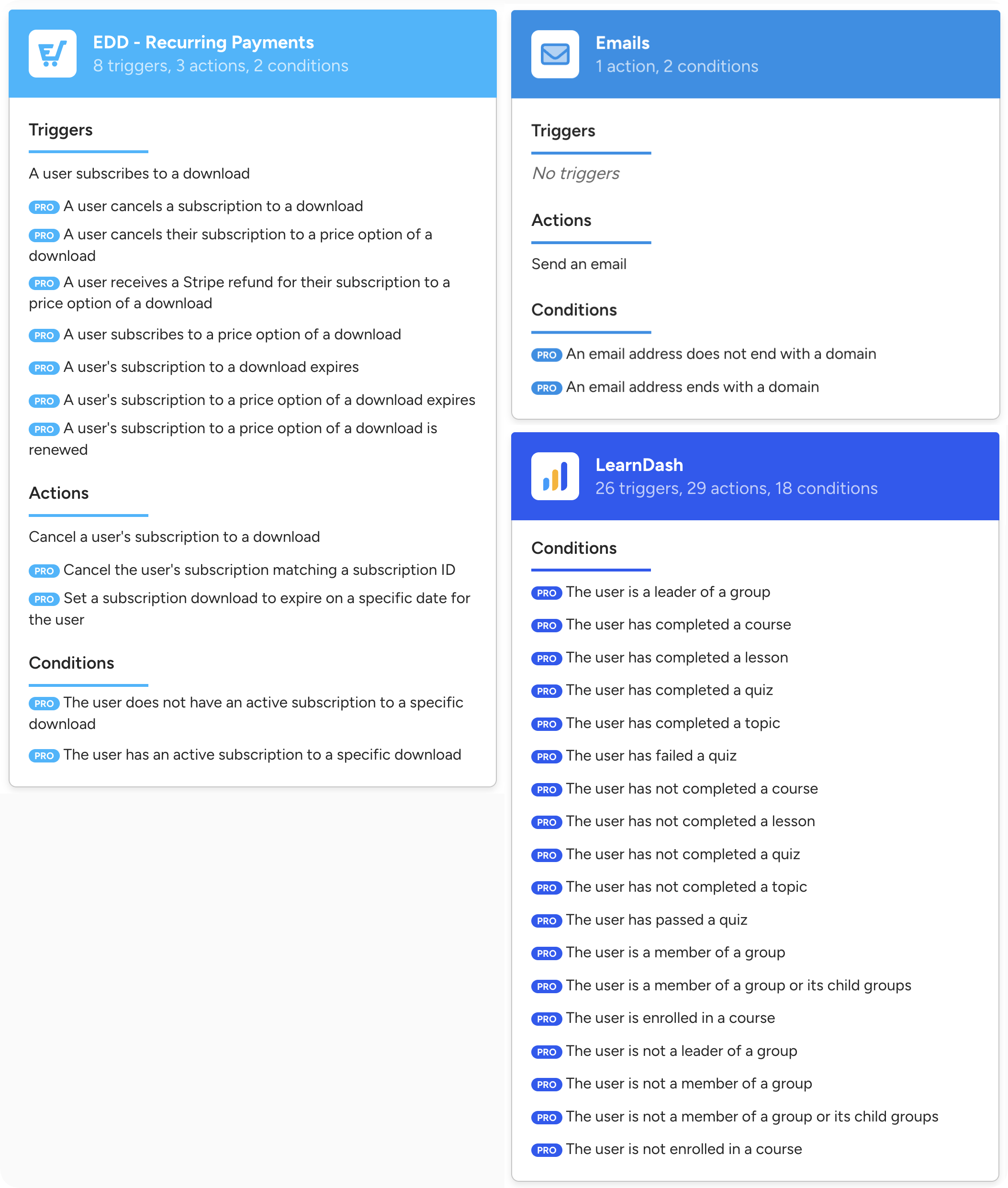
For most WordPress workflows, depth of integration is the difference between an automation that almost works and one that actually solves the problem or creates new opportunities.
Filling Integration Gaps with Webhooks and Custom Code
So what happens when you do want to use an app or plugin that Automator doesn’t support natively? You use webhooks.
If you’re unfamiliar with webhooks, they’re not as intimidating as they might sound. I’m not a developer myself, but I don’t need to be one to use Automator’s Webhooks integration. It’s not altogether different from setting up any other kind of recipe, you’ll just end up using more tokens (and more customizable tokens) than you otherwise would.
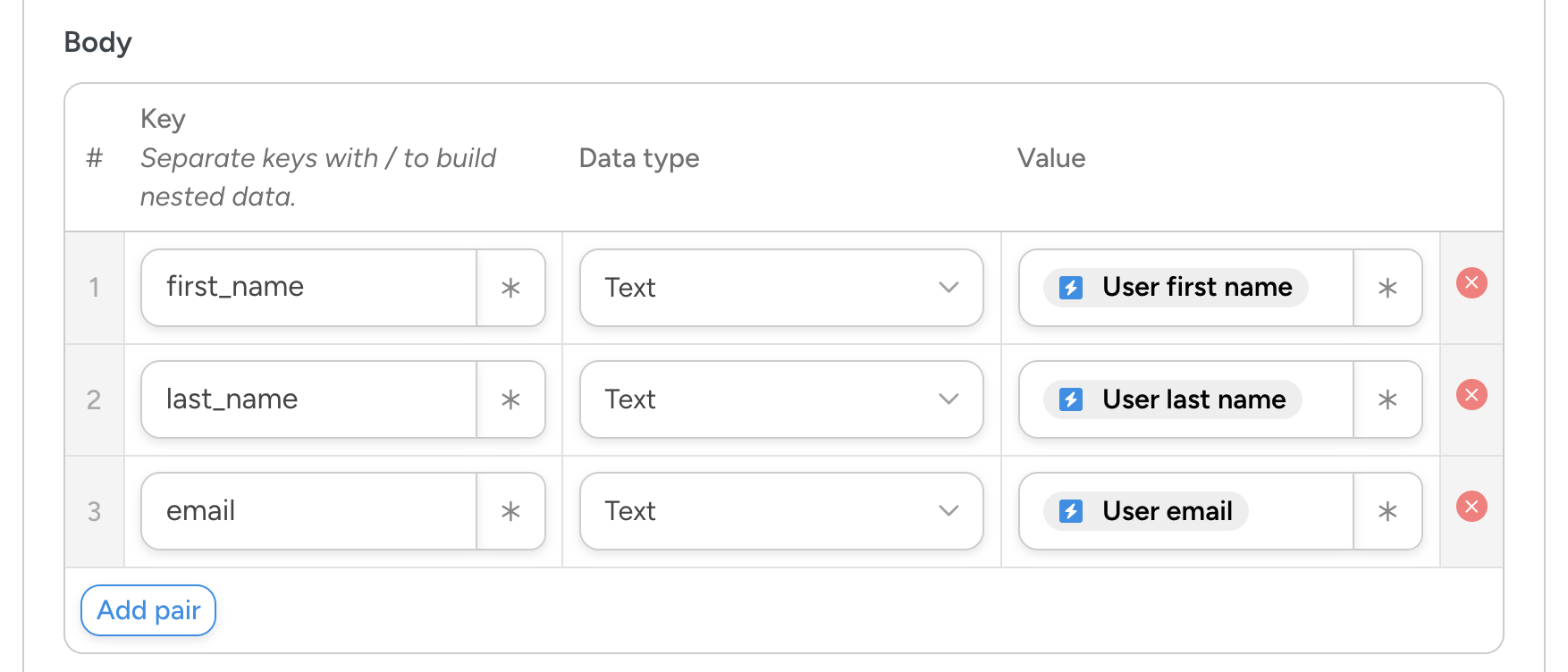
Automator Pro supports both incoming and outgoing webhooks with advanced configuration and security settings for the more technologically savvy people out there.
For most “missing” integrations, a webhook recipe gets you 90% of the way there.
And if you’re a developer, you have more options. Automator’s developer platform lets you create custom triggers from any WordPress action hook, run custom WordPress hooks as recipe actions, and even call custom PHP functions inside recipes. Need a truly bespoke integration? Build one.
The bottom line: Automator’s integration list is shorter than Zapier’s. But it doesn’t need to be as long. The combination of native depth, webhooks, and developer extensibility covers what WordPress site owners actually need and use.
Ease of Use: Setup, UI, and Learning Curve
Both tools have visual builders. Neither requires code for most workflows. Where they differ is in setup location and the friction of day-to-day use.
Zapier’s Setup and Interface
You sign up for a Zapier account, connect your apps via OAuth, and build Zaps in Zapier’s web UI. The interface is polished, well-documented, and familiar to anyone who’s used a SaaS automation tool before. Templates are abundant and you’ve got an AI assistant to help you if need be.
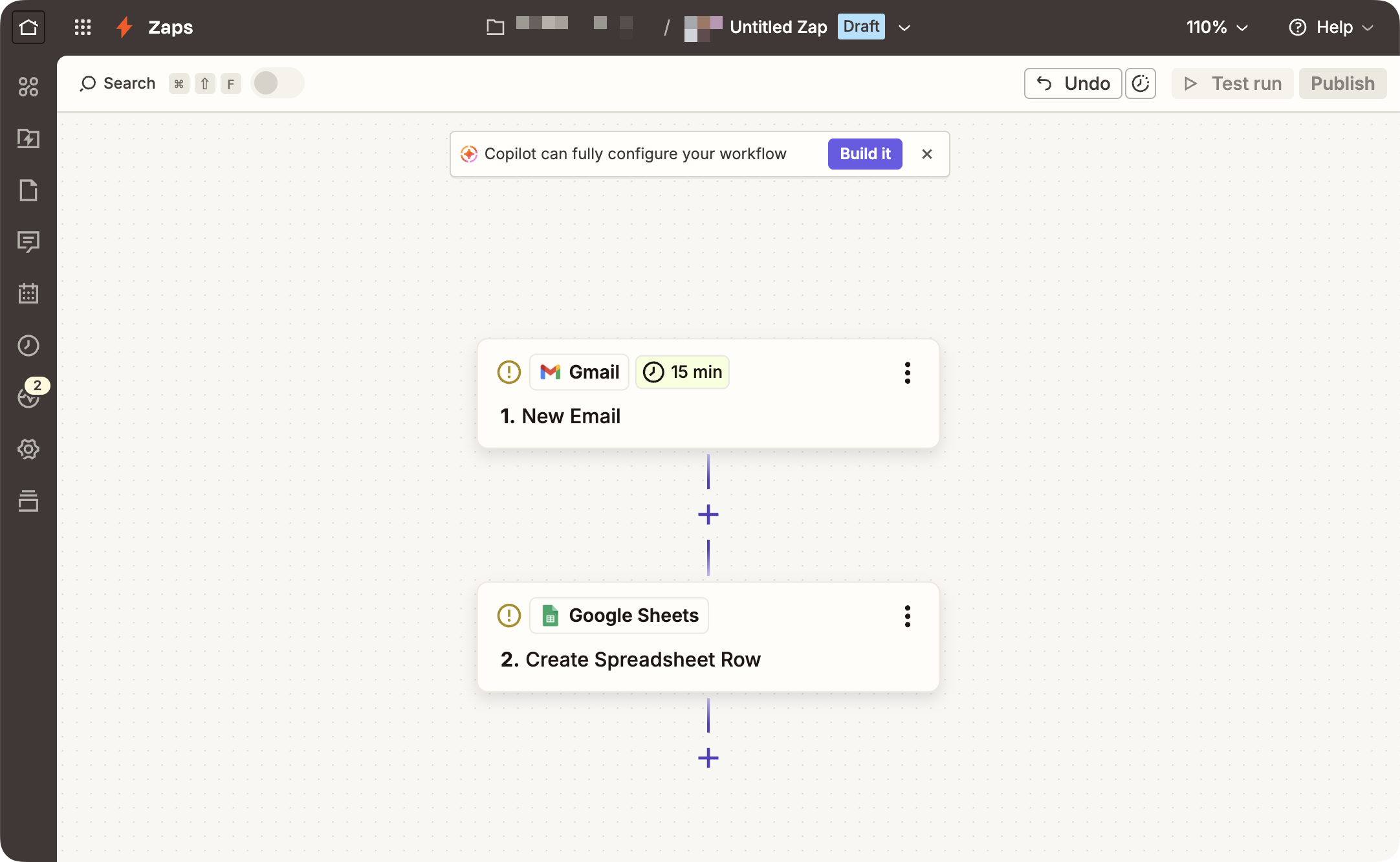
The friction point is that WordPress is just one of 9,000+ apps to Zapier. To wire up a WordPress-centric workflow, you’re bouncing between Zapier’s web app and your WordPress site, copying webhook URLs, switching browser tabs, and managing your Zapier account separately from your WordPress account.
Uncanny Automator’s Setup and Interface
WordPress site owners, developers and admins will already be familiar with installing and activating Uncanny Automator—it’s just like installing any other WordPress plugin.
There’s no separate account to manage, no separate dashboard to learn. You download and install Automator Lite from the WordPress repository or your WordPress dashboard. For Automator Pro, once you’ve purchased your license, you can upload the .zip to Plugins > Add plugin.
Similar to Zapier, the recipe builder is “click-and-play”. Select your integrations, choose your triggers and actions from dropdown lists, and customize with filters, delays, and other features.
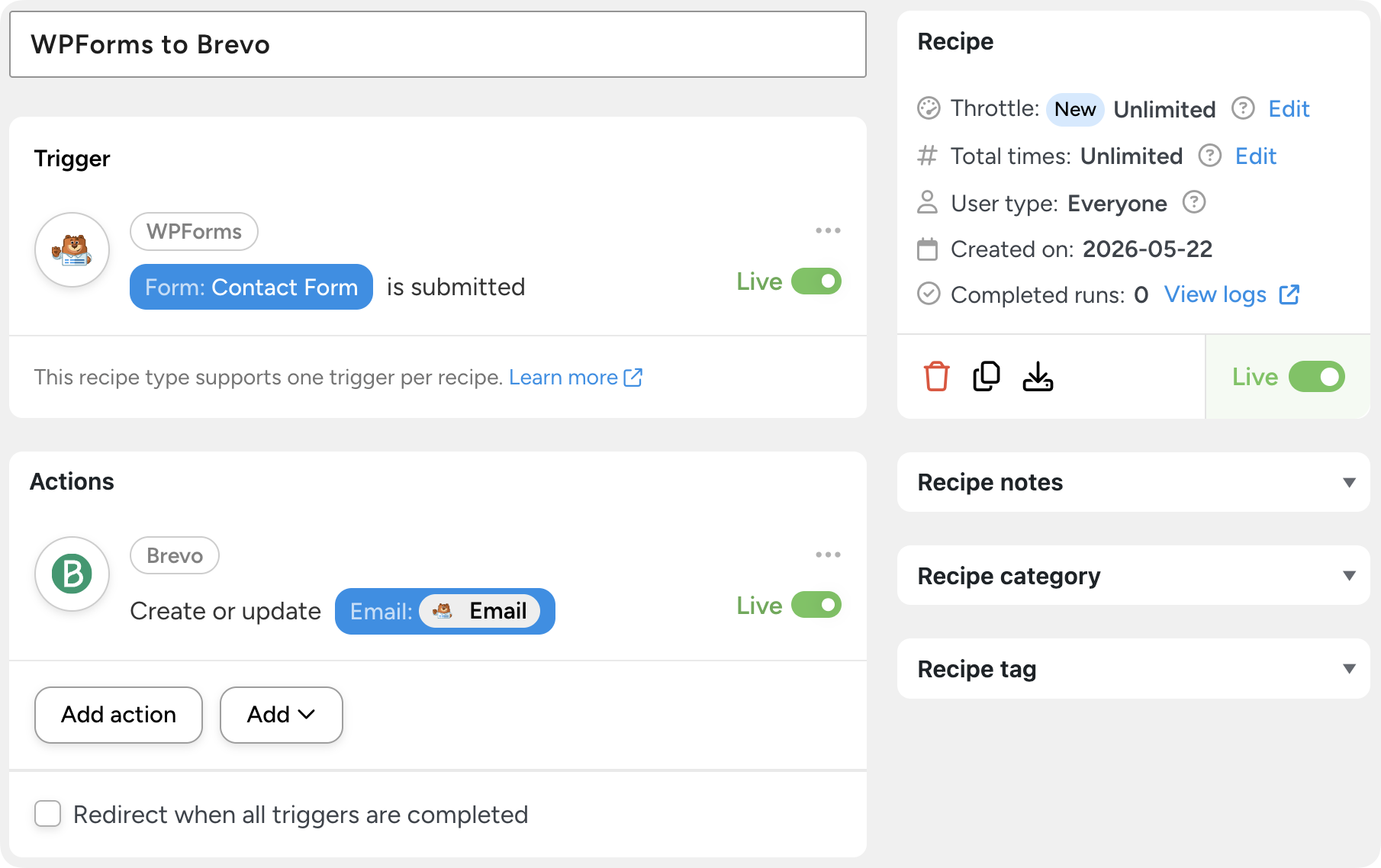
The flow mirrors how you’d describe the automation to a colleague: “When a user submits the contact form, add them to Brevo and put them in the right list based on their service request.” In fact, you can copy and paste that exact line into an Uncanny Agent chat window and let Automator build the recipe for you.
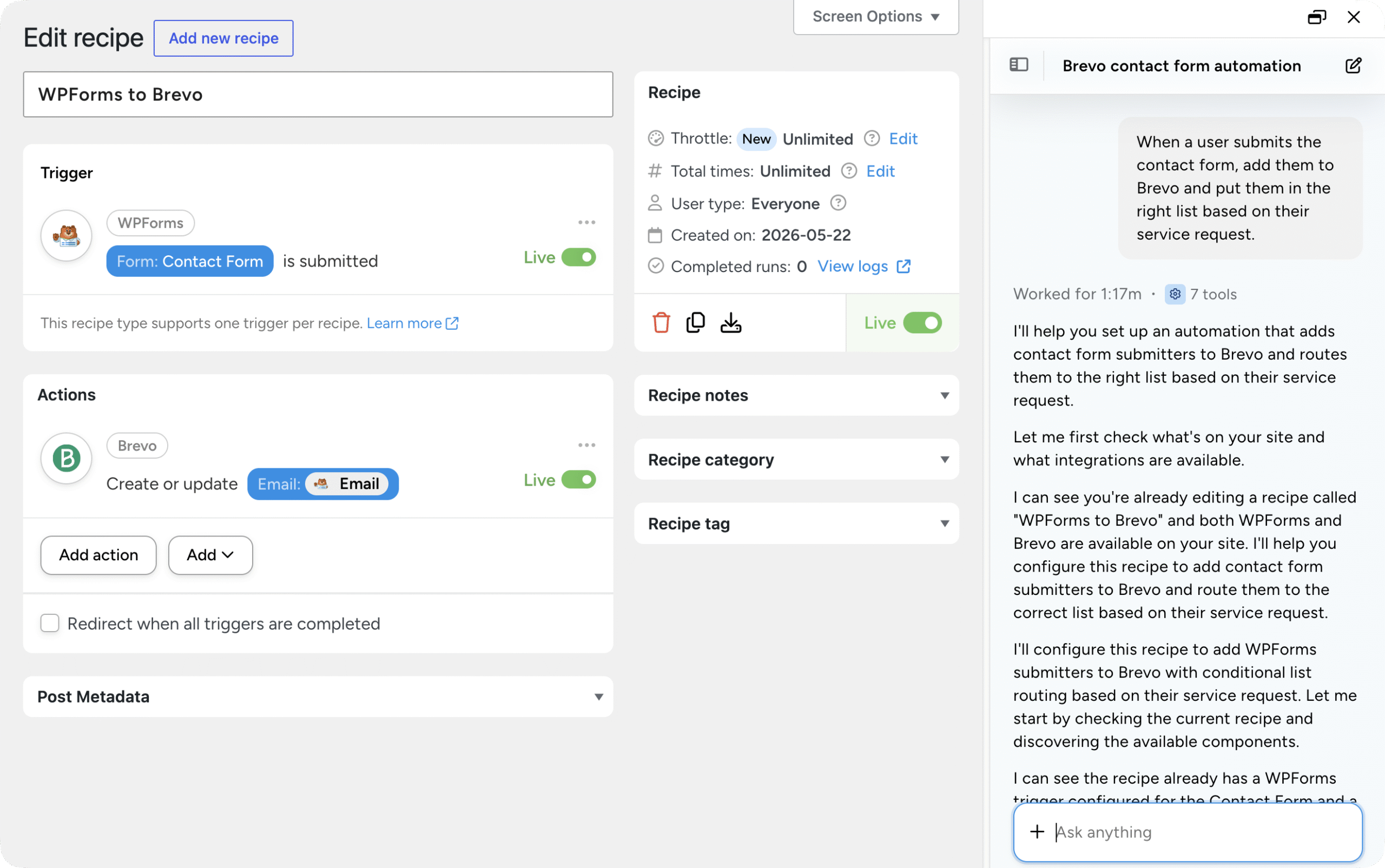
There isn’t much of a difference between Automator’s UI and Zapier’s. Both offer intuitive “click-and-play” interfaces for building automations. Both let you build automations from plain text.
Where Zapier wins out is in having a larger library of Zaps than Automator has of recipes. That might help some users get started faster. But if you have any experience with WordPress, Automator will feel very familiar and save you from switching between tabs.
Site Performance: How Each Tool Affects Speed
This dimension is where it’s important to be precise. Zapier doesn’t run on your WordPress server, so Zapier itself has zero direct impact on your site’s frontend speed. That’s true.
But, “Does this tool slow down my site?” doesn’t capture the full picture. The more useful question is: “How does each tool affect my workflow’s end-to-end performance?”
Uncanny Automator runs in-process inside WordPress. Triggers fire immediately when a WordPress event happens (a form submission, a course completion, a purchase). Actions execute on your server. That means local actions are fast—there’s no network round-trip to a cloud service when an action just needs to update a WordPress user or post.
Zapier round-trips data to the cloud on every step, which introduces:
- Network latency on every step. Each round-trip from your site to Zapier and back adds time.
- Polling intervals. For triggers that aren’t real-time webhooks, Zapier periodically asks the source app, “anything new?” That periodic check is called polling. Crucially, polling frequency depends on your Zapier plan: the Free plan polls every 15 minutes, while paid plans poll more frequently—down to every minute on higher tiers. So a “real-time” Zap on the Free plan can actually mean a delay of up to 15 minutes between the trigger event and the first action.
- Dependencies on external services. If Zapier is down, or the integrated SaaS app is having an outage, your workflow waits—or breaks.
There’s also the data-out-and-back-in pattern. When a Zapier workflow needs to read WordPress data, modify it, and write it back, that’s at least two API round-trips per task. Automator does the same thing without leaving the site.
That might all sound like technological window dressing but it has real impacts on how your workflows run and how much they cost you.
For example, automating SEO content updates or site maintenance tasks with Zapier consumes more tasks (getting SEO data from your WordPress site > sending it to an AI platform > updating the content > sending back the new content to WordPress).
With Automator, that’s just a conversation with Uncanny Agent—no task/recipe credits used, no data leaving your site, no additional AI costs incurred with platforms like ChatGPT or Claude.
Here’s the catch: running high-volume workflows with Automator on less robust shared hosting can stress your server. That’s true of any plugin doing real work. The good news is Automator is already optimized to minimize memory and CPU overhead. Many sites running Automator process thousands of users and/or orders daily with negligible to minimal impact on site performance and speed.
Realistically, most sites running that many heavy-duty automations already have dedicated cloud hosting. So, if you are using Automator to update thousands of records at once or publishing dozens of social media posts a day, it’s worth upgrading your hosting anyway to support your site’s broader architecture.
AI Capabilities: Uncanny Agent vs Zapier Copilot, Agents, and MCP
Let’s talk about the thing on everyone’s mind these days: artificial intelligence. Both Automator and Zapier have AI features that are more than just a chatbot “tacked onto” your automations. It’s also more than just an integration for AI platforms like Grok, Perplexity, or ChatGPT.
Zapier and Automator are AI and automation platforms—i.e., they offer a platform that can understand information in the right context, make decisions, and execute tasks.
If you would like some additional clarity, check out our post on AI automation and what it means for WordPress sites.
Zapier’s AI Tools: Copilot, Agents, Chatbots, and MCP
Zapier has built out a stack of AI products:
- Zapier Copilot is an AI assistant for building Zaps. It’s bundled into all plans (with daily message limits on Free). You describe what you want and Copilot drafts the Zap for you.
- Zapier Agents is an “AI workspace”, intended to execute tasks on your external integrations. According to Zapier, it is still “experimental” and it is priced separately.
- Zapier Chatbots brings AI chatbots to your site to help with support. It’s also sold separately.
- Zapier MCP lets external AI agents reach Zapier’s integration library via the Model Context Protocol. Each MCP tool call uses two tasks from your Zapier plan.
Zapier’s AI ambitions are real and growing fast. But the AI tooling lives in separate products with separate billing, which means a complete AI automation setup with Zapier can get pricey quickly and leaves gaps without the full suite of Zapier’s AI products.
Uncanny Agent: An AI Assistant Built Into WordPress
Uncanny Agent is an AI assistant for WordPress, included with Automator Pro licenses. You can think of it as your site’s resident expert and all-round WordPress whiz.
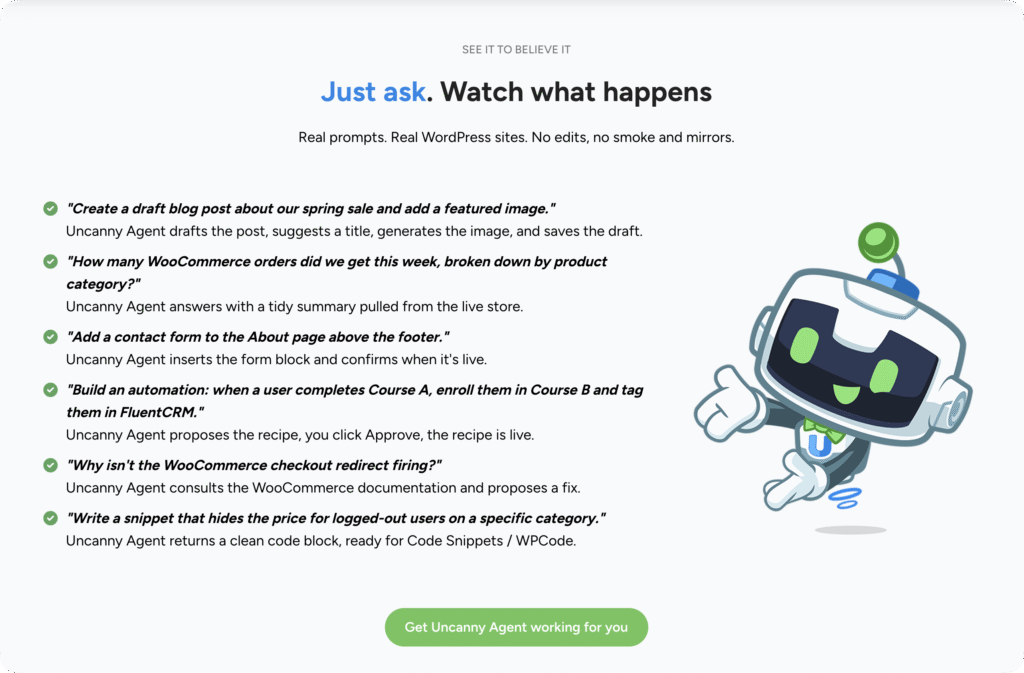
What distinguishes Uncanny Agent is that it is an AI assistant that already knows your content, your users, your plugins, and your settings. It lives in your WordPress site and can execute tasks (creating users, drafting blog posts, checking for plugin conflicts, etc.) from simple plain text conversations.
It’s easiest to think of Uncanny Agent as Zapier’s “Copilot” and “Agents” combined into one.
Agent can:
- Answer questions about your site and your business. Compiling reports won’t be necessary. Just ask Agent, “How many sales did I make last week?” or, “Which of my products sell together most often?” Agent gives you an answer in seconds—no CSVs downloaded, no dashboards navigated, no menus clicked through.
- Build recipes from a conversation. Don’t know which trigger or action to use? Unsure if there’s a simpler way to build that automation? Tell Uncanny Agent what you’re looking for, brainstorm some ideas, and then let Agent build the recipe for you.
- Complete WordPress tasks for you. Create posts, manage users, update pages, change settings, troubleshoot issues—all through plain-language requests.
If you want to see what Agent can do firsthand, check out our guide on 5 things you get Uncanny Agent working on for you right now.
Which AI assistant is better for WordPress?
As with everything else in this head-to-head comparison, whether you go with Automator’s AI assistant or Zapier’s depends on what you’re trying to do.
Zapier’s AI is optimized for building and running cross-app automations from outside your site. If your AI workflow is “watch this Gmail inbox, summarize attachments, push the summary to Notion,” Zapier Agents will handle it well.
Uncanny Agent is optimized for understanding your site and business, and acting within your site and connected app integrations. If your AI workflow is “look at my LearnDash data and tell me which courses have the highest drop-off rate, then draft a re-engagement email,” Agent has the context built in.
For WordPress site owners, the latter is usually what you actually want. And, unlike with Zapier’s suite of AI capabilities, you get full access to Uncanny Agent and all of its capabilities as part of your regular license.
Learn more about Uncanny Agent >>>
Data Ownership and Privacy: Where Your Data Lives
For agencies, regulated industries, and anyone with privacy-conscious customers, this dimension deserves more weight than it usually gets.
With Zapier, your data passes through Zapier’s external servers as part of normal operation. Zapier’s security posture is strong and their privacy practices are well-documented, but the round-trip is a structural fact: when a Zap moves data from one app to another, it passes through Zapier’s infrastructure to do so.
With Uncanny Automator, your data stays on your WordPress server unless an action explicitly sends it to a third party. When it does—say, an action that adds a contact to Mailchimp—the data passes through Automator’s encrypted relay and is not retained. (You can read more about Automator’s data privacy posture in our Data Privacy and GDPR knowledge base article.)
For agencies serving clients in regulated industries—or for any WordPress owner who’d prefer their customer data not bounce through a third party—the architectural simplicity here matters. Fewer hops, fewer parties, simpler compliance conversations.
This isn’t a “Zapier is bad” claim. Both companies handle data responsibly. The point is architectural: when data doesn’t leave your server in the first place, there’s less to worry about and explain.
Workflow Logic, Reliability, and Error Handling in Automator and Zapier
Reliability, error handling, logic—these are the features of automation tools that almost all businesses, admins, and even a fair number of developers overlook.
They are also the features that, a year from today, you’ll be glad you have when you’ve automated entire funnels and onboarding sequences.
Workflow Logic and Conditional Branching
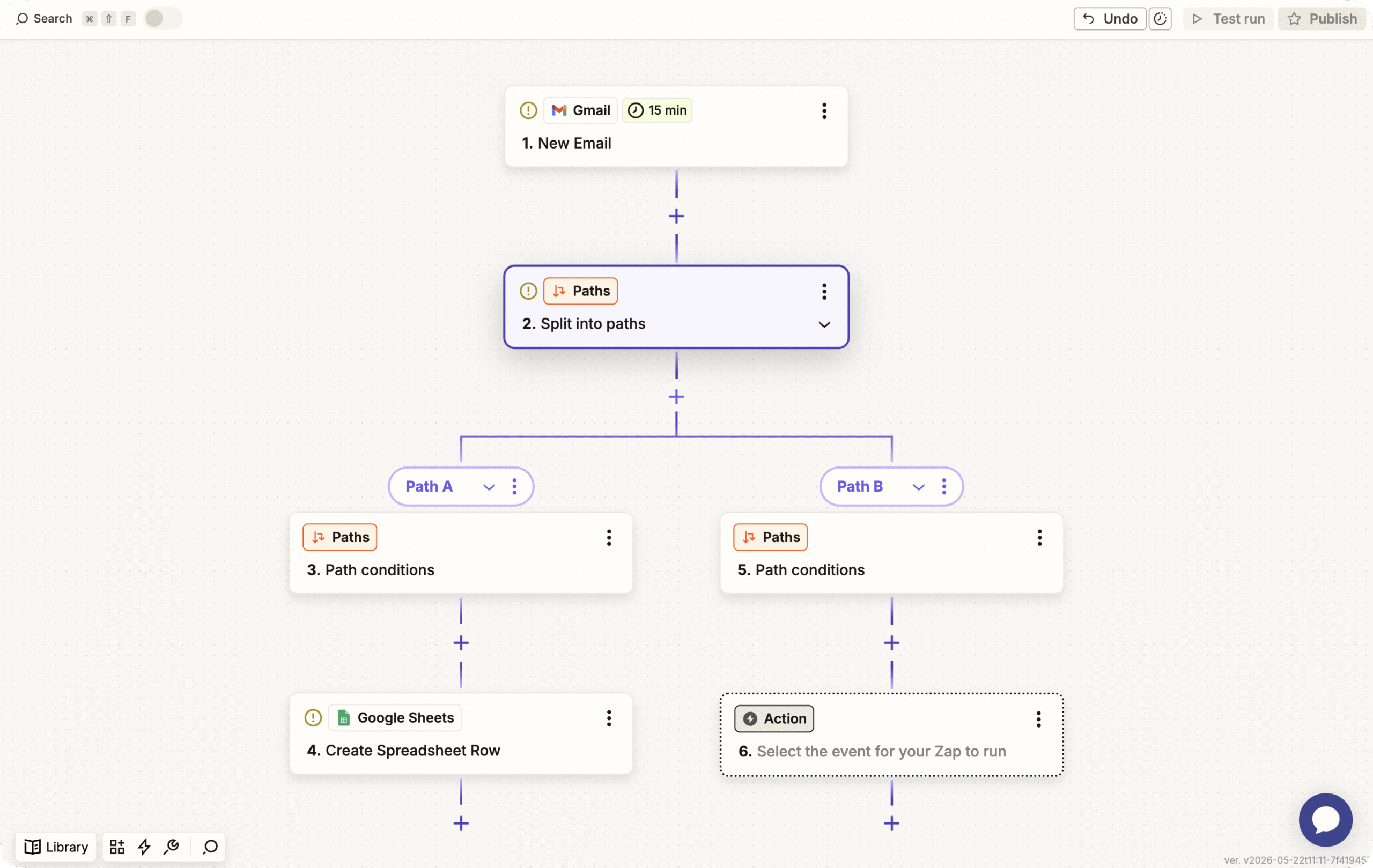
Zapier supports multi-step Zaps with paths (conditional branching), filters, formatters, and delays. The branching path UI is mature and well-designed; it’s particularly easy to visualize a multi-branch workflow at a glance.
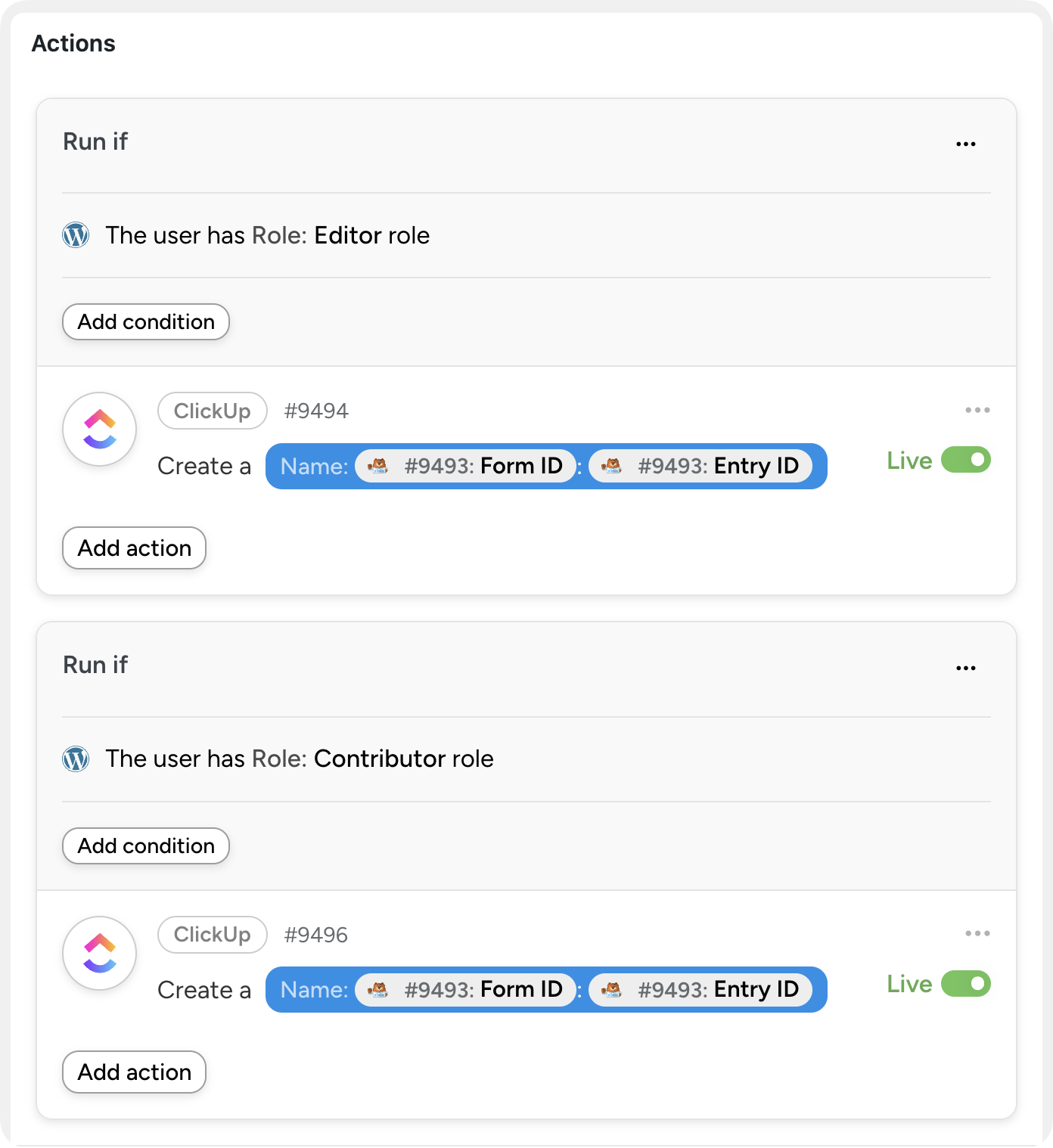
Uncanny Automator also supports multi-step automations with branching logic in the form of filters. However, this is another area in which using a WordPress-native tool offers greater customizability. Automator lets you set filter conditions based, not only on integration data, but on your WordPress data as well—that’s a level of specificity that Zapier can’t replicate.
Additionally, Automator brings Loops to the table as another kind of automation. Loops are automations that run actions across multiple records.
- User loops run actions on all or some of your WordPress users simultaneously.
- Post loops run actions on all or some of your blog posts, products, events, courses, quizzes, etc.
- Token loops run actions on all or some of your WordPress data.
Automator’s recipe builder also supports delays, scheduling (run a recipe at a specific time or on a recurring schedule), data formatters, and a calculator.
Both Automator and Zapier have strong automation logic tools, so once again it comes down to what you’re trying to do. Zapier’s branching paths are sometimes easier to visualize as Automator’s UI “groups” filtered actions in the sequence in which they will run. Automator’s filters are more flexible and loops are powerful for bulk operations on WordPress data.
Reliability, Retries, and Error Notifications
Zapier offers mature error notifications, automatic retry logic, and version control on paid tiers. The error UX is one of the things Zapier does best.
Automator offers detailed recipe logs, configurable error notifications, and even triggers and actions for retrying failed recipes. You can build a recipe whose trigger is “another recipe failed” and have it alert you, log to a sheet, or take corrective action.
Both work well, but neither is a magic bullet. It’s best to think of these features as troubleshooting as opposed to problem solving.
Even so, errors with Zapier and Automator are rare. If a recipe misfires, it’s probably missing a token or two—I can speak from experience.
When to Choose Uncanny Automator vs Zapier
You’ve made it this far—that’s commitment to finding the right tool. So, I’ll commit too:
Choose Zapier If…
- Your business runs primarily on SaaS apps (Salesforce, Slack, HubSpot, Notion, and similar) with WordPress as a small part of the stack
- You need an integration with a niche SaaS app Automator doesn’t support, and no webhook workaround is acceptable
- You don’t have WordPress at all, or you don’t want automations running on your server
- You’re already deep into the Zapier ecosystem (Tables, Forms, MCP, Agents) and the switching cost outweighs the savings
Choose Uncanny Automator If…
- WordPress is at the center of your business—your site is where customers buy, learn, sign up, or interact
- You want predictable flat-rate pricing instead of metered per-task billing
- You’re an agency building automations for clients (or managing a multi-site portfolio) and need a scalable cost structure
- You want your customer data to stay inside your site as much as possible
- You want an AI assistant that already knows your WordPress site, not a generic one you have to teach
- You want bulk operations (User Loops, Post Loops, and Token Loops) on WordPress users, posts, or data
- You’d rather not manage another SaaS subscription
Can You Use Uncanny Automator and Zapier Together?
Yes—and many users do. Automator includes a native Zapier integration so you can bridge the two tools when you need to.
Here’s how most dual Automator and Zapier users choose to integrate these two platforms:
- Automator → Zapier. Use Automator’s Zapier integration to send WordPress data to a Zap, which then handles the SaaS-side workflow. Useful when you need a Zapier-only app at the end of a WordPress workflow.
- Zapier → Automator. Use Automator’s Webhook integration to receive data from Zapier to fire off a WordPress workflow. Useful when an event happens outside WordPress (a Calendly booking, a Typeform submission) and needs to drive a WordPress action (enroll the user in a LearnDash course, create a WooCommerce order, etc.).
Get started with Uncanny Automator
If reading this post brought you to the “let me just try it” point, here’s the fastest way to get going.
Get Uncanny Automator — #1 AI and automation plugin for WordPress >>>
- From your WordPress Admin Dashboard /wp-admin/, navigate to Plugins > Add new. In the search bar, enter “uncanny automator” and click Install and Activate. (This installs the free version of Uncanny Automator which must be active to use Automator Pro features.)
- Purchase your Automator Pro license from the Automator pricing page.
- Once purchased, you can download the latest version of Uncanny Automator Pro inside your Automator account.
- After downloading the .zip file, navigate to Plugins > Add New in /wp-admin/. Click the Upload Plugin button, select the Pro .zip file then install and activate the plugin.
- Once activated, be sure to visit Automator > Settings in /wp-admin/ to enter your license key (in your purchase confirmation email).
For a more detailed walkthrough, click here.
Uncanny Automator vs Zapier: Which Should You Choose?
I started this post by saying that the question isn’t really, “Which tool is better?” It’s, “Which tool is better for what you’re actually trying to do.”
If your business lives primarily inside WordPress, Uncanny Automator is the better default. You’ll pay less, your data will stay closer to home, your AI assistant will already know your site, and your automations will run with the depth of WordPress data they need to actually solve problems. The architecture is on your side.
If your business runs primarily on SaaS apps and WordPress is a bit player, Zapier is the better fit. The breadth is real, the polish is real, and the per-task model can make sense when you’re orchestrating dozens of cloud services that don’t touch your site.
For most WordPress site owners and agencies, though, the answer is Automator. Installing Automator Lite takes two minutes. You can have your first recipe live in five. And if it turns out Automator doesn’t do everything you need, you’ve lost very little. Both tools play well together, so you can always add Zapier later for the edge cases.
Install Uncanny Automator Lite (free) >>>
What will you do with more time?
Frequently Asked Questions
Is Uncanny Automator a true Zapier alternative for WordPress?
For automations that involve WordPress, yes—and for many users it’s a more natural fit because it runs inside the site. For automations between SaaS apps that don’t touch WordPress, Zapier remains the better tool. The two are complementary more often than they’re competitive.
Does Uncanny Automator have a free version like Zapier does?
Yes. Uncanny Automator Lite is available for free on WordPress.org and supports unlimited recipe runs—no monthly task cap. Some premium integrations and advanced features are reserved for Pro, but you can build, test, and run real workflows on Automator Lite without paying anything.
How does Automator’s pricing compare to Zapier’s at higher volumes?
Automator’s pricing is a flat annual fee—you pay the same whether you run 100 recipes a month or 100,000. Zapier’s per-task model means costs scale with usage; at a few thousand tasks per month or more, the cost difference becomes substantial.
Does Zapier have an AI assistant like Uncanny Agent?
Zapier has several AI products (Copilot, Agents, Chatbots, and MCP), but each lives in its own product silo with its own billing and its own usage limits. Uncanny Agent is included with Automator Pro and runs inside your WordPress site with built-in knowledge of your business, content, users, and settings.
Will Uncanny Automator slow down my WordPress site?
Recipes only run when their triggers fire, so idle recipes have no impact. High-volume workflows on shared hosting can add load—but that’s true of any plugin doing real work. Automator’s built-in throttling lets you cap how often a recipe runs in a given timeframe, which keeps your site responsive even under heavy automation use.
Can I use Zapier and Uncanny Automator together?
Yes. Automator includes a native Zapier integration, plus incoming and outgoing webhooks, so you can bridge the two tools easily. Many users start with Automator for WordPress workflows and add Zapier later for SaaS-only edge cases.
What about the integrations Uncanny Automator doesn’t support?
Automator supports incoming and outgoing webhooks in the free version (and advanced webhooks in Pro), plus a developer platform for building custom triggers and actions. For most missing integrations, a webhook recipe gets you the result you need without a separate tool.
Do I need to be a developer to use Uncanny Automator?
No. Recipes are built in a click-and-play interface—pick your integrations from a grid, select your triggers, actions, and filter conditions then toggle the recipe to “Live”. Developers have additional tooling available (custom hooks, REST API, developer docs) but the typical user never touches code.

Related Posts
Comments (0)