

TLDR? Get the highlights ▾ 1No-code automation lets your WordPress site run workflows and carry…
Uncanny Agent vs. ChatGPT: Why an AI WordPress Assistant Wins
Trying to figure out which AI tools are best for WordPress site owners? See why dedicated AI WordPress assistants like Uncanny Agent beat ChatGPT.
TLDR? Get the highlights:
- ChatGPT and Gemini are brilliant generalists — but they have no live access to your WordPress site, and they advise rather than execute.
- Uncanny Agent is an AI assistant built into Uncanny Automator that understands your specific site — your content, plugins, users, and data — and completes tasks on your behalf.
- We asked a general AI tool and Agent the same WordPress questions, side by side. The difference isn’t intelligence — it’s context and the ability to act.
- Agent works alongside your automations: recipes handle the recurring workflows, Agent handles the on-demand requests and questions.
- For some users, having a capable AI assistant inside WordPress can even reduce the need for a separate LLM subscription.
You’ve got two tabs open. ChatGPT in one, your WordPress admin in the other. You noticed this morning that a weekend’s worth of newsletter signups never made it into Mailchimp, so you do what most of us do now—you describe the problem to the chatbot: “Why aren’t my WordPress form submissions syncing to Mailchimp?”
In an instant, a confident, beautifully written answer comes back. ChatGPT lists seven possible causes. Yet, not one word of it actually applies to your situation. So you go to Gemini which gives you a list of common issues that other people have reported on Reddit subthreads three years ago. Not helpful. Next, you go to Claude… which just asks you for more context.
Finally, you throw your hands up and say, “AI is useless.” (I’ve been there.) But the truth is that the AI isn’t useless—it’s just being misapplied. Like using a hammer to screw in a nail.
Here’s the problem: none of those LLMs know your site. They don’t know what form plugin you’re using, how you’ve connected it to Mailchimp, or whether a recent update might have created a conflict. In other words, even the most powerful AI in the world is still a stranger to your site.
AI platforms like Claude and ChatGPT can reason about WordPress in the abstract and quickly read existing documentation online. But they can’t read your database, see your plugins, or deal with situations that are unique to you—let alone implement a fix if they guess the cause of the problem correctly.
To be fair, these LLMs are genuinely excellent and they power most of the AI assistants and agents that businesses have already adopted. But they are generalists, not specialists—consultants, not assistants.
That’s where Uncanny Agent steps in… like, actually steps into your WordPress dashboard to execute tasks and implement solutions with your entire site serving as the context.
Here’s what AI actually looks like in WordPress when done right.
General-Purpose LLMs vs. a Dedicated WordPress AI Assistant
“AI for WordPress” has become a marketing term that lumps together a few very different things.
General-purpose LLMs (ChatGPT, Gemini, Claude, etc.)
OpenAI’s ChatGPT, Anthropic’s Claude, Google’s Gemini. These are the names in AI that everyone knows. They’re pretty spectacular at open-ended work: writing, generating images, summarizing, explaining, drafting code, etc.
If you need a blog outline, a tricky regex, or a plain-English explanation of a theoretical framework for the singularity, they’re great tools to have.
But for running a WordPress site? They hit two structural limits:
- They advise; they don’t execute. Every answer is “here’s what you should do,” never “done.” The work still lands on your plate.
- No live access to your site and data. They only know what you paste into the chat, plus their general training knowledge. They’ve never seen your install.
Generic “AI” WordPress plugins
A growing number of WordPress plugins now advertise “AI for WordPress” or “AI agents for WordPress”. If you’ve been searching for terms like that, then you’ve almost certainly come across Elementor’s Angie, Zapier Agents, and terms like “AI integrations” from plugins like AutomatorWP.
While most of these tools bring some aspects of AI to some functions of WordPress, they don’t bring the full power of AI to your actual workflows.
- Elementor’s Angie can build your web designs from text.
- Zapier Agents can perform tasks on your behalf, but not with the full context of your WordPress site.
- Plugins like AutomatorWP can add text-generation actions to automated workflows for things like scheduling blog post drafts or replying to comments.
A lot of that is useful, if a little underwhelming. The promise of AI in WordPress is meant to be more than just SEO title suggestions, quick content generators, and clunky general labor.
It’s supposed to be—and now it is.
Uncanny Agent: AI for WordPress, Delivered
Naturally, the next question is: “What if you had an AI platform with all of the knowledge of an LLM like ChatGPT and all of the capabilities of a WordPress site manager?”
Then you would have Uncanny Agent:
Uncanny Agent is an AI assistant built into Uncanny Automator. It understands your WordPress site, answers questions about it, and completes tasks on your behalf—working alongside your automations to help you manage your site more efficiently.
Uncanny Agent delivers on the promise of AI in WordPress. It’s a lot more than a randomized text generator or a souped-up search engine. It’s a full-fledged AI, working with the toolkit of the most powerful automation plugin in WordPress. In the next section, we’ll explore what that means in practice.
Read our article on Uncanny Agent to learn more about it >>>
Four Things a Purpose-Built AI Assistant for WordPress Does Differently
Here’s the thing nobody wants to admit in an AI comparison: intelligence isn’t the differentiator. Every modern model is “smart”.
The differences that actually decide which AI wins for site management are context, action, partnership with automation, and WordPress-native architecture.
1. It understands YOUR specific site
A general LLM knows WordPress the way a textbook knows it—in the abstract. Uncanny Agent knows your install: your content, your settings, your plugins, your users, your data—all accessed securely from your server. You don’t paste in three paragraphs of context before every question, and you don’t get “well, it depends on your setup” non-answers. The context is already there.
2. It takes action — it doesn’t just advise
This is the big one. A general LLM hands you a to-do list: “Here are the seven steps to…” On the other hand, Uncanny Agent does the steps. It completes tasks on your behalf—drafting a post, building a recipe, or updating content. The work gets done in the conversation, not on your follow-up time.
3. It works alongside your automations
Recipes handle the recurring, systematic workflows—sync a form submission to your CRM, push content to social media on a schedule, fire a reminder before a renewal—and they run automatically, forever, without you. Agent handles the on-demand requests and one-off tasks that don’t justify building a full automation. And when something should be automated, Agent can build the recipe for you. Two capabilities, one platform, one subscription.
4. It’s purpose-built for WordPress (and can replace an LLM subscription for some users)
Uncanny Agent lives natively in your admin—no separate logins, no API keys to wire up, no external dashboard to babysit. Because it’s WordPress-native, it understands WordPress-specific concepts that general tools treat as trivia: custom post types, taxonomies, user meta, and the data models of the plugins your site depends on.
There’s a cost angle here too. If most of your day-to-day AI use is tied to your site, a capable assistant living inside WordPress can cover that ground without a separate ChatGPT or Gemini subscription—one platform handling both your automations and your AI assistance.
AI WordPress Assistant Compared: Same Questions, Different Answers
Theory is fine, but the difference is clearest with a side-by-side comparison.
Here are three real WordPress requests, with what a general AI tool returns versus what Uncanny Agent returns.
Building automations with AI
If you can provide it with enough context, ChatGPT can walk you through building automations, including Automator recipes, step-by-step.
ChatGPT Prompt: “How can I build an automation that connects my form submissions from WordPress to Google Sheets or Slack?”
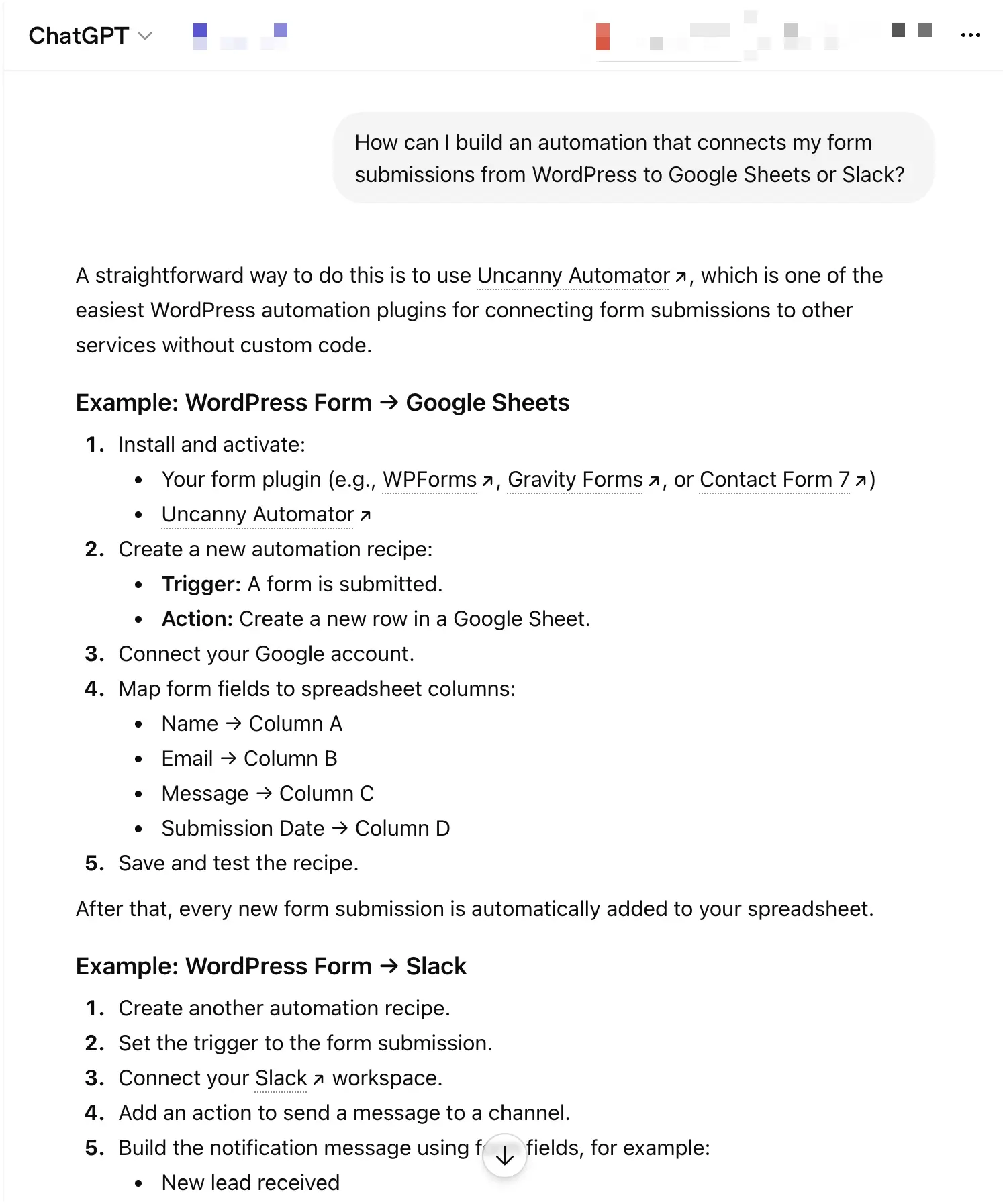
Uncanny Agent, on the other hand, already has all of the context that it needs and actually builds the recipe for you. All you need to do is review it (always review AI outputs) and then switch it on.
Uncanny Agent Prompt: “Build an automation that saves my WPForms contact form entries to Google Sheets and sends a message to ‘Brendan’ in Slack.”
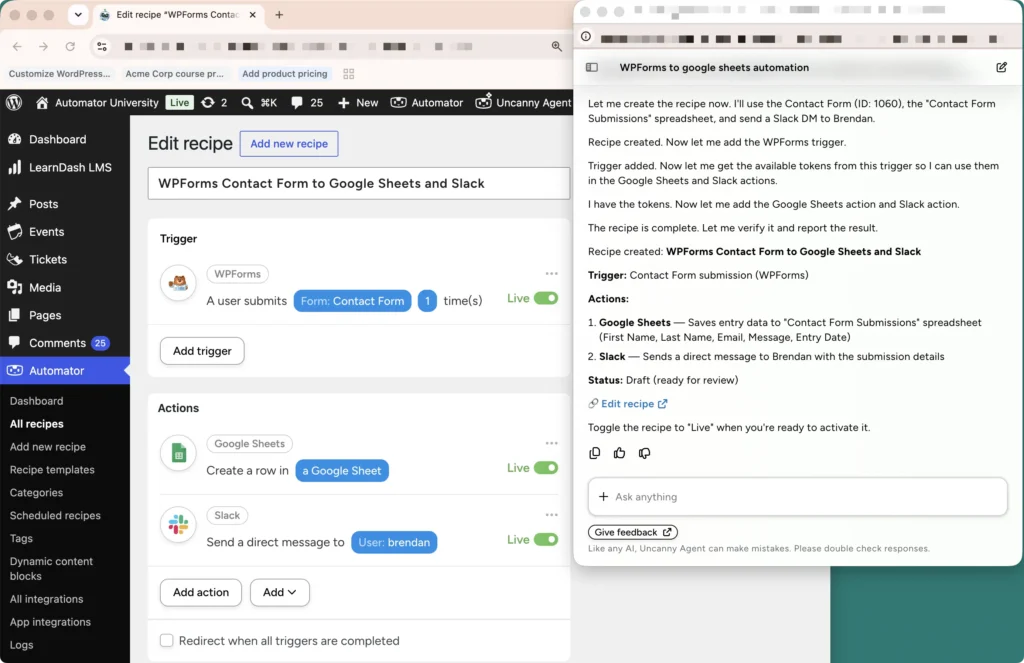
Writing WordPress content with AI
Whether it’s blog posts or product descriptions, you can write high-quality, SEO-friendly content with Uncanny Agent from simple prompts.
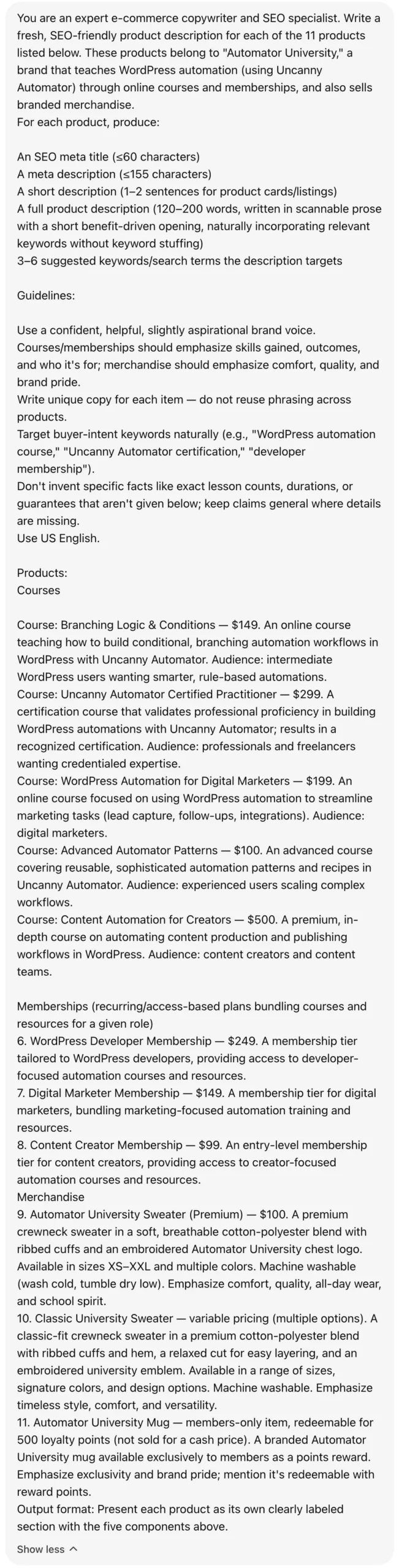
Agent: “Write new, SEO-friendly, conversion-focused product descriptions for all of my products.”
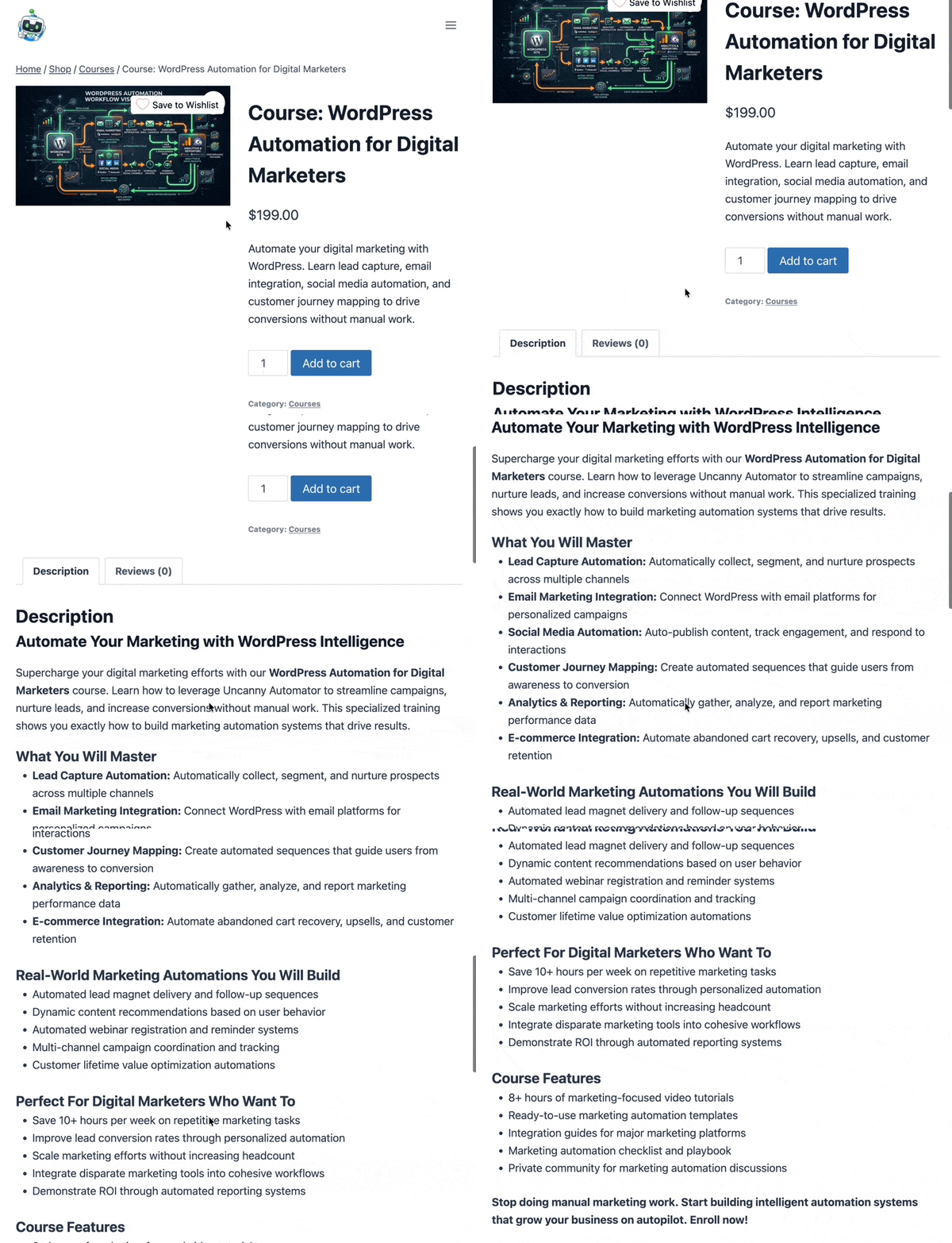
Agent also drafts the content directly in WordPress—no tab switching, no copy and pasting, no pesky formatting.
Of course, you can do the same with ChatGPT or another LLM platform. However, with the amount of context you have to provide to get workable content, you may as well write it yourself…
Want to boost your search results with an AI writing plugin for WordPress? Read our guide on writing content in WordPress with AI using Uncanny Automator >>>
Alternatively, check out our full guide on AI-powered content automation >>>
Troubleshoot your site with AI
LLMs like ChatGPT have access to sites like Reddit, YouTube, and WordPress.org to help users troubleshoot site issues. However, if the issue that you’re experiencing is unique to your site, then ChatGPT can’t help you without getting a full picture of your tech stack and site build.
ChatGPT: “Are there any known plugin conflicts for sites running the latest version of WordPress, Easy Digital Downloads, and Jetpack CRM?”
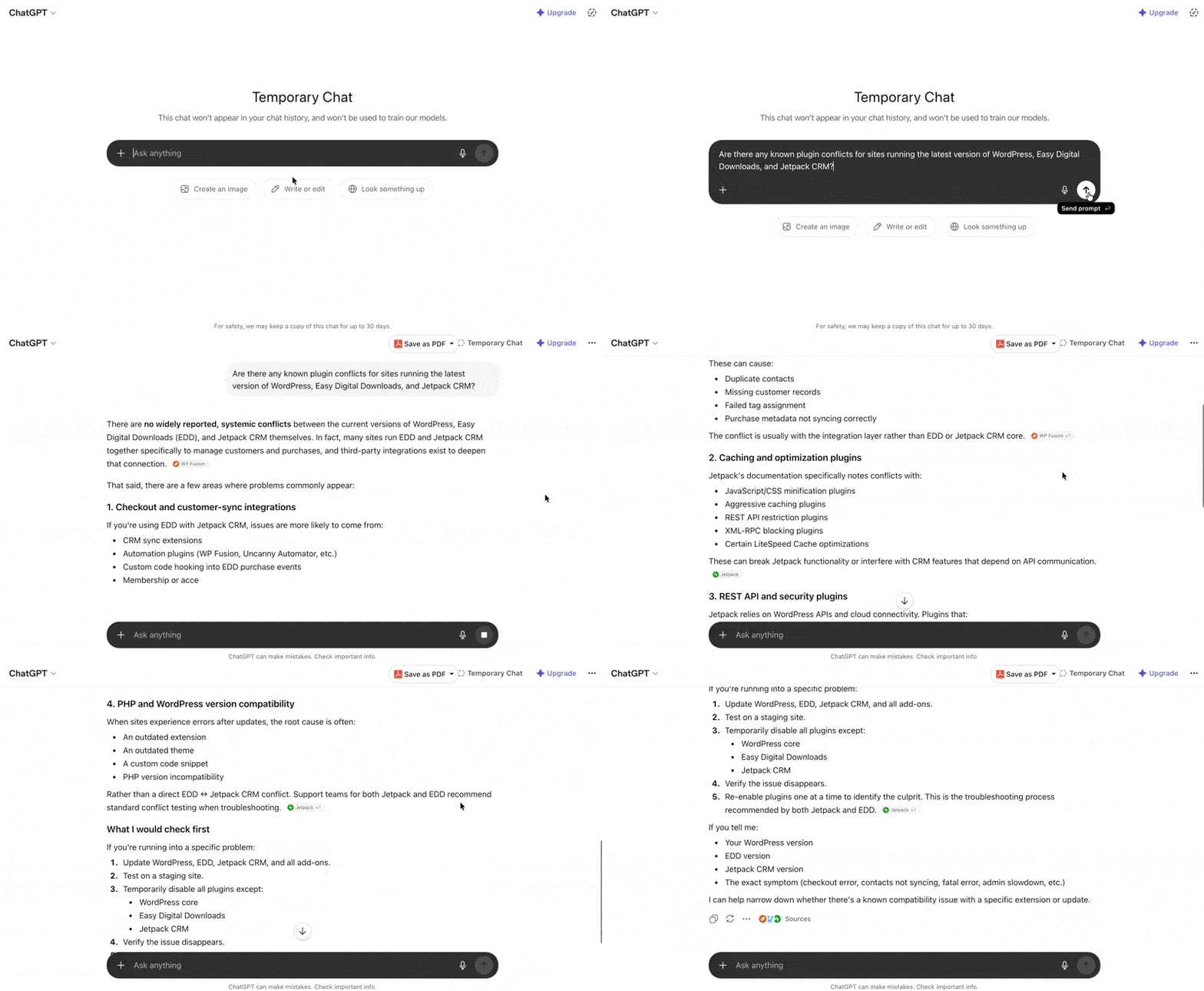
With Uncanny Agent, on the other hand, all you need to do is ask if there are any issues with your plugins or where they might conflict. Better yet, with your permission, Agent can implement solutions to technical problems.
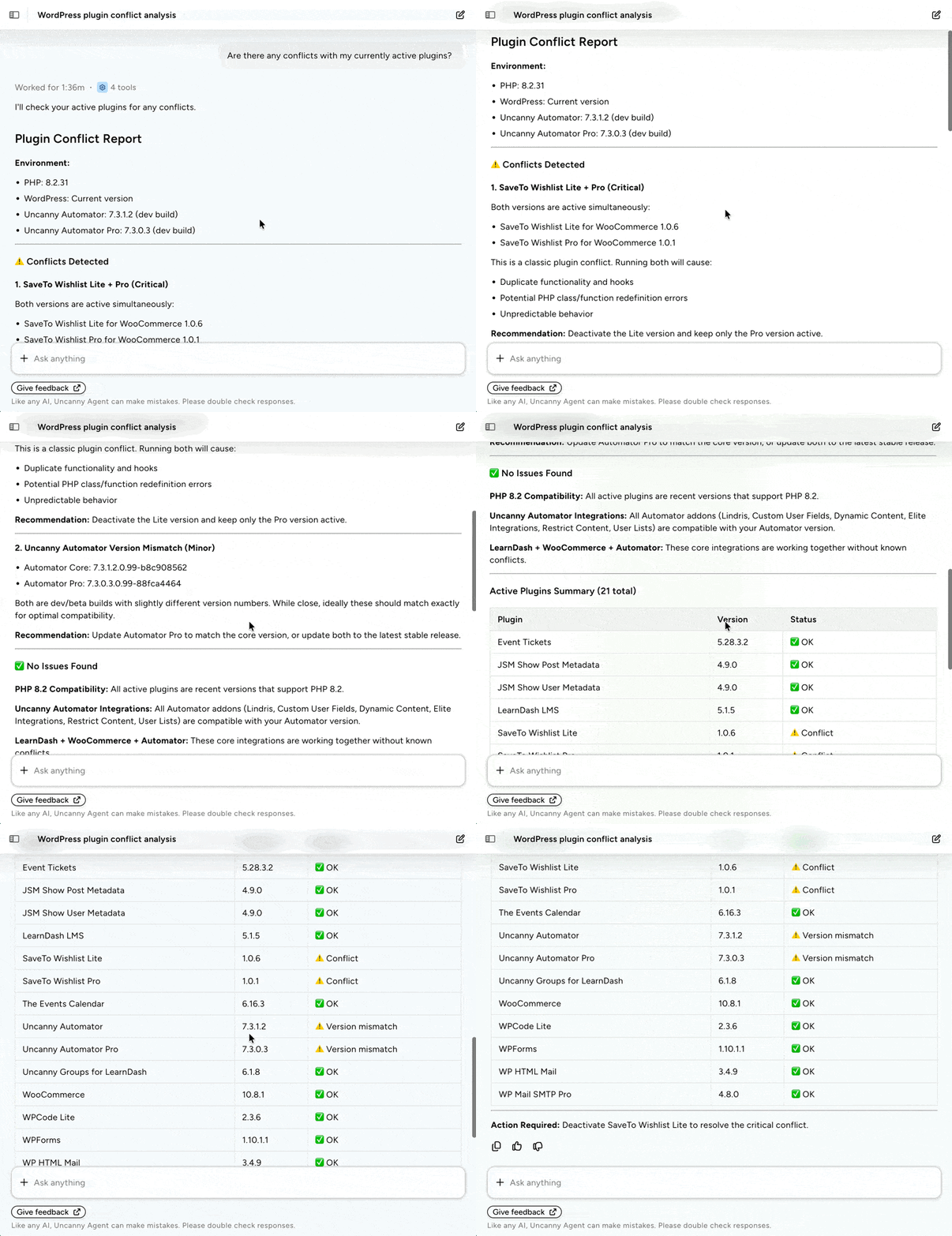
See the difference yourself—try the Uncanny Agent >>>
Conclusion
Remember those two tabs? The real fix isn’t a better chatbot in the second one. It’s closing the gap entirely — bringing the AI into your site instead of endlessly describing your site to the AI.
So when you compare an AI WordPress assistant to a general chatbot, the verdict comes down to one thing: which one actually knows your site and can act on it. For pure writing and reasoning, keep your favorite general model close — it earns its place. But for managing the site itself, the answer is the assistant built for the job: Uncanny Agent, inside Uncanny Automator.
The good news is that finding out costs you nothing. Download Uncanny Automator free, open Agent, and ask it something only your site would know. Then picture the parts of your week you’d get back.
Get Uncanny Automator free and meet Agent >>>
What will you do with more time?
Frequently Asked Questions
What’s the difference between Uncanny Agent and ChatGPT?
ChatGPT is a general-purpose AI that advises based on what you tell it — it has no live access to your WordPress site. Uncanny Agent is an AI assistant built inside WordPress that understands your specific site and completes tasks on it. ChatGPT tells you how; Agent does it.
Does Agent replace ChatGPT or Gemini?
ChatGPT is a general-purpose AI that advises based on what you tell it—it has no live access to your WordPress site. Uncanny Agent is an AI assistant built inside WordPress that understands your specific site and completes tasks on it. In short, ChatGPT tells you what or how; Agent tells you what or how and then can act on it.
Does Agent replace ChatGPT or Gemini?
Uncanny Agent and ChatGPT are built for different jobs. AI platforms like ChatGPT are more general purpose—work related, personal use, etc. While Uncanny Agent offers the same general purpose use, its connection to your WordPress site means it has the added benefit of working as an AI assistant for WordPress.
That said, if most of your AI use is site-related, some people find Agent reduces the need for a separate AI subscription.
Is this the best AI plugin for WordPress?
For the job of managing a WordPress site—understanding your site, your business, and your users, and acting with that information—Uncanny Agent is purpose-built in a way general chatbots and AI workflow steps simply aren’t. If you’re looking to integrate more AI and automation into your WordPress site, Agent is tough to beat.
Do I need to know how to code to use Agent?
Not at all. If you can describe what you want in plain language, Agent can help. There’s no setup required either—no need to navigate API keys, admin menus, etc. Just open up your WordPress admin dashboard and start chatting with Agent to carry out tasks on your site.
Am I still in control of my site?
Yes, Uncanny Agent leaves you in control of your site and your data. Agent was built with security and privacy in mind, so your data and your customers’ data never goes where it shouldn’t. Further, when taking important actions on your site, Agent will ask for permission.
Uncanny Agent is AI that gives you more agency, not less.
How is Agent different from the “AI” features in other WordPress plugins?
Most plugins add an AI step inside an automated workflow—generate text, classify content, etc.—or a front-end chatbot for visitors. Uncanny Agent, on the other hand, is a conversational assistant that understands your whole site and completes tasks through conversation. It’s a different category of capability that includes building recipes, generating content, and executing tasks.
Looking for a deeper comparison? Check out our head-to-head comparison of the best automation and AI plugins for WordPress >>>
How do Uncanny Agent and my automations work together?
Uncanny Agent doesn’t change your automations. You can still build recipes the way that you always have and they will work the same way. However, you can also build recipes with Uncanny Agent through plain text. That’s particularly useful for people who are new to Automator and/or who are building more complex recipes.
Additionally, Agent can handle the one-off tasks that aren’t worth creating a recipe for, such as creating a new user or updating a product description.

Related Posts
























































Comments (0)