

TLDR? Get the highlights ▾ 1No-code automation lets your WordPress site run workflows and carry…
Uncanny Agent + Uncanny Recipe Builder: How and When to Use Each
Uncanny Automator has two ways to automate WordPress: the Uncanny Recipe Builder and Uncanny Agent, your AI assistant. Knowing when to use which makes life easier.
TLDR? Get the highlights…
Uncanny Automator gives you two options for automating tasks: a click-and-play Uncanny Recipe Builder and Uncanny Agent, an AI assistant. The Recipe Builder gives you quick setups, visual wireframing, and fine-tuning. Uncanny Agent can also build recipes, plus complete tasks and answer questions. Used together, you can do much more on WordPress than ever before.
Ready to put both to work? Upgrade to an AI + Automation license >>>
You’ve been building recipes in Uncanny Automator or zaps in Zapier for years. Now there’s Uncanny Agent—an AI assistant built into your WordPress site.
Uncanny Agent can do most of what you’d do in the Recipe Builder—plus a lot that you couldn’t—and now you’re wondering, “When should I use Uncanny Agent, and when should I use the Recipe Builder?”
You describe what you want. It builds. It executes. It answers questions about your site.
If you’ve been building automations for years, then visual builders like the Recipe Builder feel like second nature to you. So, where does Uncanny Agent fit into your existing picture? Is it a shortcut? A replacement? Another way to do the same work?
The answer to all of your questions about Uncanny Agent is, “Yes, and…”.
Uncanny Agent represents a new way to work, not just in Uncanny Automator, but in WordPress altogether. Describe what you want, Uncanny Agent builds it. Ask for yesterday’s new leads, Uncanny Agent finds them. Type a request, Uncanny Agent executes it.
This guide is about when to use the Recipe Builder, when to ask Uncanny Agent, and how to use them together to get more done across your WordPress site.
Two ways to work in Uncanny Automator
Both the Recipe Builder and Uncanny Agent let you build automations and complete work on your WordPress site. The difference is in the type of work and the amount of help you want with it.
Uncanny Recipe Builder is visual and hands-on. You click your way through the logic of an automation—triggers, actions, filters, delays, etc. Uncanny Agent is conversational. You describe what you want and Uncanny Agent does the work—building the recipe, completing the task, or answering the question.
Most things you can do in one, you can do in the other—they’re two different, yet equally intuitive ways to automate WordPress. Where they differ for you will depend on what type of work you’re trying to get done.
Uncanny Recipe Builder
The Recipe Builder is the visual interface inside Automator where you assemble workflows “by hand”.
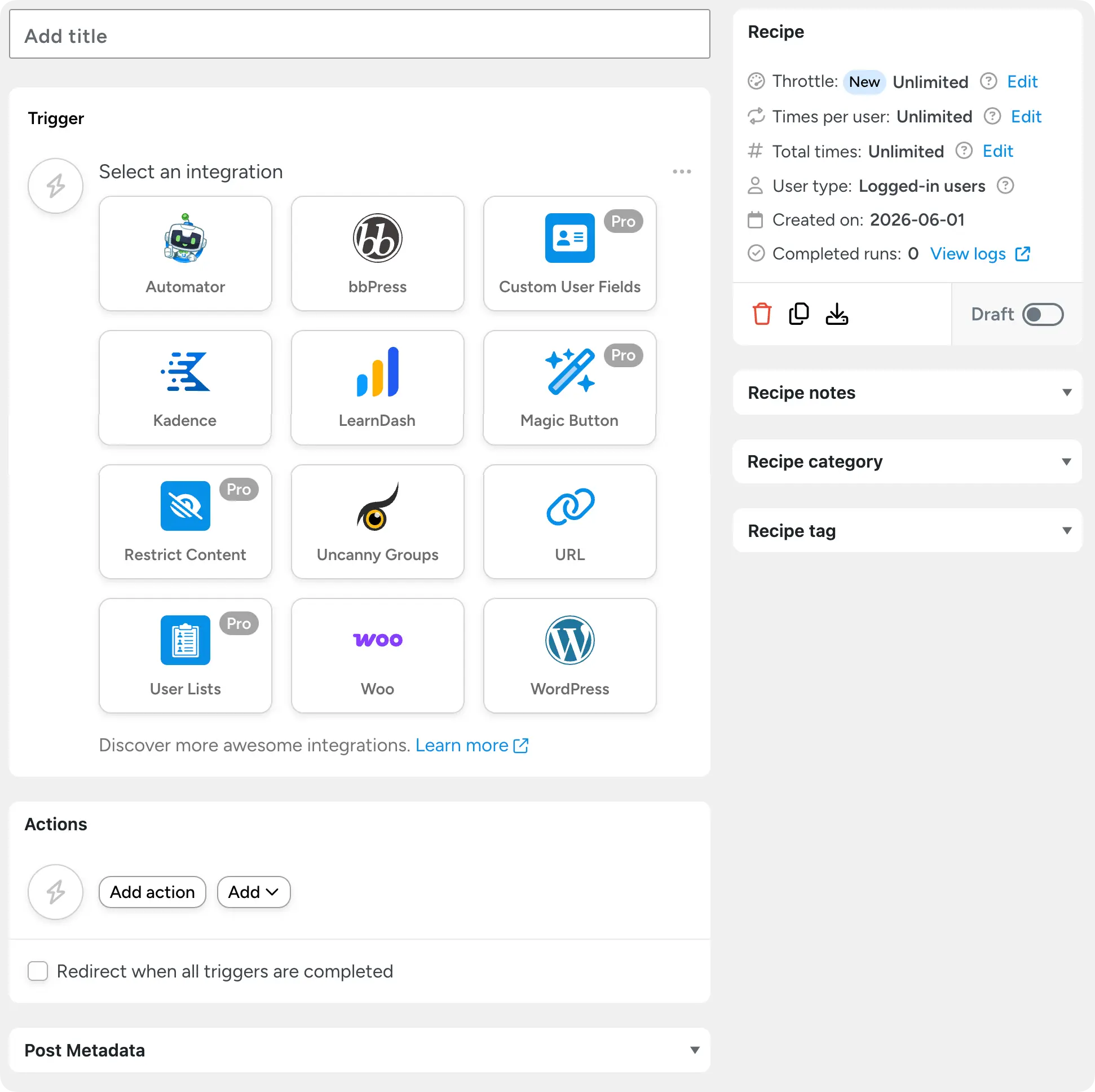
Once a recipe is built and active, it runs on its own. You set it up; it works in the background.
The Recipe Builder is precise. You see and control every field, every mapping, every condition. If you know exactly what you want, this is where you build it.
Uncanny Agent
Uncanny Agent is an AI assistant inside WordPress that you interact with by chat. You describe what you want, and Uncanny Agent gets to work.
Uncanny Agent has three main jobs:
- Helping you build recipes. You describe the automation you want, and Uncanny Agent does the clicking for you—picking triggers, mapping fields, adding conditions, etc. Anything Uncanny Agent builds is a normal Automator recipe—you can open it in the Recipe Builder and edit it like any other.
- Completing tasks on your site. Uncanny Agent can execute work directly in WordPress. Importing a list of contacts into HubSpot from a spreadsheet, drafting a blog post, updating product details, creating new users, building courses. Uncanny Agent does the task itself.
- Answering questions about your site and business. “Are there any free form plugins that can replace my current paid form plugin?” “How many sales did I make last week, and what was the average order value?” “Why did this recipe fail yesterday?” Uncanny Agent reads your site, your settings, and your logs and replies.
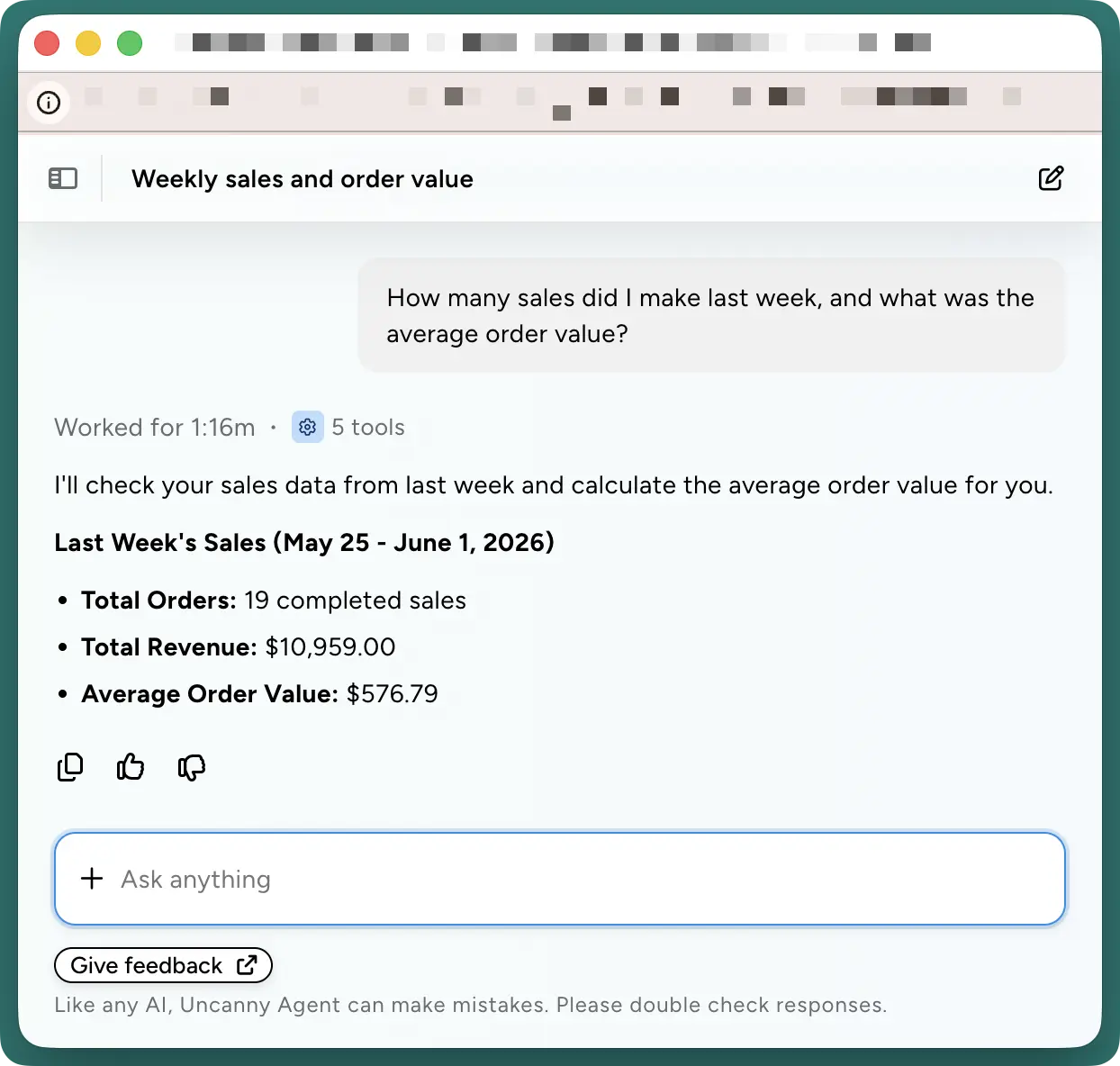
Uncanny Agent is interactive. You ask, it responds, you refine, it adjusts. It works alongside your recipes, not in place of them.
Knowing When to Use Uncanny Agent and Recipe Builder
Both Uncanny Agent and Uncanny Recipe Builder help you automate WordPress. Behind the scenes, they’re often using the same tools to carry out tasks and surface data.
So, when trying to decide whether you should use the Recipe Builder or Uncanny Agent, what matters most is what you are trying to accomplish.
Reach for the Recipe Builder when:
- You’re setting up an integration for the first time. Example: You haven’t connected your LinkedIn account to your WordPress site before and you want to create a new recipe that includes a LinkedIn action.
- You know exactly what you want to build and prefer to build it yourself. Example: you want every WooCommerce order over $200 to post to your #vip Slack channel with the order details. You’ve built similar recipes before, and you can configure this one in a few minutes.
- You’re fine-tuning a recipe that’s already built. Example: changing which HubSpot list new contacts get added to, swapping in a different tag, or updating the email template tokens.
Reach for Uncanny Agent when:
- You have an outcome in mind, but you don’t know how to get there. Example: “I want to launch multi-channel abandoned cart recovery campaigns that are optimized for conversion.”
- You have a one-off task and don’t need a permanent recipe for it. Example: “Create a new user with the email [email protected], first name ‘John’ and last name ‘Doe’,” or, “Draft a product update post based on the changelog I’m pasting in.”
- You have a question about your site, your recipes, or what Uncanny Automator can do. Example: “Which of my recipes ran yesterday and how many failed?” or “Can I trigger a recipe from a Stripe webhook?”
- You want to optimize your existing workflows. Example: “How can I optimize my lead capture? What new recipes am I missing for a seamless funnel?” Uncanny Agent will look at your lead capture recipes, identify gaps, and suggest new ones.
- You want help troubleshooting a recipe that isn’t behaving as expected. Example: “My lead capture recipe ran 142 times yesterday but only created 138 HubSpot contacts—what happened with the other 4?”
Most people end up using both, often within the same session. They allow you to change your working style to suit the task and desired outcome.
How Uncanny Agent and UncannyRecipe Builder Work Together
When used together, Uncanny Agent and Uncanny Recipe Builder can do more than just automate your WordPress site. They can help you identify opportunities and vulnerabilities, and respond to them quickly and with ease.
From security updates to new content drafts and sales reports, combining traditional visual automation builders with AI agents opens new possibilities for WordPress sites.
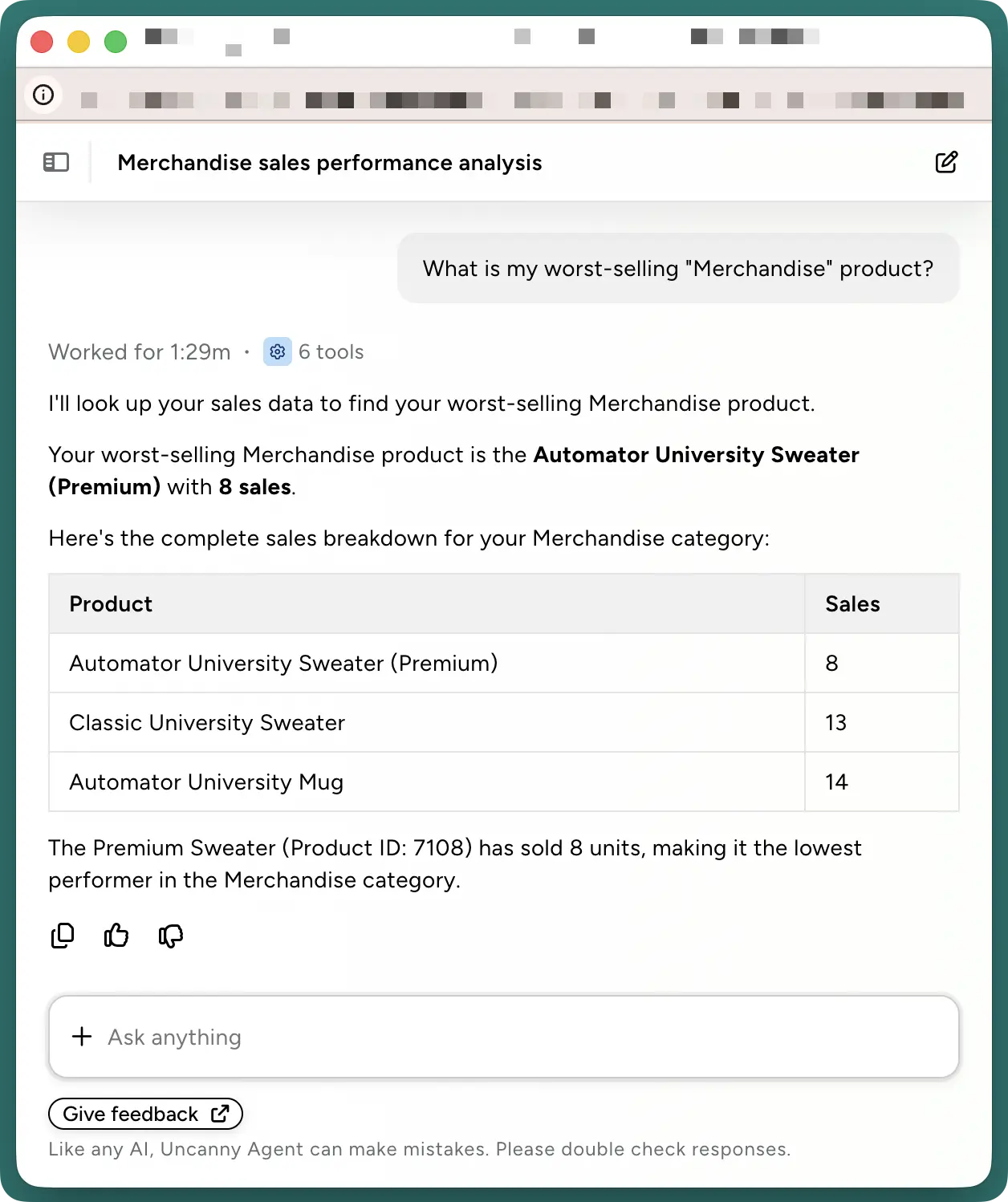
For example, I used Uncanny Agent to identify the weakest “merchandise” product in my WooCommerce store.
Then, with the Recipe Builder, I was able to create a User Loop to offer some of my customers a limited time offer.
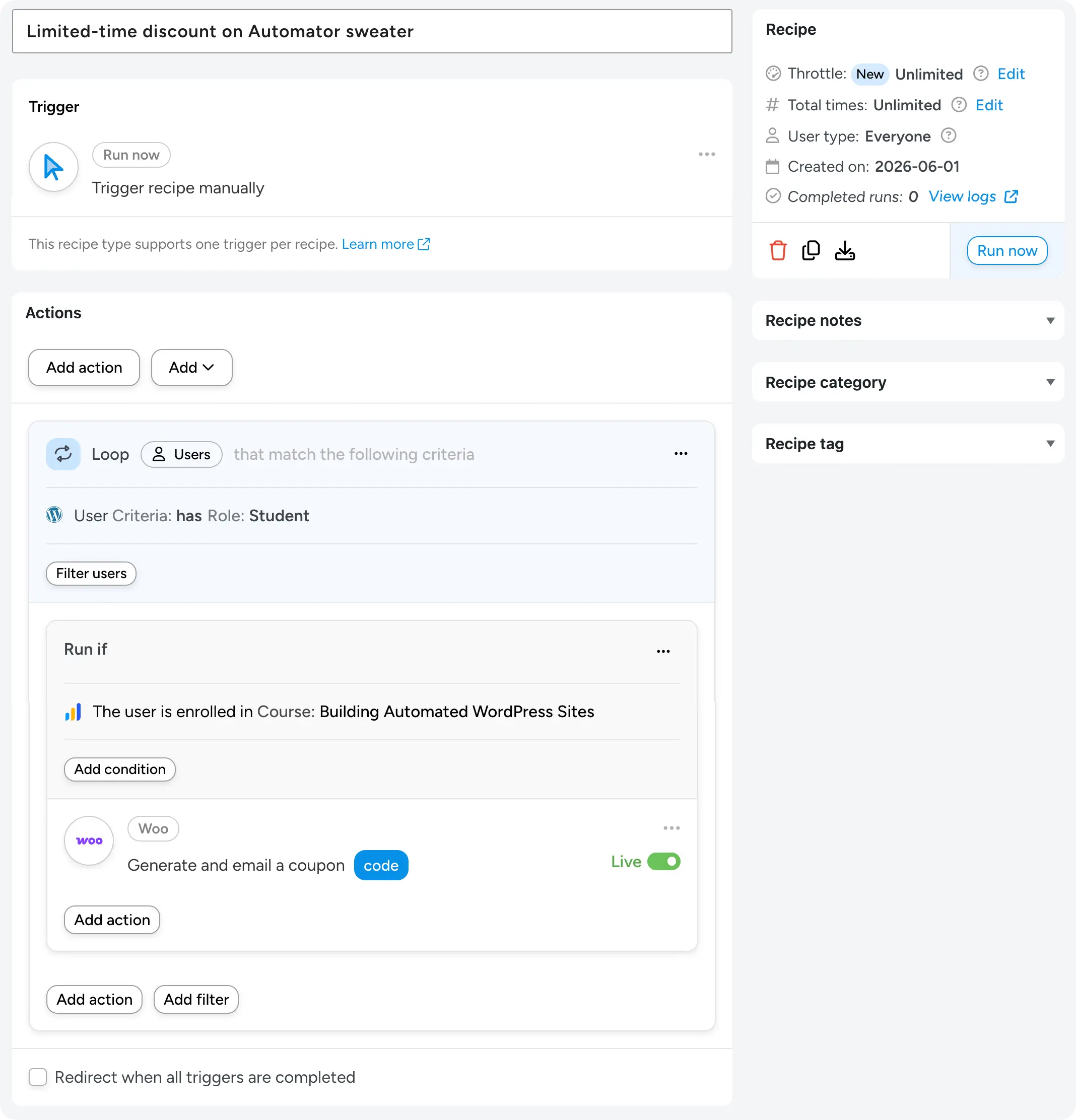
That’s a full data-informed, sales-boosting marketing campaign, researched, drafted, and launched in 5 minutes.
Where Uncanny Agent and the Recipe Builder Overlap
Some tasks can clearly be done with either Uncanny Agent or the Recipe Builder.
For example, I could have instructed Agent to build my “Limited-time discount on Automator sweater” recipe instead of using the Recipe Builder—I’m just a whiz with the Recipe Builder.
Here are the areas where choosing Agent or the Recipe Builder for a particular task is a matter of personal preference:
- Building a recipe. You can build it yourself in the Recipe Builder or describe it to Uncanny Agent. They both give you the same recipe in the end. Use whichever feels faster for the recipe in front of you.
- Updating a recipe. Open the Recipe Builder and click through new triggers, tokens, actions, or static copy, or ask Uncanny Agent to make the changes for you. ”Add a condition to the lead capture recipe that excludes test submissions (email domain is ‘@mycompany.com’).” Same result.
- One-off tasks that could also be recipes. Most one-off tasks, if they require enough repetition, could become recipes. If it’s truly one-time, Uncanny Agent is faster. If it might come back, ask Uncanny Agent to do it now and build a recipe for next time—two outcomes from a single request.
When both options feel reasonable, use both! Uncanny Agent and the Recipe Builder give you the ultimate flexibility for managing and automating your WordPress site.
Final Thoughts
Uncanny Recipe Builder and Uncanny Agent are two ways to work inside Uncanny Automator. Same automations, same outcomes, different experience.
If the recipe builder is already your default, Uncanny Agent gives you a conversational shortcut for the moments when describing what you want is faster than building it. And Uncanny Agent can answer questions about your site, bringing powerful AI capabilities to your WordPress dashboard.
Ready to put both to work? Upgrade to an AI + Automation license >>>
What will you do with more time?
Frequently Asked Questions
Can Uncanny Agent build Automator recipes for me?
Yes. Uncanny Agent can build recipes from scratch, update existing ones, and, in some cases, even test them. Anything Uncanny Agent builds is a normal Automator recipe—you can open it in the Recipe Builder and edit it like any other.
Can Uncanny Agent edit or update recipes I’ve already built in the Recipe Builder?
Yes. Uncanny Agent can adjust conditions, add or remove actions, and disable recipes. Review changes before they apply if you want to confirm exactly what’s changing.
Do I need to use both Uncanny Agent and Uncanny Recipe Builder, or can I just use one?
You can use just one. If all you want to do is build and manage recipes manually, the Recipe Builder works fully on its own and has for years. Uncanny Agent can build and manage recipes but can also complete tasks, analyze your business, optimize your SEO and much more. If you feel more comfortable building and managing recipes with Uncanny Agent, you don’t need to go into the recipe builder at all. Neither requires the other.
Is Uncanny Agent meant to replace the Recipe Builder?
No. Uncanny Agent is not going to replace the recipe builder. Even though you can build recipes with Uncanny Agent through conversation, sometimes, you may prefer to build an automation “by hand”. Both modes of automating your WordPress site are available to you and you can use either depending on the task at hand.

Related Posts
























































Comments (0)