

TLDR? Get the highlights ▾ 1No-code automation lets your WordPress site run workflows and carry…
Uncanny Automator 7.3: Automate Events, Donations, Wishlists, and More
Is this our biggest release yet? Uncanny Automator 7.3.0 adds SaveTo Wishlist plus 100+ new triggers and actions for The Events Calendar, Charitable, Popup Maker, and more.
TLDR? Get the highlights:
- SaveTo Wishlist joins Automator as a brand-new integration—including back-in-stock and on-sale triggers for wishlist products in Pro
- The Events Calendar gets full lifecycle automation: venues, organizers, check-ins, RSVPs, waitlists, and recurring events
- Charitable support gets expanded—off-site donation triggers and powerful new donor management actions
- New triggers for Popup Maker, Groundhogg and FluentCommunity, plus custom field automation for ACF, JetEngine and Meta Box
- Asana and GitHub integrations are now available in Automator Lite
Update to 7.3.0 and put your newest plugins on autopilot >>>
Uncanny Automator 7.3 is one of our biggest releases yet. It’s a release that’s so big, we had to split it into two separate blog posts just to scratch the surface.
This release keeps everything you love and adds one new integration and more than 100 new triggers and actions across events, fundraising, ecommerce, marketing, and custom fields.
Let’s dig into what’s new.
New Integration: SaveTo Wishlist
Wishlists are where purchase intent goes to wait… and wait, and wait. With our new SaveTo Wishlist integration, however, Automator can help you turn intent into action—automated actions!
In Automator Lite, recipes can now fire when:
- A user creates a wishlist or adds a product to one
- A user moves a product from their wishlist to their cart
- A guest wishlist syncs to a user account on login
Automator Pro adds more triggers for more conversion-focused users:
- A product in a wishlist is back in stock
- A product in a wishlist goes on sale
- A user purchases a product from their wishlist
Pair the back-in-stock trigger with any of Automator’s CRM integrations—or even native email integration—and every shopper who wishlisted a sold-out product gets an automatic “It’s back!” email.
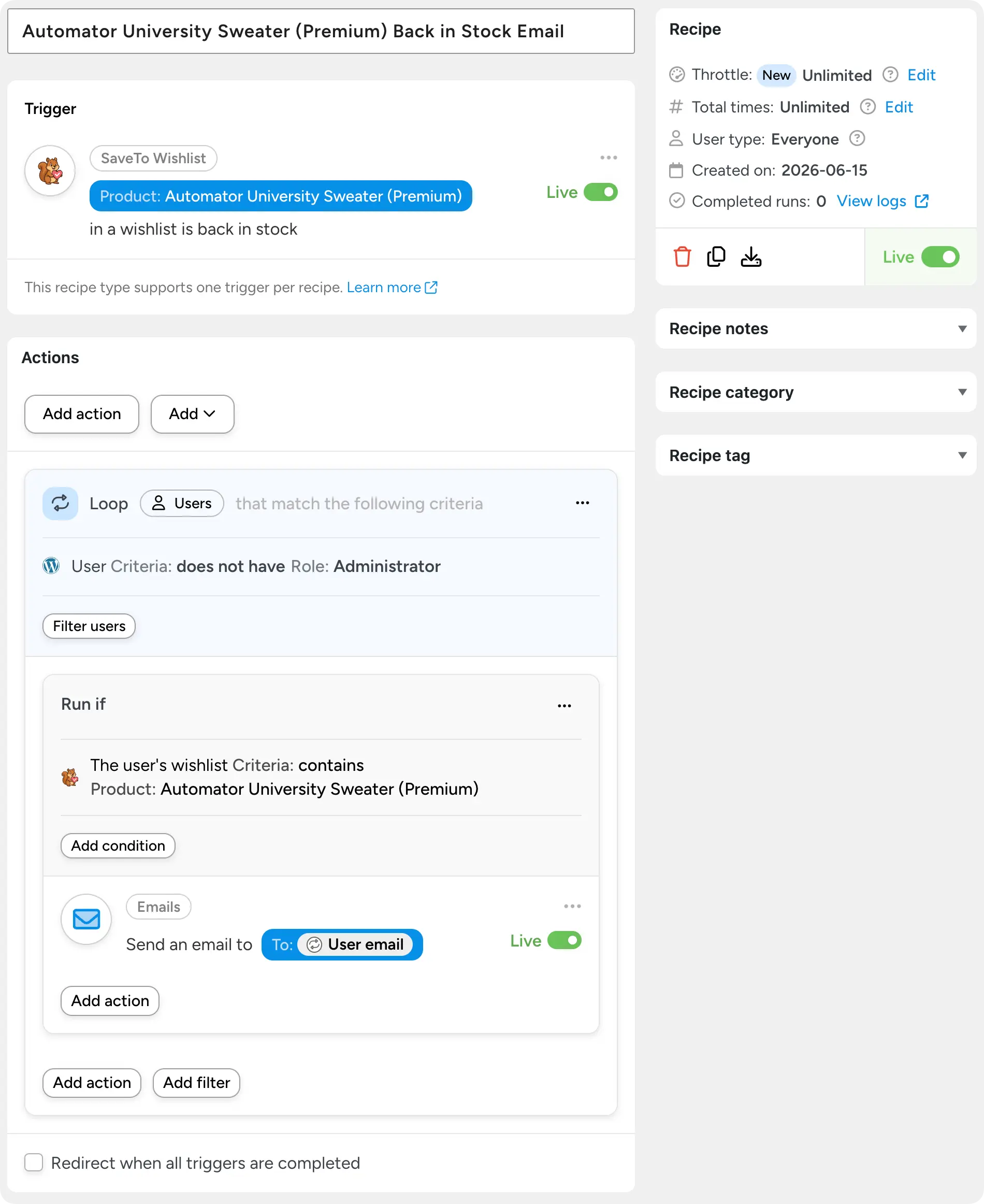
Pro also includes wishlist management actions:
- share a wishlist,
- grant edit permissions,
- move products between wishlists, and more.
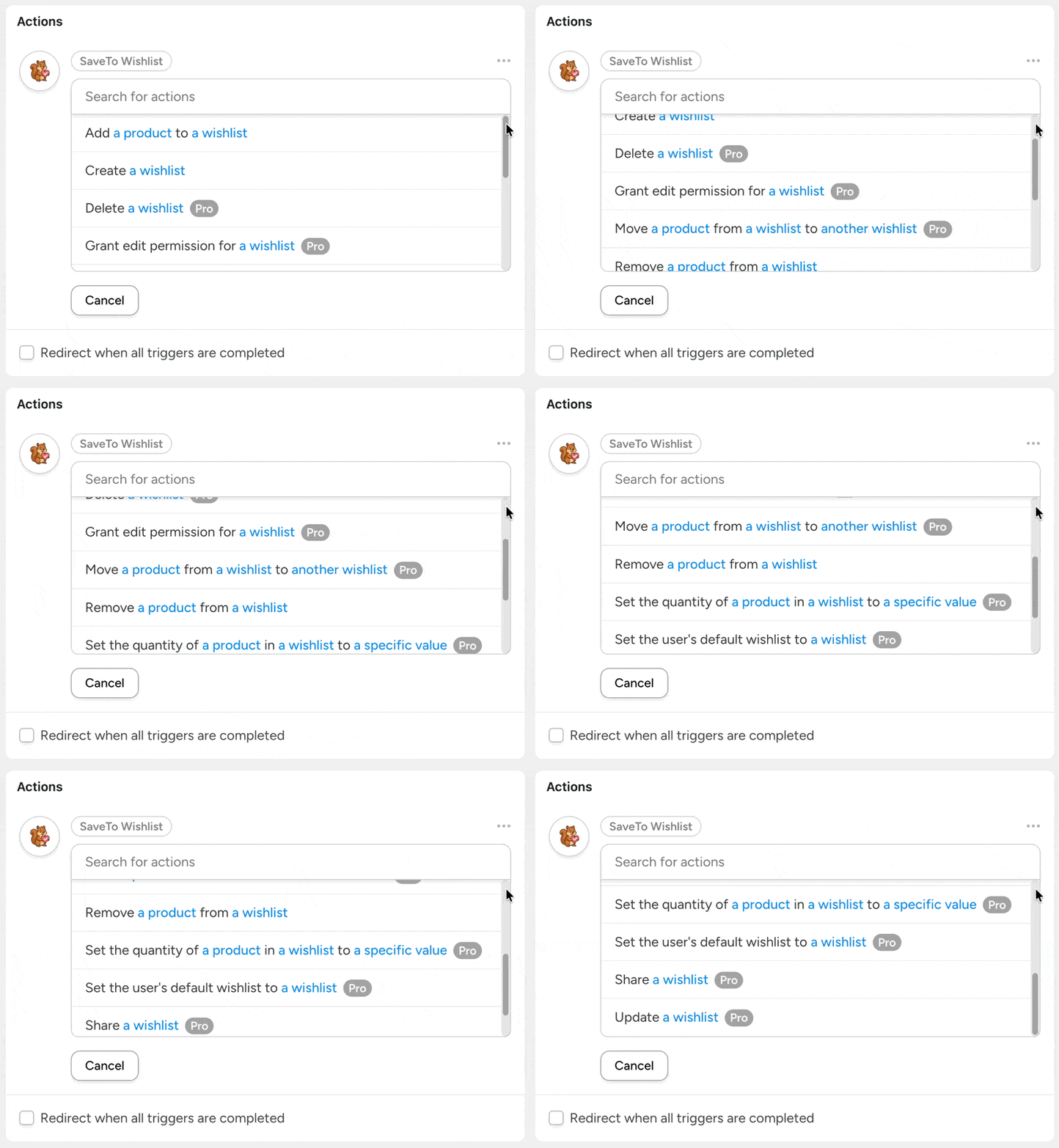
Turn wishlists into revenue with Automator Pro >>>
The Events Calendar: Full Event Lifecycle Automation
From registration to post-event follow-up, The Events Calendar integration just made it that much easier for you to get that standing ovation.
In Automator Lite, you can now trigger recipes when:
- venues and organizers are created or updated,
- events are linked to related posts,
- attendees check in, and
- tickets are added or removed, or RSVP tickets are generated (via Event Tickets)
On the action side, your event automations can now create, update, and delete events. In addition, we’ve added actions to create venues and organizers, and even check in attendees automatically. Imagine tracking event attendance in real time from something as simple as page visits or something as sophisticated as QR code scans.
Automator Pro extends these powerful new event automation features to Event Tickets Plus and Events Calendar Pro:
- Waitlist triggers and actions: a user joins the waitlist, is promoted from it, or is notified—and recipes can add or promote waitlist subscribers
- Attendee triggers for tickets purchased via WooCommerce or Easy Digital Downloads
- Recurring event and duplicated event triggers
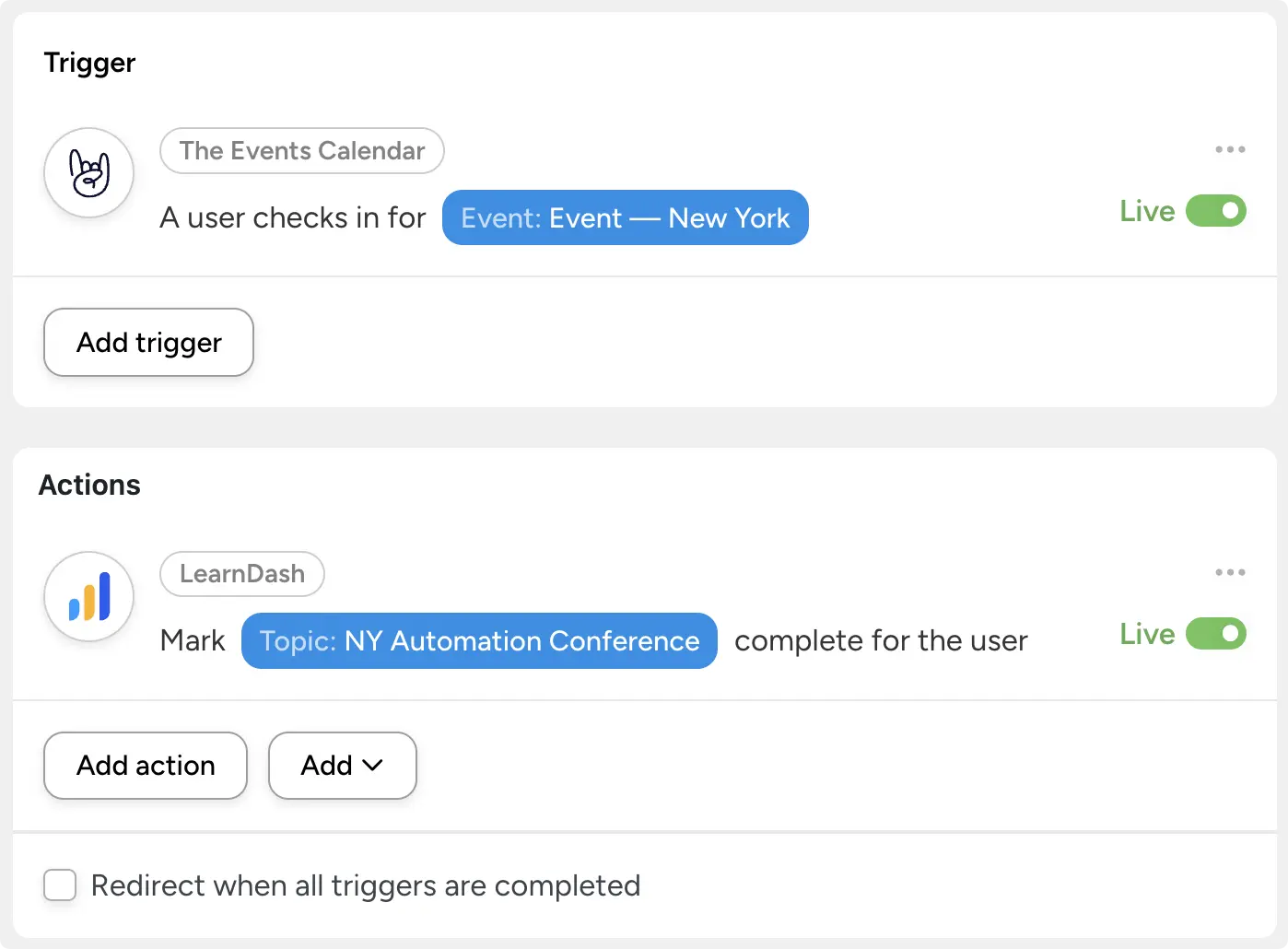
Picture it: an attendee checks in for your event and Automator issues their certificate, logs the check-in to Google Sheets, and tags them in your CRM. Or a spot opens up and your waitlist promotes itself while you’re at lunch.
The bridge between in-person events and your online eLearning, eCommerce, or membership platform is complete.
Charitable: Automation for Nonprofits
New Charitable support in 7.3 covers the full donor journey for those fundraising projects and nonprofit organizations that need to run lean.
Automator Lite triggers include:
- a donation being completed or refunded,
- a campaign ending or reaching its goal, and
- a donor being created.
Lite actions let recipes create donors, record offline donations, update donation statuses, and tag donors.
Naturally, Automator Pro goes deeper with new triggers and actions meant to help you keep track of your donations across payment gateways and accounting software:
- Stripe and PayPal webhook triggers,
- recurring donation status changes,
- donor consent and email verification triggers, and
- donor management actions (link a donor to a WordPress user, update addresses and social links, and more).
Popup Maker, Groundhogg and FluentCommunity
Three marketing and community favorites also got attention in 7.3.0:
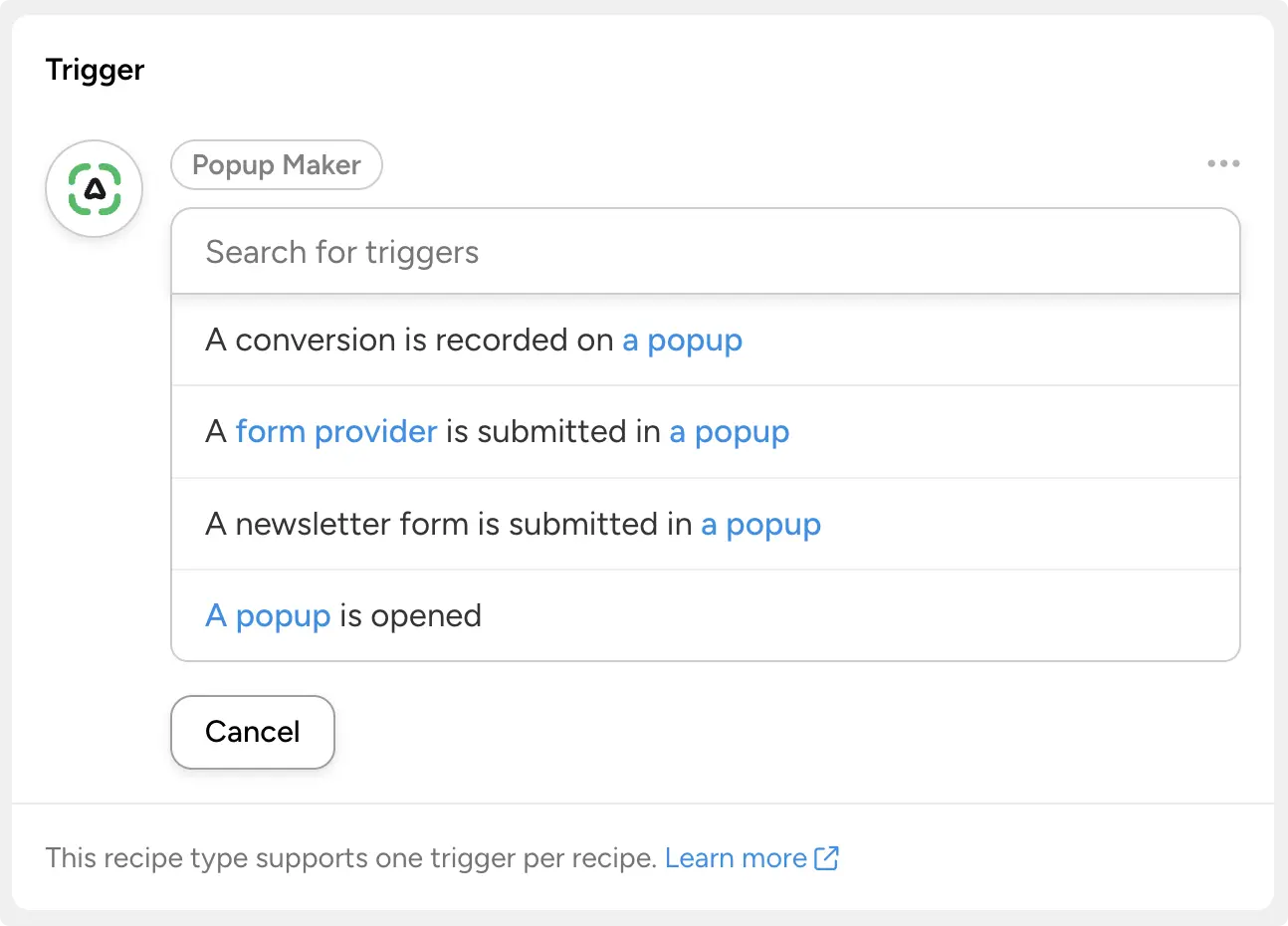
- Popup Maker (Lite): trigger recipes when a popup is opened, a conversion is recorded, or a form—including newsletter forms—is submitted in a popup. Your popups can now do more than collect emails; they can kick off entire workflows.
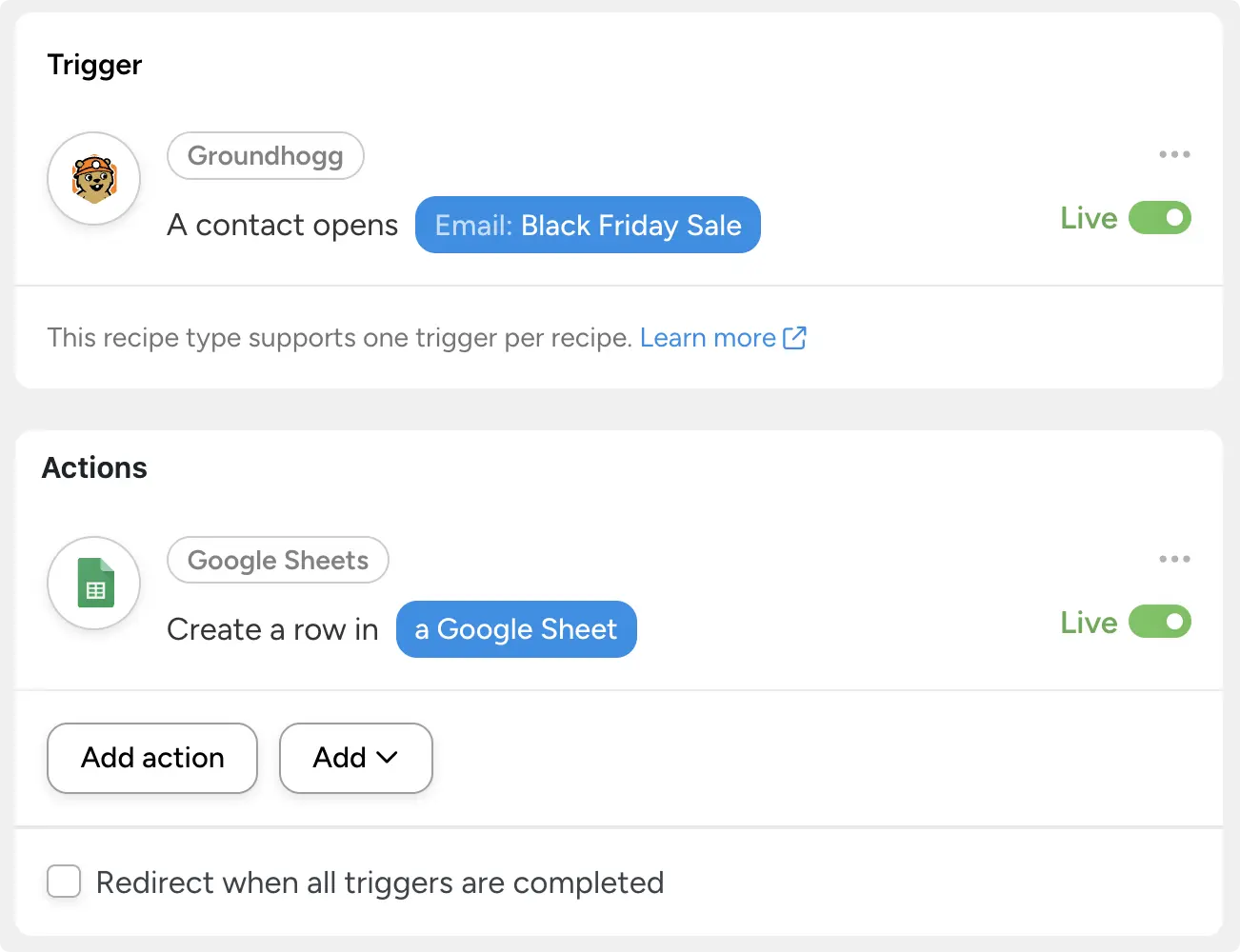
- Groundhogg: Pro adds triggers for email opens and clicks, contact creation, opt-in status changes, tasks and flow steps. Lite adds an “add a note to a contact” action, and the create-or-update contact action now supports address fields and custom properties.
- FluentCommunity (Lite): new quiz triggers—completion, pass/fail, and score thresholds—so course quizzes can drive badges, follow-up emails or enrollments.
Custom Fields: ACF, JetEngine, and Meta Box (Pro)
For the data modelers among us, Automator Pro expands the triggers and actions available for everyone’s favorite custom field plugins: Advanced Custom Fields, JetEngine, and Meta Box.
New triggers and actions include:
- A field is deleted on a post (Advanced Custom Fields)
- A row is added to a repeater/flex field on a post (Advanced Custom Fields)
- Create an item in a custom content type (JetEngine)
- Update an item in a custom content type (JetEngine)
- Set a field on a post to a specific value (Meta Box)
- Set a field on a term to a specific value (Meta Box)
See all new triggers and actions in the 7.3.0 release >>>
If your site’s content lives in custom fields, your automations can now read and write it directly.
Also in Uncanny Automator 7.3.0
A few more items worth knowing about:
- Asana and GitHub moved from Automator Pro to Automator Lite—project management and dev workflow automation, now free
- Refreshed AI model options for Claude, Cohere, Gemini and Mistral across our AI integrations
- A new execution pipeline under the hood for improved recipe reliability
- A new Telegram Text (HTML) token that preserves message formatting
The full details live in the Automator changelog and Automator Pro changelog.
What You Can Build with 7.3.0
The fun starts when these pieces combine:
- Wishlist win-back: a wishlisted product comes back in stock → email the shopper → tag them in Groundhogg → log the conversion when they buy
- Self-running events: an attendee checks in → mark a lesson or topic complete → issue a certificate → add a row to Google Sheets
- Donor care on autopilot: a recurring donation fails → update the donor’s status → notify your team in Slack → schedule a friendly follow-up email
That’s just a quick sampling of what’s now possible inside of WordPress.
Available Now
Uncanny Automator 7.3.0 is available now. Update from your WordPress dashboard under Plugins, or grab the latest Pro version from your Automator account.
Still on Automator Lite? The back-in-stock triggers, waitlist automation and custom field support above are waiting in Pro.
Claim your Pro license. Reclaim your time >>>
What will you do with more time?

Related Posts
























































Comments (0)