

TLDR? Get the highlights ▾ 1No-code automation lets your WordPress site run workflows and carry…
Uncanny Automator 7.2: Microsoft Teams, LinkedIn Personal Profiles & 9 Rebuilt Integrations
Uncanny Automator 7.2 adds Microsoft Teams, LinkedIn personal profiles, a major AffiliateWP expansion, new Kit and Mautic actions, and rebuilds 9 integrations for speed and reliability.
Uncanny Automator 7.2 is here—and this release packs a punch. New integrations to build automations, and a stronger engine under the ones you already use.
Here are the key takeaways:
- Microsoft Teams joins the Automator family with 10 actions at launch.
- LinkedIn now supports personal profiles.
- Kit and Mautic pick up new actions.
- AffiliateWP gets a huge upgrade.
Not to mention, nine app integrations have been rebuilt from the ground up.
Let’s walk through the new possibilities together.
Microsoft Teams: 10 Actions, Endless Workflows
Microsoft Teams is now a fully supported integration in Automator, and it ships with 10 actions covering the workflows your team actually needs.
Here’s what you can do:
- Send messages to channels and group chats
- Create and manage channels within your teams
- Schedule and create online meetings
- Add and remove tags on team members
- Manage group chats—create them, add members, send messages
If your team runs on Microsoft Teams, this opens up some powerful automations. Here are a few ideas:
- A new WooCommerce order comes in → a message is posted to your #orders channel
- A student completes a LearnDash course → a Teams meeting is created for their coaching session
- A new product is released → create a tag in your support team
The B2B angle here is huge. Teams is where many businesses live. Now your WordPress site can talk to it—no extra tools, no extra costs.
Connect WordPress to Microsoft Teams with Automator Pro >>>
LinkedIn Personal Profiles—Finally
This one’s been a long time coming. Until now, Automator’s LinkedIn integration only worked with company pages. That’s fine for brand accounts, but it left personal profiles out.
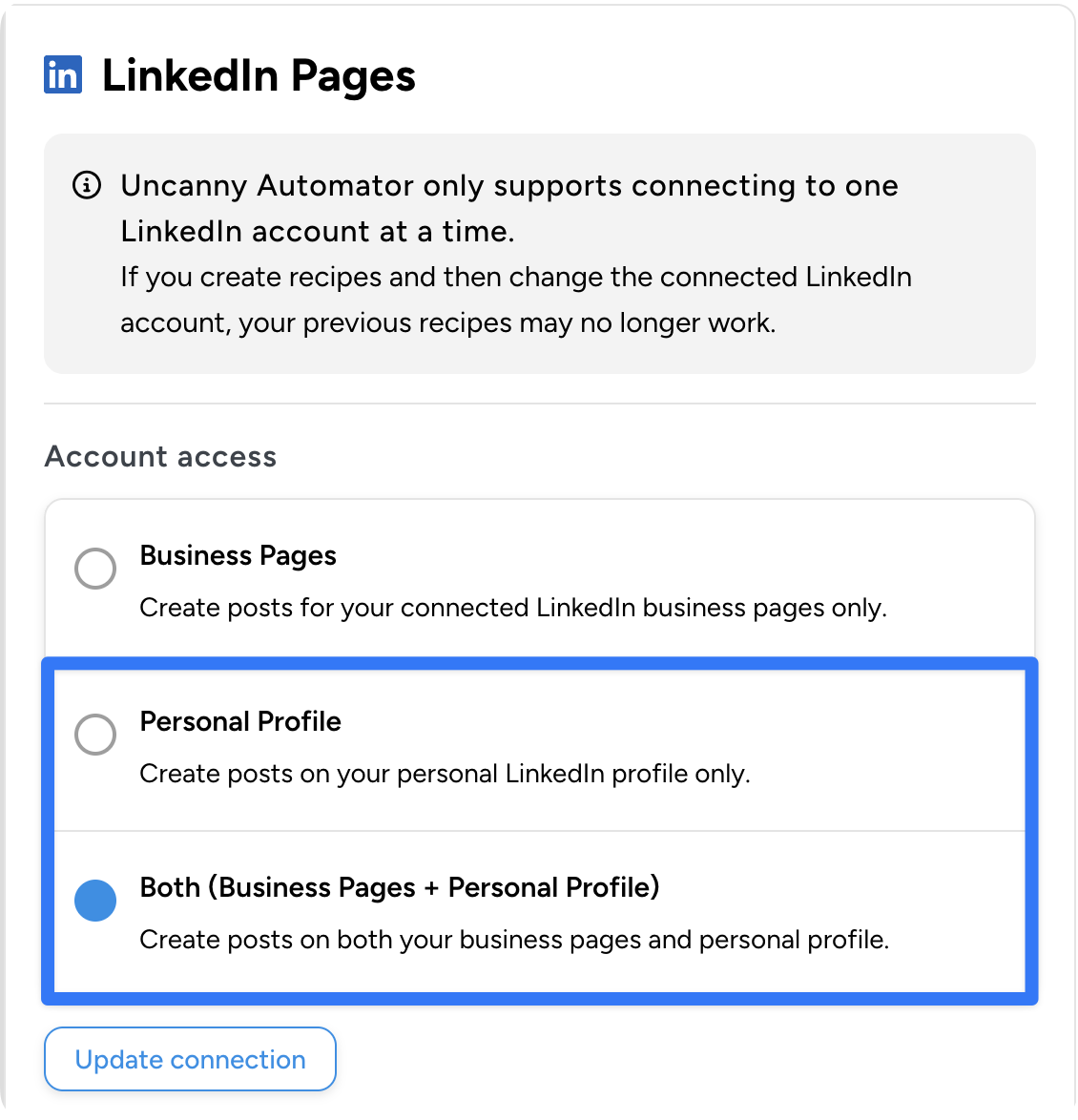
Not anymore. With 7.2, you can post straight to your personal LinkedIn profile from WordPress.
Why does this matter? On LinkedIn, personal profiles get more reach than company pages. Your audience wants to hear from you, not your logo. Now you can set that up without leaving your WordPress dashboard.If you’ve connected LinkedIn to your WordPress website, head to Automator > Settings > App integrations and update your connection.
A couple of workflows to try:
- Publish a blog post → share it to your personal LinkedIn with a custom intro
- Launch a WooCommerce product → post a note on LinkedIn on launch day
It’s never been easier to connect your portfolio to your LinkedIn profile.
New Actions for Kit and Mautic
Kit (formerly ConvertKit)—5 New Actions
Kit users, this is a big upgrade. Before the 7.2 release, Automator already let you tag and segment Kit contacts. Now, 7.2 adds five new actions for much deeper control:
- Create and send broadcasts from a WordPress trigger
- Manage custom fields on subscribers
- Record purchases (great for tying WooCommerce transactions to Kit)
- Apply and remove tags with more options
- Unsubscribe subscribers when conditions are met
The broadcast action alone changes the game. Picture this: a new product goes live in WooCommerce and Kit sends a message to your VIP list right away—no manual work, no delay.
Mautic—3 New Tag Actions
Mautic picks up three new tag actions: add a tag, remove a tag, and manage tags on contacts.
You can now auto-tag Mautic contacts based on what happens on your WordPress site—form fills, purchases, course progress, you name it.
See all Automator integrations >>>
AffiliateWP: A Major Expansion
AffiliateWP gets the biggest single upgrade in this release. It’s not just a couple of new triggers or actions—it’s a full toolkit for building smart affiliate programs.
Here’s what’s new:
New Triggers:
- Fire a recipe when an affiliate’s unpaid referral count hits a number
- Fire a recipe when an affiliate’s visit count hits a number
New Action (Pro):
- Set an affiliate’s rate—change rates based on how well they perform
12 New Conditions (Pro): Control when your recipes run with checks like affiliate status, rate, earnings, referral counts, visit counts, and more.
13 New Loop Filters (Pro): Work with groups of affiliates using filters (e.g., “affiliates with earnings above $500 who signed up in the last 90 days”). A new MemberPress loop filter also joins in.
What does this look like in real life? You can build a fully hands-off affiliate rewards program. When an affiliate hits 50 referrals, bump their rate to a higher tier, tag them as “Gold” in your CRM, send a congrats email, and notify your team—all without a spreadsheet.
Improvements That Make a Difference
Not every meaningful update gets its own headline, but these are worth knowing about.
- Bluesky now lets you share links without adding an image. Sometimes words speak louder than images.
- FluentCRM triggers now support “Any” tag and list matching. Before, you had to pick one tag or list. Now your recipes can fire when any tag is added or any list is joined. Much more flexible.
- BuddyBoss activity posts now support Activity Topics and Post Titles. This gives your communities more context to work with.
- Closure redirects got a privacy-friendly update. They now use session storage instead of cookies. And only the active browser tab redirects when a recipe finishes. No more surprise redirects in other tabs.
- Delayed actions now retry on their own when they fail. Leftover data is cleaned up too. Set it, forget it, and trust that it’ll recover.
- Recipe logs are faster and easier to read. Loop runs handle large data sets without slowing down. Timestamps now show in a format humans can read. And log cleanup respects memory limits with smarter caching.
- Stripe invoices no longer show empty line items—cleaner invoices make happier customers.
- WooCommerce actions filters are now clearer with “has / has not” labels for a customer’s past purchase history.
9 Integrations Rebuilt for Speed and Reliability
This is the update that you won’t see on the surface—but you’ll feel the effects every day.
We moved nine integrations to Automator’s new internal framework:
- Drip
- ClickUp
- Kit (ConvertKit)
- MailerLite
- Mautic
- Microsoft Teams
- OpenAI
- Zoho Campaigns
What does that mean for you? Faster speed. More reliable triggers. And a base that lets us add new features to these apps faster in future releases.
On top of the rebuilds, 7.2 brings broad core upgrades:
- On-demand loading—apps only load when needed, so your site runs leaner
- Pre-packed file maps—faster plugin startup by skipping folder scans
- Smoother loop handling—checkpoints keep large loops stable
- Faster webhook lookups—recipe matching is snappier
- A security pass across the codebase
If Automator felt fast before, it should feel faster now—above all on sites running complex recipes with loops and high-traffic triggers.
What You Can Build with 7.2
The best part of any release is seeing how the pieces fit together. Here are a few workflows that weren’t doable before 7.2:
The B2B Lead Machine: A visitor fills out a form → they’re tagged in Kit → a broadcast goes to your sales list → a message lands in your Teams channel → a meeting is set up in Teams for the intro call.
The LinkedIn Content Engine: You publish a blog post → it’s shared to your personal LinkedIn → a Kit broadcast goes to your email list → Bluesky gets a post with the link (no image needed now).
The Affiliate Growth Program: An affiliate hits 100 referrals → their rate goes up on its own → they’re tagged as “Platinum” in Mautic → a congrats email fires → your team gets a heads-up in Teams.
The Course Follow-Up: A student finishes a LearnDash course → they’re removed from the onboard flow in Kit → given a new tag → a Teams meeting is set for their review.
These are just starting points. With 220+ apps and plugins and the new features in 7.2, the options are almost endless.
Available Now
Automator 7.2 is live now. Head to your WordPress dashboard and update. Pro users—make sure you update both Automator Lite and Automator Pro to get everything.
For the full list of every change, check out the changelogs:
New to Automator? There’s never been a better time to jump in. Microsoft Teams, LinkedIn personal profiles, a huge AffiliateWP toolkit, deeper Kit and Mautic support, rebuilt apps, and a faster core—7.2 is one of our most complete releases yet.
Get Automator Pro >>>
What will you do with more time?

Related Posts
























































Comments (0)