

Uncanny Automator 7.6 adds FluentCart, FluentBoards, All-in-One WP Migration, and Really Simple Security. 7.5 brought…
Automator 7.0: New Integrations & the Foundation for What’s Next
Uncanny Automator 7.0 is a milestone release. It adds new integrations, rebuilt form support, many quality-of-life improvements, and it lays the groundwork for something big.
We’re excited to announce the releases of Uncanny Automator 7.0 for both the Lite and Pro plugins. These are significant updates that lay the groundwork for major upcoming features while delivering new integrations, improving existing ones, and adding a number of improvements that make your automations more powerful and more reliable.
We recognize that 7.0 is a big version jump, and there’s a reason for that. Under the hood, significant architectural changes have been made to support exciting new capabilities, including something called “Uncanny Agent”. “Agent” is a new AI-powered WordPress assistant built directly into Automator that understands plain language and can perform real tasks on your site. Picture creating recipes by describing what you want, completing admin activities, and even answering questions about data on your WordPress site. It’s currently in beta; a full public release is coming soon, and we’ll have a post here with the full details as soon as it’s available.
Let’s talk about what’s new in the 7.0 releases that you can use right now.
New Integration: WP Event Manager (Lite)
Event management sites now have more options in Automator workflows. The 7.0 Lite release adds WP Event Manager as a new plugin integration, with both a trigger and an action now available:
- New Trigger: An attendee registers for an event
- New Action: Register an attendee for an event
Perhaps when an attendee registers for an event you could add them to a Mailchimp mailing list, send a personalized email, and log the registration in an attendance template in Google Sheets. The action makes it easy to automatically register users for events when they complete a purchase, fill out a form, or perform some other activity.
Gravity Forms: Major Overhaul (Lite + Pro)
Gravity Forms was one of our earliest integrations and in need of an upgrade. The changes in 7.0 represent a ground-up rebuild that improves trigger reliability, adds expanded token support, and even adds some new features, including:
- New Trigger: A form entry is updated to a status
- New Action: Update an entry of a form
These additions give you finer control over form-based workflows. Respond more quickly to status changes and update entries based on other user activity.
Important: If you’re running Gravity Forms recipes, please make sure that you update both Automator Lite and Pro plugins to 7.0 at the same time.
New Actions in Popular Integrations
Beyond WP Event Manager and Gravity Forms, the 7.0 release adds new actions for several existing integrations. Here’s what’s new:
- FluentCRM: Add or update a contact
- Groundhogg: Add a contact to a tag
- Groundhogg: Remove a contact from a tag
- Formidable Forms (Pro): Create an entry for a form
Platform Improvements in 7.0
The Uncanny team is always working hard at improving Automator, including behind the scenes. The 7.0 releases add a number of updates that make Automator better across the board, including:
- Bluesky and X now support line breaks in posts.
- Telegram supports sending messages using WYSIWYG-powered HTML formatting.
- DeepSeek has been retired.
- Under the hood, a new capability system replaces old manage_options checks, RESTful endpoints have been added for recipe item CRUD, and the frameworks have been updated for a number of plugins.
These might not be flashy changes, but they make 7.0 faster, more secure, and easier to extend.
New Third-Party Integration: PressPrimer Quiz
We’re also excited to welcome a new third-party integration to the Automator family: PressPrimer Quiz.
PressPrimer Quiz is a free enterprise-grade quiz plugin for WordPress with features like AI-powered question generation, Automator support, anti-cheat protection, and deep integrations with LearnDash, Tutor LMS, LifterLMS, and LearnPress. PressPrimer Quiz automatically detects Automator and adds three triggers:
- A user completes a quiz
- A user passes a quiz
- A user fails a quiz
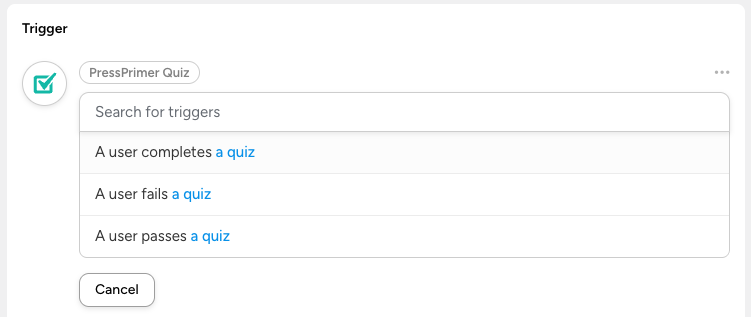
Each trigger comes with a rich set of tokens, including quiz score, points earned, time spent, pass/fail status, HTML-formatted question-and-answer data, and a lot more.
Check out PressPrimer’s integration guide for Automator (or watch the video) and grab the free plugin from WordPress.org. Premium add-ons with features like xAPI support, import/export, audit history, and additional reports are also available, and there’s a launch sale happening now.
Update Now
Uncanny Automator 7.0 is available now for both Lite and Pro users. As always, we recommend updating both plugins at the same time, especially if you use Gravity Forms. And if you’re not on Pro yet, now is a great time to upgrade and unlock the full power of WordPress automation.
Happy automating!

Related Posts























































Comments (0)