

AI website management is changing WordPress: AI page builders, AI assistants, and MCP servers that…
The Best Make.com Alternative for WordPress: Uncanny Automator (2026)
Comparing Make.com alternatives for WordPress? See how Uncanny Automator delivers unlimited, instant automations with no credit limits.
You built your automations in Make’s slick visual canvas. Everything hummed along — right up until the credits ran out mid-month and every scenario just stopped. Or maybe you connected your WordPress site and discovered that “instant” isn’t in Make’s WordPress vocabulary: your new orders, form submissions, and sign-ups sat in a queue, waiting politely for the next polling window.
Now you’re left with two choices: switch your CMS to work with your automation platform (are you really up for a site migration?), or find an automation plugin that works with your CMS.
To be fair, Make is a powerful platform. Its visual builder is one of the best in the business, it connects 3,000+ apps, and plenty of operations teams swear by it.
But if WordPress is the center of your business, the ultimate Make alternative isn’t another cloud platform with the same credit meters and polling delays. It’s automation that lives inside WordPress itself. In this guide, I’ll show you exactly where Make falls short for WordPress users, how Uncanny Automator fills those gaps, and — honestly — where Make still deserves a place in your stack.
Why Are People Searching for Make Alternatives?
Make didn’t become one of the biggest automation platforms in the world by accident. But the same design choices that make it great for cloud-to-cloud workflows create real friction for WordPress site owners.
Two pain points stand out: the way Make charges for automations, and the way it treats WordPress. Let’s take them in turn.
Credits, Operations, and the Meter That’s Always Running
First, a quick vocabulary lesson. Make calls its automations scenarios. Each step in a scenario — a trigger, an action, a search — is a module. And every time a module runs, that’s an operation.
Operations are what you pay for. In January 2026, Make renamed its billing unit from “operations” to credits — the currency your subscription buys each month. For most modules the conversion was one-to-one: one operation still uses one credit. But if you use Make’s built-in AI features, credit usage now scales with actual token consumption — meaning AI-heavy scenarios can burn through credits much faster than one per step.
Here’s the part that surprises new Make users: an operation isn’t “one automation run.” It’s one module run, per record of data.
Make’s own help documentation walks through the math: a scenario that pulls in 10 form responses and processes them through three more modules uses 1 operation for the trigger, then 3 modules × 10 records = 30 more. That’s 31 operations for a single run.
And the meter never really stops. Polling triggers consume an operation every time they check for new data — even when there’s nothing new to find. A scenario that checks your site every 15 minutes spends credits around the clock, whether your business is busy or asleep.
What happens when the credits run out? Make’s pricing page is direct about it: “Your scenarios won’t continue to run, until credits are added again.” You’ll get warnings at 75% and 90% usage, and then your automations go quiet until you buy a top-up bundle or your month resets.
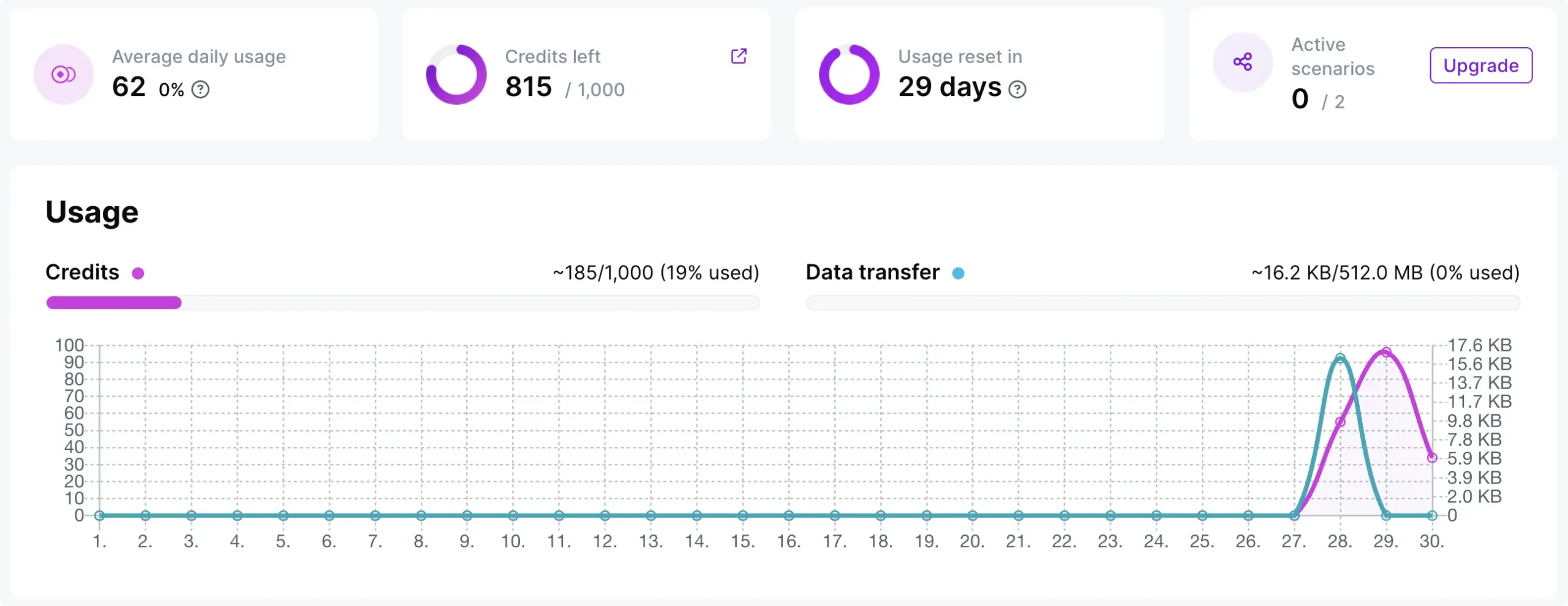
For Make’s free plan, that ceiling is 1,000 credits per month, a maximum of 2 active scenarios, and a 15-minute minimum interval between runs. Paid plans start at roughly $9–12/month (depending on billing term) for 10,000 credits and 1-minute scheduling.
None of this is a scam — it’s just a usage-based pricing model. But if you’re the one forecasting the budget, “it depends on how many records flow through how many modules” is not a fun line item to explain.
The WordPress Experience on Make: WordPress Is a Second-Class Citizen
Make treats WordPress like any other cloud app: something to poll from a distance. In practice, that looks like this.
To connect your site, you install Make’s proprietary connector plugin, copy an API key from your WordPress admin into Make, and point Make at your site’s REST API.
It doesn’t use WordPress application passwords or standard REST authentication — it’s Make’s own scheme.
If all of that sounds too jargon-y, you’re not alone.
And Make’s own documentation includes this caveat: the plugin “is not optimized to run with large websites,” recommending you raise your PHP memory limit if you hit errors.
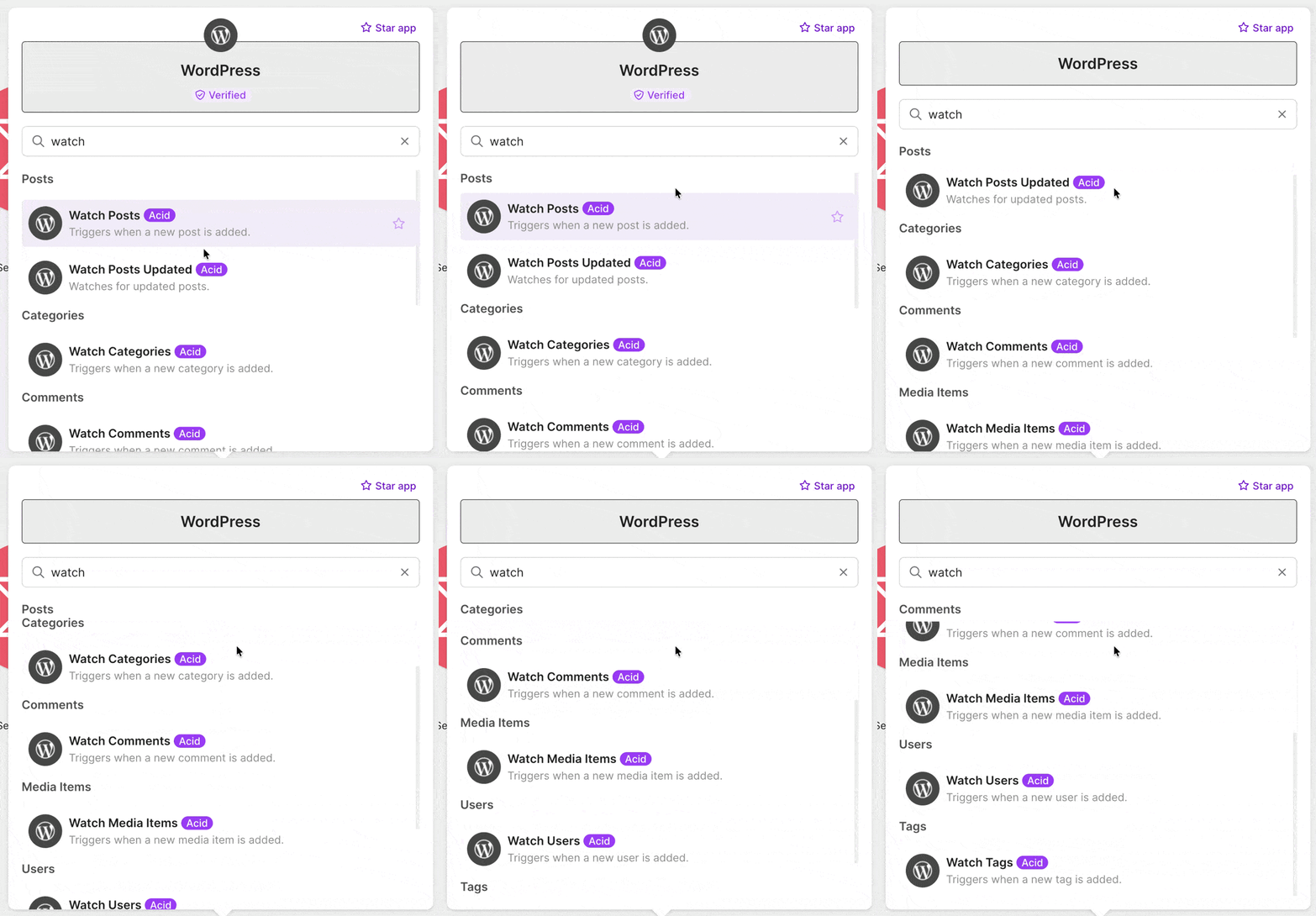
Once connected, the WordPress app gives you exactly seven triggers: Watch Posts, Watch Posts Updated, Watch Categories, Watch Comments, Watch Media Items, Watch Users, and Watch Tags. Per Make’s own documentation, all seven are polling triggers — none are instant. Your scenario finds out about new activity on your site whenever its next scheduled check rolls around, and each check costs a credit.
But here’s the bigger issue: those seven triggers only cover WordPress core. Your site doesn’t run on WordPress core alone — it runs on plugins. So how does Make handle those? Take three most popular WordPress plugins for example:
- WooCommerce is a completely separate Make app, requiring its own connection with REST API consumer keys generated in your store settings. (Credit where due: its triggers are instant webhooks.)
- Gravity Forms is another separate app with another separate connection — and it offers exactly one trigger, “Watch Entries,” which is polling-based.
- LearnDash is yet another separate app, and its four triggers only watch for new content — new courses, lessons, quizzes, and topics. There are no learner-event triggers at all: nothing fires when a student completes a course, passes a quiz, or finishes a lesson. Make’s own documentation notes it can’t fully document the LearnDash app due to limited available information.
That’s the pattern for every WordPress plugin lucky enough to have a Make app: a separate connection, separate credentials, and coverage that stops well short of the events you actually want to automate. And most WordPress plugins have no Make app at all.
One more thing worth knowing before you build anything critical: by default, Make deactivates a scenario after three consecutive errored runs, and its “incomplete executions” recovery feature ships turned off. A temporarily unreachable site can quietly switch your automation off — and you find out later.
None of these are bugs. They’re the natural consequences of automating WordPress from the outside. So what does it look like to automate it from the inside?
Meet Uncanny Automator: The Make.com Alternative Built Into WordPress
Uncanny Automator is a WordPress plugin, not a cloud platform. It installs on your site like any other plugin, and from that moment it can see — and react to — everything happening there, the instant it happens.
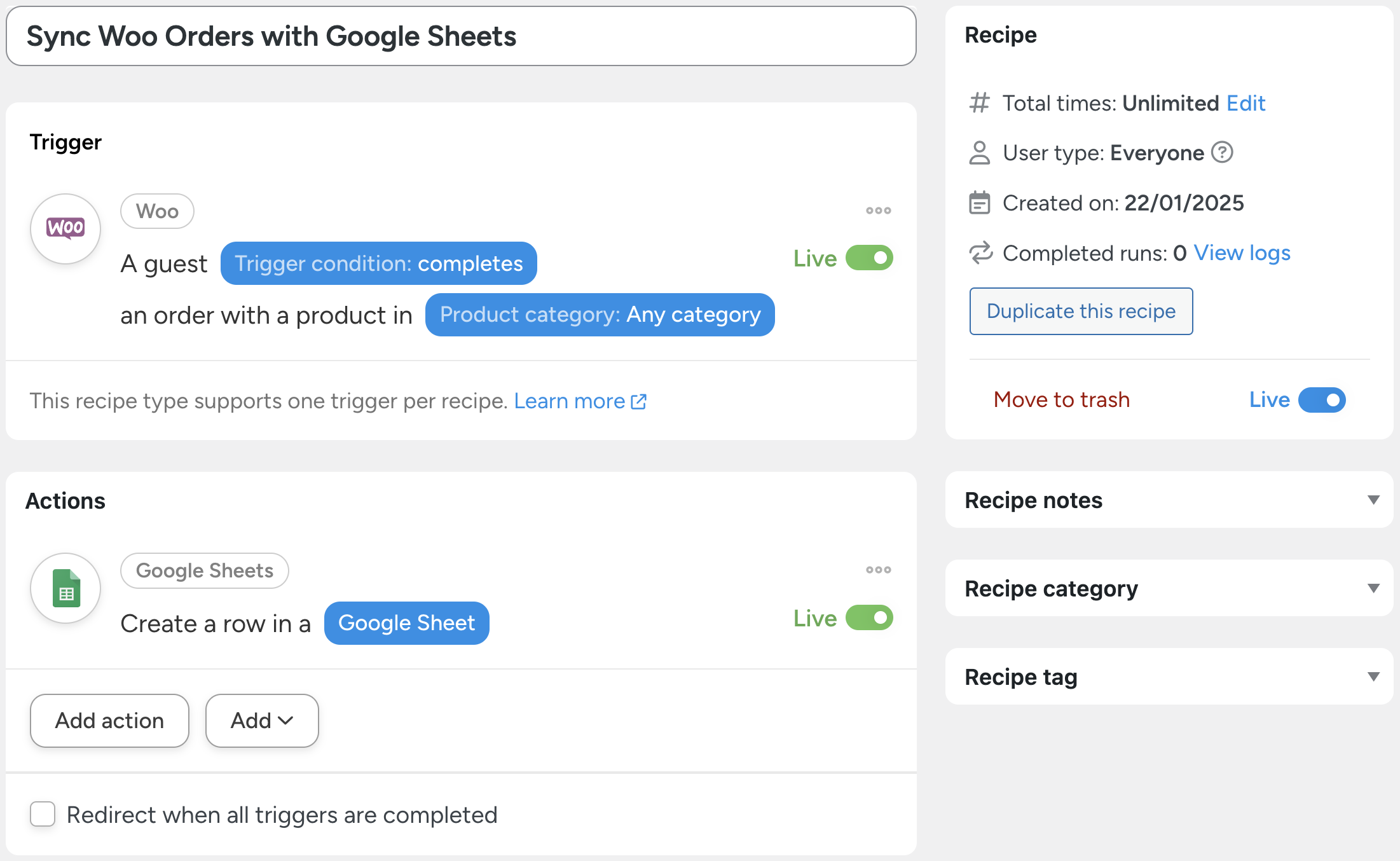
Automations in Automator are called recipes. Every recipe combines triggers and actions, and you can pass data between them using tokens (i.e., dynamic data from your WordPress site and from within recipes).
Uncanny Automator is actually an automation and AI plugin, bundling three capabilities into a single install:
- The Recipe Builder, the no-code automation engine with 253+ integrations
- Uncanny Agent, an AI assistant that completes tasks and helps you manage your site, working alongside your automations
- Uncanny Page Builder, an AI-first page builder for creating and editing pages
Here’s the architectural difference that changes everything.
When something happens on a Make-connected site, the event waits for a polling window, the data leaves your site for Make’s cloud, gets processed there, and a response comes back.
When something happens on an Automator site, the recipe fires the instant the event occurs, inside WordPress. No polling delay. No data round-trip. No connector plugin. No credit meter.
And because Automator lives where your plugins live, its 253+ integrations go plugin-deep. WooCommerce, LearnDash, Gravity Forms, MemberPress, BuddyBoss, Elementor — Automator hooks into the events Make’s apps don’t expose: a user purchases a specific product, completes a course, passes a quiz, submits a particular form, gets a new role.
These aren’t API endpoints being polled. They’re native WordPress events being heard.
For everything beyond your site, Automator connects to cloud apps too — Google Sheets, Slack, OpenAI, Anthropic, Mailchimp, social media platforms and more — using app credits (credits for using third-party integrations).
Automator Lite (the free forever version) includes 250 app credits to get you started along with a limited amount of Uncanny Agent usage.
And every Pro plan includes unlimited app credits. Yes, unlimited. That word doesn’t appear anywhere on Make’s pricing page.
Ready to automate without the meter? Compare Automator plans >>>
Uncanny Automator vs. Make: Feature by Feature
Here’s the whole comparison at a glance, then we’ll dig into each row.
| Uncanny Automator | Make | |
|---|---|---|
| Where it runs | Inside WordPress | Make’s cloud |
| WordPress triggers | Instant, event-driven, 253+ plugins | 7 polling triggers (core WP only) |
| Usage limits | Unlimited recipes and runs | Credits; scenarios stop at 0 |
| WooCommerce / LMS / forms | Native and deep | Separate apps and connections (where they exist) |
| AI | Uncanny Agent + Page Builder bundled | AI Agents and Maia (consume credits) |
| WordPress-specific addons | Custom User Fields, Restrict Content, User Lists, Dynamic Content, Elite Integrations | None — cloud platform only |
| Entry price | Free (Automator Lite) / $25/mo billed annually | Free (1,000 credits) / from ~$9–12/mo |
Pricing Predictability
Automator’s pricing model fits on a sticky note: unlimited recipes, unlimited recipe runs, flat annual license. Whether your site processes ten orders this month or ten thousand, the price is the same.
Every AI + Automation plan bundles the Recipe Builder, Uncanny Agent, and Uncanny Page Builder together with unlimited app credits:
- Basic — $25/month for 1 site (billed annually)
- Plus — $40/month for 10 sites, plus multisite support (billed annually)
- Elite — $60/month for 50 sites, plus multisite support (billed annually)
Every plan carries a 14-day no-questions-asked refund guarantee.
Compare that to forecasting Make credits. You can budget Automator to the dollar in January and not think about it again.
With a usage-based meter, a good month for your business — a product launch, a viral post, a Black Friday rush — is precisely when your automation bill spikes or your scenarios stop.
Speed and Reliability
Make’s polling model means your automations react on a schedule: every 15 minutes on the free plan, down to 1 minute on paid plans. Automator’s triggers are native WordPress hooks — they fire in the same instant the event happens. A customer completes checkout, and the welcome email, the spreadsheet row, and the Slack ping all happen now.
There’s also no equivalent of Make’s silent scenario deactivation. Recipes don’t get switched off after a run of errors, and Automator’s built-in recipe logging shows you exactly what ran, when, and with what data. You can even create a recipe to monitor your other recipes, so you know the minute a recipe runs into an error — if it ever does.
Depth of WordPress Integration
This is where the gap is widest. In Automator, “A user completes a course” and “A user passes a quiz” are one-click LearnDash triggers — the exact learner events Make’s LearnDash app doesn’t offer at all.
“A user submits a form” is a native Gravity Forms trigger, not a polled entry check. And WooCommerce triggers can key off specific products, variations, and even coupons.
And it’s not just the events. Automator Pro unlocks 10,000+ triggers, actions, and tokens across the WordPress ecosystem, so the data flowing through your recipes — order totals, quiz scores, form field values, user meta — is available for mapping into any action.
Breadth of Cloud Apps (Where Make Wins)
Time for some honesty: Make connects 3,000+ apps. Automator connects 253+ integrations. If your workflows are mostly SaaS-to-SaaS — Airtable to Notion to Slack, with WordPress nowhere in sight — Make is excellent, and Automator isn’t trying to replace it there.
But Automator’s webhooks (incoming and outgoing) cover the long tail: any app that can send or receive a webhook can talk to your recipes. And as we’ll see below, the two tools can even be chained together.
AI Capabilities
Both platforms have gone big on AI — with one structural difference.
On Make, AI is metered. Its AI Agents and Maia (Make’s conversational assistant) draw down your credits, and Make’s built-in AI provider bills dynamically by token usage.
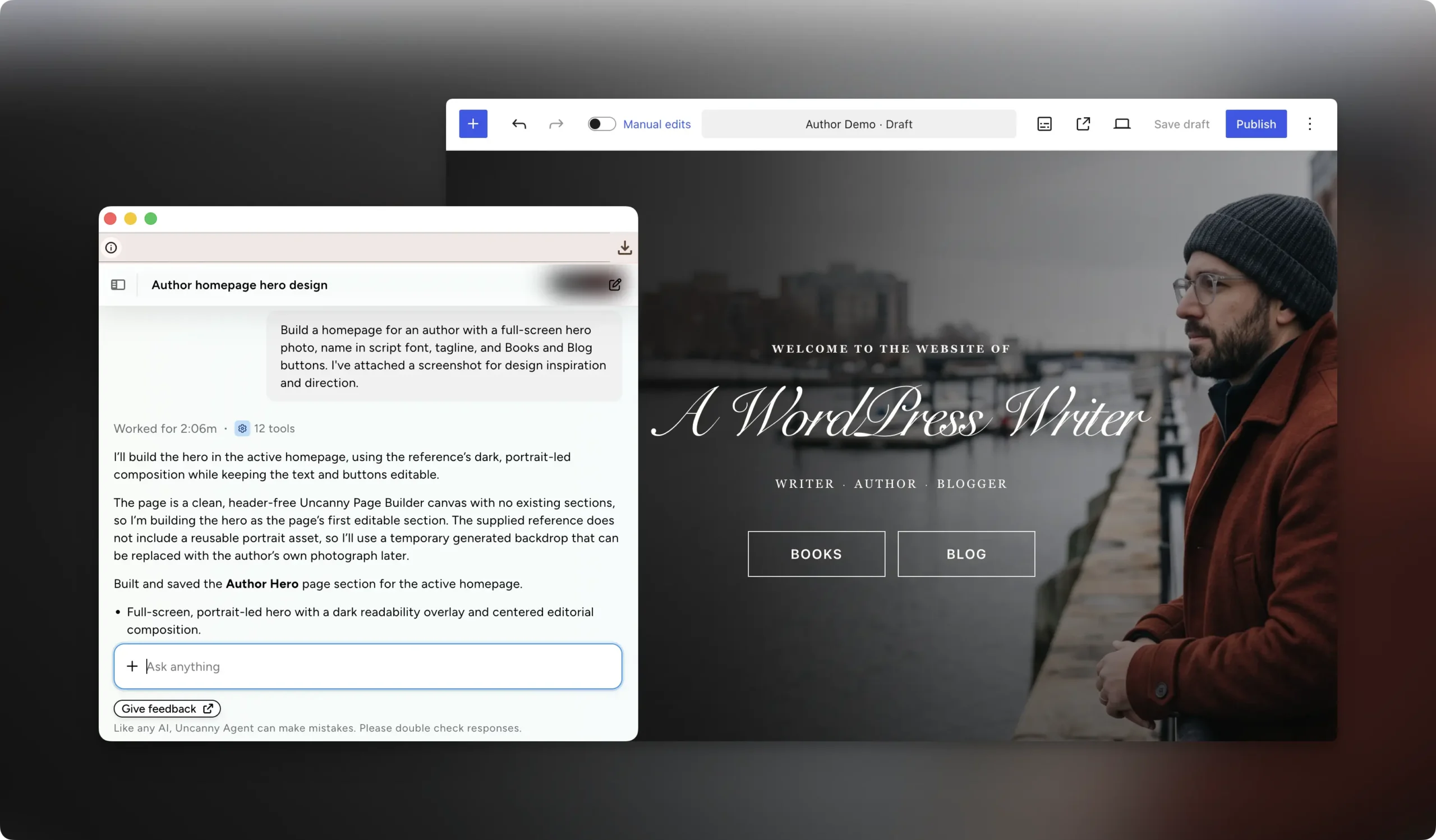
On Automator, Uncanny Agent is an AI assistant bundled into every AI + Automation plan. Agent completes tasks and helps you manage your site — troubleshooting, building recipes, making site changes — working alongside your automations rather than replacing them.
Recipes can also call AI services directly, with integrations for OpenAI, Anthropic, Google Gemini and more, so you can generate content, summarize data, or personalize messages inside any workflow.
And Uncanny Page Builder, an AI-first page builder, rounds out the bundle for creating the pages your automations point to.
Addons That Extend WordPress Itself (Something a Cloud Platform Can’t Do)
Because Automator lives in WordPress, its addons don’t just extend your automations — they add real capabilities to your site:
- Custom User Fields — extra user profile data your recipes can read and write
- Restrict Content — control who can access which content
- User Lists — segment users for targeted automations
- Dynamic Content — personalize what your pages display
- Elite Integrations — deep Salesforce and QuickBooks Online connections
The Plus plan includes the first three; Elite includes all five. Make, by design, can only move data between apps. It can’t add a feature to WordPress — Automator’s addons do exactly that.
When Make Is Still the Right Choice
I promised honesty, so here it is: there are workflows where I’d tell you to keep Make.
If your automations are cloud-to-cloud pipelines with no WordPress in the middle — syncing a CRM to a data warehouse, wrangling Airtable bases, routing Slack messages — Make’s canvas, iterators, aggregators, and data stores are legitimately strong tools, and Automator isn’t built for that job.
If your team is already invested in Make for non-WordPress workloads, ripping everything out would be churn for its own sake.
The best answer for many sites is both: let Automator own everything WordPress-side, where it’s instant and unlimited, and keep Make for the cloud-only work. Connect the two with a webhook — an Automator recipe can trigger a Make scenario, or receive data from one, using Automator’s incoming and outgoing webhook support.
How to Switch from Make to Uncanny Automator
Switching is less “migration” and more “rebuild, but faster” — recipes take minutes to create, and you can even delegate the work. Here’s the path.
Step 1: Install Uncanny Automator Lite
From your WordPress Admin Dashboard /wp-admin/, navigate to Plugins > Add New. In the search bar, enter “uncanny automator” and click Install and Activate. That’s the free version — enough to start rebuilding immediately. To unlock unlimited app credits and the full trigger library, grab a license from the pricing page and follow the setup guide.
Step 2: Inventory Your Make Scenarios
Open Make and list your scenarios in two columns: WordPress-centric (anything triggered by or acting on your site) and cloud-only. The first column is your migration list; the second can stay in Make.
Step 3: Rebuild a Scenario as a Recipe
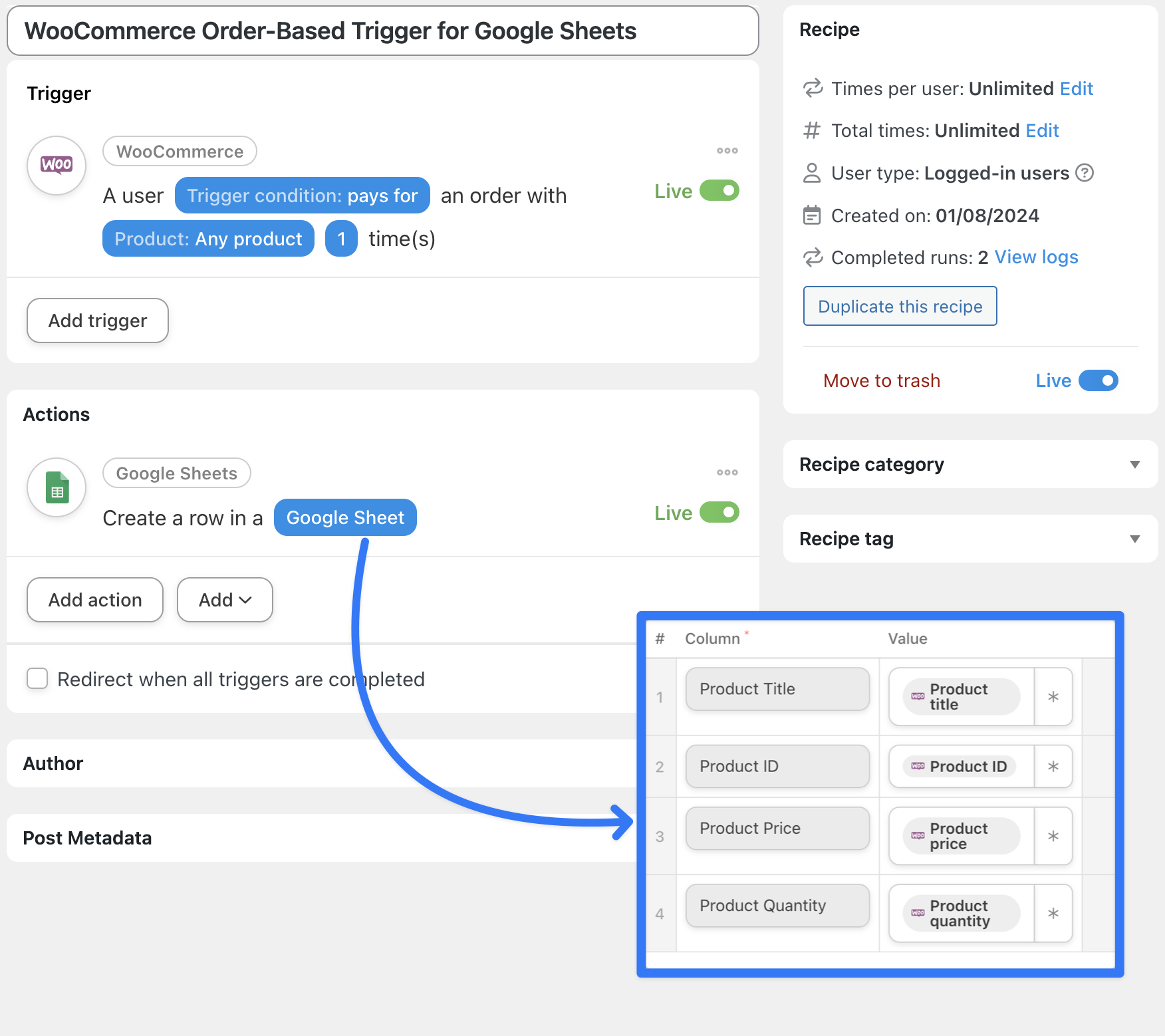
Let’s take a classic: logging WooCommerce orders to a spreadsheet.
In Make, that’s the WooCommerce app’s Watch Orders trigger connected to a Google Sheets Add a Row module — a separate REST-key connection on the WooCommerce side, credits consumed on every run and every check.
In Automator, create a new recipe, select WooCommerce, and choose the trigger “A user purchases a product.” Then add a Google Sheets action: “Create a row in Google Sheets.” Use tokens to map the order data — customer name, product, total — into your spreadsheet columns. Instant, and free to run as many times as your store can manage.
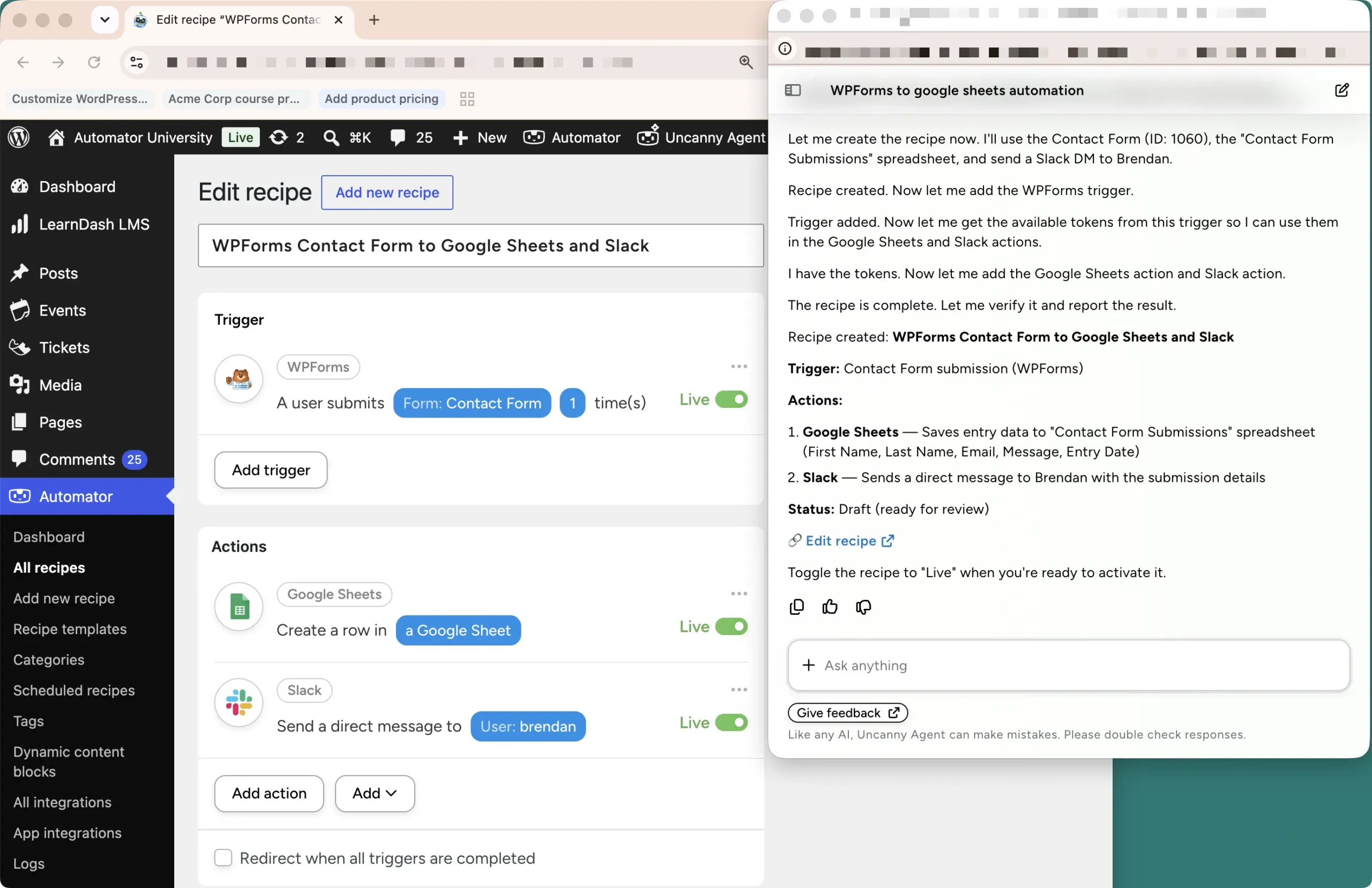
The shortcut: hand it to Agent. You don’t have to rebuild by hand. Tell Uncanny Agent which scenarios you have in Make.com — “I have a scenario that adds new WooCommerce orders to a Google Sheet, and one that welcomes new users by email” — and ask it to create the recipes to replace them. Agent builds the recipes for you; you review them before setting them live.
Step 4: Point Remaining Make Scenarios at Automator Webhooks
For the cloud-only scenarios you’re keeping, connect them to your site through Automator’s webhooks — a recipe can receive data from Make or send data to it. Our complete guide to webhooks walks through both directions.
Step 5: Go Live and Retire the Connector Plugin
Toggle your recipes from Draft to Live, watch a few runs come through in the recipe log, then deactivate Make’s connector plugin. One less plugin, one less API key, one less meter.
Claim your Pro license. Reclaim your time >>>
Conclusion
Make rents you automation by the operation — a meter that runs faster the busier you get, on a platform that watches your WordPress site from the outside through a narrow window. Uncanny Automator makes automation part of your site: instant, event-driven, and unlimited, with an AI assistant and an AI-first page builder in the same bundle.
If WordPress is the center of your business, the choice is clear. And if your stack is genuinely mixed, you don’t have to pick a side — let Automator own WordPress and keep Make for the cloud, connected by a webhook.
Still comparing Make.com alternatives? Check out our list of the 8 best Zapier and Make alternatives, or see how Automator stacks up against the biggest name in cloud automation in our Uncanny Automator vs. Zapier head-to-head.
Or skip the comparison shopping and start automating without a meter today. Get Uncanny Automator >>>
What will you do with more time?
Frequently Asked Questions
Is Uncanny Automator really unlimited?
Yes. Recipes and recipe runs are unlimited on every plan, including Automator Lite. App credits (credits for using third-party cloud integrations like Google Sheets or Slack) are the only metered element — Lite includes 250, and every Pro plan includes unlimited app credits.
Is Make.com free?
Make has a free plan with 1,000 credits per month, a maximum of 2 active scenarios, and a 15-minute minimum interval between runs. When the credits run out, scenarios stop running until the month resets or you upgrade.
How much does Make cost in 2026?
Make’s paid plans — Core, Pro, and Teams — start at roughly $9–12, $16–21, and $29–38 per month respectively, depending on billing term, each with 10,000 credits per month. In January 2026, Make renamed operations to credits; usage-based billing means your real cost depends on how many module runs your scenarios consume.
What’s the difference between Make’s operations and credits?
For most modules they’re the same thing under a new name — one operation costs one credit. The exception is Make’s built-in AI provider, which now bills credits dynamically based on token usage, so AI-heavy steps can cost more than one credit each.
Can I use Uncanny Automator and Make together?
Absolutely. Automator supports incoming and outgoing webhooks, so a recipe can trigger a Make scenario or receive data from one. Many sites use Automator for everything WordPress-side and Make for cloud-only pipelines.
Does Uncanny Automator work with WooCommerce and LearnDash?
Natively and deeply — no separate apps, connections, or REST keys. Automator includes instant triggers for WooCommerce orders and products, and LearnDash learner events like “A user completes a course” and “A user passes a quiz” — events Make’s LearnDash app doesn’t offer.
Do I need coding skills to switch from Make?
No. Recipes are built in a no-code visual editor where triggers and actions read like sentences. And if you’d rather not rebuild by hand, you can describe your Make scenarios to Uncanny Agent and have it create the replacement recipes for you.
Does Uncanny Automator send my data to the cloud?
Only when you ask it to. Automations between your WordPress plugins run entirely on your site. Data leaves your server only for the app integrations you explicitly add, like Google Sheets, Slack, or an AI service.

Related Posts

























































Comments (0)