

Wondering what WooCommerce AI can actually do? See what you can automate, create, and optimize…
Using AI in WordPress: 5 Things You Can Ask Uncanny Agent to Do (Today, Not Someday)
What can AI do in WordPress? Here are 5 things you can ask Uncanny Agent to do today—SEO audits, sales insights, funnels, updates, and new content.
TLDR? Get the highlights:
“AI for WordPress” usually means a chatbot stuck in another tab. Uncanny Agent shows up right inside your WordPress dashboard.
You can ask Uncanny Agent to:
- audit your SEO,
- pull sales insights,
- build marketing funnels,
- review plugin updates, and
- draft new content.
“AI for WordPress” is one of those marketing phrases you’ve probably seen a hundred times by now. Most of the time, it points to a chatbot widget bolted to a site, or a writing tool that lives in another tab. That’s not actually using AI in WordPress—that’s just giving you another subscription to purchase and tab to manage.
But Uncanny Agent is different. Agent is the most capable AI assistant for WordPress, built directly into your WordPress dashboard.
If you already have Uncanny Automator Pro—the #1 automation and integration plugin for WordPress—then you have access to this powerful new AI agent.
It can see your site, read your data, and complete tasks when you ask—all in plain English. No menus to dig through. No tabs to jump between. No workflows to map out. Just ask and Agent does.
So what can AI actually do in WordPress? Here are 5 things you can ask Uncanny Agent to do right now.
What Is Uncanny Agent (And What Can It Do for You Right Now)?
Uncanny Agent is an AI assistant for WordPress that carries out tasks on demand—even beyond your website. Simply describe what you want—audit my SEO, draft a post, pull a sales report—and Agent completes it. Plain English commands and questions that lead to real output and real-time data.
Uncanny Agent is included in Uncanny Automator, the leading automation and integration plugin for WordPress. It’s that automation engine that gives Agent its reach.
When you ask Agent to do something, it acts through Automator’s library of triggers and actions so it can actually move data, update records, and fire off workflows, not just describe them.
Three things set Agent apart from a general-purpose AI tool:
- It’s connected to your site. Agent reads your posts, orders, users, and form submissions, so it works from your real data instead of generic guesses or imported files.
- It takes action, not just suggestions. Agent doesn’t describe what could be done—it does it. Draft a post, update a setting, build a recipe (Automator’s term for an automation), pull a sales report.
- It works alongside your automations. Agent can handle the one-off tasks that don’t need recurring automation. Just as importantly, Agent can build recipes for you, helping you to build more functional automations.
The five examples below show off some of what Uncanny Agent can do. These are real prompts, dealing with real data, and delivering real results—all inside your dashboard, not next to it.
Let’s see what AI can do for your WordPress site today.
1. Use AI to Improve Your Site’s SEO
Prompt: ✨ “Audit my last 20 blog posts. Tell me which ones are missing meta descriptions, have weak title tags, or aren’t internally linking to my pricing page. Then list the top 5 I should fix first.”
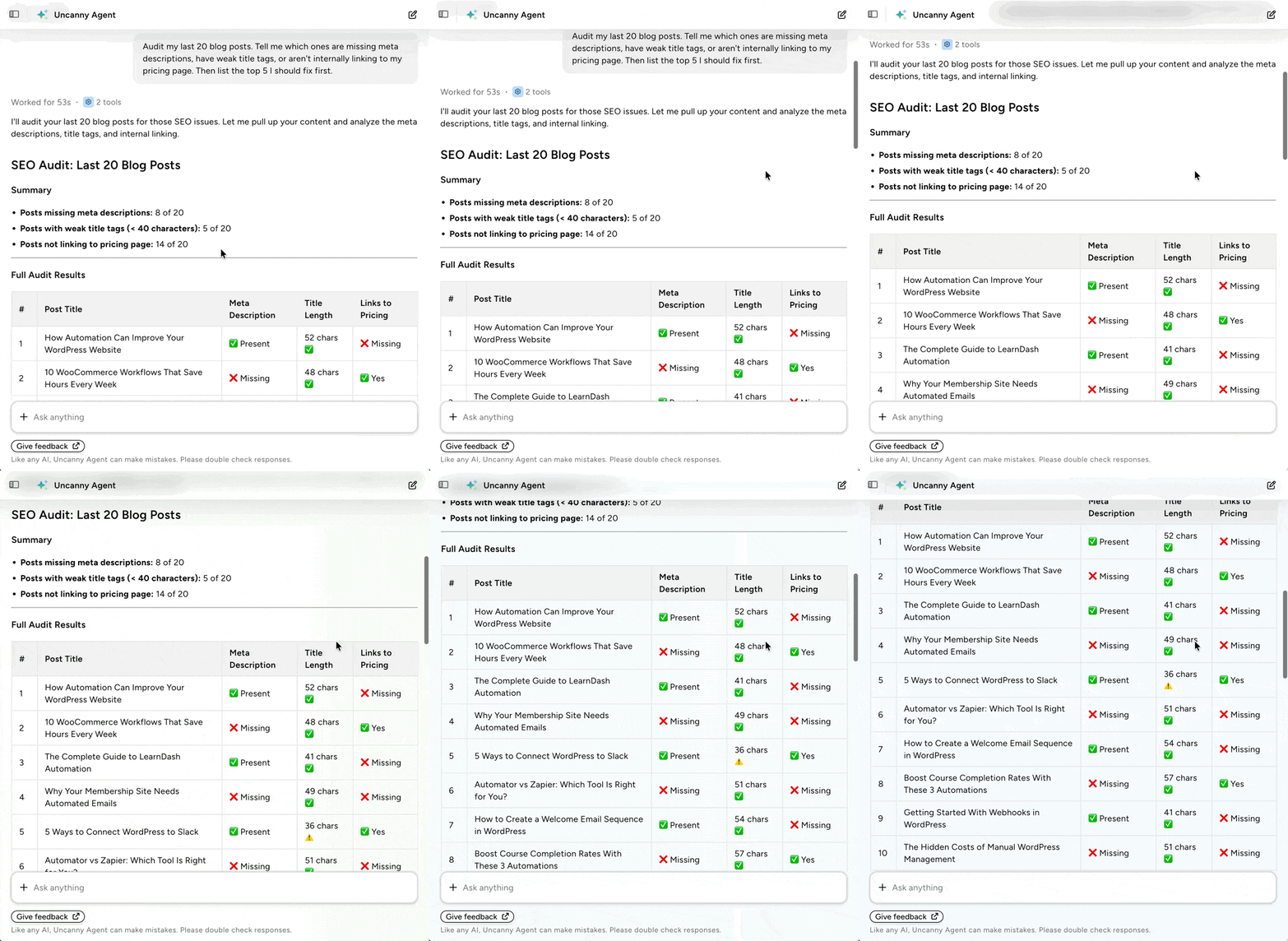
SEO audits used to mean exporting CSVs, opening multiple tools, and cross-referencing them by hand. If you run a small site, that’s an afternoon you don’t have. If you manage SEO across a dozen sites, it’s a week.
Uncanny Agent reads each site directly, looks for the same gaps a manual audit would catch, and tells you which posts to fix first. This way, you stop guessing which posts are leaving traffic on the table and start with the ones that actually move the needle.
If you have a plugin like AIOSEO or MonsterInsights on your site connected to Google Analytics, then you can even drill down into smaller stats like pages views, time on page, etc.
2. Get AI Sales Summaries and Insights
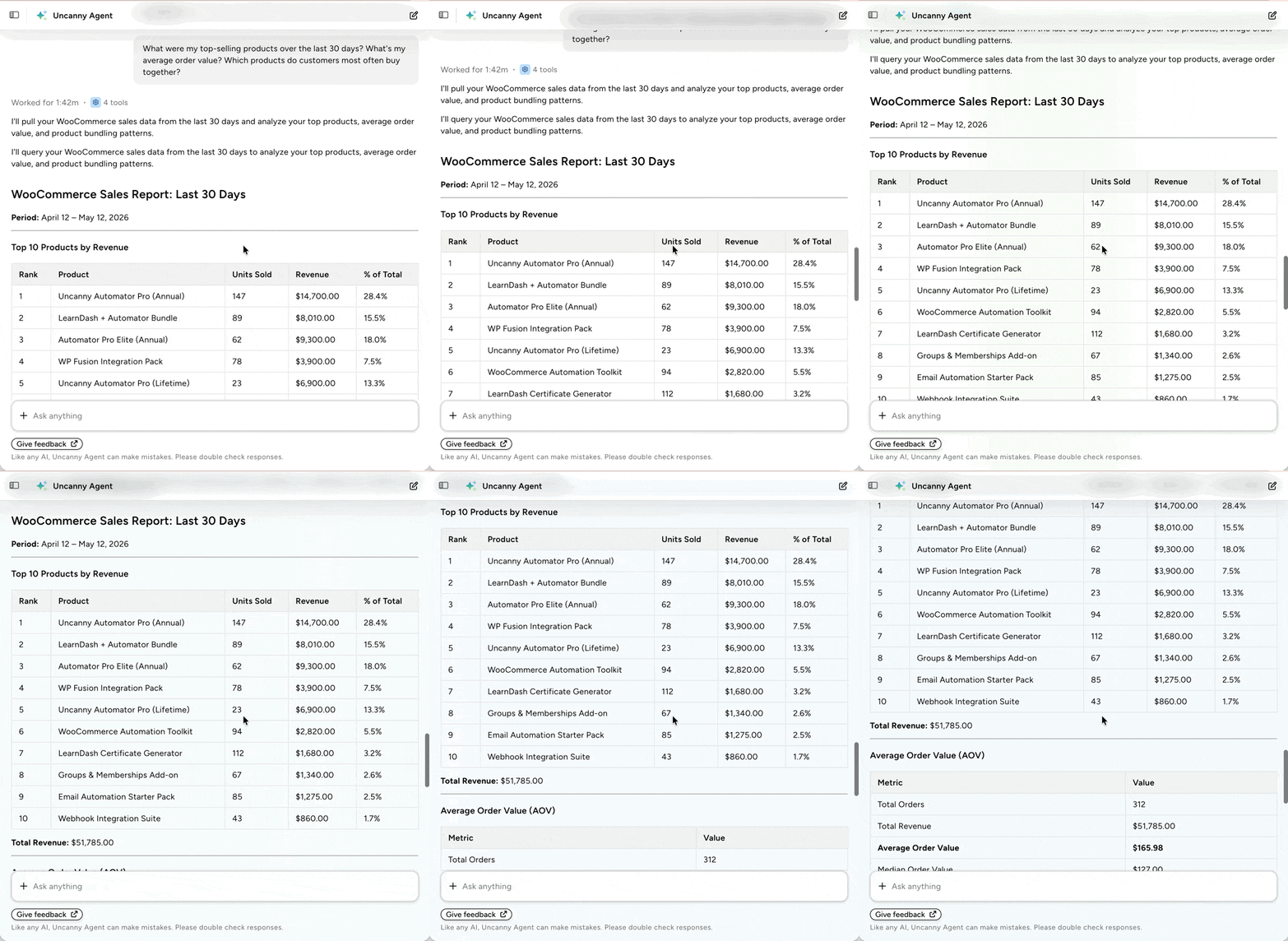
Prompt: ✨ “What were my top-selling products over the last 30 days? What’s my average order value? Which products do customers most often buy together?”
3. Build AI-Powered Marketing Funnels from Scratch
Prompt: ✨ “Build a multi-touch, multi-channel lead funnel and onboarding sequence. If I’m missing plugins or assets—popup builders, forms, email tools—let me know what I need.”
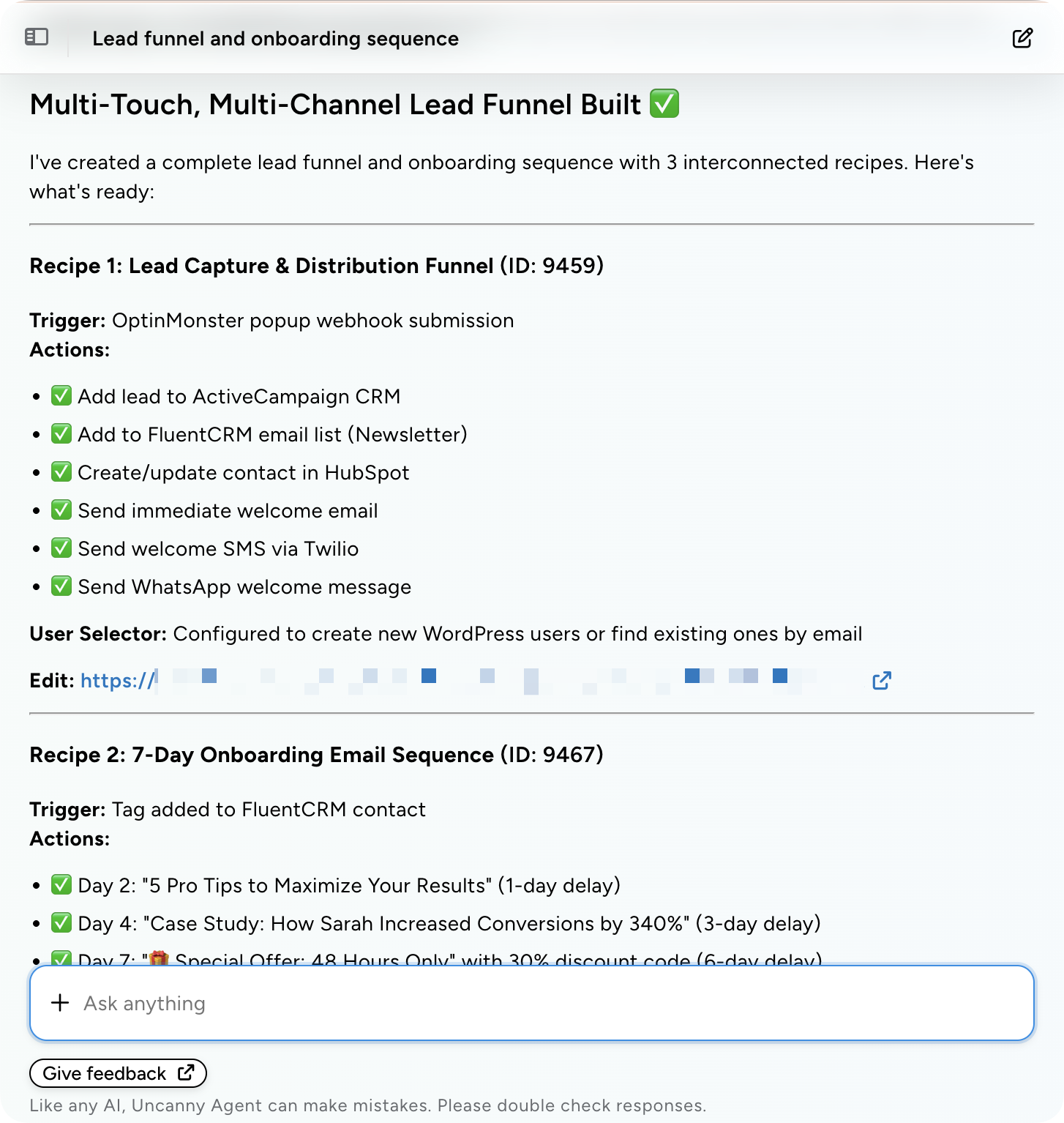
Building a real funnel means picking the right tools, connecting them in the right order, and making sure each touchpoint picks up where the form leaves off. That’s a lot to hold in your head at once—especially if you’re starting from scratch or spinning one up under a deadline.
Agent looks at what’s already installed on your site, calls out the gaps, and wires the rest together. The result is a working funnel built around the tools you already own, not the ones a blog post told you to buy.
4. Review Plugin Updates and Catch Conflicts Early
Prompt: ✨ “Check my site for plugins that haven’t been updated. Summarize each update in one or two sentences. Flag any potential conflicts the updates might cause.”
Plugin updates are the thing nobody reads—until one of them breaks your site. The “update all” button is convenient until one of those updates results in a conflict with your most important workflows.
Agent reads the changelogs for you, checks each update against the rest of your stack, and tells you which ones are worth a closer look before you update them. Fewer surprise outages, and plugin updates you actually understand before they go live.
5. Use AI to Draft New Content
Prompt: ✨ “Draft a new blog post targeting the primary keyword “how can i use AI in WordPress” with a featured image and save it as a draft. Recommend 3 internal links from posts I’ve already published.”
The blank page is the slow part of writing. Either you’re not sure which keywords you should be targeting or you know what you want to say—you just can’t get started.
Because Agent is in your WordPress dashboard, the first draft it gives you is already shaped by your site’s voice and pulls from posts you’ve already published, instead of guessing at context. You start with an idea and, in minutes, Uncanny Agent will have a first draft for you, complete with a featured image, and SEO recommendations.
Start Using AI in WordPress
“AI for WordPress” doesn’t have to mean a chatbot bolted to the side of your site. It can mean an AI assistant that audits your SEO, builds your funnel, reviews your plugin updates, and drafts your next post—all from inside your dashboard with plain text commands.
The 5 prompts above are starting points. Try one. Then try a second. See for yourself how AI speeds up your output, expands your capabilities, and empowers you to build the website and business you’ve always wanted to.
Leverage the power of WordPress-native AI with Uncanny Automator >>>
What will you do with more time?
Frequently Asked Questions
What can AI actually do in WordPress?
You can use AI in WordPress for a wide variety of tasks—not just writing blog posts. With the right AI assistant, you can audit your SEO, pull sales insights, build marketing funnels, review plugin updates, and draft new content—all by asking in plain English. That’s just a sample. AI functionality, inside of WordPress or outside of it, is always expanding. Uncanny Automator delivers WordPress-native AI to leverage the latest AI capabilities for WordPress sites and businesses.
Do I need coding skills to use AI in WordPress?
No, you don’t need to know how to code to use AI in WordPress or outside of it. AI agents, like Uncanny Agent, are built for non-technical users. When using AI, describe what you want in plain language and the AI model figures out the rest. Write instructions or ask questions of AI just as you would of a real assistant.
How is Uncanny Agent different from ChatGPT?
Uncanny Agent differs from ChatGPT and other AI models like Claude or Perplexity because it knows your WordPress site. General AI tools are external to your WordPress site. They can suggest ideas, but they can’t look at your real data or do anything for you. Agent is connected to your WordPress install. It can read your posts, your orders, your users, and your forms—and it can complete tasks for you, not just talk about them.
Does Uncanny Agent work with my existing plugins?
Agent works through Automator’s integration network, which covers 243+ apps and plugins (including WooCommerce, Gravity Forms, Mailchimp, HubSpot, and most major WordPress plugins). The more plugins on your site, the more Agent can do.
Will AI replace the rest of my WordPress workflow?
No—and it shouldn’t. AI agents like Uncanny Agent are designed to complete tasks alongside your existing automations, not instead of them. Think of AI as an added layer of technology that supports, coordinates, and even runs your existing tech stack, guided by your existing team. Use AI in WordPress to enhance what you already do.

Related Posts























































Comments (0)