

The Run now integration in Uncanny Automator Pro has one trigger, Trigger recipe manually. A recipe that uses it does not wait for an event: you run it yourself by clicking Run now in the recipe builder’s top bar, where the button takes the place of the Recipe on/off switch. It is the trigger to reach for when you want to do something once, on demand, to many users or posts at a time. This article covers adding the trigger, running the recipe, and what you see while a run is in progress.
What Run now is for
Most recipes react to something that happens on the site. Run now is for jobs you start deliberately: sending an email to every member of a LearnDash group, adding a tag to every customer who bought a product, exporting a list of users, or updating a field on every post in a category. Add a Loop block to the recipe to repeat the actions for each user or post, then click Run now once. Bulk update users with a recipe and Bulk update posts with a recipe walk through two such recipes end to end.
Run now is also useful while you build a recipe: click it to run the actions once and read the result in the log, without waiting for the real event.
Add the trigger
The Run now trigger works in an Everyone recipe. In a Logged-in users recipe the picker shows it disabled with the note “This trigger runs for everyone and cannot be used in a recipe for logged-in users.” When the recipe’s actions act on a user and there is no Loop block to supply one, set the Run recipe as card; see Recipes for Everyone.
- In your WordPress dashboard, go to Automator > Add new recipe, select Everyone, and click Confirm.
- Click Add trigger, search for Run now, select the integration, then select Trigger recipe manually. The trigger has no fields to fill in, so no Set up step opens: it is added straight to the canvas as Run now / Trigger recipe manually.
- Add the actions, and a Loop block if you are updating many users or posts.
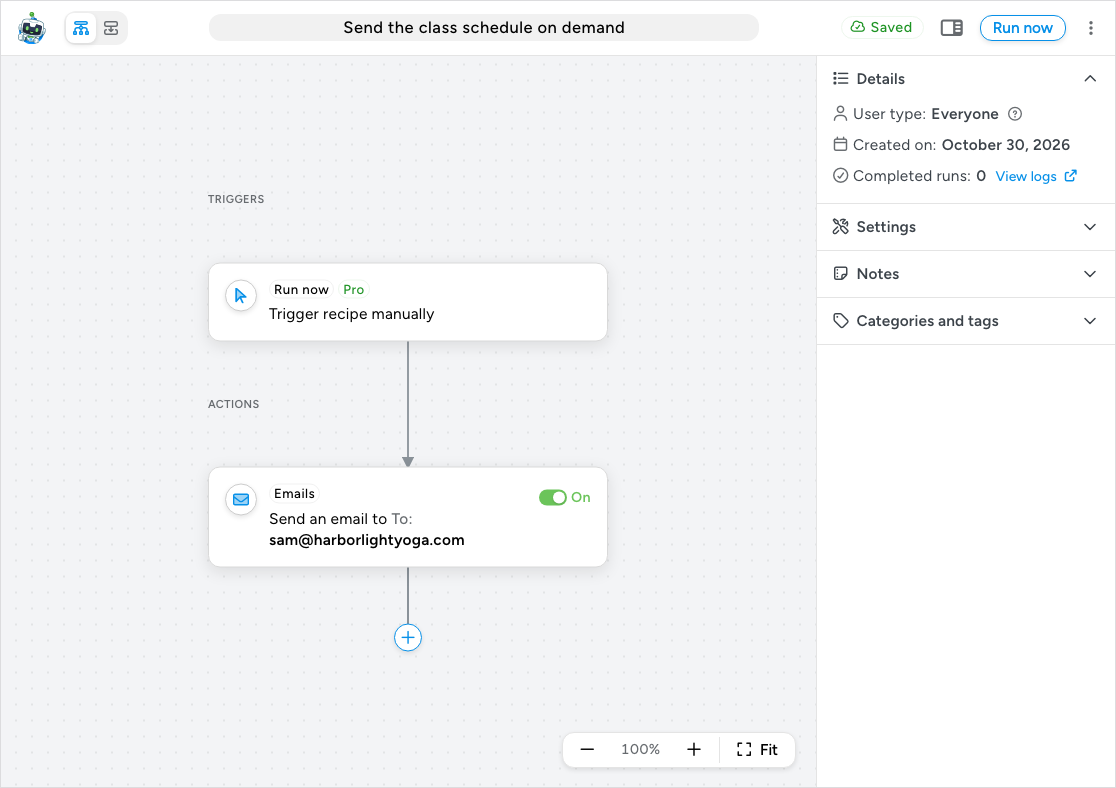
As soon as the trigger is on the canvas, the top bar shows a Run now button where Recipe off / Recipe on would otherwise be. The trigger’s node has no On/Off switch of its own, because there is nothing to listen for; the recipe runs only when you click the button. Run now is also listed in the ⋮ More actions menu.
Run the recipe
- Click Run now in the top bar.
- Automator checks the recipe the same way it does before switching a recipe on: there must be a live action, every required field must be filled in, and the Run recipe as card must be set if an action needs a user. If something is missing, a dialog headed This recipe can’t be run yet lists what to fix, with a Fix with Uncanny Agent button and Close. Nothing runs until the list is empty.
- When the checks pass, the recipe is switched on if it was not already, the run starts, and the builder opens the log entry for that run so you can watch the actions complete.
While the run is in progress the recipe is locked. A dialog headed This recipe is running explains: “You can’t make changes while this recipe is running. You can watch its progress in the logs, and cancel any actions that haven’t run yet.” It offers View log entry, Return to recipe list, and Duplicate this recipe, which gives you an editable copy. The Run now button is disabled until the run finishes; a second run started elsewhere is refused with “Recipe is already running.” The lock protects a Loop block or a Queue block mid-run from edits that would change what the remaining iterations do.
When the run completes, the builder unlocks and Completed runs in the Details panel of the sidebar goes up by one. Click View logs beside it to open the recipe’s history in Automator > Logs.
Things to know
- Run now needs an active Pro license. Without one the button answers “Run Now requires a valid Uncanny Automator Pro license.” and nothing runs.
- Each click is one run. With a Loop block, one run covers every matching user or post. Clicking again when the run has finished runs the whole recipe again, so check the log before repeating a bulk update.
- You cannot stop a run from the builder. In the run’s log entry, a Queue block that is still waiting has Run now and Cancel buttons, and a Loop block that is still running has Cancel with Pause or Resume. Deleting a log entry that is still in progress also cancels its scheduled actions.
- Import triggers behave the same way. The triggers that import from a CSV, JSON, XML, or RSS source also show the Run now button in place of the recipe switch and lock the recipe while they run.
- Logged-in users recipes cannot use it. A recipe of that type would only run for the person clicking the button, which is what the Everyone type with Run recipe as or a Loop block does better.
Related: Bulk update users with a recipe, Bulk update posts with a recipe, Loop block: users, posts and tokens, Schedule triggers: run a recipe at a specific time or on a recurring schedule, Recipes for Everyone

Comments (0)