

Pages built with Uncanny Page Builder are stored as clean, standard HTML and CSS — not proprietary shortcodes or builder-specific code. That means your content is portable: move it, copy it, or take it somewhere else entirely. Your pages are yours.
Download a page as a standalone web page
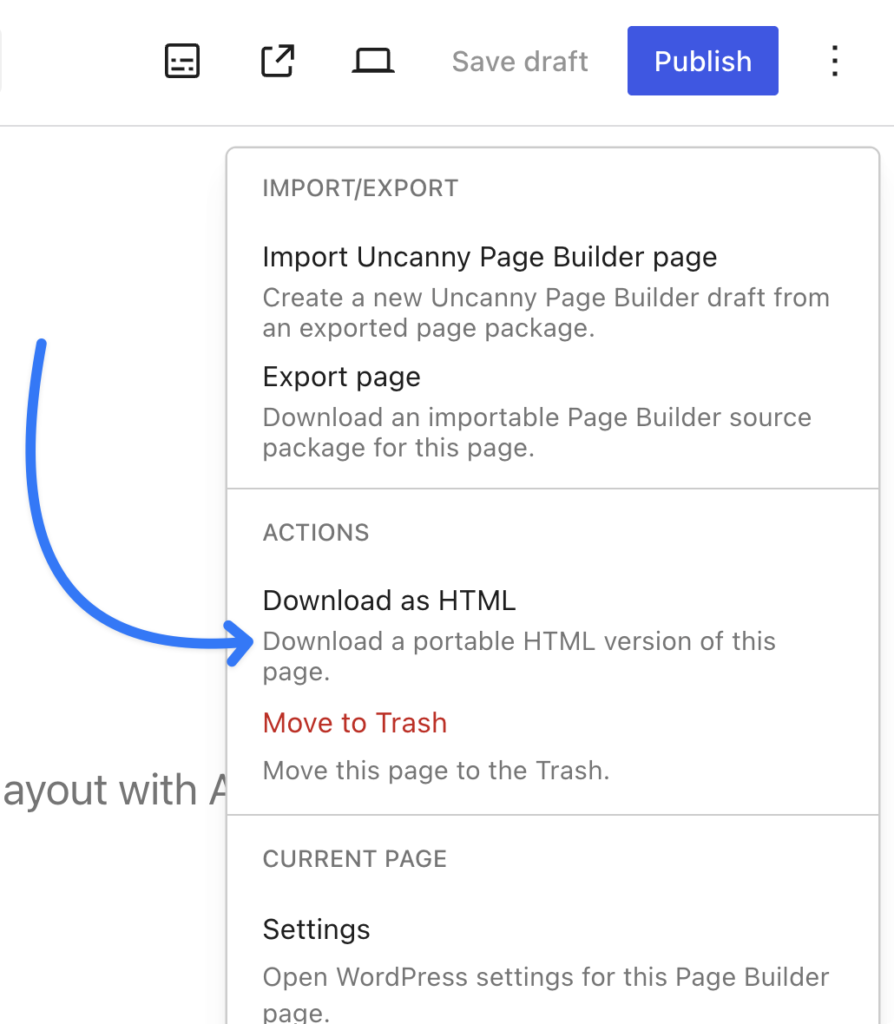
From the More page actions menu, choose Download as HTML to download a portable HTML version of the page, complete with styling. You can host it anywhere — even outside WordPress.
Move pages between sites
Choose Export page from the same menu to download an importable Page Builder source package. Import it on another site running Uncanny Page Builder from the Pages list — handy for agencies moving work between staging and production, or reusing a page across client sites.
What happens without the plugin
Because the output is standard web code, your pages keep rendering even if the plugin is deactivated:
- Content and design stay intact.
- Most live elements keep showing their last-published content and pause updating until the plugin returns.
- Live-only elements (like login forms and visitor-specific content) need the plugin active to display — see Adding live content to your pages.
And uninstalling the plugin never deletes your pages or content.
Why this matters
If you’ve ever switched page builders, you know the pain: broken layouts, garbled shortcodes, hours of rebuilding. Clean HTML and CSS output means you are never trapped. For a page-level safety net, see Redesigning an existing page (and switching back).
























































Comments (0)