

In Uncanny Page Builder, Uncanny Agent is the builder. Everything you can do with a page — create it, restructure it, restyle it — you can do by describing what you want in the chat panel. This article covers what you can ask for.
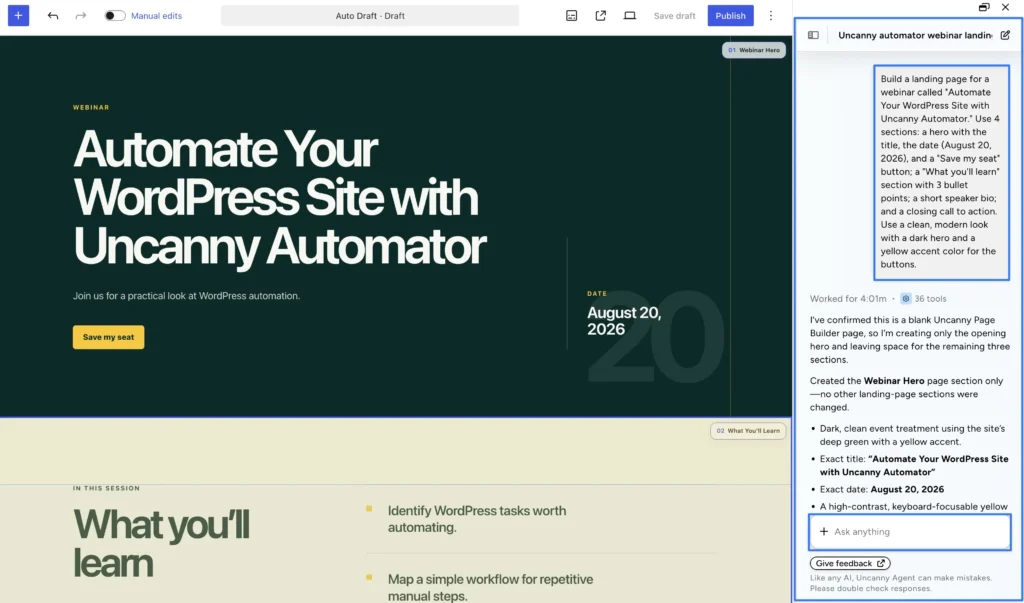
Create whole pages and sections
Describe the page and Uncanny Agent builds the layout, content, and styling together:
Create a landing page with a hero section, three feature cards, a testimonial, and a call to action.
You can be as specific or as loose as you like. Uncanny Agent plans the sections, writes concise copy from your description, and names each section so it’s easy to refer to later (“the Webinar hero,” “the pricing section”). On an empty page, the chat suggests creation prompts; on an existing page, it suggests refinements.
Refine through conversation
Iterate the same way you built:
- “Make the hero section taller and change the background to a lighter shade of blue.”
- “Swap the feature cards for a two-column layout.”
- “Move the signup form above the testimonials.”
- “Make the buttons bigger on mobile.” (Styles can differ per device — desktop, tablet, and mobile.)
- “Darken the button on hover.” (Styles can also differ per state — normal, hover, and focus.)
Uncanny Agent reads the actual page and your site’s design settings before editing, so changes are grounded in what’s really there.
Beyond the page itself
Uncanny Agent handles the whole job, not just layout:
- Menus: create site navigation menus, add, remove, or reorder items, and assign menu locations — all by conversation.
- Images: Uncanny Agent can search your media library and upload images as part of a build.
- Icons: thousands of open-source icons are available from the Lucide library.
- Interactive touches: administrators can ask for page elements like sliders, carousels, and subtle animations from curated, pre-approved libraries.
Build from an example
Have a design you admire? Upload a screenshot of it in the chat, and Uncanny Agent will build a page in that style. (Agent works from your uploaded image — it can’t browse the web or visit URLs itself.)
Ask for design insights
Uncanny Agent doesn’t just build — it has design intelligence. Ask “How can I optimize this page for conversions?” and it will suggest improvements, like an experienced designer looking over your site.
For prompt-writing techniques, see Tips for getting better results from Uncanny Page Builder. For quick hands-on edits, see Fine-tuning pages with the Manual editor.
























































Comments (0)