

OttoKit vs Uncanny Automator — which is better for WordPress automation in 2026? An honest…
The Complete Guide to WordPress Content Automation — From Idea to Impact
Content automation is a crucial part of any modern WordPress site. Learn how to automate every stage of content creation, from the editorial calendar to SEO updates, all enhanced with the latest AI models.
TLDR? Get the highlights:
WordPress content automation uses triggers, actions, and AI to connect your plugins and apps to create, optimize, and distribute content for you so you can publish more while typing less.
This guide covers how content automation works, how to set up Uncanny Automator as the engine behind your content workflows, and where to start for maximum impact.
- Content creation automations: AI-generated blog posts, featured images, product descriptions, and landing page copy.
- SEO & optimization automations: automated meta descriptions, internal linking audits, and keyword-optimized titles.
- Publishing & distribution automations: one-click social sharing to Facebook, X, LinkedIn, Instagram, Discord, and other platforms with AI-tailored captions.
- Content management automations: bulk post updates, content decay reversal, editorial calendar workflows, and automated reporting.
- Pro tips & frameworks: human-in-the-loop AI, the content refresh schedule, and the R.I.C.H. Framework (FREE download!) for identifying your next automation opportunity.
Introduction: WordPress content automations that help you “Work Less. Publish More.”
Publishing content on your WordPress site and other distribution platforms was supposed to be simple—after all, WordPress is the best CMS there is. So, why does it feel like you’re on a content treadmill that keeps accelerating?
We could blame the rapidly changing world of SEO and AIO. We could talk about writer’s block and burnout. We could point the finger at the sheer number of platforms to manage.
While those are all valid reasons, they all boil down to essentially the same thing: so much to write, so little time.
Blog posts get outlined and then sit in limbo. Social channels go quiet for days that turn into weeks. Evergreen content decays because nobody has time to update it. SEO metadata goes stale and falls off the SERP cliff. A content calendar that exists in theory… somewhere.
You’re not alone. Sadly, that’s the reality for thousands of WordPress content creators, bloggers, and marketing teams.
But WordPress content automation can change all of that.
Instead of manually running every stage of your content workflow, automation lets you build a content engine that delivers consistent, high-quality work and markets it across your channels. All leaving you with less typing, fewer clicks, and much more content so you can finally step away from that blank page and blinking cursor.
- Your favorite LLM drafts blog posts, creates images, and churns out social captions from a single prompt.
- New posts publish and distribute across every social channel automatically.
- SEO titles and meta descriptions are generated and optimized without you ever leaving your editor.
- Aging content is flagged, refreshed, and republished on a schedule.
- Editorial workflows notify the right people at the right time—from idea to outline to publication and engagement.
- Performance data flows into reports that land in your inbox, not in another tab you forgot to check.
And all of that while you step away from your keyboard.
Uncanny Automator puts this kind of automation at your fingertips—connecting your favorite plugin and apps with AI-enhanced workflows that execute your content strategies.
That’s the promise of WordPress content automation: getting your website to create, optimize, and distribute content for you so you can finally tell your business’ story.
Ready to see what that looks like in practice? Let’s get started.
WordPress content automation: how automation and AI work together for you
Content automation in WordPress
You’ve probably already used automation without thinking about it.
If you’ve ever scheduled a WordPress post to go live at 8 AM on a Tuesday, that’s automation: a trigger (the scheduled time arrives) fires an action (the post publishes) and produces an outcome (your content is live without you clicking “Publish”).
WordPress content automation is that same logic, scaled across your entire workflow.
A draft is saved → Slack notifies your editor. A post goes live → it’s pushed to five social channels. A post turns 12 months old → it’s flagged for a content refresh. A form is submitted → AI generates a blog post and saves it to WordPress.
Every automation follows the same pattern: trigger → action → outcome. The difference between scheduling a single post and running a full content engine is just how many of those chains you have running at once and how they work together.
That’s the automation side—the brawn of your content operation. It executes reliably, instantly, and the same way every time.
AI content generation for WordPress
AI, on the other hand, is the brains of your content operation.
Where automation follows rules, AI generates. It can draft a blog post from a prompt, create a featured image from a description, write platform-specific social captions, suggest SEO improvements, and summarize a 3,000-word article into a newsletter blurb.
AI adapts its output based on context, which is exactly what content work demands.
For content creators, AI isn’t an optional add-on to automation—it’s a core part of the engine.
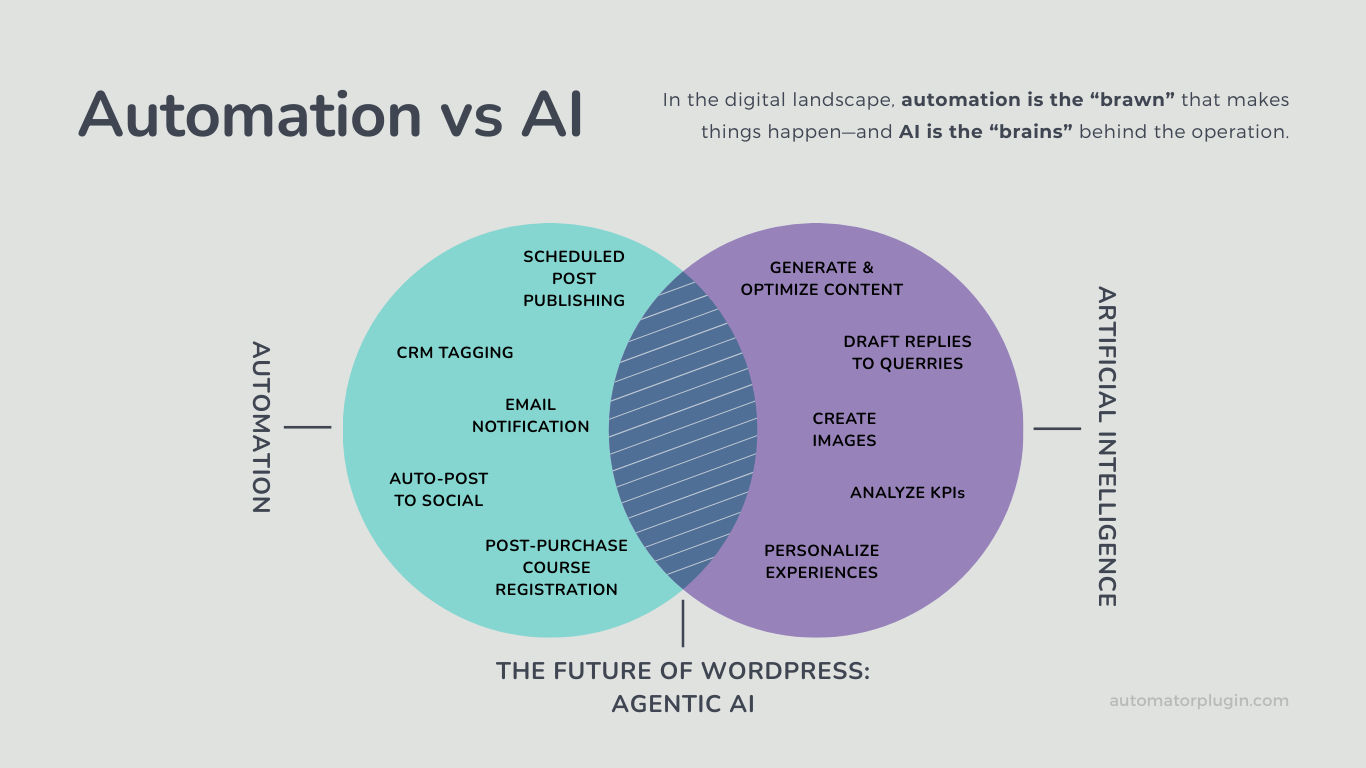
The real power, though, comes from combining them. Automation without AI can distribute your content—but it can’t create it. AI without automation can draft a blog post—but it can’t publish it, promote it, or track its performance.
Together, they form what’s called agentic AI: intelligent workflows where AI makes decisions and automation carries them out.
Here’s what that looks like in practice: you click “Publish” on a blog post. Automation detects the trigger and passes the post content to an AI platform. AI generates an optimized excerpt for LinkedIn, a punchy caption for X, and an image description for Instagram. Automation then publishes each one to the right channel, logs the event to Google Sheets, and notifies your team in Slack. One action from you. Six outcomes. (And zero headaches.)
That’s the kind of workflow Uncanny Automator is built for—and it’s why Automator has 7+ AI platform integrations plus an AI assistant of its own, Uncanny Agent. (For a deeper look at how automation and AI work together in Uncanny Automator, check out our guide: Automation vs AI: The Brawn and Brains of Your WordPress Website.)
The Content Engine: automation + AI across the content lifecycle
So: automation is the brawn that executes your workflows and AI is the brains that creates your content. But how do they fit together across your entire content lifecycle?
It helps to think about the two sides of content work.
On the production side—planning, creating, and optimizing content—AI does most of the heavy lifting. It generates drafts, creates images, writes SEO metadata, and suggests improvements. Automation supports AI by saving drafts to WordPress, routing them for review, and enforcing quality checks. You might know this side as content automation.
On the distribution and performance side—publishing, promoting, and measuring content—automation takes the lead. It pushes posts to social channels, logs analytics to Google Sheets, delivers reports to your inbox, and coordinates multi-channel campaigns on a schedule. AI supports automation by generating platform-specific captions, summarizing content for newsletters, and surfacing insights from performance data. This side is often called content marketing automation.
Most tools handle one side or the other. Uncanny Automator handles both, integrating the production side with the distribution side in a single, harmonious ecosystem.
We call this the Content Engine Loop.
Here’s what that looks like at each stage of the content lifecycle.
Content ideation + planning
Every piece of great content starts with an idea—but ideation doesn’t have to start with a blank page. Use AI to analyze trending topics, identify keyword gaps, and generate data-backed content briefs.
Next, integrate your AI content tool with your project management tool and auto-populate your content calendar—all from a single click.
Content creation
This is where AI saves the most visible time. Use powerful AI platforms—OpenAI, Claude, Gemini, Perplexity, etc.—to complete blog post drafts from simple form submissions.
A published post can also trigger AI to generate a newsletter summary, a LinkedIn post, and a tweet—each tailored for its platform.
SEO + AIO
Creating great content is only half the equation. If nobody can find it, it doesn’t matter how good it is. Automation takes the grind out of SEO by generating titles optimized for engagement, keyword-rich meta descriptions, and descriptive alt text, all with AI.
Then leverage AI’s speed to check for keyword density, distribution, and even rich snippet opportunities.
Publishing + editorial workflows
The path from “done” to “live” is where many content teams lose the most time—not because the content isn’t ready, but because the approval process is full of friction.
Automation removes those bottlenecks: when a writer saves a draft, an AI model like Claude performs a simple review then Slack hands that off to the editor. When the editor approves, the post publishes automatically.
Distribution + promotion
Publishing is just the beginning. The moment a post goes live, automation can push it to your favorite social platforms with AI-generated, platform-specific content.
Simultaneously, automation notifies email subscribers, posts to activity streams, and alerts affiliates. Integrate that with an RSS feed and your content is syndicated!
Content updates
Content decay—the gradual loss of search ranking as posts age and information becomes outdated—is one of the biggest silent threats to organic traffic.
Schedule automations that flag content older than a specified threshold, send it to AI for refreshed copy and updated SEO metadata, and create a ClickUp or Notion task for your team to review.
Reporting + analytics
Every stage of the Content Engine Loop generates data. The question is whether it reaches you in time to act on it. Automation ensures it does.
Log performance metrics—pageviews, click-throughs, comments, etc.—to Google Sheets automatically. Schedule weekly reports and get key insights from AI, delivered right to your inbox.
What you need to automate your WordPress content
If you’re a blogger or content creator, your tech stack probably looks something like this: WordPress for publishing, AIOSEO or Yoast for search optimization, an AI platform or two for drafting, ideation, and spelling and grammar checks, a handful of social media accounts you’re supposed to be posting to, your email platform or CRM, and maybe a Google Sheet that’s doing its best impression of an editorial calendar.
Each of those tools is good at its job. The problem is that none of them talk to each other. Your AI draft lives in one tab. Your SEO analysis and strategy live in another. Your social accounts live in five more. Your email is somewhere off on its own. And you’re the one copy-pasting and syncing data between all of them.
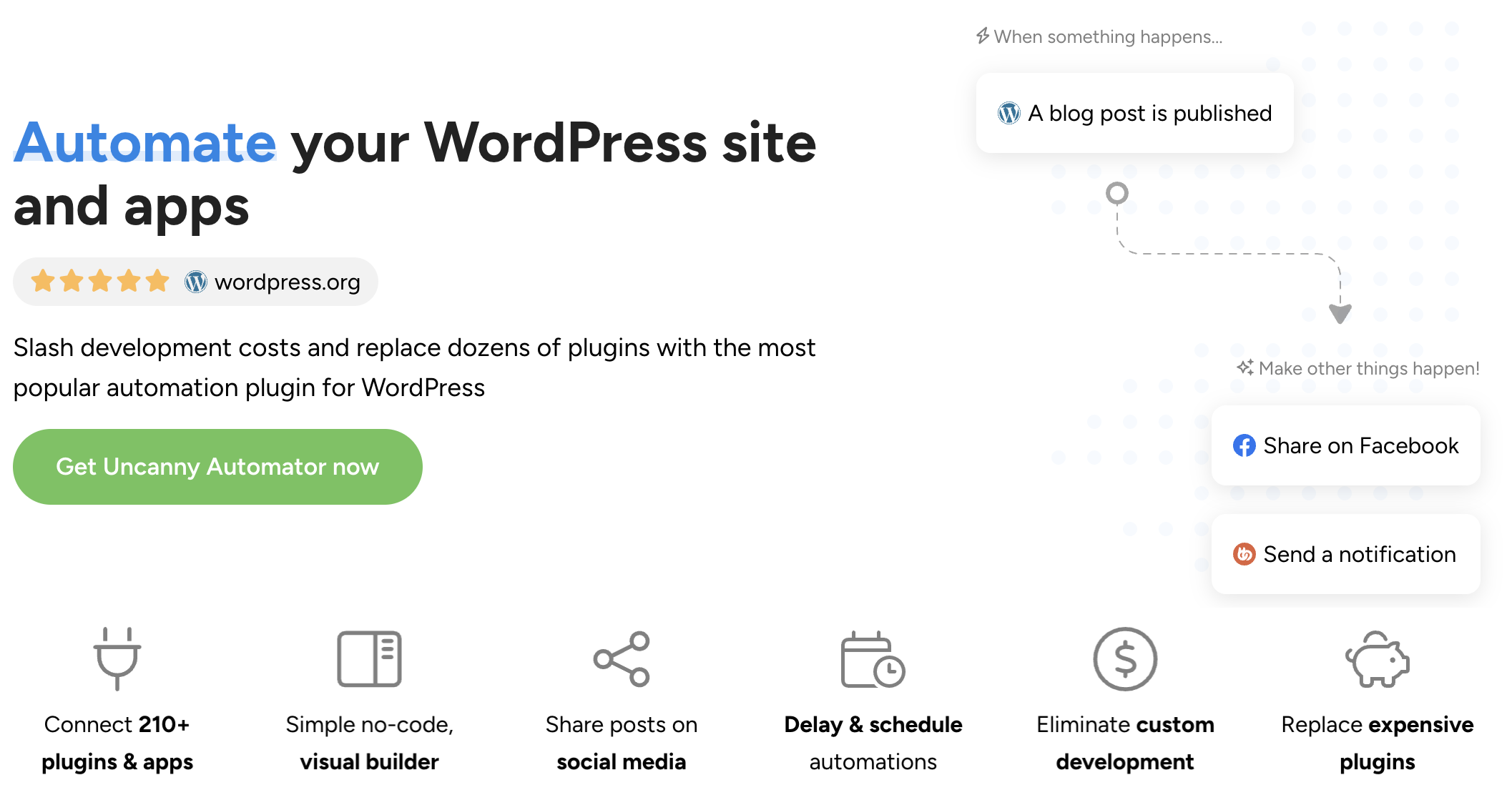
Uncanny Automator eliminates the copy-paste. It’s an AI and automation plugin for WordPress that connects your content tools into workflows that move content from one stage to the next without you being the middleman.
What makes Automator an essential WordPress content tool?
So, why Automator over the dozens of other automation tools in the WordPress ecosystem—or an expensive SaaS product like Zapier? For content creators such as yourself, a few capabilities set it apart.
- Automator knows your content, inside and out: Automator doesn’t just see that a post was published—it sees the title, the category, the publish date, the author, the custom fields, and the featured image. That means your automations can make smart decisions: only distribute posts in the “tutorials” category to LinkedIn, or only flag posts older than 12 months from a specific author for a content refresh. The deeper the data, the smarter the workflow.
- Publish more without paying more: Most automation platforms charge per workflow or per execution—which means the more content you produce, the more you pay. Automator flips that script: flat pricing, unlimited automations. Whether you’re publishing three posts a week or thirty, the cost doesn’t change. For bloggers scaling their output with AI, that math matters.
- 7+ AI integrations: Connect OpenAI, Claude, Gemini, Perplexity, Grok, Mistral, Cohere, and more. Generate text, images, summaries, and translations within your workflows. Use different models for different tasks—one for keyword research, another for drafting, and a third for image generation.
- Post Loops for content at scale: Bulk-update hundreds of posts in a single click. Add AI-generated SEO summaries, change categories, update metadata, reverse content decay, and restructure your content library—all without editing posts one by one.
- An AI assistant for content teams: Execute real workflows—whether it’s building automations or generating reports—simply by asking. Talk to Uncanny Agent as you would talk to a real editorial assistant, turning plain-language requests into real content operations.
- Your entire publishing stack, connected: AIOSEO for search optimization. Uncanny Agent (or your preferred LLM) for drafting. Google Sheets for your editorial calendar. ClickUp, Asana, or Notion for task management. Facebook, X, LinkedIn, Instagram, Discord. and more for distribution. Mailchimp or Kit for newsletters. Automator connects all of them so your content flows from ideation to inbox faster, smoother, and with better results.
The result: a content operation where the only thing you do manually is the writing you actually want to do.
Get started with Uncanny Automator
There’s an automated future filled with all of the benefits that we’ve been talking about just a few short clicks away.
But, just before we get into the details, let’s get you set up with Uncanny Automator.
Claim your Pro license. Reclaim your time >>>
- From your WordPress Admin Dashboard /wp-admin/, navigate to Plugins > Add new. In the search bar, enter “uncanny automator” and click Install and Activate. (This installs the free version of Uncanny Automator which must be active to use Automator Pro features.)
- Purchase your Automator Pro license from the Automator pricing page.
- Once purchased, you can download the latest version of Uncanny Automator Pro inside your Automator account.
- After downloading the .zip file, navigate to Plugins > Add New in /wp-admin/. Click the Upload Plugin button, select the Pro .zip file then install and activate the plugin.
- Once activated, be sure to visit Automator > Settings in /wp-admin/ to enter your license key (in your purchase confirmation email).
For a more detailed walkthrough, click here.
Where to start & the content automations that get views and clicks
Automator is installed. Your content tools are connected. Now what?
The honest answer: it depends on where your content workflow hurts the most.
If you’re a solo blogger drowning in social media posting, start there. If you’re running a content team and the bottleneck is the draft-to-publish pipeline, that’s a good kick-off point. If you have 500 blog posts with stale meta descriptions, tackle those first.
There’s no single “right” first automation. But there are patterns. Below are some of the content automations that bloggers and content teams build first—and the ones that deliver the fastest relief.
AI Content Creation & Blogging
Automations that use AI to generate, draft, and enhance your WordPress content.
How to Use AI Writing Tools in WordPress: Generate Blog Posts, Images, and Social Content Automatically
From ideation to publication, this guide shows you how to use Automator and your preferred AI platform to generate blog posts, featured images, meta descriptions, and social media captions—all from within your WordPress dashboard. One tool. Every content format.
Whether you’re a solo blogger or managing a content team, you’ll learn how to turn a single prompt into a complete, publish-ready draft.
The Best AI Writing Plugin for WordPress
Not sure which AI writing tool to choose for your WordPress site? This guide compares the options and shows you how Uncanny Automator and AIOSEO combine AI-powered writing, SEO optimization, and automated distribution into a single content workflow.
Generate blog posts for pennies, optimize them for search engines, and promote them on social media—without ever leaving your dashboard.
How to Auto-Generate AI Images for WordPress with DALL·E
Stop scouring stock photo sites for the perfect image. This guide shows you how to generate stunning, original visuals with DALL·E and Automator—automatically adding them to your WordPress media library for blog posts, product pages, and social media. From custom featured images to member avatars and social graphics, AI image generation is faster, cheaper, and more on-brand than stock photography.
SEO, AIO & Content Quality
Automations that improve your search rankings, readability, and content quality before and after you hit publish.
Increase WordPress Blog Traffic with Automation: 7 Proven Strategies
From AI-powered SEO to strategic push notifications, these proven strategies can get more eyes on your content.
Learn how to use Automator, AIOSEO, and AI to drive organic traffic, manage internal linking, optimize your evergreen content, and keep your blog visible in an increasingly competitive search landscape.
Publishing & Editorial Workflows
Automations that streamline the path from draft to published post.
The Best Way to Bulk Edit WordPress Posts
Manually updating hundreds of posts can feel like trying to empty the ocean with a bucket.
With Automator’s Post Loops feature, you can manage all of your WordPress content with one click—adding tags, updating metadata, changing post types, bulk-adding AI-generated SEO summaries, and more.
If it involves editing posts at scale, Post Loops handles it.
Social Media Distribution & Content Promotion
Automations that amplify your content reach across social channels without manual posting.
How to Connect WordPress to Facebook (A Beginner’s Guide)
Get started with the basics of social media content automation. Learn how to set up a no-code connection between your WordPress site and Facebook account so you can start promoting your content without adding more work.
Auto Post From WordPress to Social Media: Facebook, Instagram, X, and More
Publishing a blog post is just the beginning. This guide shows you how to automatically push new content to Facebook Pages, X, LinkedIn, Instagram, Discord, and more the moment it goes live—plus how to use AI to tailor captions for each platform.
No more logging into five different accounts to share one piece of content. One publish action, unlimited distribution.
The Best FREE Social Media Plugins for WordPress
Not sure which social media plugin is right for your WordPress site? This comprehensive comparison covers post-to-social plugins, social sharing buttons, social feed embeds, and analytics tools.
Create an Instagram Worthy Blog With Automator
Learn the best strategies for turning your blog content into share-worthy Instagram posts. Find out automation strategies specifically aimed at helping you go viral on Instagram.
Content Updates & Evergreen Maintenance
Automations that keep your content fresh, relevant, and ranking.
How to Automatically Reverse WordPress Content Decay
Every piece of content has its moment in the sun—but content decay can steal it away.
This guide shows you how to use Automator, AI, and project management tools to automatically detect aging content, generate refreshed copy, update SEO metadata, and create editorial tasks for your team to review. Keep your content library evergreen without manual audits.
How to Easily Change WordPress Post Types in Bulk
Restructuring your content library?
This guide shows you how to use Automator’s Post Loops to change post types individually or in bulk, update custom fields and metadata, and streamline your content management at scale.
Whether you’re converting posts to pages, reorganizing taxonomies, or cleaning up years of accumulated content, Automator makes it painless.
Everything else
Not sure what to automate next? Here at Uncanny Automator, we developed the R.I.C.H. Framework to help businesses like yours identify opportunities for automation.
The concept is pretty simple. Any task that satisfies one or more these criteria is ready to be automated:
- Repetitive: Tasks, particularly unavoidable ones, that you perform over and over again.
- Iterative: Tasks that you can and/or do perform across any measurable number of records (customers, products, etc.).
- Costly: Tasks that consume significant resources, namely time and money.
- Hard: Tasks that are complex and prone to human error.
Here’s a freebie to help you: Preview and use the R.I.C.H. Framework template.
Pro tips for automating your WordPress content
Before you build your next recipe, a few lessons from the bloggers and content teams who’ve been automating the longest.
1. Start with distribution, then work backward
Most content teams automate creation first—but distribution is where the biggest time savings hide. Set up the “publish → distribute” automation first. Once every new post automatically goes to social, email, and Slack, you’ll feel the relief immediately.
Then layer in AI creation, SEO optimization, and content refresh workflows. Build from the end of the loop backward.
2. Keep humans in the loop for AI-generated content
AI can draft a blog post in seconds. But publishing AI-generated content without human review is a recipe for brand damage. Whatever your workflows, take the “human-in-the-loop” approach.
Always set AI-generated content to “Draft” status so a real person can review, edit, and approve before it goes live. Automation handles the grunt work; you handle the quality gate. The best content is AI-assisted, not AI-replaced.
3. Build a content refresh schedule, not just a publishing schedule
Most editorial calendars only track new content. But your existing content is a revenue-generating asset that decays over time.
Use Automator’s Schedule integration to create recurring audits—flagging posts older than 6 or 12 months and sending them through an AI-powered refresh workflow. The best content strategies don’t just produce; they maintain.
4. Use conditional logic to route content by type
Not all content should be distributed the same way.
Use Automator’s filters and conditions to create different publishing pathways: blog posts go to LinkedIn and X; product announcements go to Facebook and Instagram; case studies trigger an email campaign.
One automation engine, multiple content strategies.
5. Centralize your editorial calendar in a tool Automator can talk to
Google Sheets, Asana, ClickUp, Notion, Airtable—pick one and make it the single source of truth for your content pipeline. Connect them to your site with Automator to create tasks, update statuses, and sync data like publication dates, authors, meta descriptions, and more.
The more integrated your various editorial tools are, the less manual coordination your team needs and the smoother your content pipelines flows.
Final steps: Work less. Publish more.
If you’ve read this far, you’re probably already thinking about which automation to build first and how to scale from there. Good. That instinct of, “This one thing is eating my time,” is exactly where to start.
Pick that one workflow. Build the recipe. Watch it run. Then ask yourself what else you’re doing manually that a trigger and an action could handle. That’s how a content treadmill becomes a content engine—one automation at a time.
Your blog has things to say. Automator makes sure they get said.
Get started with Uncanny Automator >>>
Until next time, happy automating!
Frequently asked questions about WordPress content automation

Related Posts























































Comments (0)