

WordPress membership automation lets you focus on serving your community—not your website. Automate every stage…
15 Ways to Automate Your LearnDash Site
Automate your LearnDash site with 15 proven workflows for enrollment, emails, reporting, and user management—no code required.
TLDR? Here are the key takeaways…
LearnDash automations help you unlock the full potential of your LearnDash site.
- Create personalized learning pathways that help accelerate advanced learners and provide additional resources to those who need it. Generate personalized content based on segment and let learners choose their own pace.
- Improve learner engagement without the added work. Celebrate milestones, auto-enroll users in groups, and more.
- Boost course enrollments and sales with automated upsells, personalized offers, and automated re-engagement campaigns for inactive learners.
- Improve learner retention with multi-channel integrations and blended learning opportunities.
Running a LearnDash site can quickly turn into a balancing act. You want better completion rates, more engaged learners, and meaningful insights—but instead you’re buried in reports, follow-up emails, and manual admin work. Sound familiar?
That’s where LearnDash automation comes in. By automating key workflows on your WordPress LMS, you can deliver personalized learning experiences while saving serious time and effort. This is exactly why we built Uncanny Automator—to help LearnDash site owners do more with less, without code or complexity.
In this guide, I’ll show you 15 easy ways to automate your LearnDash site, from enrollments and notifications to reporting and learner engagement. Each idea can be set up in minutes and is designed to improve outcomes, boost efficiency, and help your courses work smarter—not harder.
Personalized Learning Paths
Creating personalized learning experiences can help to deliver improved student satisfaction, higher completion rates, and better knowledge transfer.
Not everyone learns the same way, and it’s important to give learners control over their learning journey and access to additional resources at the right time. With automation, a few simple recipes make it easy to support weaker learners, keep advanced learners from getting bored, and provide alternatives to students that need them.
1. Let advanced users skip ahead.
If users demonstrate mastery of a subject in a pre-test, why not let them skip the rest of the course? You could just autocomplete LearnDash lessons in a course that were covered by the pretest materials, or you might autocomplete that course entirely.
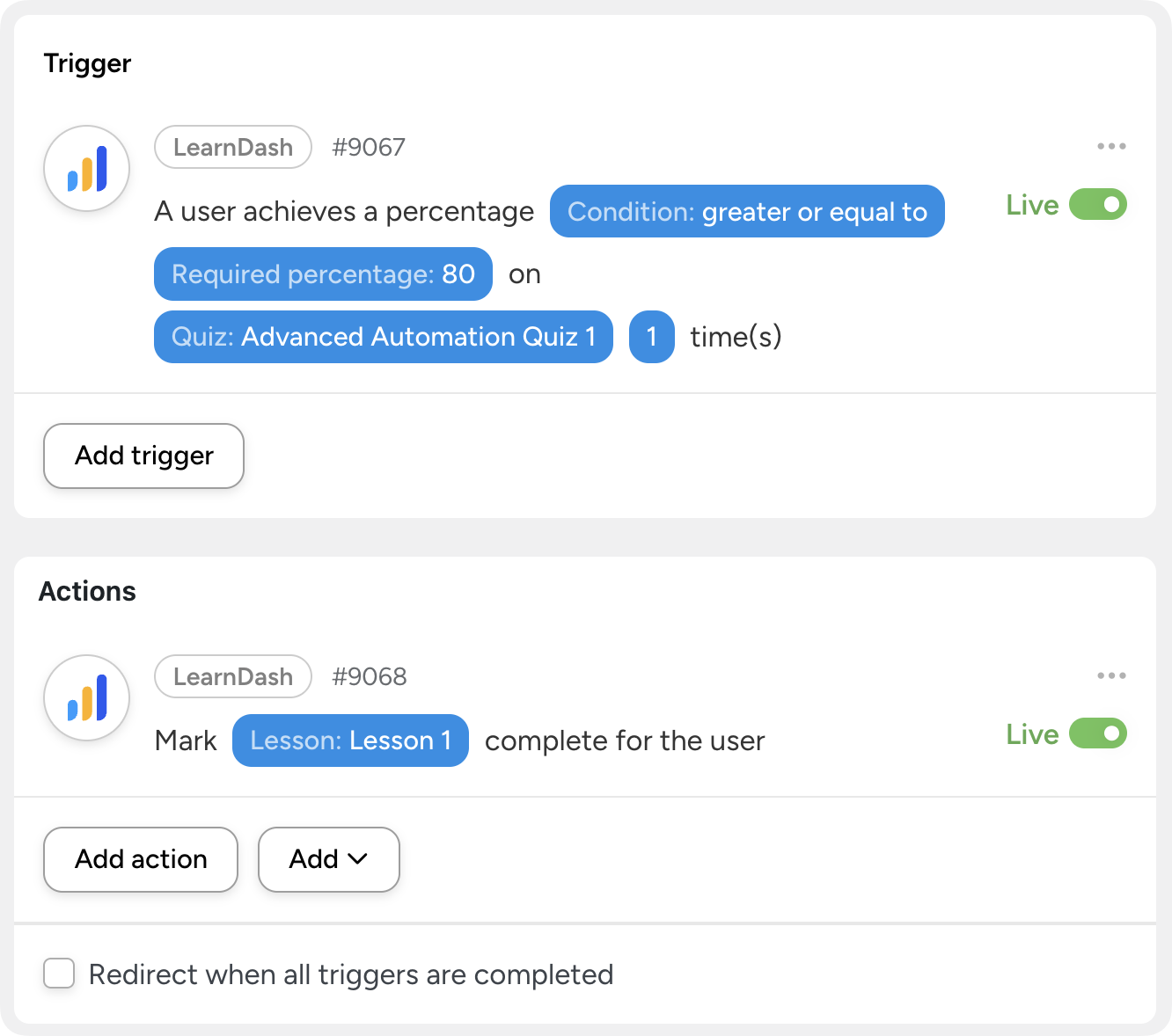
2. Give struggling students extra help
Sometimes learners fall behind,—not because they don’t care, but because they need additional support.
The challenge is spotting those learners early. Low quiz scores and stalled course progress are clear warning signs, but without automation, tracking them means digging through reports and manually monitoring activity over time.
Automation changes that.
Quiz results can instantly trigger follow-up actions, and inactivity can be monitored automatically. For example, you might use a CRM integration like WP Fusion to detect when a learner completes the first lesson of a course but doesn’t finish the course within seven days.
When triggers like these occur, support workflows can run automatically, including:
- Automatically enrolling the learner in a remedial course
- Sending a helpful email with suggested learning activities
- Adding the learner to a study group using BuddyBoss
- Notifying a manager or instructor so personal coaching can be offered
- Provide access to AI-powered tutoring
With automation in place, no learner slips through the cracks—and you don’t have to constantly check dashboards to make it happen.
3. Incorporate personalized content
Despite appearances, your LearnDash lessons don’t have to look the same for every learner. With the right tools, it’s easy to personalize course content based on user roles, group memberships, or CRM tags.
For example, users of Uncanny Owl’s Toolkit Pro and/or Uncanny Automator’s Dynamic Content Addon can use shortcodes to display content only to specific groups. Combined with membership plugins or CRM integrations, you can also show content to users with a particular level or tag.
Struggling learners might see an extra explainer video or downloadable guide, while learners tagged as benefiting from auditory resources could be offered an audio version of the lesson.
These small, targeted adjustments help learners get the format and support that works best for them—without facilitators needing to intervene mid-course.
Learn how to incorporate personalized learning content with the Dynamic Content Addon >>>
4. Give users more control over their learning experience
Learners are more engaged when they have a say in how they learn. With automation and front-end controls, you can give users meaningful choices while still keeping your courses structured and effective.
Using Uncanny Automator, you can build recipes that add interactive options throughout your courses. For example, learners might click a button (Automator’s Magic Button) to skip ahead by auto-completing lessons, reset their progress for extra practice, email a Group Leader for help, or self-enroll in additional courses.
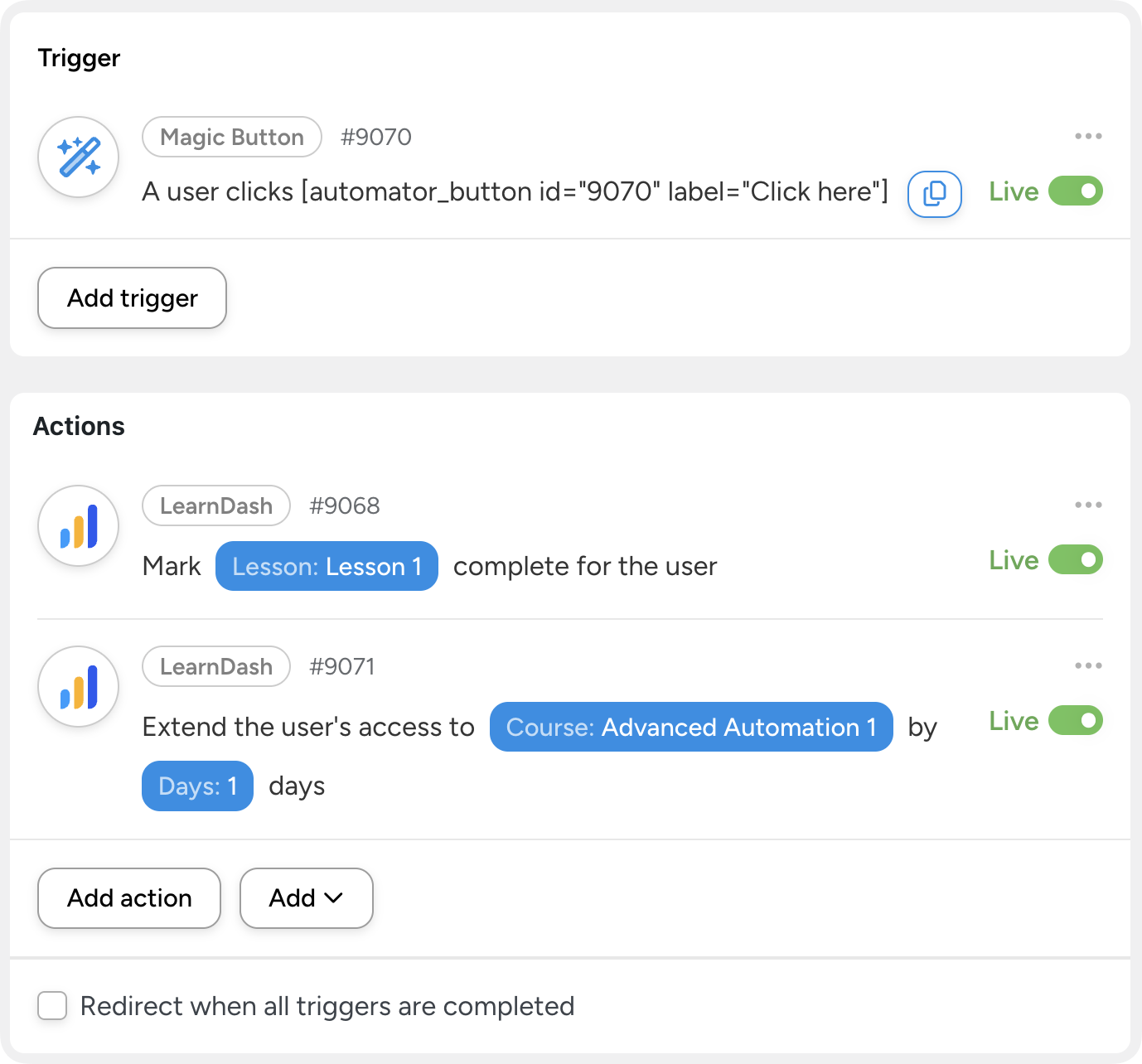
Automation handles the heavy lifting behind the scenes, while learners enjoy a more flexible, empowering experience—one that adapts to their goals and learning style.
Improve Learner Engagement
5. Celebrate learner accomplishments
Self-directed learning can sometimes feel isolating, which makes it easier for learners to lose momentum—or drop out altogether. Celebrating progress helps learners feel seen, supported, and motivated to keep going.
With automation, recognition happens instantly and consistently. You award learners with badges with a plugin like GamiPress or even store credit with a plugin like Advanced Coupons.
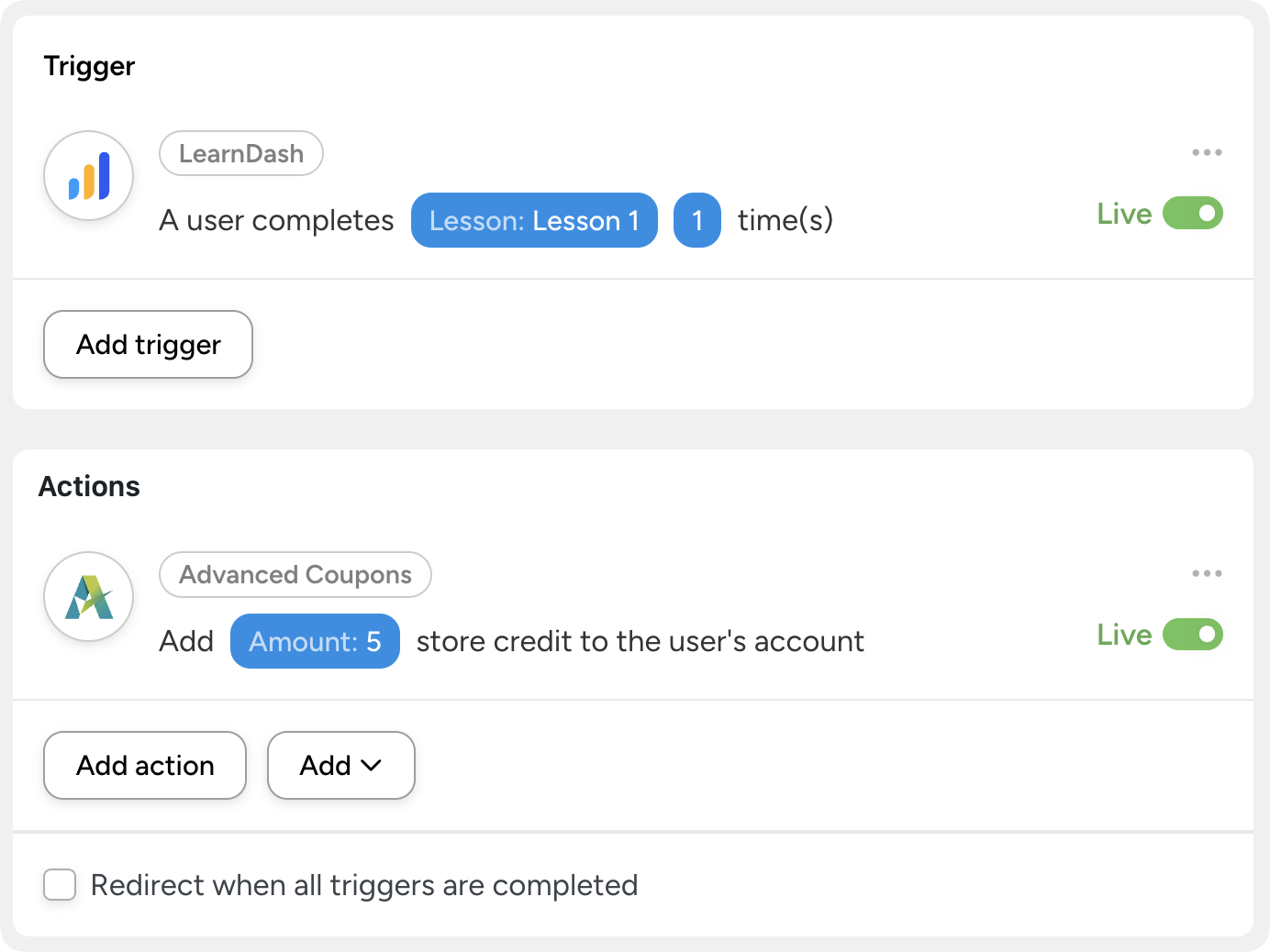
Alternatively, automatically send a congratulatory email from the course instructor, notify a learner’s manager, or even post a celebration message to your organization’s X account.
To make these messages feel more personal, you can use a CRM to tag learners based on specific achievements—such as scoring over 80% on a final exam—and schedule congratulatory emails to send during business hours on the next working day. The result feels timely and human, not automated.
6. Add users to a study group for peer collaboration
Learning doesn’t have to happen alone—in fact, it shouldn’t. Automation makes it easy to place learners into the right study groups based on performance, encouraging collaboration and peer support.
For example, learners who score 50% or lower on a course pre-test could be automatically added to a remedial group, while those scoring 90% or higher join an advanced group.
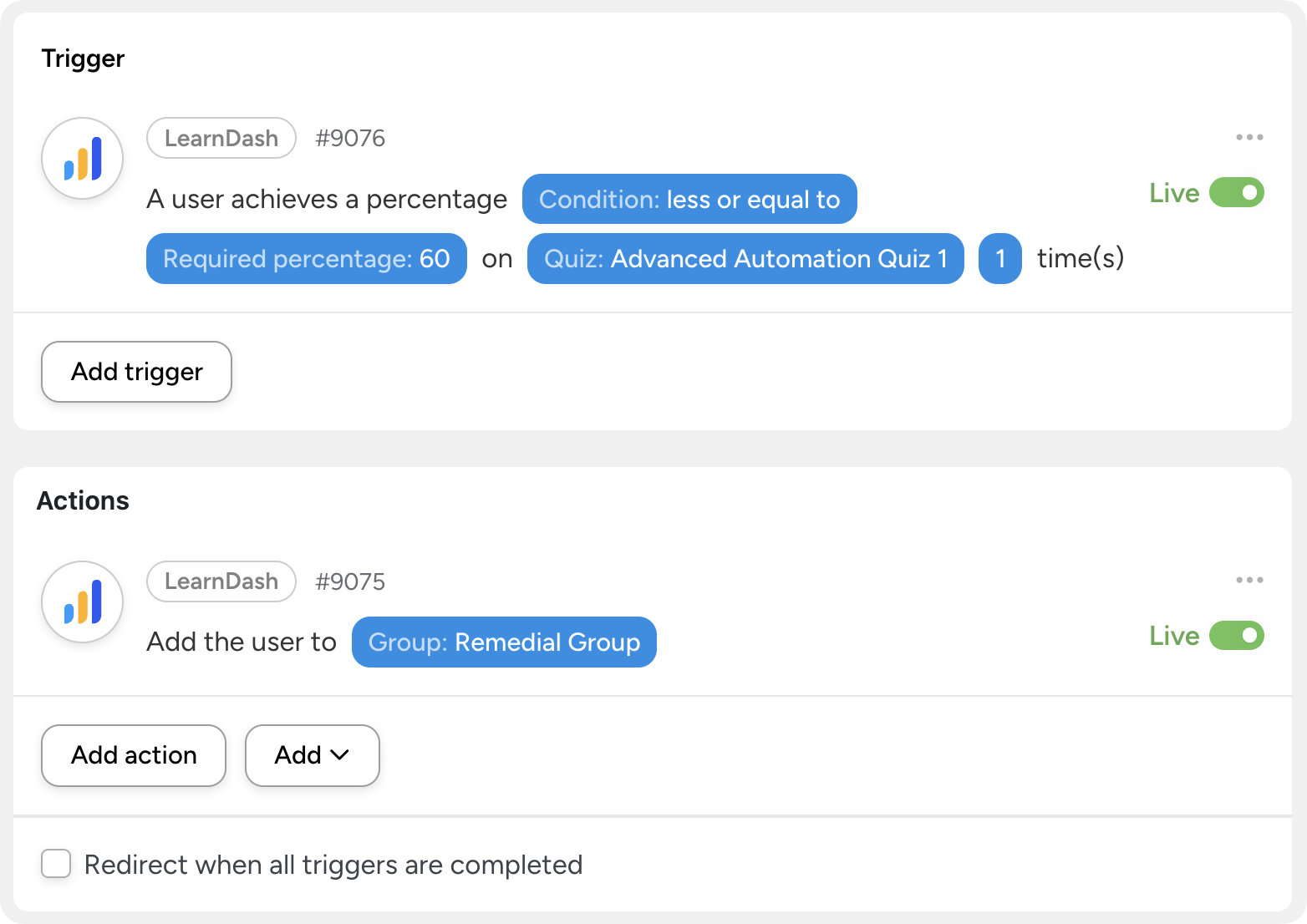
This action can be paired with a series of automated, drip-fed emails that explain how to participate, introduce community norms, and encourage ongoing engagement. With the right group at the right time, learners are more likely to stay involved and succeed together.
7. Check in on incomplete courses
Some of the most valuable automations trigger when nothing happens. When learners stall, forget to return, or quietly drop off, automation can step in before it’s too late.
Using Automator’s Filter and Delay features, you can detect when a learner has access to a course but hasn’t completed a lesson after a set number of days. These automations might send a friendly reminder email, trigger additional support, or follow up when a learner hasn’t visited the site recently or viewed a lesson without completing it.
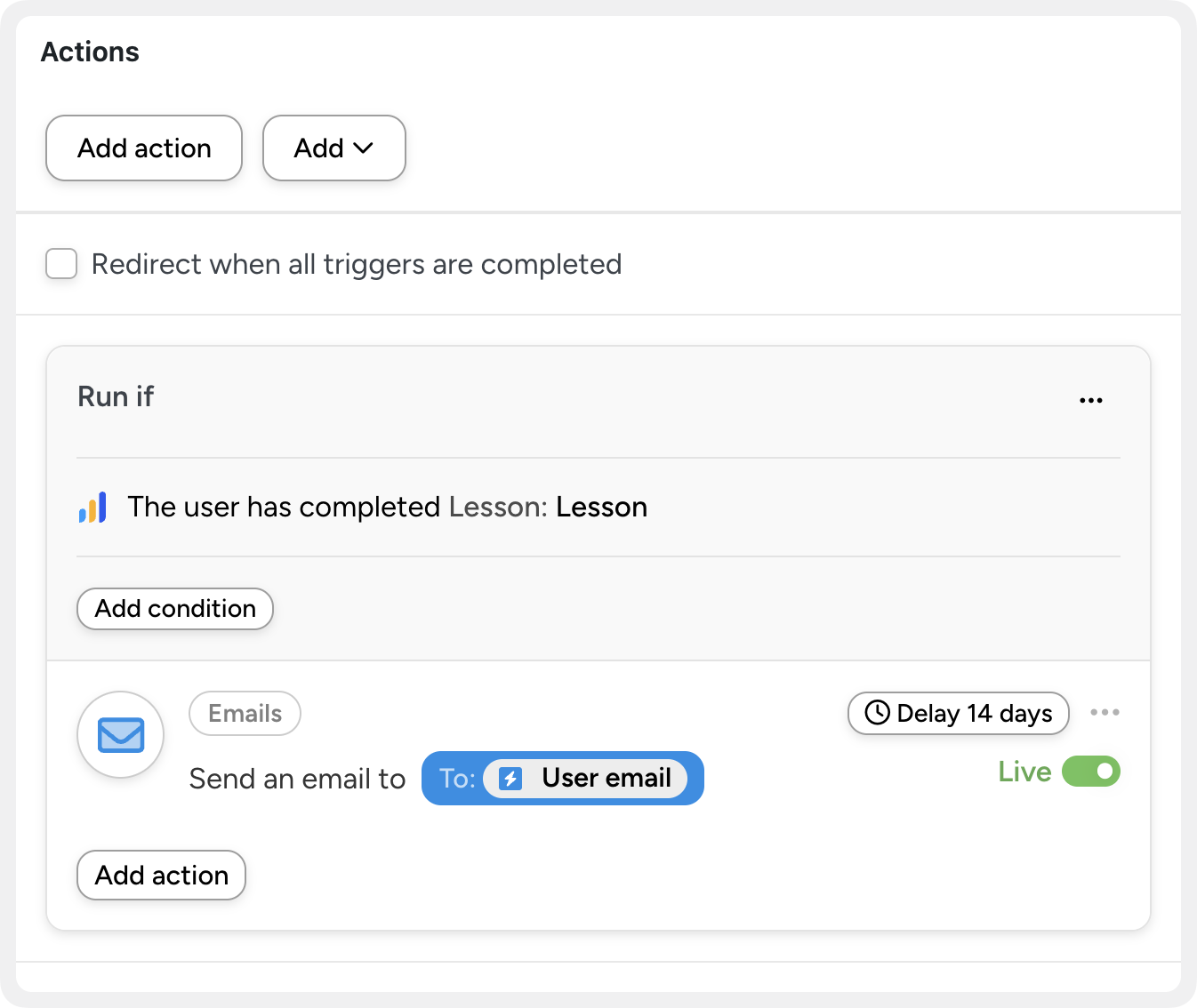
By checking in at the right moment, you can re-engage learners automatically—without manual monitoring or awkward follow-ups.
Improve course sales
Not every LearnDash site is built to generate revenue—but for those that are, automation makes it easy to create helpful, well-timed opportunities to sell without disrupting the learning experience.
When recommendations are relevant and timely, they feel like guidance, not marketing.
8. Recommend products on course completion
When a learner completes a course, it’s the perfect moment to suggest what comes next. Instead of leaving learners to figure it out on their own, automation lets you send a follow-up email with a relevant course or product recommendation.
With Automator, these recommendations can be personalized based on previous purchases and completed courses. This way, you never suggest something a learner has already bought or finished. The result is a smoother learning journey and a natural transition to the next step.
If you’re using WooCommerce alongside LearnDash, you can even generate new orders for learners complete with a direct-to-checkout link and coupons automatically applied.
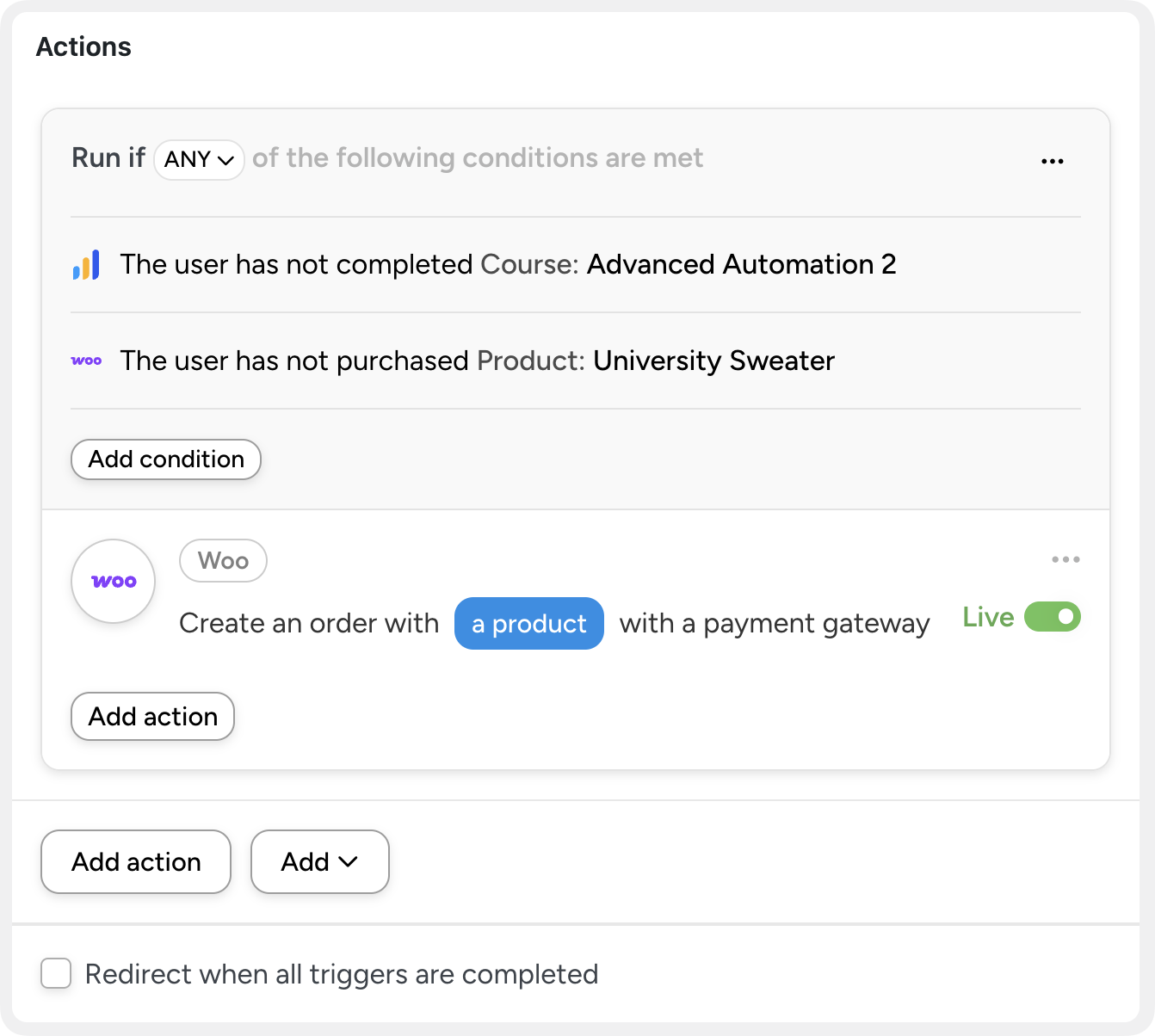
9. Offer upsells that fit the learner’s needs
The best upsells solve real problems. Automation and CRM data make it easier to spot those opportunities and act on them at the right time.
If a learner is struggling with quiz performance, you might suggest private coaching or supplemental training. If a course evaluation shows interest in a specific topic, you can recommend a more advanced class. By tracking behavior and performance, automation helps you deliver relevant offers when learners are most likely to benefit—and most likely to say yes.
10. Create certification programs
LearnDash doesn’t include built-in certification programs, but certifications can be a powerful way to encourage learners to complete more courses and invest in deeper learning.
With the Uncanny Owl Continuing Education Credits addon, you can award certificates for completing combinations of courses. Tools like GamiPress, BadgeOS, and Uncanny Automator let you automatically award badges or certification rewards when learners complete a defined series.
You can even require learners to both complete the courses and purchase a certification product, creating a structured, revenue-generating certification pathway.
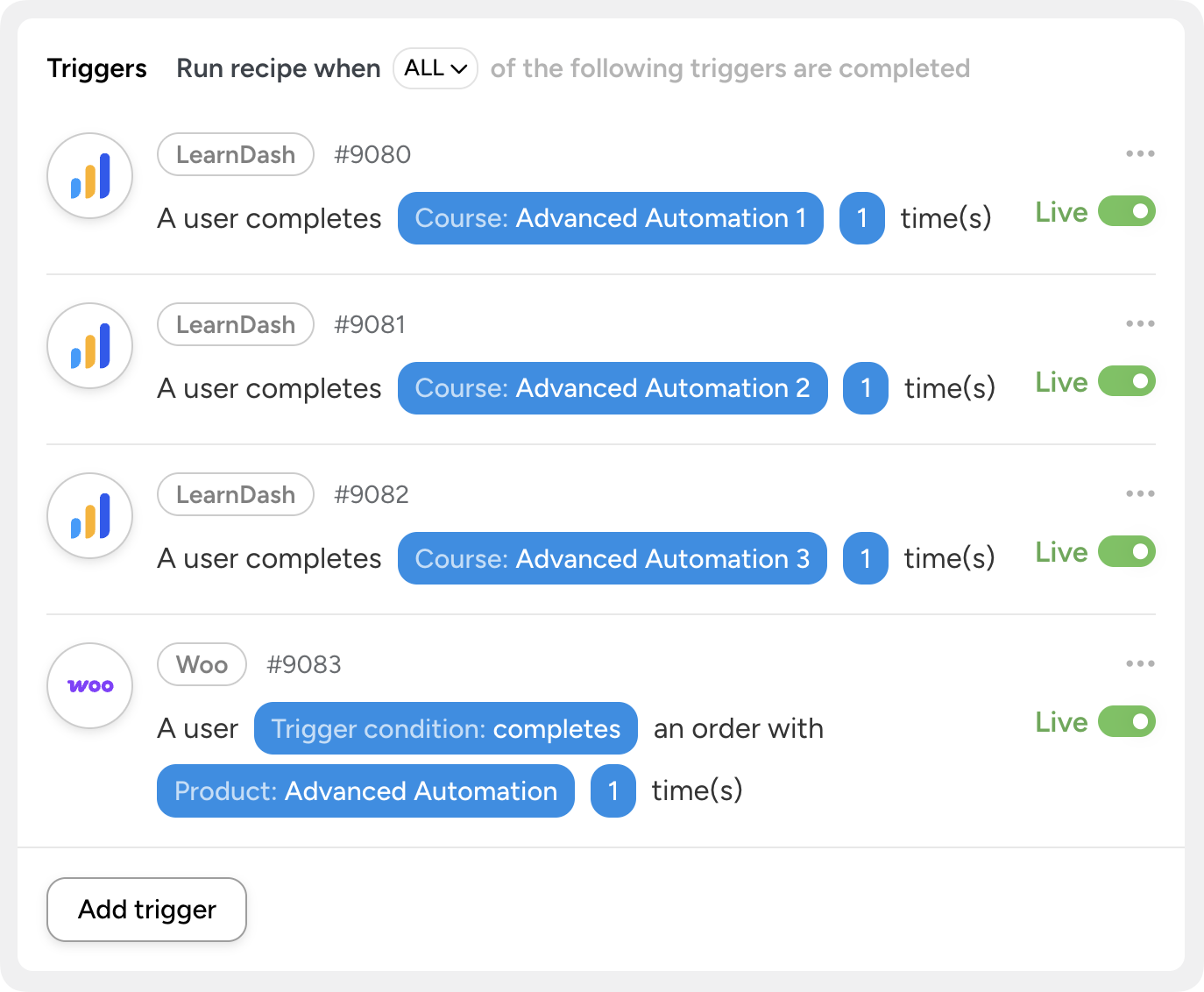
Looking for more ways to automate your LearnDash and WooCommerce upsells? Check out this article: 3+ WooCommerce Upsell Automations That Actually Drive Sales.
Improve knowledge transfer
Automation doesn’t just save time—it helps learners retain more of what they’ve learned.
By reinforcing concepts, pacing learning appropriately, and setting clear expectations, you can dramatically improve how well information sticks.
11. Reinforce training outside of your WordPress site
Learning doesn’t have to stop when a lesson ends. With Automator’s 229 integrations, you can extend LearnDash training beyond your WordPress site and reinforce key concepts in other tools your learners already use.
For example, after completing a set of important lessons, you can use Uncanny Automator to send learners a summary of what they covered along with suggested next steps.
With Automator and tools like WhatsApp, Discord, and Zapier, you can also pass training data to HR systems or other apps, allowing related learning materials to be delivered through additional platforms and channels.
Connect LearnDash to WhatsApp for Multi-Channel eLearning Experiences >>>
12. Offer more blended learning opportunities
If you offer live in-person events and/or webinars as a complement to your online courses, automation makes it easy to connect them into a single learning experience.
Signing up for a live Zoom workshop could automatically unlock a related LearnDash course to help learners prepare in advance. Or you could bundle live sessions and on-demand content together to reinforce learning across multiple formats.
Blended learning keeps engagement high and helps learners absorb information in ways that work best for them.
Connect LearnDash to Zoom to Host Live Webinars >>>
13. Keep learning manageable
Seeing a long list of required courses can feel overwhelming—especially for new learners. Instead of giving users access to everything at once, automation lets you release content gradually and intentionally.
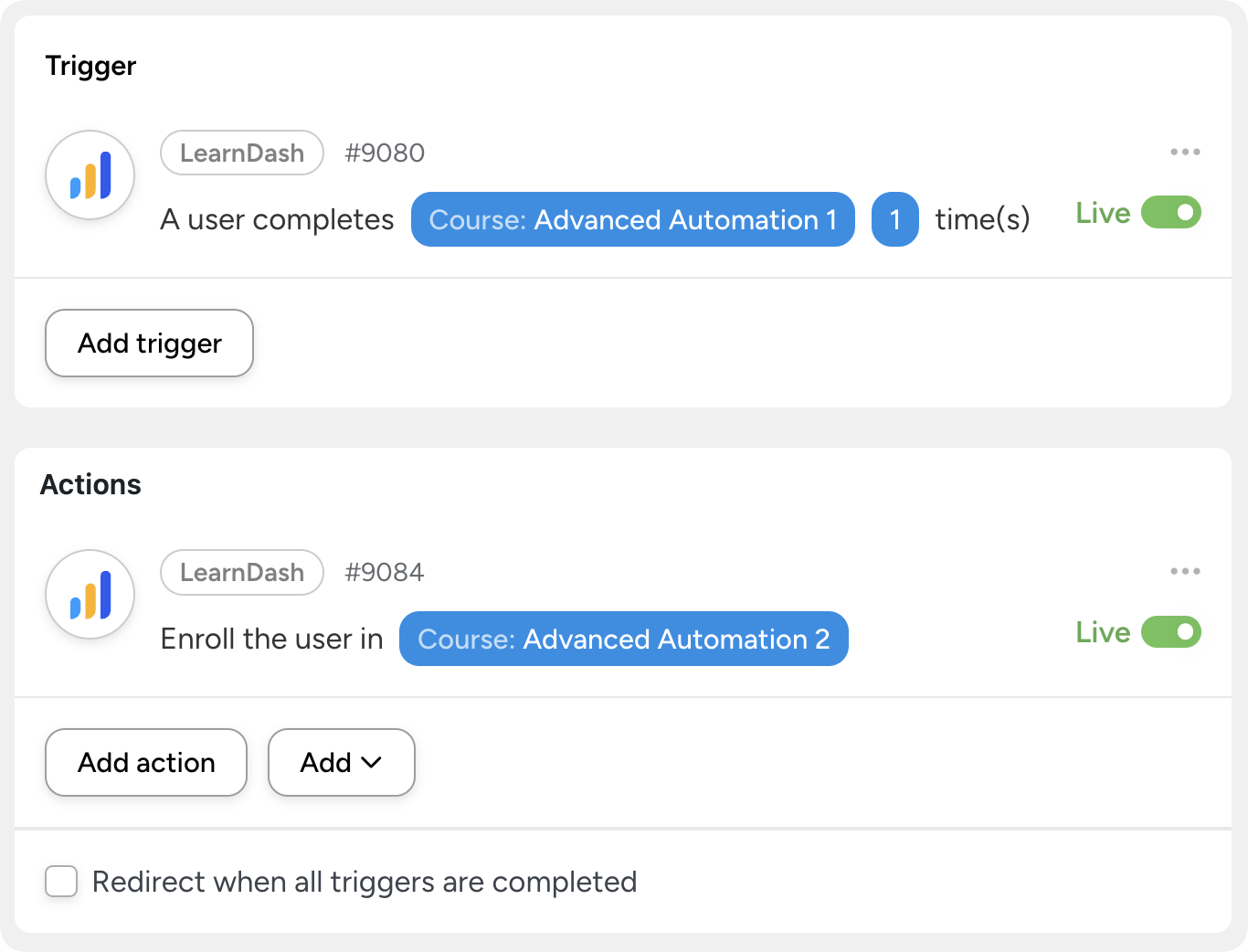
You might unlock the next two courses only after one is completed, or release additional resources when learners reach key milestones. By pacing access to content, you help learners stay focused, motivated, and confident as they move through their learning path.
14. Set users up for success
One of the most overlooked opportunities on LearnDash sites is the course start experience. A simple automated welcome can make a big difference.
When a learner enrolls in a course, you can automatically send an introductory email that welcomes them, sets expectations, and shares tips for success. This early guidance helps learners feel supported from the start—and leads to better engagement and stronger learning outcomes overall.
Created Automated Drip Campaigns for LearnDash (Without a CRM) >>>
Create better courses
Automation doesn’t just support learners—it helps you improve the courses themselves. By collecting better data and measuring what really matters, you can continuously refine your training programs.
15. Make course evaluation automatic—and more meaningful
Post-course surveys are great for capturing immediate feedback, but they don’t always tell you whether learning actually stuck. With automation, you can go beyond surface-level reactions and start measuring real knowledge transfer.
Using tools like Uncanny Automator and Zapier, you can automatically collect pre and post-test quiz scores and pass them to Google Sheets for comparison, helping you see how much learners improved after completing a course.
You can also take evaluation further by using a CRM to trigger follow-up assessments—such as a quiz sent 30 days after course completion—to better understand long-term retention and how learners apply what they’ve learned in the real world.
With richer, automated insights, your courses get better over time—without adding more manual work.
Looking to make better online courses with AI? Learn how to connect LearnDash to OpenAI’s ChatGPT to generate course content, provide feedback, and more.

Uncanny Automator: #1 eLearning Automation Tool
Running a successful LearnDash site doesn’t have to mean working harder or even spending more money.
With the right automations in place, you can create more engaging learning experiences, support learners at the right moments, and grow your courses—without adding more work to your plate.
Uncanny Automator is built specifically to make LearnDash automation accessible. Whether you’re:
- auto-enrolling learners in new courses,
- sending timely emails and cross-channel communications,
- unlocking content in a personalized way,
- marking milestones and rewarding progress,
- or connecting LearnDash to WooCommerce, CRMs, and other tools,
Automator lets you build powerful workflows in minutes—no code required.
If you want your LearnDash site to work smarter, adapt to learners automatically, and scale without complexity, Uncanny Automator is the easiest way to make it happen.
Unlock eLearning Automations >>>
Frequently Asked Questions

Related Posts






















































great ideas, please add more posts like this with ideas on how to automate other plugins on my website.