

Every recipe can limit how often it runs. The three limits, Times per user, Total times, and Throttle, live in the Settings panel of the recipe builder sidebar. All three are unlimited until you change them, so a new recipe runs every time its trigger fires. This article explains what each limit does and when to set one.
Open the Settings panel
- Go to Automator > Recipes and open the recipe.
- If the sidebar is hidden, click the sidebar toggle in the top bar, between the Saved status and the Recipe on / Recipe off switch.
- Click Settings to expand the panel. Each setting shows its current value and an Edit link.
- Click Edit next to a setting to change it. An Edit setting dialog opens. Make the change and click Confirm; the recipe then saves automatically. Cancel closes the dialog without changing anything.
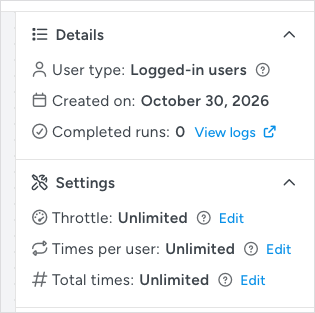
Note: An Everyone recipe shows only Throttle and Total times. It has no fixed user to count against, so Times per user does not apply. See Recipe types: logged-in users and everyone.
Times per user
Times per user sets how many times one user can complete the recipe. It is unlimited until you change it, which means the actions run every time a user completes the trigger: if the trigger is a purchase, every purchase by the same user runs the actions again. Set a limit for recipes that grant something a user should receive once, such as a welcome email, a one-time enrollment, or a signup bonus. A limit of 1 is the common choice; a higher number suits things like a reward a member can claim a few times.
- Click Edit next to Times per user.
- In Allowed runs per user, enter a whole number of 1 or more. Leave the field empty to return to unlimited.
- Click Confirm. The panel shows the new value, for example Times per user: 1.
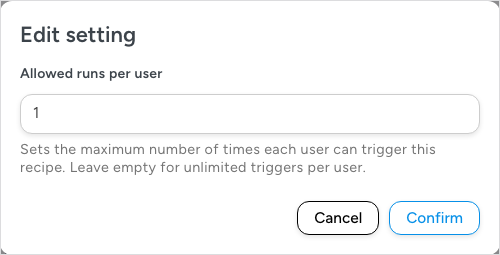
Once a user reaches the limit, the recipe no longer runs for that user. Other users are not affected, and the limit does not expire: it is a lifetime count for each user, not a count per day or per week. For a time-based limit, use Throttle.
Total times
Total times caps how many times the recipe can run in total, regardless of who triggers it. It is unlimited until you change it. Set it when the recipe gives away something in limited supply: the first 50 buyers of a product get a bonus course, the first 100 subscribers get a coupon, or a promotion should stop after a set number of redemptions.
- Click Edit next to Total times.
- In Total allowed runs, enter a whole number of 1 or more. Leave the field empty for unlimited runs.
- Click Confirm.
When the total is reached, the recipe stops running for everyone. Completed runs in the Details panel shows how many runs have happened so far, so you can see how close the recipe is to its cap. Total times and Times per user work together: set Times per user to 1 and Total times to 50 for a bonus that goes to 50 different people, once each.
Throttle
Throttle runs the recipe at most once in a period you set, even if the trigger fires many times in that period. It is off (Unlimited) until you enable it. Throttling suits recipes whose trigger can fire in bursts: a notification that should go out at most once an hour, a sync with an external service that has rate limits, or a form a visitor could submit repeatedly.
- Click Edit next to Throttle.
- Switch on Enable throttling so it reads Yes. The remaining fields appear.
- In a Logged-in users recipe, choose the Throttle scope. It starts at Per recipe when you first enable throttling.
- Per recipe – Shared limit for all users: the recipe runs once per period in total, whoever triggers it. Choose this for site-wide limits, such as one Slack alert an hour or an API that allows one call a minute.
- Per user – Each user has their own independent limit: each user can trigger the recipe once per period, independently of other users. Choose this to stop one person triggering the recipe over and over, for example a user who logs in and out several times in a row.
An Everyone recipe has no scope field and is always throttled per recipe.
- Enter the Throttle duration, for example 30, and pick the Duration unit: Seconds (the starting choice), Minutes, Hours, Days, Weeks, Months, or Years.
- Click Confirm.
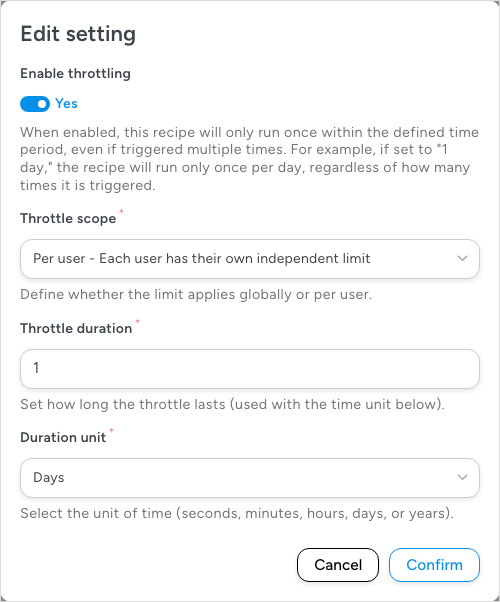
The panel then summarizes the setting in short form, for example Throttle: 30 min for a per-recipe throttle or Throttle: 1 d, per user for a per-user one. While the throttle is in effect, the trigger still fires but the recipe does not run again until the period has passed. These skipped events are not recorded in Automator > Logs.
How the three limits combine
Each limit answers a different question, and the recipe runs only when all three allow it:
- Times per user: how many times in total may this user complete the recipe?
- Total times: how many times in total may the recipe run, for everyone combined?
- Throttle: how much time must pass between runs?
A “first 50 buyers” promotion needs Total times. A welcome sequence needs Times per user. A recipe that posts to an external service with a rate limit needs Throttle. Leave the other two unlimited unless you have a reason not to; every extra limit is one more reason a run may not happen when you expect it.
Related: Creating a recipe, Recipe types: logged-in users and everyone, Managing triggers, Recipe blocks: Filter, Queue and Loop


Comments (0)