

Upgrade your license
If you want to upgrade your current license to a Plus or Elite license, follow these steps:
- Log in to your account.
- Go to the Licenses page.
- Find the license you would like to upgrade and click View Upgrades.
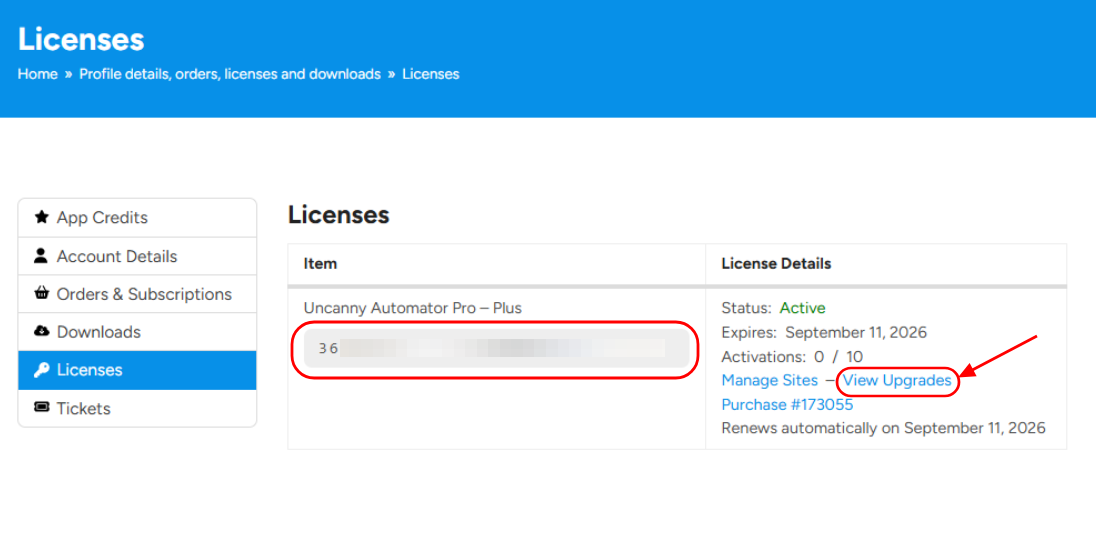
The cost of the upgrade is the difference between the price of your current license and the price of the license you would like to upgrade to.
Note
Upgrading your license does not change your subscription renewal date.
Downgrade your license
If you’re looking to downgrade your license to a Plus or Basic subscription, you will need to cancel your current subscription. (If you’re within 14 days of your purchase, you can request a refund instead.) After this, you can purchase the license you want to switch to.























































Comments (0)