

A purchase on automatorplugin.com gives you two things: the Uncanny Automator Pro plugin to install, and a license key that unlocks it. Both are in your purchase email and in your account. This article covers where to find each, where to enter the key on your site, and how staging and development sites are treated.
Download your plugins
There are two ways to download a plugin you have purchased.
- The purchase confirmation email, with the subject line “Your Uncanny Automator Purchase”, contains download links for the plugins you bought.
- If those links have expired, download from your account:
To install the zip, see Installing Uncanny Automator. The free Uncanny Automator plugin is not on the Downloads page; it comes from WordPress.org and is installed from Plugins > Add Plugin in your WordPress dashboard.
Find your license key
There are also two ways to view a license key.
- The same purchase confirmation email contains the license key.
- Your account lists every license you own:
If you do not have a license yet, the pricing page lists the plans.
Enter the key on your site
With Uncanny Automator Pro installed and active:
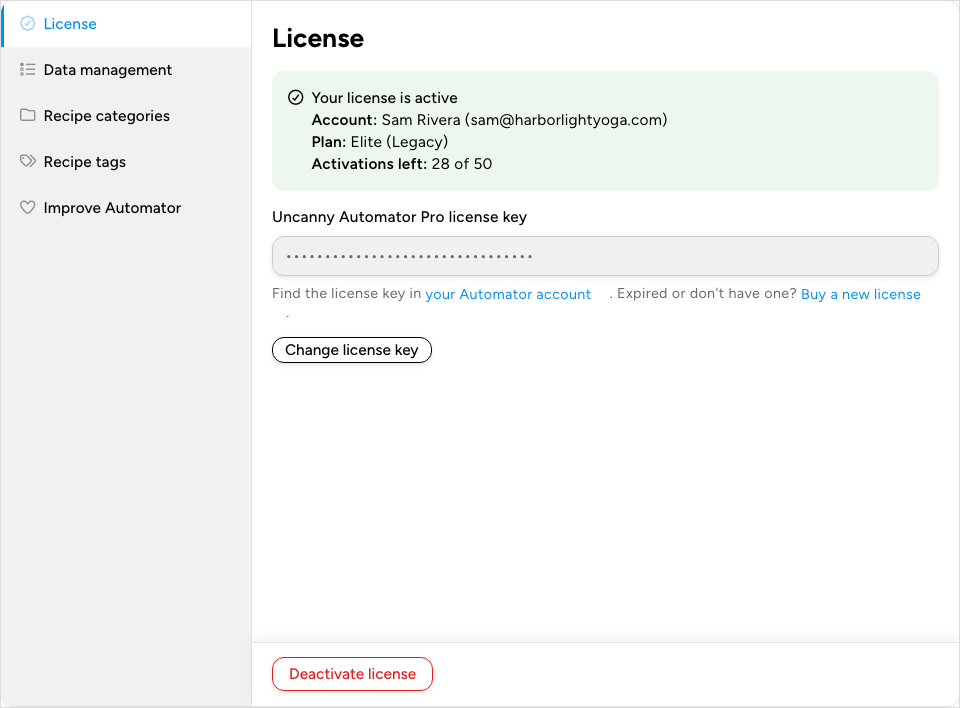
- In your WordPress dashboard, go to Automator > Settings. The General tab opens on its License panel.
- Paste the key into Uncanny Automator Pro license key.
- Click Activate license.
The panel then reads Your license is active and shows the Account the license belongs to, the Plan, and Activations left: the activations still available out of the license’s total, one per site. Two buttons manage the key from here on: Change license key deactivates the license on this site so you can enter a different key, so click it only when you have the new key ready, and Deactivate license, at the bottom of the panel, frees up one activation so you can use the key on another site. The Setup wizard that opens after installing takes the same key in its Activate license step.
Staging and development sites
You are welcome to run Uncanny Automator Pro on staging and development copies of your site. A site whose address matches one of these patterns is treated as a development site and does not count against the activations on your license:
localhost- IP addresses in
10.0.0.0/8,172.16.0.0/12, or192.168.0.0/16 - domains ending in
.devor.local - domains beginning with
dev.orstaging.
Recipes run without limit on these sites. App integrations are the exception: on a site without an activated license, they draw on the app credits of a free account rather than the unlimited credits of your plan. See What are App Credits?.
Related: Installing Uncanny Automator, Manage your subscription, What are App Credits?

Comments (0)