

A Post meta token reads a value from a post’s meta when the recipe runs. You tell the token which post and which meta key to look at, and it returns the value stored there, so information kept in post meta, such as course data, product data, or order data, can be used in any action.
Insert a Post meta token
- In the action’s Set up step, click the ∗ button at the end of the field that should receive the value.
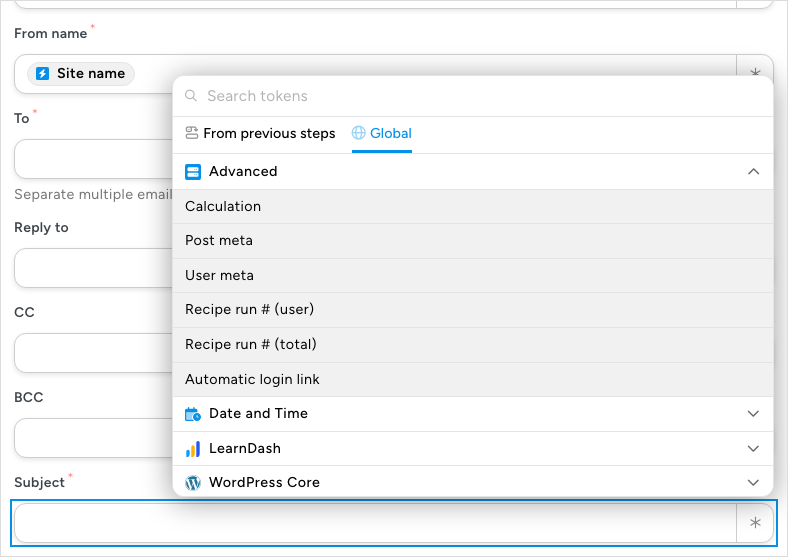
- In the token picker, search for post meta, or open the Global tab, expand Advanced, and click Post meta. Managing tokens explains the picker.
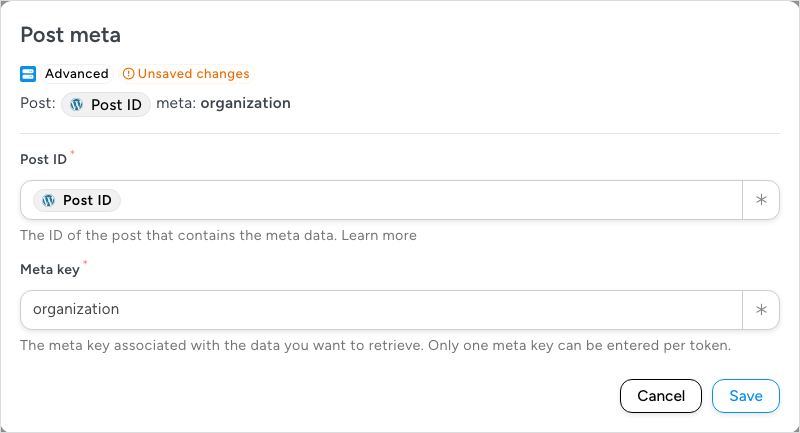
- The Post meta dialog opens. In Post ID, enter the ID of the post that holds the data, or click ∗ and insert a token that holds it, such as the trigger’s Post ID.
- In Meta key, enter the key the value is stored under. A token reads one key; insert a second token for a second value.
- Check the line above the fields, which shows your choices as Post: followed by the post and meta: followed by the key, and click Save. The token appears in the field as a chip that reads Post: with the post ID and meta: with the key. Closing the dialog without saving inserts nothing.
Choose the post with a token
Both fields accept tokens, so the post, and even the key, can come from the recipe’s trigger instead of being fixed. When a user completes a course, for example, insert the trigger’s course ID token in Post ID, and the token reads meta from the course that was completed. Depending on the LMS plugin you use, that meta may include the course’s start date, details about the instructor, and more. Trigger and action tokens work in these two fields. The token picker in them does not offer Post meta, User meta, or Calculation tokens, because one meta token can’t be nested in another.
What the token returns
- A stored value — the value saved under the key. When the key holds several values, they are returned in one line, separated by commas. When the post has nothing under the key, the token is empty.
- A post field — a key that matches one of the post’s own fields, such as
post_titleorpost_date, returns that field. - An Advanced Custom Fields value — the token can read simple, non-hierarchical ACF fields. Enter the meta key that stores the field’s data in Meta key.
To read data stored on a user rather than a post, use a User meta token.
Related: Managing tokens, User meta tokens, Calculations (math equations)

Comments (0)