

A tool use is one thing your AI does on your site through Uncanny Automator: reading a list of posts, updating a setting, saving a recipe. On Lite, your AI gets 300 tool uses a day for your first week, then 150 a day; paid plans have unlimited tool usage. This article explains what counts, when the count resets, where to see it, and what happens at the limit.
How many tool uses you get
- Lite (a free Uncanny Automator account): 300 tool uses a day for your first week, then 150 a day.
- Basic, Plus and Elite: unlimited tool usage. Your WordPress permissions and the switches you set on each site still apply.
The daily allowance belongs to your Uncanny Automator account, not to a site or an app. All your connected sites and all your AI apps share the same daily tool uses. Connecting a second site or a second AI app doesn’t add to it.
Which plan applies depends on the license you use at mcp.automatorplugin.com. If your account has more than one license, the one you chose under Choose a license (or Switch license in the account menu) decides whether your AI has 150 tool uses a day or unlimited tool usage. To compare plans, see the pricing page.
What counts as a tool use
One request to your AI often takes several tool uses. Asking it to tidy up your draft posts, for example, can mean one tool use to list your sites, one to find the drafts and one for each post it changes.
Only tool uses that succeed are counted:
- Counted: every successful tool use, whether it reads something or makes a change. A search that finds nothing still counts, because the search itself worked. Listing your sites, loading Uncanny Automator’s guidance and uploading a file through your AI app count too.
- Not counted: a tool use that fails, one refused because the AI doesn’t have access, one refused because you’ve reached the limit, and one whose result Uncanny Automator can’t confirm.
- Retries count again: if your AI repeats a tool use and it succeeds, that is a new tool use.
- Loading the tool list doesn’t count: when your AI app checks which tools Uncanny Automator offers, nothing is used.
Recipes don’t use tool uses. Building a recipe with your AI does, but once the recipe is switched on it runs on your site without your AI.
When the count resets
The count starts again at 6:00 AM Eastern Time (Toronto) every day, not at midnight and not 24 hours after your first tool use. The reset follows the local clock in Toronto, so it stays at 6:00 AM when daylight saving time starts or ends.
If you’re in another time zone, the hosted Usage card shows the reset in your own local time.
Where to see your tool uses
In WordPress
- In your WordPress dashboard, go to Automator > Dashboard.
- Find AI tool uses today on the Usage card, below App credits.
On Lite it shows the number used and the limit, such as 2 / 150, above a progress bar, and the card ends with a Get unlimited with Pro link. Once you’ve used 70 percent of the day’s allowance, a line underneath shows how long until the count resets. On a paid plan it reads Unlimited with a Pro label. The row appears once the site has at least one AI connection.
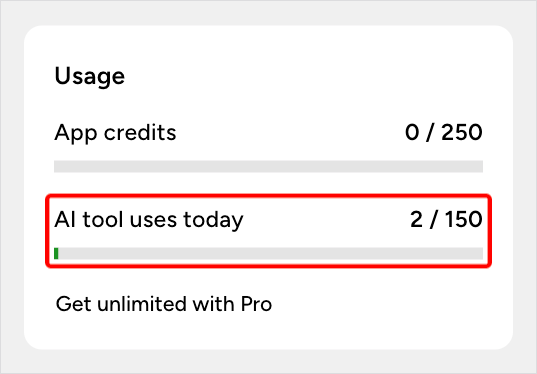
The number on the card is your account’s total for the day, across all your sites and AI apps, so every connected site shows the same figure.
At mcp.automatorplugin.com
- Sign in at mcp.automatorplugin.com. Once an AI app is connected, the Connections page opens; you can also reach it from Connections in the header.
- Find the usage figure in the last box of the row of totals at the top, and the Usage card further down the page, near Recent activity.
On Lite, both show how many tool uses are left today out of the daily limit, such as 148 of 150. The card also says when more become available, as a day and time in your local time zone (for example, Sun 6:00 AM), followed by a Plans link. On a paid plan, both read Unlimited.
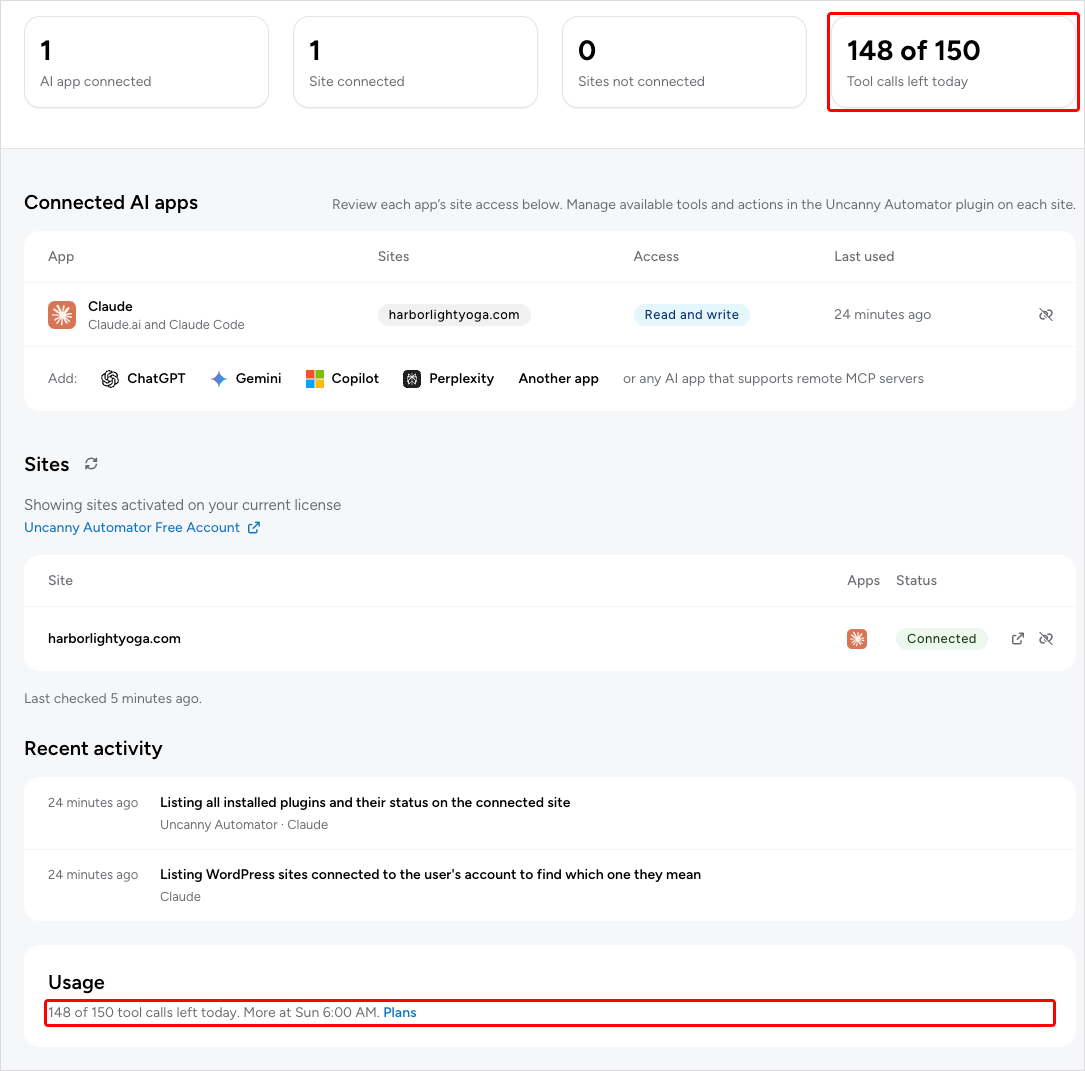
Recent activity lists the tool uses of the last 7 days, and marks the ones that were refused at the limit as over the allowance.
When you reach the limit
When the day’s tool uses are used up, your AI can’t use Uncanny Automator again until the 6:00 AM reset. Your AI app receives a message saying the day’s allowance is used, when it resets, and where the plans are described, and it usually passes that on to you. Nothing your AI has already done is undone, and your recipes keep running.
On the Automator > Dashboard Usage card, the row shows Daily limit reached with a link to upgrade. At mcp.automatorplugin.com, the Usage card shows that the day’s tool uses are used, when more are available, and an upgrade button.
Near the limit, your AI may also be told that its remaining tool uses are already in progress. That happens when it starts several at once: it has to wait for those to finish before starting another, and any that fail are given back.
To keep working before the reset, upgrade to a paid plan for unlimited tool usage. See the pricing page.
On a paid plan
On Basic, Plus or Elite there is no daily count once the Pro license key is activated on the site, in the Setup wizard or under Automator > Settings > General > License (see Connect your AI to your WordPress site). Both the Dashboard Usage card and mcp.automatorplugin.com show Unlimited.
If the license you’re using at mcp.automatorplugin.com expires, your AI’s tool uses stop. Renew the license and sign in at mcp.automatorplugin.com again, or choose another eligible license with Switch license. Your AI app’s connection stays valid, so you don’t need to connect it again.
Tool uses, app credits and Uncanny Agent usage
Tool uses are only for AI apps connected through Uncanny Automator. Two other kinds of usage are counted separately:
- App credits are used when a recipe on Lite sends data to or receives data from an app integration. See What are app credits?
- Uncanny Agent, the AI assistant built into Uncanny Automator, has its own monthly usage and Anytime usage. See Monthly usage vs. Anytime usage, explained.
Related: Connect your AI to your WordPress site, What your AI can do on your site, Manage and remove AI connections, Troubleshooting AI connections


Comments (0)