

Uncanny Automator now connects ChatGPT, Claude, Gemini or any AI to your WordPress site. An MCP server with a built-in automation engine, free to start.
Uncanny Automator 8.1: Redesigned Logs, Sensei LMS, Masteriyo LMS, MainWP, SportsPress and More
Monday, 8:40. Coffee in one hand, wp-admin in the other, and one question before anything else gets your attention: did everything run while you were enjoying your weekend? And if something didn’t, what stopped it?
Uncanny Automator 8.1 is out now for Lite and Pro, and it makes that check quicker. The Logs page has been redesigned so finding the details of recipe runs has become a lot simpler. And eight new integrations bring broader support for course, client-site, sports and community automations.
Here’s what changed in Automator Lite and Pro, along with some ideas for what’s now possible.
Redesigned Logs: Find Any Recipe Run Faster
Site admins and developers, rejoice! The Monday morning check of Automator › Logs just got cleaner and quicker.
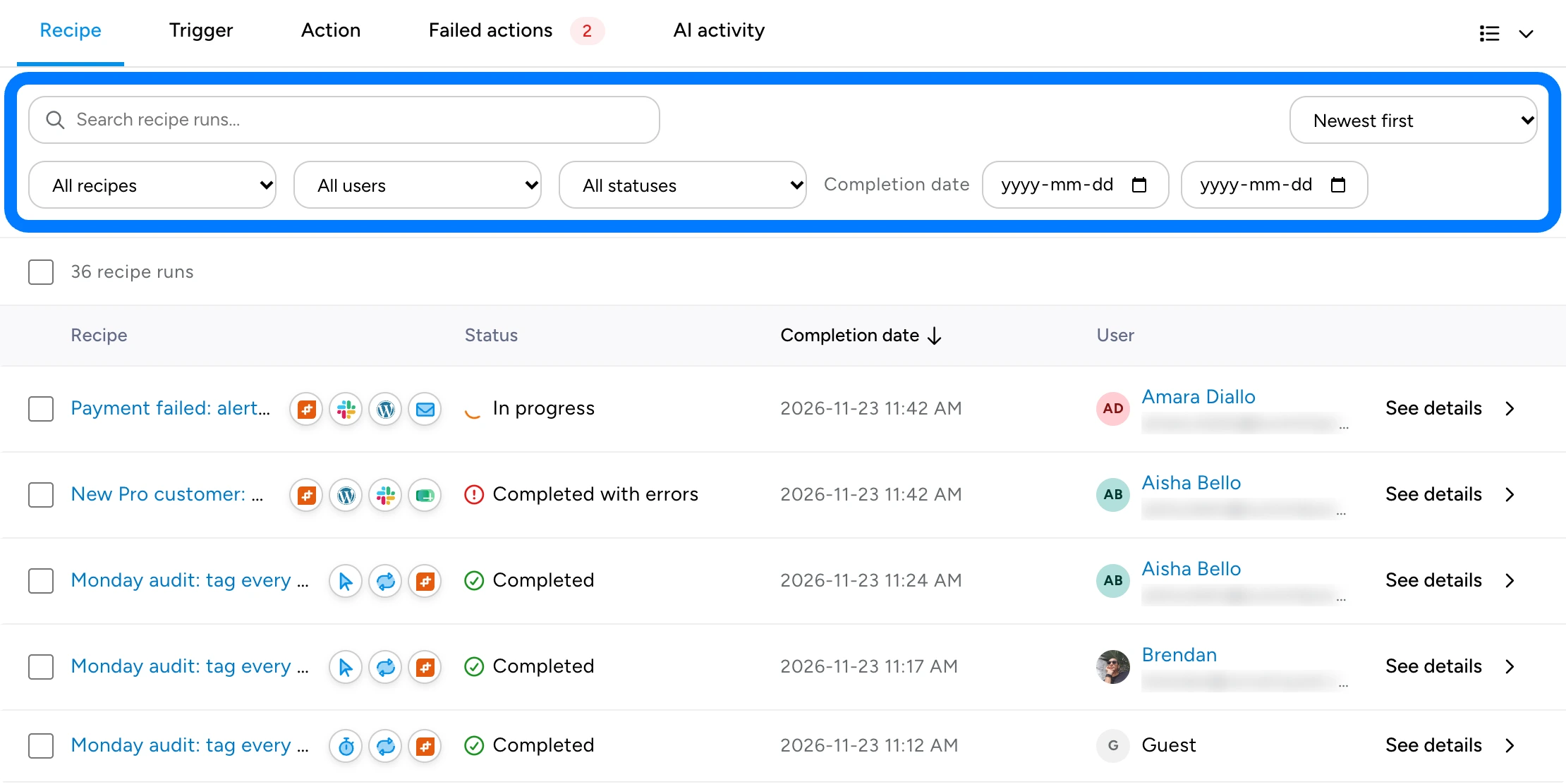
8.1 redesigns the page for better navigation, filtering and visibility. Search your recipe runs, then narrow them by specific recipe, user, status and completion date. Each run shows the integrations it touched, its status and who triggered it, with See details for what happened inside. A Failed actions tab carries a count, so you know what needs extra attention.
New LMS Integrations: Sensei LMS and Masteriyo LMS
If you run courses on WordPress, this is the part of 8.1 to read closely. Until now, Sensei LMS and Masteriyo LMS required webhooks to create recipes. In 8.1 they’re part of the Automator ecosystem.
A course event can reach your forms, CRM, memberships and apps, and those can enroll students in return. Both integrations are included in Automator Lite.
Sensei LMS
Sensei LMS is the course plugin from Automattic. Here’s what connecting it to the rest of your site makes possible:
- Enrollment from anywhere. Someone submits your WPForms application form, or gets a “student” tag in FluentCRM, and they’re enrolled in the course.
- Access that ends cleanly. A MemberPress membership is cancelled, and the user is unenrolled from the course(s) associated with it.
- Completion that leaves the LMS. A user completes a course: tag them in FluentCRM or Mailchimp for your next offer, and add a row to a Google Sheets spreadsheet for your completion records.
- A gradebook for instructors. A user submits a quiz, and a row lands in the instructor’s Airtable database.
- A nudge for the stragglers (Pro). Loop through everyone enrolled in a course, check who hasn’t completed it, and email them a reminder.
Or the simplest: hand students from one course to the next. Claude built this one on our test site through Automator’s MCP server, from one sentence:
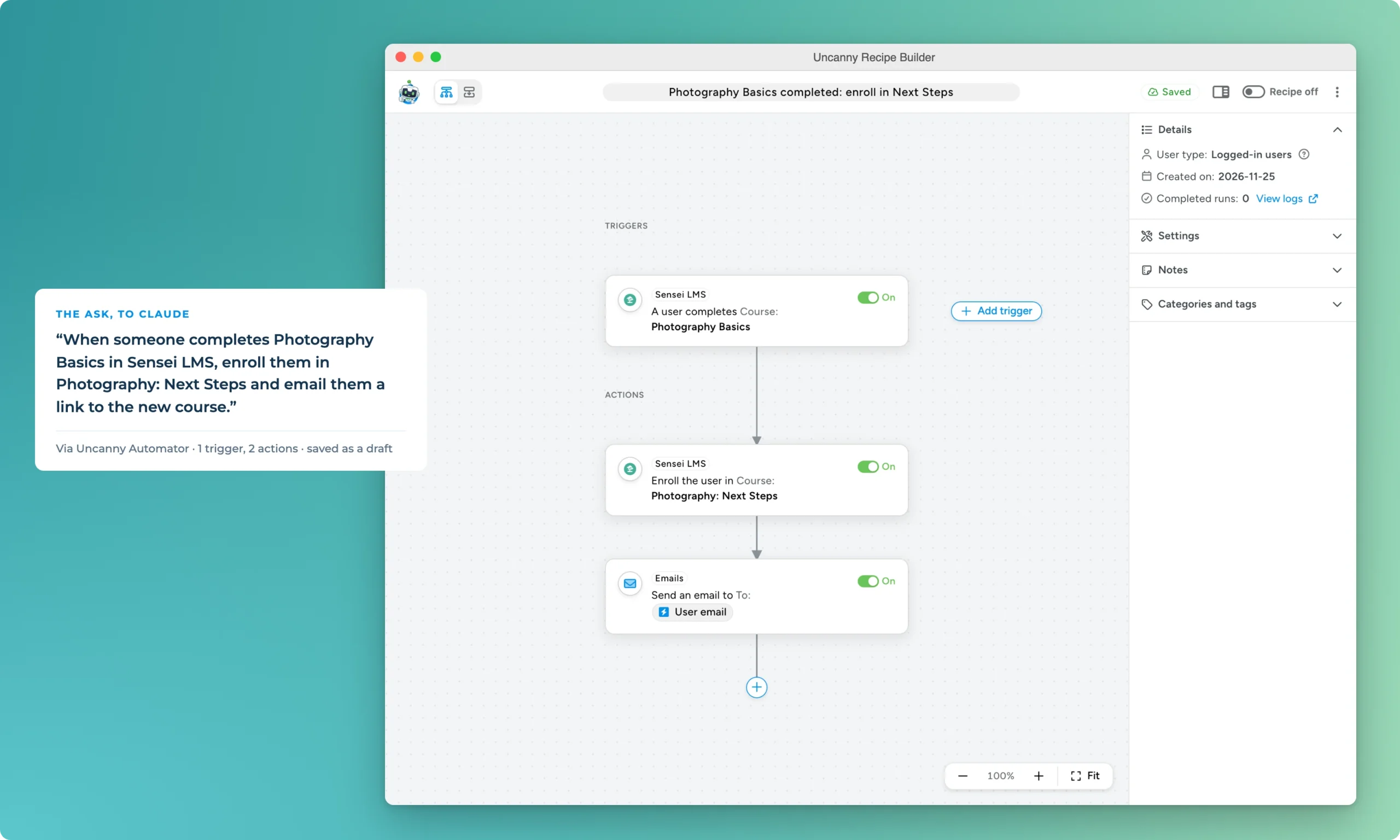
In Lite, Sensei LMS brings 4 triggers (a user completes a course, completes a lesson, is enrolled in a course, submits a quiz) and 3 actions (enroll the user in a course, unenroll the user from a course, mark a lesson complete for the user).
Pro adds a quiz-passed trigger, a reset-progress action, 4 completion and enrollment conditions, and a loop filter for enrolled users.
Masteriyo LMS
Masteriyo LMS is ThemeGrill’s course plugin, with quizzes and course sales built in. With Automator:
- Students on your list from day one. A user registers in Masteriyo, and they’re added to your Mailchimp audience or Brevo list with a student tag.
- Help before they drop out. A user fails a quiz: email them the lesson to review, and post a note in the instructor’s Slack channel.
- The next course, automatically. A user completes a course: enroll them in the follow-on course and tag them in your CRM.
- Sales and struggling students (Pro). An order for a course is completed: add the buyer to your CRM and a row to your Google Sheets sales log. A student’s quiz score falls below the mark you set: tag them for extra help.

All Access Pass for WordPress
Want to extend Sensei LMS and Masteriyo LMS even further?
Get the All Access Pass for WordPress and add xAPI/SCORM support, Continuing Education Credits, and Uncanny Redemption Codes to your stack.
Explore the All Access Pass →

In Lite, Masteriyo LMS brings 7 triggers (a user registers, enrolls in a course, completes a lesson, completes a course, starts, passes or fails a quiz) and 2 actions (enroll the user in a course, mark a course complete for the user).
Pro adds 3 triggers (quiz scores, assignments and course orders), 3 actions (mark a lesson complete, reset progress, unenroll), 3 conditions and 2 loop filters.
New Integration: MainWP
For WordPress admins and site developers, that Monday morning check isn’t one site. It’s twenty dashboards, or one MainWP Dashboard. In 8.1, the Monday morning changes come to you instead of you hunting them down.
Lite adds 4 triggers:
- a child site is added,
- a child site is removed,
- a plugin, theme or translation is updated on a child site,
- and WordPress core is updated on a child site.
Pro adds 8 more triggers (backups, syncs, clients, installs and more) and 2 conditions: a child site has updates available, and a child site is connected.
New Integration: SportsPress
SportsPress runs events, teams, players and results for club and league sites. While Automator can’t automate your team’s path to the trophy, it can help you and your site visitors score big wins.
Lite adds 4 triggers (a new event, team or player is created, and an event is updated) and 2 actions (create an event, and update the results of an event).
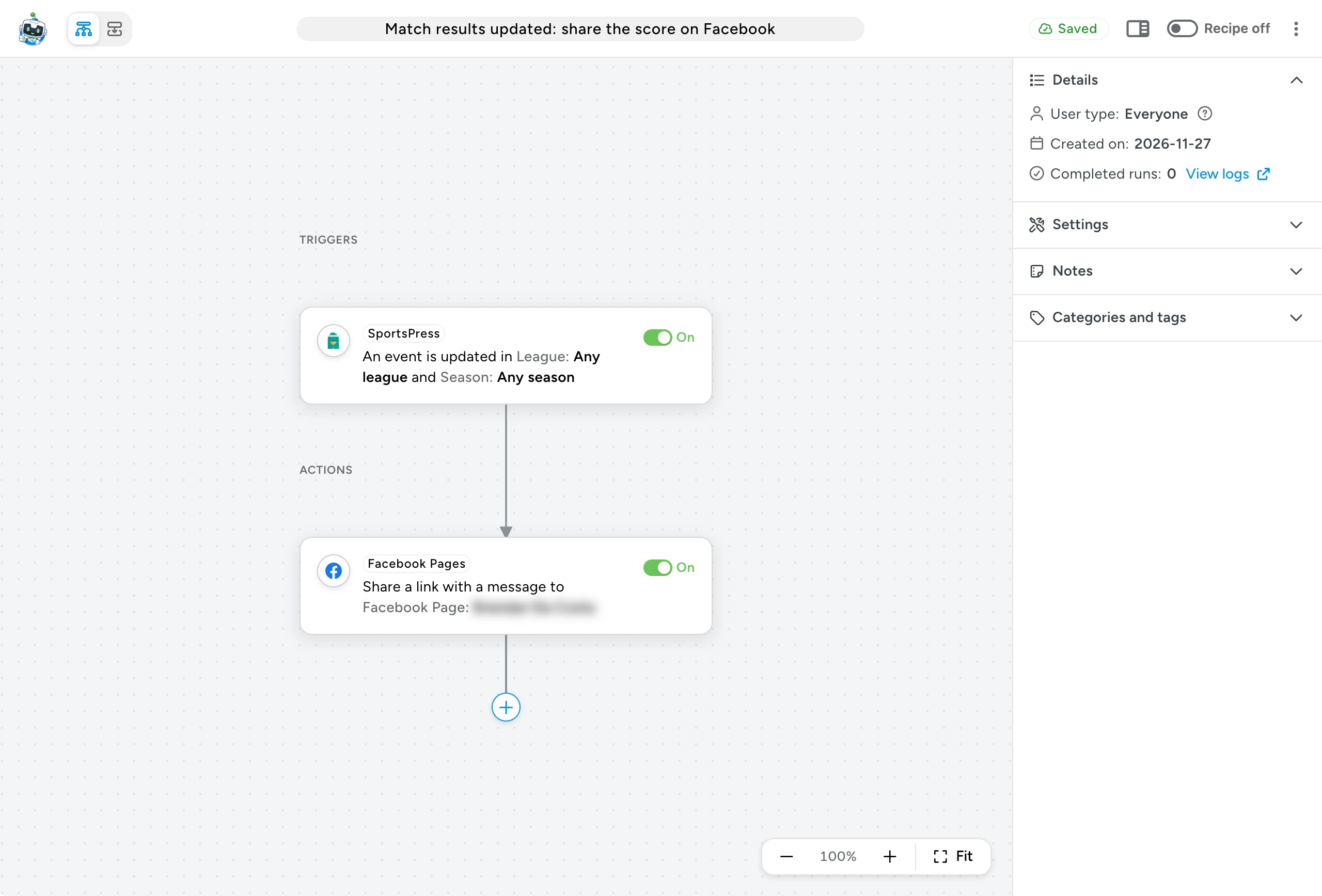
Pro adds triggers for status changes and postponed or cancelled events, actions to create players and teams, 4 conditions and 2 loop filters. The obvious first recipe: results updated, and the score goes straight to your club’s Facebook page.
Here’s that recipe in the Recipe Builder, ready for the next final whistle:
New Community Integrations: Asgaros Forum, UsersWP and Favorites
Three smaller integrations for membership and community sites, each included in Automator Lite.
Asgaros Forum
Asgaros Forum is a lightweight forum plugin. Lite brings 5 triggers (new topics, replies, reactions, approvals and usergroup changes) and 4 actions (add to or remove from a usergroup, create a topic or a reply).
Pro adds 3 triggers, 4 moderation actions (ban, unban, delete a post or topic), 4 conditions and 3 loop filters.
UsersWP
UsersWP adds front-end registration, login and profile pages. Lite brings 6 account triggers (registration, email activation, login, profile and password changes, account deletion) and an action that updates profile fields.
Pro adds 2 password-reset triggers, a profile-field condition and 2 loop filters.
Favorites
Favorites lets visitors save posts they like.
Lite brings 3 triggers: a user favourites a post, unfavourites a post, or clears all their favourites. A favourite signals interest: a good moment to tag the user in your CRM or send related content.
New Integration: Contact Form CFDB7
The Database Addon for (Contact Form CFDB7) stores Contact Form 7 submissions in your database. Lite adds a trigger (an entry is saved for a form) and 2 actions (mark an entry as read, delete an entry).
Pro adds actions to delete all entries for a form and mark an entry as unread, plus 2 conditions.
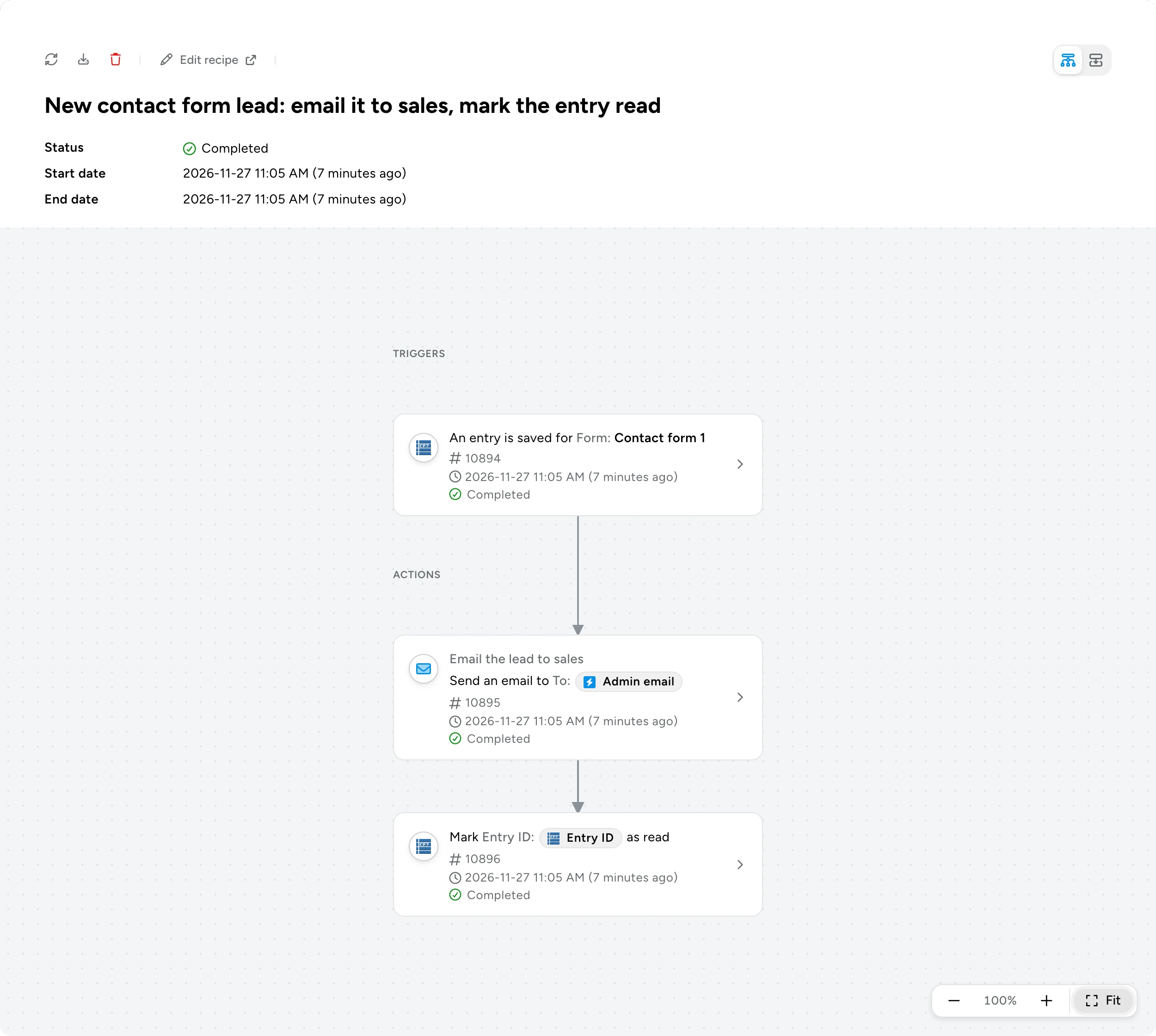
Send the lead where it belongs, then mark the entry “read” or delete it, and the table only holds what still needs a person.
Here’s one test lead going through that recipe on our test site: the email goes out, then the entry is marked as read.
Start Recipes Faster: A Welcome Screen and a Smarter Template Library
Two changes make starting a recipe quicker even in the updated Uncanny Recipe Builder that arrived in our previous release.
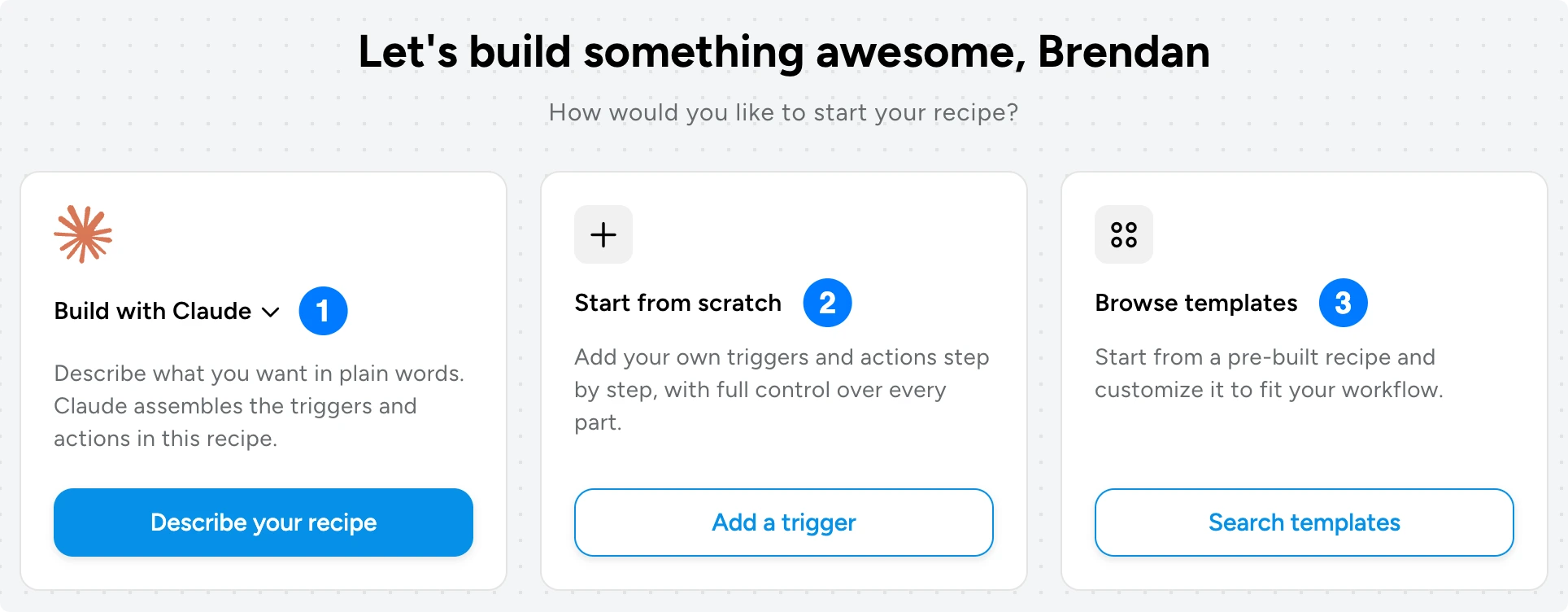
A new recipe now opens on a welcome screen with three ways to start:
- Build with your AI: describe what you want in plain words, and the AI you’ve connected gets cooking.
- Start from scratch: add your own triggers and actions, step by step.
- Browse templates: start from a pre-built recipe and customize it.
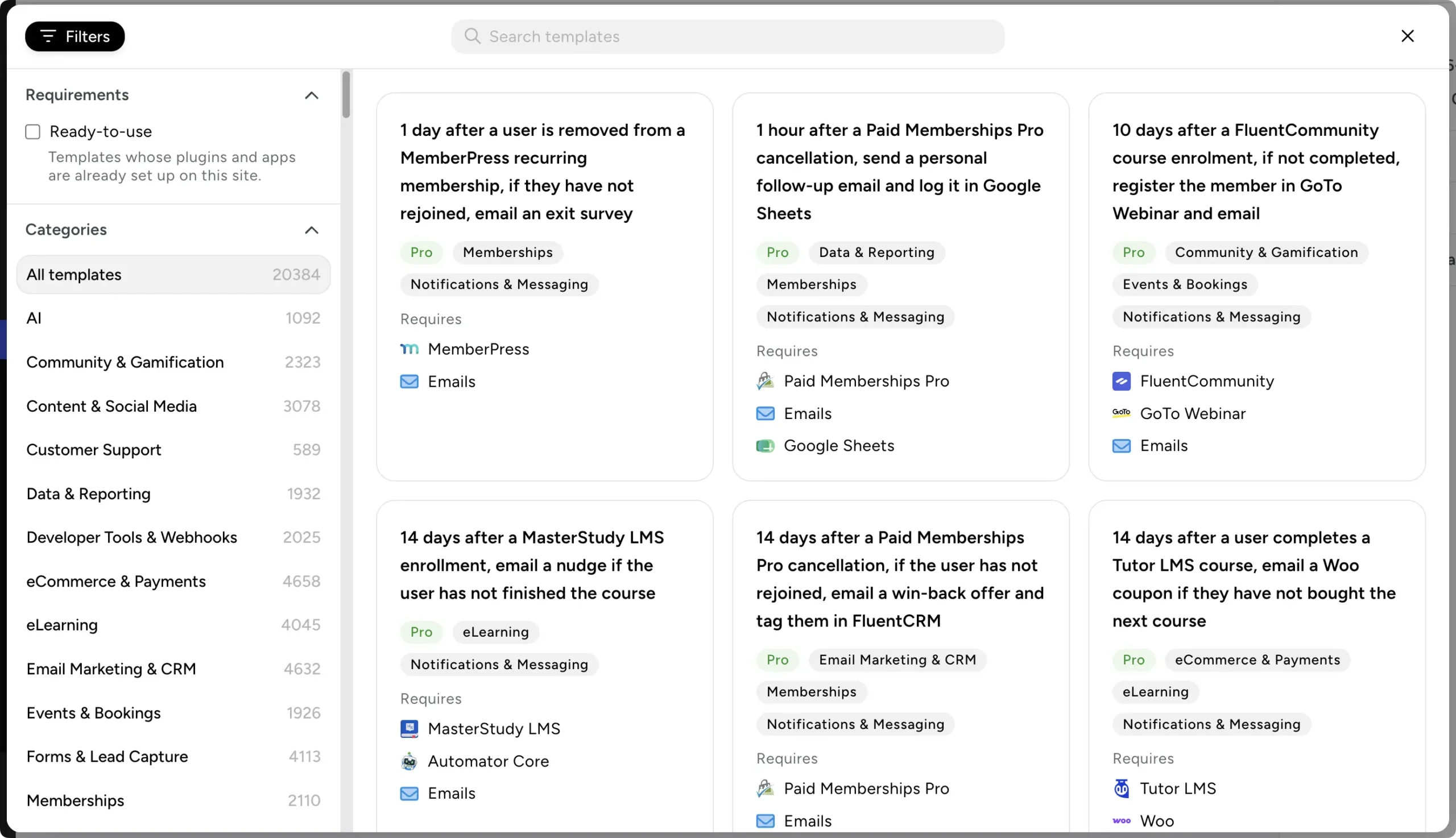
Browse templates opens the Template Library, now with over 20,000 real-world scenarios at your fingertips. If that’s too many to choose from, the Ready-to-use filter removes the templates that don’t pertain to your site.
For Your Connected AI: MCP Server Improvements in 8.1
That Sensei recipe we showed off earlier was built simply by asking an AI, and 8.1 makes asking work better.
What changes for your AI in 8.1:
- Your AI finds the right operation more reliably, along with the details each one needs.
- Clearer errors: when a request is invalid or an operation fails, the message says why and what to try instead.
- Tighter access: stronger protection of credentials and restricted data in database reads, stricter checks on API requests, and potentially destructive operations restricted.
- Steadier connections: a temporary hiccup in a license check no longer disconnects your site.
Not connected yet? Connect your AI in 60 seconds >>>
Also in Uncanny Automator 8.1
Smaller changes that may touch recipes you already run:
- Easy Digital Downloads: a trigger for refunds of orders paid through a payment gateway, and a License key token on the purchase trigger. Pro adds a refund trigger for a specific price option of a download.
- Media uploads no longer fail behind a CDN or proxy that compresses files, such as Cloudflare.
- FluentCRM keeps field values when you rename field labels; WPForms Name tokens now show First name and Last name; Telegram reconnects cleanly with a new bot token.
- Pro: fixes for WooCommerce Subscriptions, WP Courseware, webhooks and loops, plus Code Snippets 3.10 and PHP 8.5 support.
The full lists are in the Lite changelog and the Pro changelog.
What You Can Build with 8.1
Need a starting point? Three recipes from the new integrations, each a trigger and two actions:
- Client update log: a plugin, theme or translation is updated on a MainWP child site → add a row to that client’s Google Sheet → message your team in Slack.
- Matchday change (Pro): a SportsPress event is postponed or cancelled → email the team → post the change to your Facebook page.
- Member welcome: a user registers through UsersWP → add them to an Asgaros Forum usergroup → reply to your welcome topic.
Available Now: How to Update to Uncanny Automator 8.1
From your WordPress Admin Dashboard, go to Dashboard › Updates and update Uncanny Automator first, then Uncanny Automator Pro if you have a license. Update both, so the versions match.
The new integrations, the Logs redesign and the welcome screen are all included in Automator Lite. The extra triggers, actions, conditions and loop filters for the new integrations are part of Automator Pro, on the Basic, Plus and Elite plans.
See plans >>>
Next Monday’s check takes a minute less, and it covers more of your site than it did this week.
What will you do with more time?

Related Posts
Comments (0)