

Comparing Make.com alternatives for WordPress? See how Uncanny Automator delivers unlimited, instant automations with no…
OttoKit (SureTriggers) vs Uncanny Automator: Which Is Better for WordPress in 2026?
OttoKit vs Uncanny Automator — which is better for WordPress automation in 2026? An honest comparison of pricing, task limits, integrations, and AI.
If you’re looking for a WordPress automation solution, you’ve almost certainly come across OttoKit (formerly SureTriggers) more than a few times.
At first glance, OttoKit looks like a WordPress plugin. It’s in the WordPress.org plugin directory. You can install it from a .zip file. It even sits in your admin menu like a plugin.
But there’s a catch: OttoKit’s plugin is actually a bridge to its automation engine. With OttoKit, your workflows are executed on OttoKit’s cloud servers, not on your website.
Now, that might sound like a distinction without a difference but, for WordPress sites, the implications are tangible. How much you pay. Where your data lives. How deep your integrations can actually go. And what happens when something breaks.
If WordPress is your primary hub — whether you’re a developer, a business owner, or content creator — then a WordPress-native automation solution is almost certainly the better choice. That’s where a true plugin like Uncanny Automator steps in.
And it’s why I’ve written this honest comparison: so users can compare cloud services like OttoKit with WordPress-first solutions like Uncanny Automator.
Full disclosure: we make Uncanny Automator. Even so, I’ve endeavored to be fair and transparent in this head-to-head comparison. Where Automator is truly the better choice, I’ll say so without reservation. And where OttoKit earns its keep, I’ll make sure to point it out.
What follows is a side-by-side comparison written from the perspective of a WordPress site owner. The person who has to live with the pricing, the setup, and the early morning “why didn’t my automation fire?” moments.
Let’s dive in.
OttoKit vs Uncanny Automator at a Glance
Here’s how OttoKit and Uncanny Automator line up.
| OttoKit | Uncanny Automator | |
|---|---|---|
| Platform | Cloud platform with a WordPress bridge plugin | WordPress-native plugin |
| Pricing | Per-task metering on every plan, lifetime included | Flat rate, unlimited recipes |
| Integrations | 1,500+ apps (per OttoKit) | 246+ integrations, 966+ triggers, 825+ actions |
| Addons | Tables, Forms (stored in OttoKit’s cloud) | Custom User Fields, User Lists, Restrict Content, Dynamic Content, Elite Integrations |
| AI | AI Agents, MCP server, human-in-the-loop | Uncanny Agent (AI assistant), MCP server, AI integrations in recipes |
| Data privacy | Workflow data processed and logged in OttoKit’s cloud | Data stays on your server |
| Best for | Multi-site cloud orchestration | WordPress-centric automation |
In one sentence: OttoKit is a capable choice if you run a fleet of sites and cloud apps from one dashboard. But if your automations live on your WordPress site, Automator gives you unlimited runs, deeper integrations, and data that never leaves home.
Of course, one sentence never tells the whole story.
What Is OttoKit?
OttoKit is an automation tool created by Brainstorm Force — the same team behind WordPress-favorites Astra, Spectra, and CartFlows. That pedigree tells you something already. This is a credible, well-established WordPress company, and OttoKit has grown to 90,000+ active installs on WordPress.org.
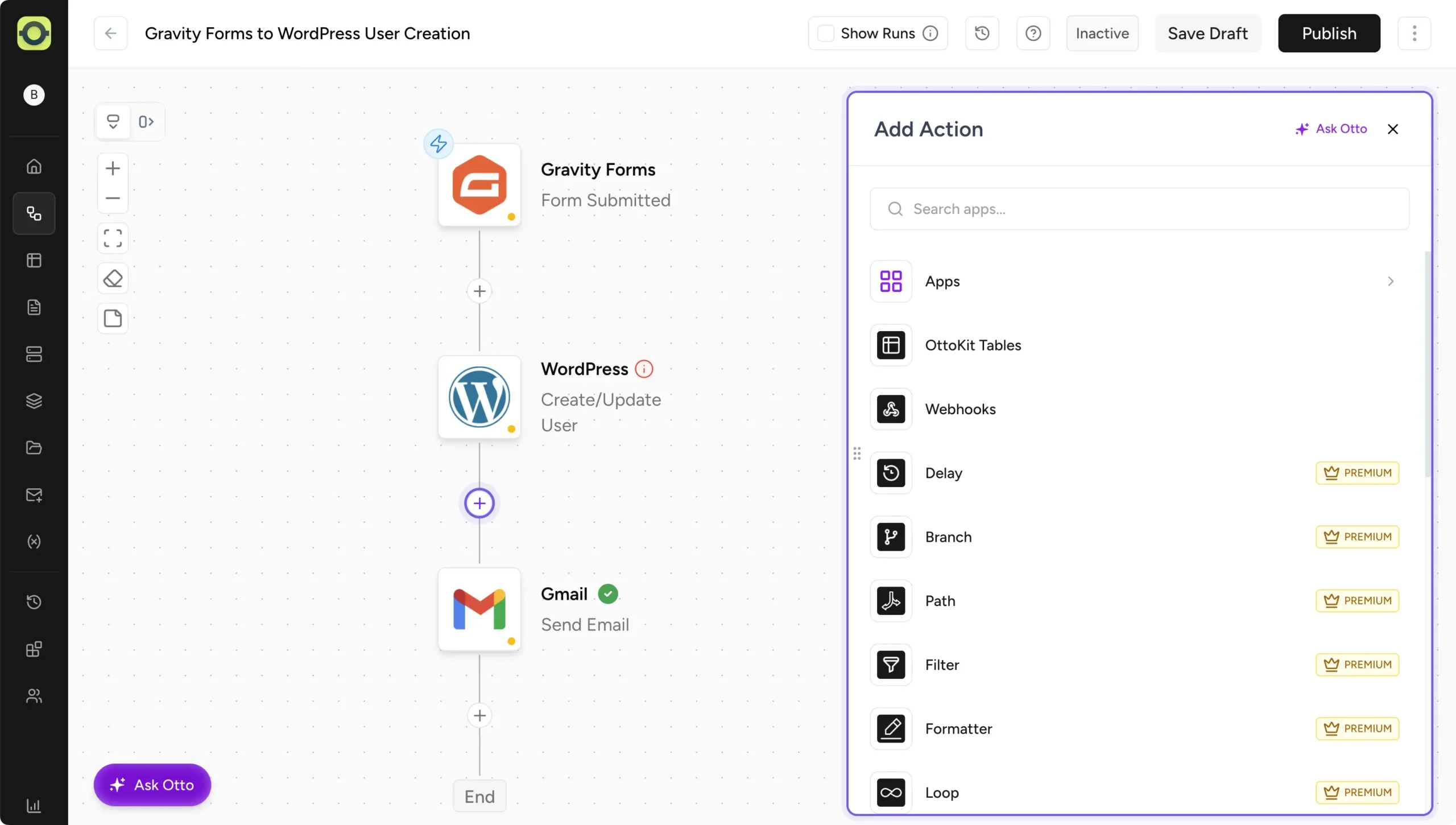
The architecture pairs a cloud platform with a connector plugin. You build workflows on a visual canvas and organize them into workspaces. From there, you can link many WordPress sites and hundreds of cloud apps to one account.
When something happens on your site, the plugin forwards that event to OttoKit’s servers. Those servers run the workflow and send the actions back.
OttoKit Pricing
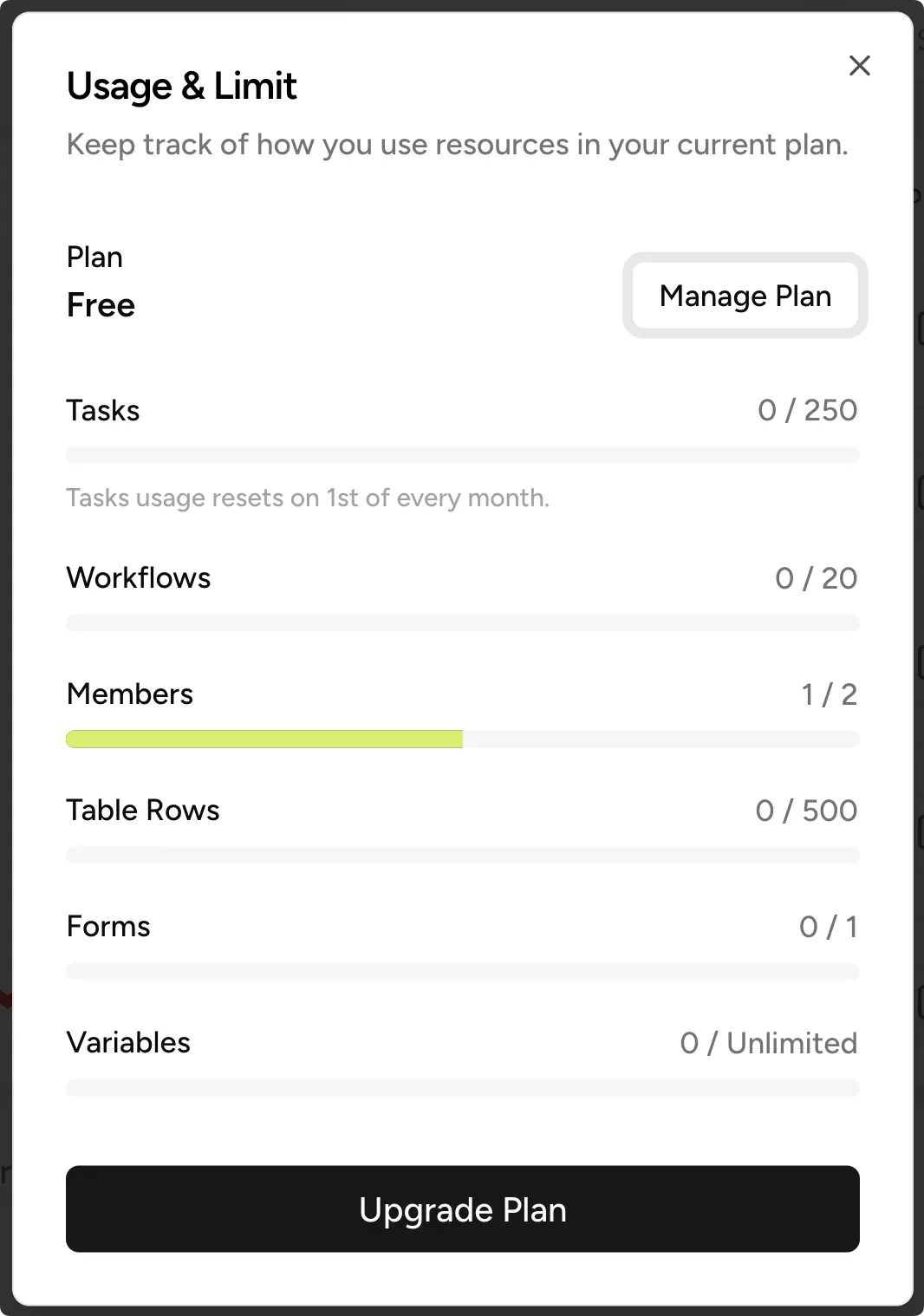
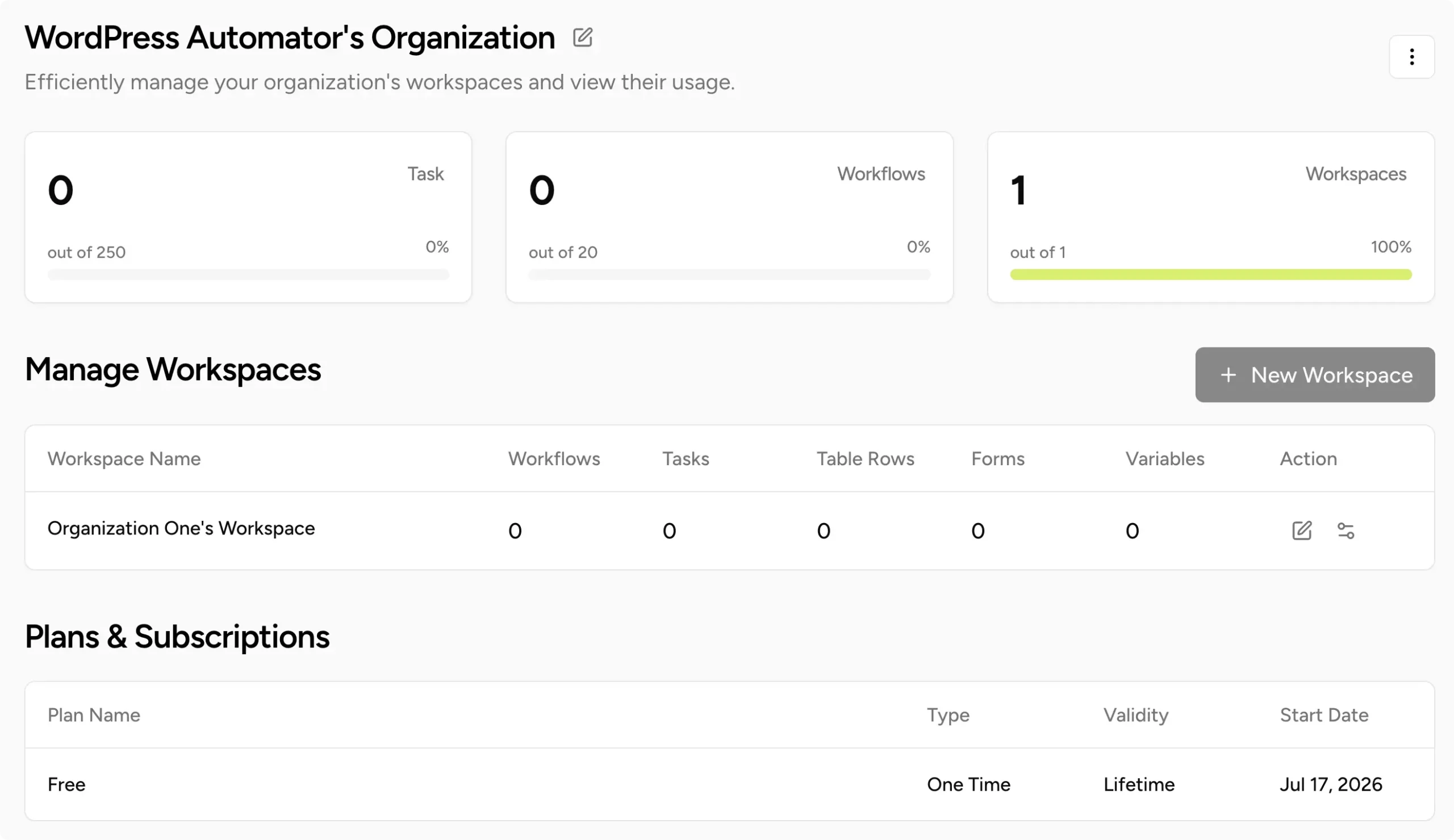
Here’s how OttoKit’s pricing breaks down:
- Free:
- $0
- 250 tasks/month
- 20 workflows
- Pro:
- $9/month billed annually, or $12 month-to-month
- 1 workspace (equivalent to 1 client environment)
- 5,000 tasks/month
- 5 WordPress connections (equivalent to 5 client sites)
- Business:
- $19/month billed annually, or $24 month-to-month
- 5 workspace (equivalent to 5 client environments)
- 10,000 tasks/month
- Unlimited WordPress connections
- Business Plus:
- $39/month billed annually, or $49 month-to-month
- Unlimited workspace (equivalent to unlimited client environments)
- 30,000 tasks/month
- Unlimited WordPress connections
- Lifetime:
- $499 (Pro)
- $799 (Business)
- $1,499 (Business Plus)
(Prices in USD, checked September 2026. See OttoKit’s pricing page for current rates.)
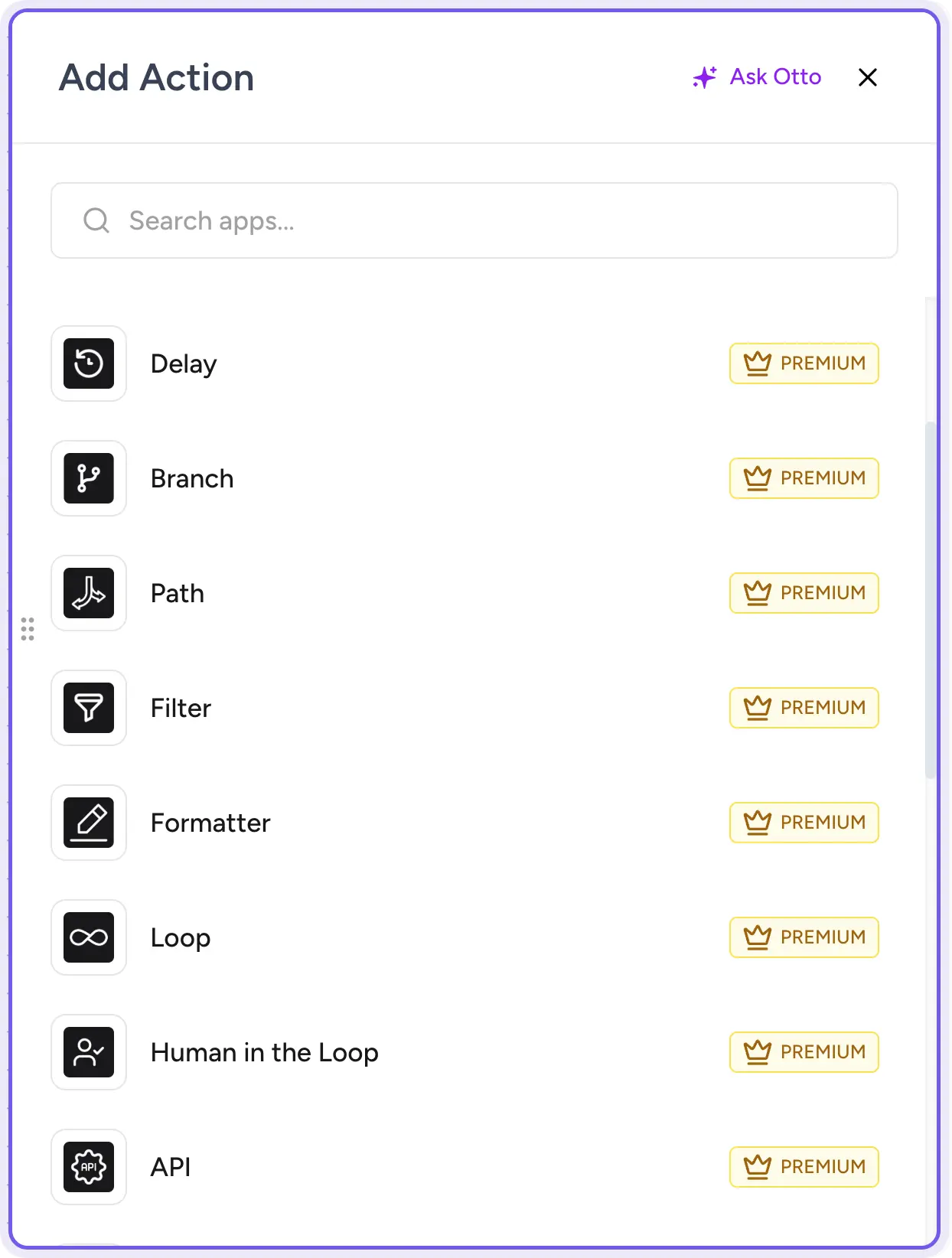
One detail worth knowing before you build anything ambitious: features that are essential to building custom/functional workflow automations aren’t in the Free or Pro tiers at all. Path/Branch (conditional routing), Loop, the API module, and human-in-the-loop approvals require at least a Business plan, ranging from $19-$24 a month.
What OttoKit Does Well
I promised to point out where OttoKit earns its keep, and there’s a fair bit to mention.
The visual canvas is polished. If you like building automations on a flowchart, you’ll like using it. The app catalog is broad, too. It reaches into the long tail of cloud services that smaller platforms skip. And, at $9 a month, the Pro plan is affordable for small and growing businesses — though lacking in some essential features.
The AI roadmap also deserves credit. OttoKit offers AI Agents that can decide and act inside a workflow, approval steps that keep a human in the loop, and an MCP server. And if you look after many sites, one central engine is considerably easier than installing one on every site.
Where OttoKit Falls Short, and Who It’s Best For
Every plan meters tasks, and lifetime licenses are no exception. Further, Path, Branch, Delays, Filters, and other automation-essential features are restricted to Business plan and higher tiers. That’s a serious limitation for solopreneurs, marketing teams, and other non-agency users.
Businesses operating in privacy-sensitive fields or that regularly deal with GDPR and CCPA regulations will also have to consider that data will be processed and logged off-site.
And because the plugin is only a bridge, there’s a ceiling on how deeply OttoKit can see into your site and plugins. For building custom workflow automations, that’s a real limitation.
However, none of these drawbacks are signs of a sloppy product. They’re the natural consequences of running the engine in the cloud instead of on your site.
None of this is disqualifying for OttoKit. If you look after several WordPress sites, your workflows are mostly app-to-app, and your volume is steady, OttoKit is a perfectly reasonable choice.
What Is Uncanny Automator?
Uncanny Automator is the #1 WordPress AI and automation plugin, trusted by 50,000+ websites. Unlike OttoKit, it runs inside your site. There’s no account to create before you start, and no second dashboard to learn.
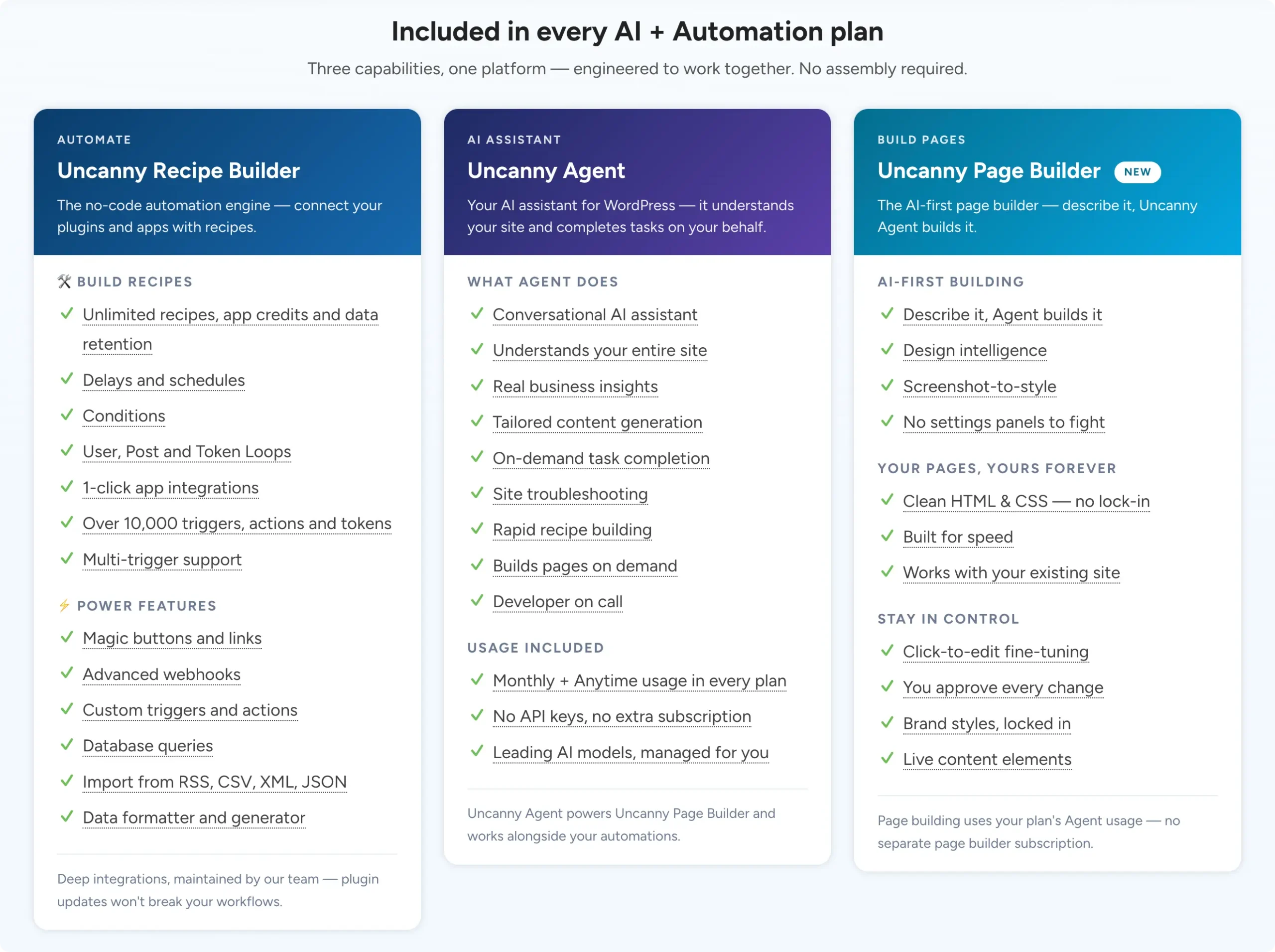
Additionally, Automator gives you three equal capabilities:
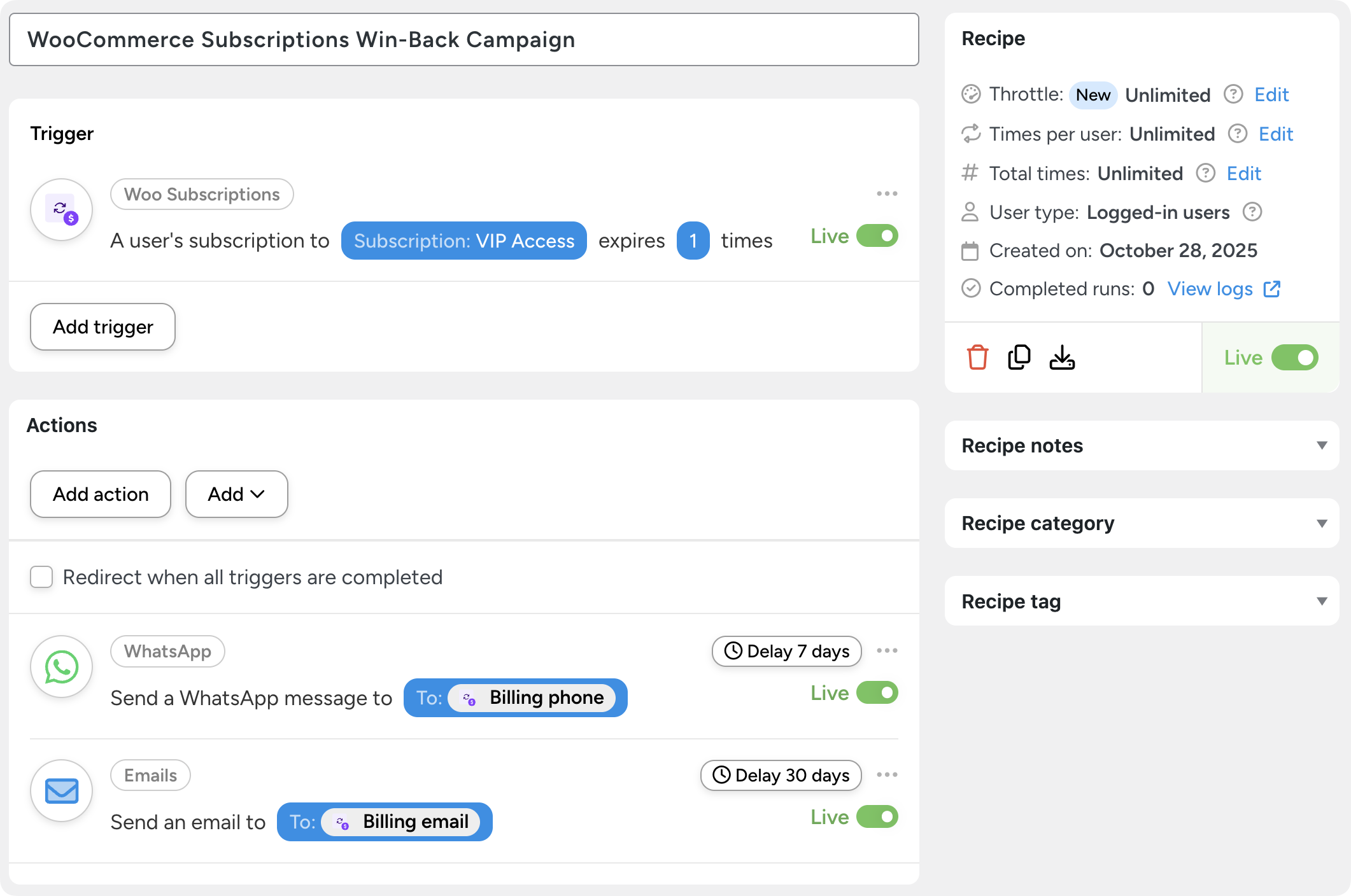
- The Recipe Builder is the automation engine. You build recipes (that’s what we call automations) from triggers and actions.
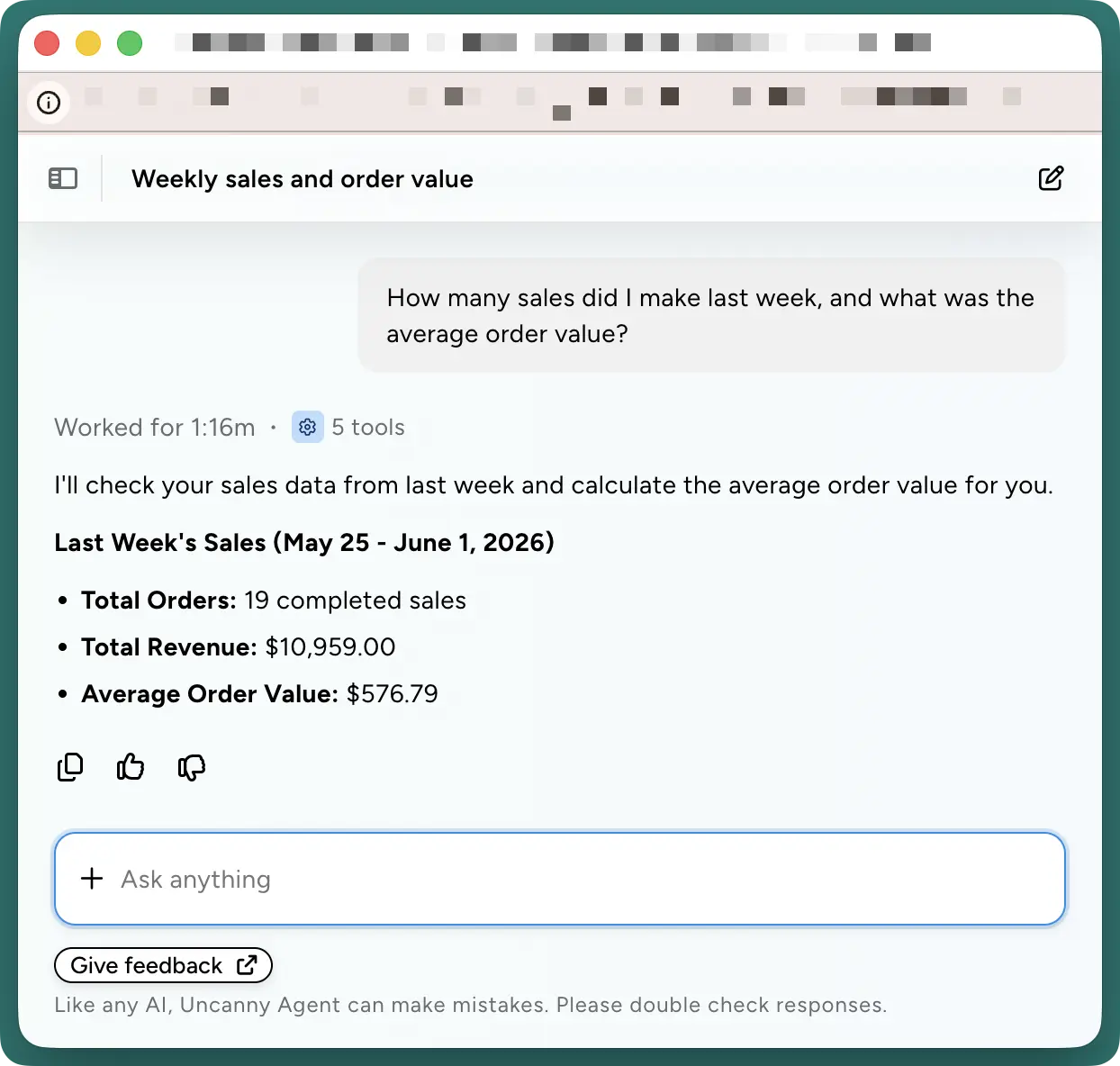
- Next, Uncanny Agent is an AI assistant built into WordPress that can handle your one-off tasks (“Write a blog post about my latest product release and publish snippets to my social media accounts.”), build your recipes, and surface data such sales, course completions, site traffic, and more from a simple question.
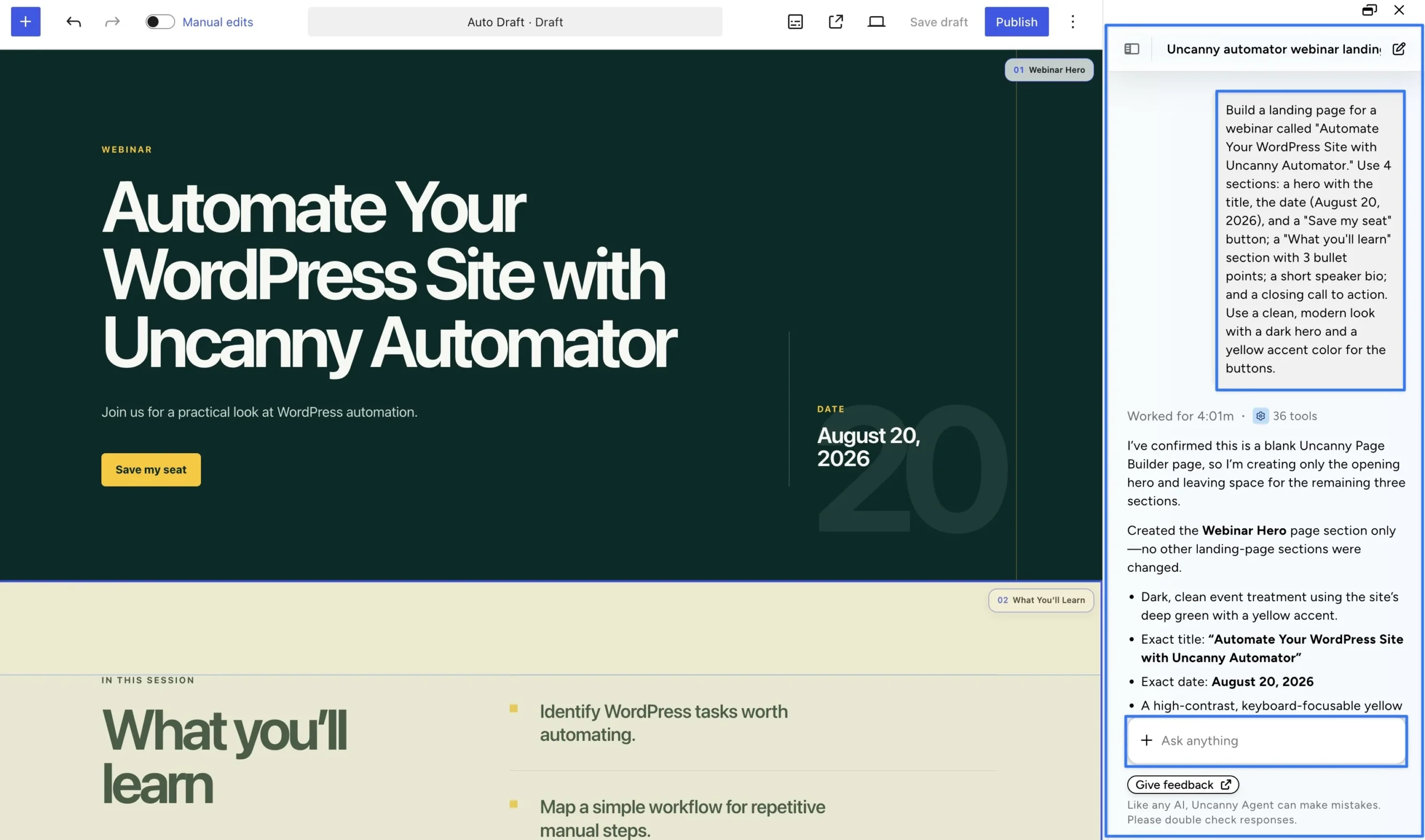
- And then there’s Uncanny Page Builder, an AI-first page builder for WordPress that turns prompts into pages — fully designed, totally on-brand, and built entirely using portable, lightweight HTML and CSS.
Here’s how Automator’s pricing compares:
- Uncanny Automator Lite:
- $0: unlimited recipes, 250 app credits (for using third-party integrations), plus starter usage for Uncanny Agent
- 1 WordPress site license
- Unlimited recipes
- Basic:
- $25/month billed annually
- Unlimited app credits and Standard Monthly + Anytime Agent usage
- Unlimited recipes
- Plus:
- $40/month billed annually
- 10 WordPress site licenses + multisite
- Everything in Basic + 2x Agent usage
- Custom User Fields, Restrict Content, and User Lists addons
- Elite:
- $60/month billed annually
- 50 WordPress site licenses + multisite
- Everything in Basic + 4x Agent usage
- All Plus addons + Elite Integrations and Dynamic Content addons
(Prices in USD, checked September 2026, for AI + Automation plans. Legacy automation-only plans are also available.)
WordPress-Native Automation vs Cloud Automation
OttoKit’s own FAQ puts it plainly: “All the heavy lifting necessary for automations is done on the cloud platform.” It watches for events, ships them to OttoKit’s servers, and waits for instructions back. If you’re primarily concerned about clogging up your hosting, that might sound like a good thing.
However, if you have average-to-premium hosting, then shipping your automations off to OttoKit’s servers comes with some drawbacks:
- Task metering. Every action a workflow completes consumes a metered task. That isn’t a pricing gimmick. It’s how cloud platforms manage their server costs.
- Shallower integrations. An external automation engine can only automate what is sent to it. An engine inside WordPress sees everything your plugins do — meaning more triggers, actions, and token data per integration.
- Off-site data processing. Your form entries, customer details, and order data all travel to OttoKit’s cloud to be processed and logged.
- Reliability and troubleshooting. Your automations wait when OttoKit’s servers are busy or unreachable. And the logs you’d use to diagnose that live on their servers for a limited period of time, then they’re cleared.
Automator takes the opposite approach:
- Unlimited automations: Because Automator lives on your WordPress site, it can leverage your existing hosting capacity. That’s what makes unlimited recipes possible, even with Automator Lite.
- Deep integrations: Automator can see the events happening within your WordPress site because it is already there. That translates to more granular triggers, actions, filters, and tokens. Think quiz-score level data as opposed to just course-level data.
- Data security and privacy: There’s no polling and no round trip. Your data and your customers’ sensitive data stay within an environment that you control.
- Reliability and troubleshooting: You determine how long you want to keep your logs, and get detailed, field-level reports for each recipe run.
OttoKit vs Uncanny Automator Pricing: Metered Tasks vs Flat Rate
Task metering is the first bullet we discussed in the previous section — because it’s the one you feel soonest. So let’s put real numbers to it.
OttoKit’s rule is simple. Every action a workflow completes counts as one task. Triggers are free, and actions are metered. Automator doesn’t meter anything: every plan, including the free Automator Lite, runs unlimited recipes.
That difference is invisible if you’re only running a handful of automations every month. But it becomes a tangible pain point as you scale your operations and try to grow.
Here’s roughly where each platform lands for five common setups.
| Your site | Approx. monthly tasks | OttoKit plan | OttoKit $/year | Automator plan | Automator $/year |
|---|---|---|---|---|---|
| Side project, ~50 form fills a month | ~150 | Free | $0 | Lite | $0 |
| Small business, orders plus forms | ~3,200 | Business* | $228 | Basic | $300 |
| Membership or LMS site; 2,000 members | ~12,000 | Business Plus | $468 | Basic | $300 |
| WooCommerce store; 1,500 orders a month | ~15,000 | Business Plus | $468 | Basic | $300 |
| Agency running 10 client sites | ~30,000 | Business Plus (at the cap) | $468 | Plus | $480 |
*OttoKit Pro covers that task volume for $108. But Path, Branch, and Filter aren’t in Pro, so any workflow with conditional logic needs Business.
Task counts are illustrative, based on three to six actions per workflow run. Your own numbers may differ. Plan prices are annual billing, checked September 2026.
Task counts are illustrative, based on three to six actions per workflow run. Your own numbers may differ. Plan prices are annual billing, checked September 2026.
Three things stand out.
OttoKit genuinely wins the second row, and it’s worth saying plainly. For a small business with predictable, low volume, $228 beats $300 if all you need is workflow automation.
The asterisk matters more than the volume. Most useful automations have a condition in them somewhere — send this only if the order is over $100, only if the member is still active, or only if the shipping address is in a specific country. The moment you need that, OttoKit’s entry price is $228, not $108.
The crossover arrives around 10,000 tasks, and it doesn’t reverse. Above that, you’re paying more every year and still working inside a ceiling. Automator’s number stops moving.
One last thing on the free tier, because it’s easy to assume free means crippled. Automator Lite includes starter usage of Uncanny Agent alongside those unlimited recipes. No API key, no separate AI subscription. Roughly, that monthly allowance covers a few hundred recipes, over a hundred blog post drafts, or dozens of images — about 60% of what a Basic plan covers. Your mileage will vary with your site and your prompts, but the output (for free) is real.
Install Automator Lite >>>
See Uncanny Automator pricing >>>
OttoKit vs Uncanny Automator Integrations: Counting Apps vs Abilities
OttoKit’s WordPress.org listing advertises 1,500+ apps, and the catalog behind that number is strong. On the app side you’ll almost certainly find the apps in your tech stack — from Xero to Zendesk. On the WordPress plugin side, you’re also covered — WooCommerce, LearnDash, FluentCRM, SureMembers, etc.
So let me concede the obvious point: if you need a long tail of cloud apps across many sites, OttoKit covers a lot of ground.
But big integration numbers deserve a closer look. Most WordPress sites don’t use anything like 1,500 apps. A typical stack looks more like this:
- A form-building plugin (WPForms, Gravity Forms, Fluent Forms)
- An eCommerce plugin (WooCommerce, Easy Digital Downloads)
- A CRM or email platform (FluentCRM, Mailchimp, ActiveCampaign)
- An LMS or membership plugin (LearnDash, MemberPress)
- A few cloud apps (Google Sheets, Slack)
- An AI service (OpenAI, Anthropic, Gemini)
- A handful of social channels (LinkedIn, X, Meta products)
That’s 10 to 20 tools at the high end. So the question that genuinely matters isn’t whether a platform supports 1,500 apps. It’s how deeply it supports the 15 you use every day.
Architecture shapes integration depth, too, and that part gets overlooked. An engine inside WordPress can see everything your plugins do. An engine in the cloud sees only what the bridge forwards. That means that WordPress-native automation gives you more triggers, more actions, more conditions/filters, and more data than a cloud service.
For example, compare OttoKit’s list of 15 LearnDash triggers with Automator’s 26 that can surface quiz score level data into your automations.
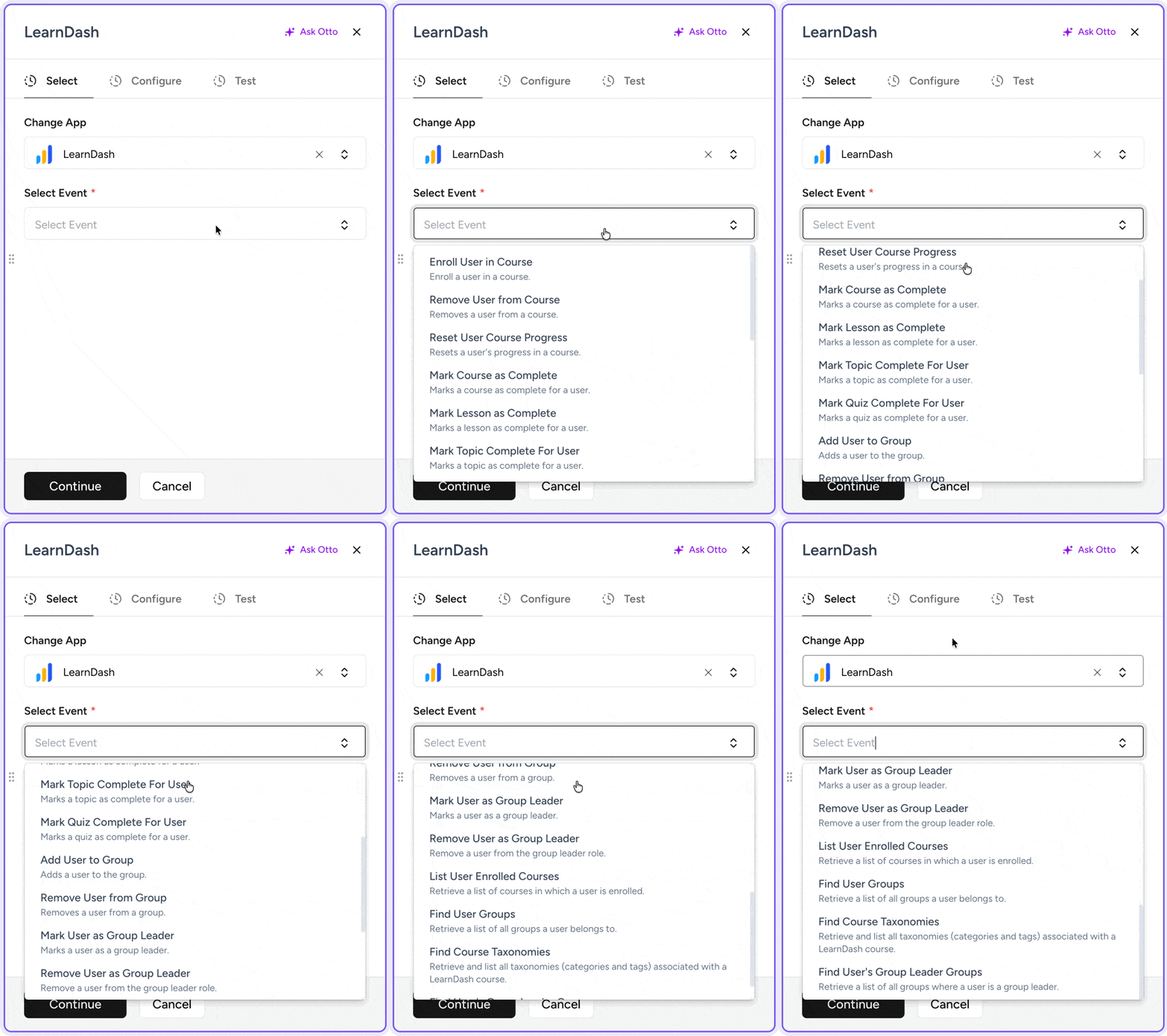
And then there’s Automator’s:
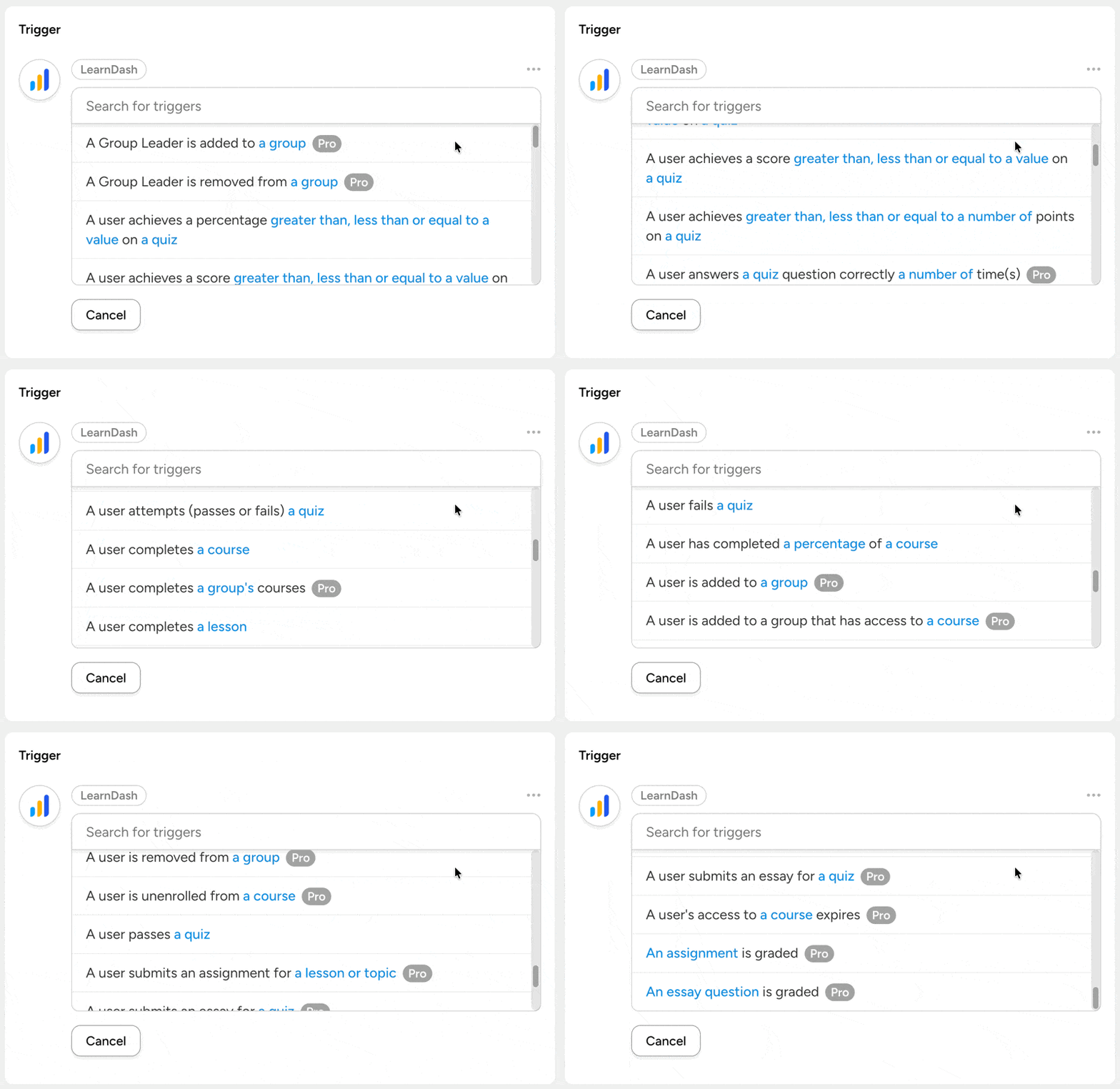
And that’s to say nothing of Automator’s pre-built, plugin-specific filter conditions and data tokens.
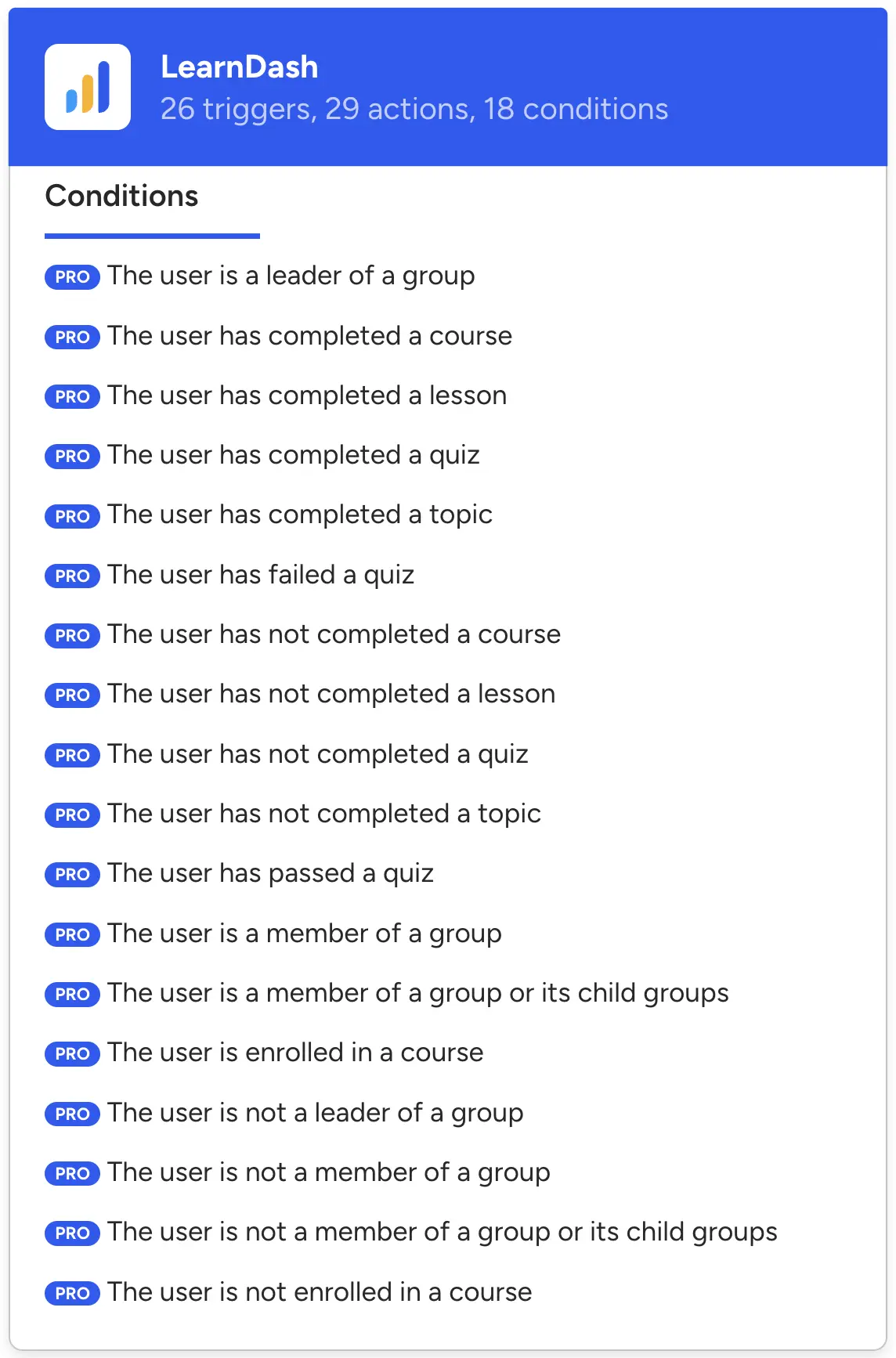
That depth scales across the catalog: Automator currently offers 966+ triggers and 825+ actions across 246+ integrations, plus conditions and loop filters for controlling exactly when an action runs, on who or what, and how.
A bridge plugin will always struggle to replicate that. It can only relay the events it was built to relay.
Filling Gaps with Webhooks
But what about apps Automator doesn’t cover? That’s what webhooks are for. Automator Lite includes outgoing webhooks, so any recipe can push data to any service with an API — unlimited, and free. Incoming webhooks let outside services start your recipes, and those come with Automator Pro.
In our experience, a webhook recipe gets you most of the way there for almost any unsupported app.
Data Ownership and Privacy: Where Your Workflows Live
Off-site data processing was the third bullet we had previously explored—and it’s not just something for the tech-heads amongst us to geek out over.
Because OttoKit runs your workflows from the cloud, it needs a way into your site. That doorway represents a point of attack that a self-hosted plugin simply doesn’t have. And that vulnerability is not theoretical. In 2025, that doorway became CVE-2025-27007, a security incident that let total strangers make themselves administrators on any site running OttoKit. That means hackers could reach everything: your content, your customers, your orders.
OttoKit patched it quickly and WordPress.org force-updated most sites, but attackers were hunting for the stragglers within two hours.
To be clear, any plugin can ship a flaw, and Automator is no exception. However, because Automator runs automations within your own hosting environment, the points of attack are far fewer. Your data never leaves your site. For third-party app actions, Automator uses an encrypted relay that doesn’t retain anything. You can read exactly how that works in our data privacy and GDPR documentation.
That distinction matters most if you’re an agency with data protection duties written into client contracts, an EU-based site working through data-processor requirements, or a membership or LMS site holding learner records.
For everyone else it’s a preference. For those three, it’s a requirement — and requirements are easier to meet when the data never travels.
Performance, Reliability, and Logs
Every OttoKit automation includes a round trip to the cloud and back. That means that your workflow automations are reliant on a third-party service being up when you need it.
Automator’s recipes run on native hooks instead, so the trigger fires and the action happens inside WordPress at the moment you want it to. Actions that call outside services run in the background, which means your pages never wait on an API call.
Here’s the honest counter-caveat. High-volume recipes on cheap shared hosting do use your server’s resources. Heavy automation deserves hosting to match. That’s fair advice whichever plugin you choose.
Then there’s logging. It rarely makes anyone’s marketing page, but it matters if and when automations misfire for whatever reason. Automator keeps a log of every run on your site, with detailed reports for every trigger, action, and filter condition.
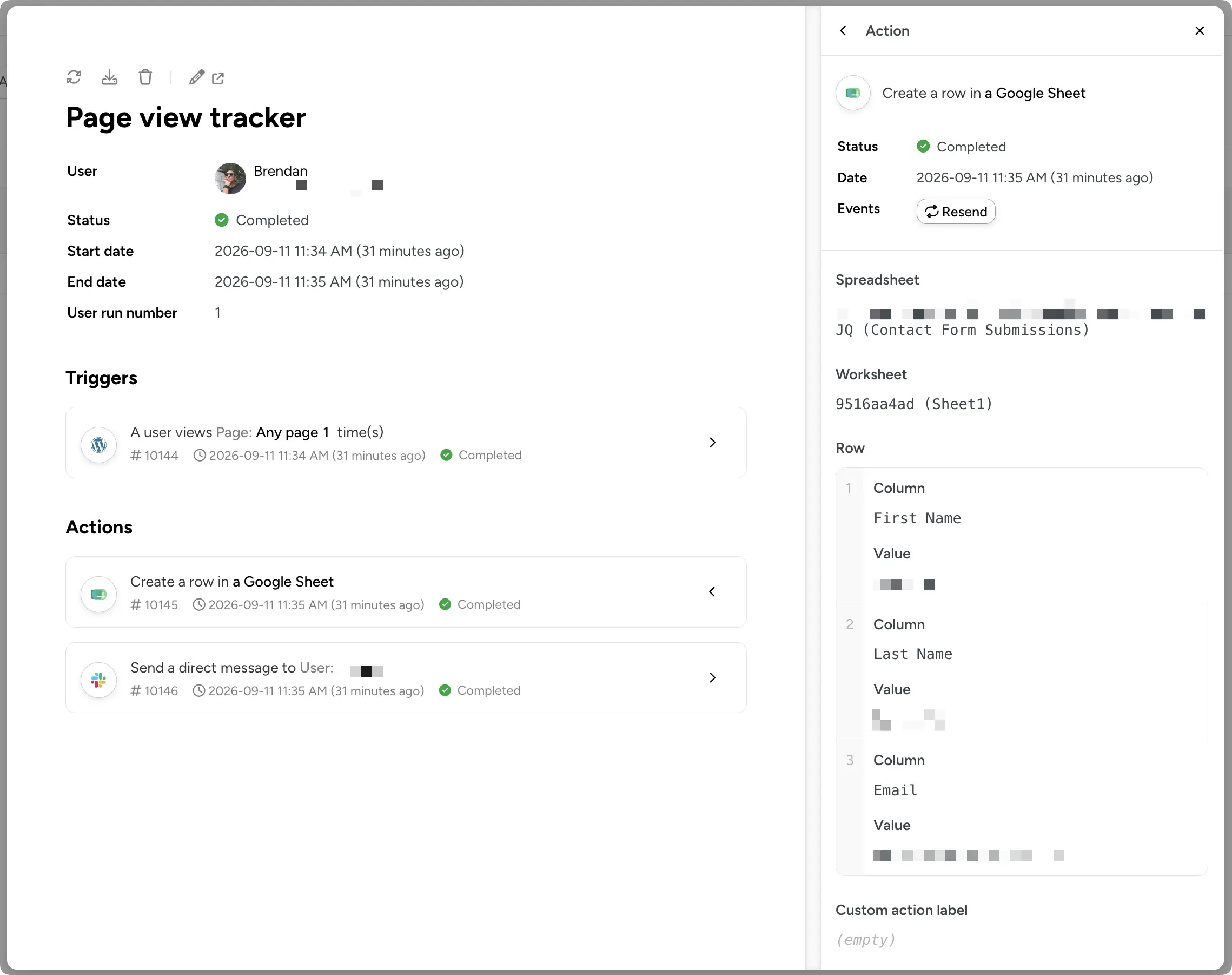
Unlike with OttoKit, you decide how long to keep your logs. When you’re investigating a support ticket or mismatched records, having detailed historical logs is how you find an answer.
AI Capabilities: OttoKit’s AI Agents and MCP vs Uncanny Agent
Both platforms are investing heavily in AI, and this one isn’t a consequence of where the engine runs. It’s a straight capability comparison.
OttoKit’s AI Tools
OttoKit has leaned hard into AI, and the roadmap is ambitious. There are AI Agents that decide and act inside workflows, approval steps that keep a human in the loop, an MCP server, and AI workflow steps.
If you’re building AI workflows across dozens of apps, there’s real capability here. I’d read the billing fine print, though. AI actions draw tasks from your monthly quota. So your most intelligent workflows are also your most expensive ones. And approval steps need Business or above.
Uncanny Agent: An AI Assistant Built Into WordPress
Uncanny Automator introduced AI integrations (OpenAI, Anthropic, xAI, Gemini, etc.) all the way back in its 4.1 release (early 2023). Since then, Automator has drastically expanded its AI capabilities, becoming the most powerful and cost-effective solution for WordPress sites to leverage AI.
In addition to AI integrations, Automator launched Uncanny Agent, the built-in AI assistant for WordPress. As with other AI capabilities for automation tools, Agent allows you to build recipes from plain text. Agent can also handle your one-off requests and help you surface critical business and site information without clicking through menus.
When you need to investigate why that recipe misfired three months ago, ask Uncanny Agent instead of rooting through the logs yourself.
Automator Lite users get starter usage, and Basic, Plus, and Elite users get progressively more. Because Agent lives in wp-admin, it works where your data already is: nothing to connect, sync, or export, and no separate AI subscription to buy.
So which approach is better? It depends where your work happens. Cloud agents shine when automations span dozens of cloud tools. An assistant that lives with your data shines when the job is managing your WordPress site. If you’ve read this far, that’s probably the job.
Learn more about Uncanny Agent >>>
Beyond Automation: Addons and Extras
Both OttoKit and Uncanny Automator reach beyond trigger-and-action automations — but they reach in opposite directions. OttoKit adds a database and a form builder in its cloud. Automator includes addons that run on your own site, plus a page builder.
OttoKit
- OttoKit Tables — a built-in database with typed fields, a little like a lightweight spreadsheet. Workflows can trigger when a record changes, and later steps can read any field. Rows live in OttoKit and are capped by plan, from 500 on Free to 50,000 on Business Plus.
- OttoKit Forms — a drag-and-drop form builder with 17 field types, which you can also generate from a plain-language description. Submissions write into a linked OttoKit Table along with a timestamp and IP address. The free plan covers one form.
Uncanny Automator
- Custom User Fields (Plus and above) — define your own user profile fields, like “Company”, “Phone number”, or “Renewal date.” Each saves as standard WordPress user meta and becomes a token that you can use in triggers, actions, and conditions in your recipes. Currently, it supports text values only.
- User Lists (Plus and above) — named mailing lists inside WordPress, with a built-in “Unsubscribe” feature that feeds into Automator’s recipes. It manages lists and subscriptions rather than sending campaigns.
- Restrict Content (Plus and above) — access levels that gate whole pages, single Gutenberg blocks, or inline content, granted and revoked by your recipes. It’s the access layer, not a commerce plugin: no payments, subscriptions, or expiry dates.
- Dynamic Content (Elite) — named content blocks that your recipes rewrite, for one user or for everyone, updating without a page reload.
- Elite Integrations (Elite) — Salesforce and QuickBooks Online actions for your recipes.
Uncanny Page Builder
We already mentioned Uncanny Page Builder in the “What Is Uncanny Automator?” section. It’s worth mentioning here again because it is a genuine plugin-replacement capability that sets Automator apart from all other automation tools, cloud-based or not.
Build pages from simple text prompts, or give Uncanny Agent a screenshot of a site you want to emulate. You get back fully designed, publish-ready pages. Set your brand values once — colors, fonts, logo, spacing, button styles — and Agent builds every page to match.
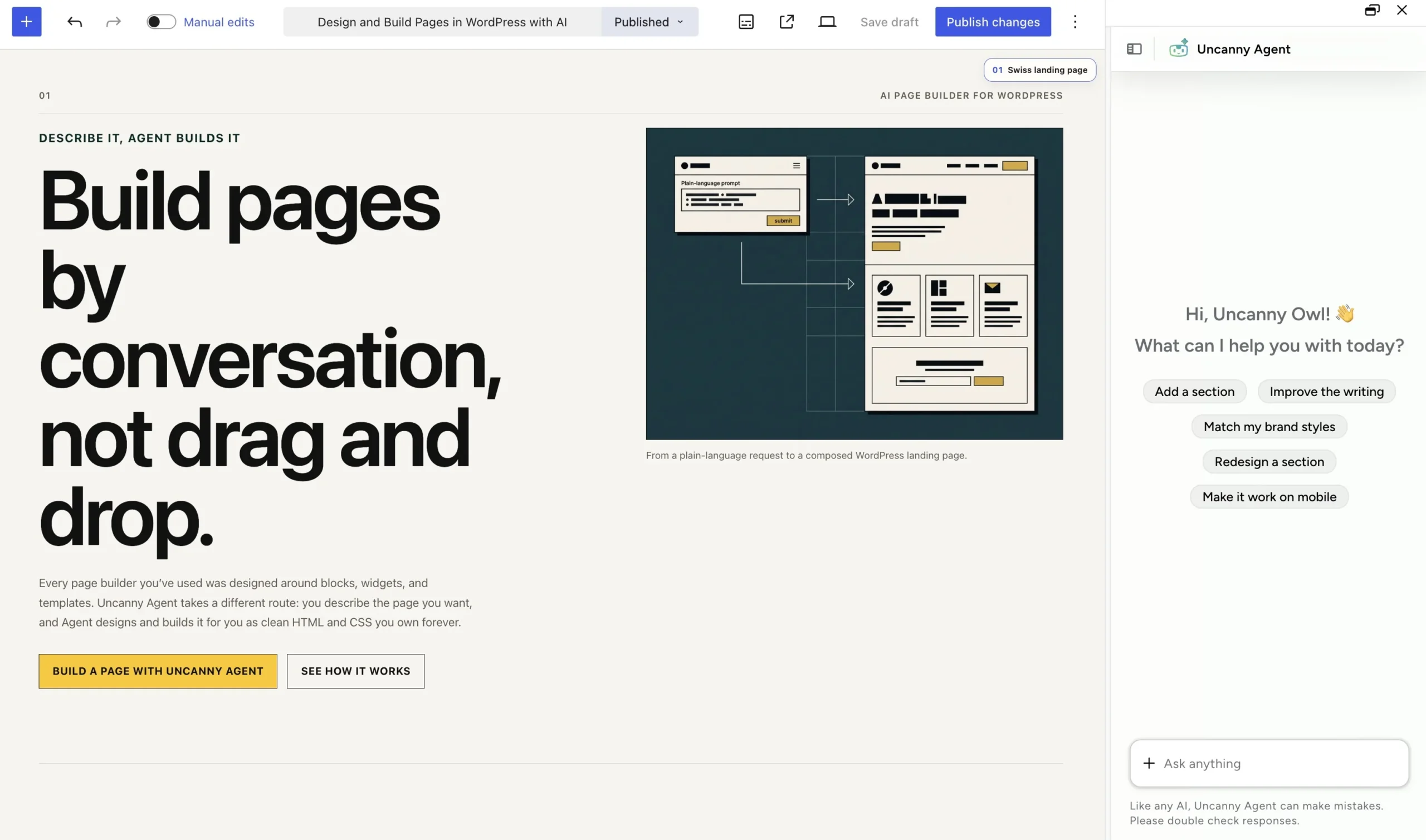
For solopreneurs — and even agencies with ongoing content obligations to their clients — Page Builder is a gamechanger. Lightweight, fully-portable HTML and CSS that you can host anywhere, even outside of WordPress.
It’s included in every AI + Automation plan. Given that standalone WordPress page builders start at about $60/year for a single-site license, Page Builder changes the cost comparison between Automator and every other automation tool. Instead of a direct head-to-head, the question becomes “how much more is Uncanny Automator saving me?”
So here’s the one-line version. OttoKit’s extras store your data for you. Automator’s addons let you store, segment, gate, and personalize on your own site — and build the pages while you’re there.
See everything included with Automator Pro >>>
Switching from OttoKit (SureTriggers) to Uncanny Automator
If you’ve decided to make the move, here’s some good news. Migrating is mostly a mapping exercise rather than a rebuild:
1. Start with an inventory. List your OttoKit workflows and note the apps each one touches. Then flag any that rely on cloud services Automator doesn’t cover. You can either replace those SaaS apps or ask Uncanny Agent if it can build a custom integration.
2. Next, map the concepts across. OttoKit workflows become Automator recipes, and workflow steps become actions. Where OttoKit has you map data between steps, Automator uses tokens, available from any earlier step.
3. Then handle the gaps. Outgoing webhooks are free in Automator Lite and will push data to any API. Incoming webhooks in Automator Pro let outside services start your recipes. Rely on Uncanny Agent to help you find the optimal solution.
One tip from experience: rebuild your busiest workflows first. Those are the ones consuming your task quota, so they deliver the most savings immediately.
Install Automator Lite and start rebuilding >>>
Getting Started with Uncanny Automator
If reading this post brought you to the “let me just try it” point, here’s the fastest way to get going.
Get Uncanny Automator — #1 AI and automation plugin for WordPress >>>
- From your WordPress Admin Dashboard /wp-admin/, navigate to Plugins > Add new. In the search bar, enter “uncanny automator” and click Install and Activate. (This installs the free version of Uncanny Automator which must be active to use Automator Pro features.)
- Purchase your Automator Pro license from the Automator pricing page.
- Once purchased, you can download the latest version of Uncanny Automator Pro inside your Automator account.
- After downloading the .zip file, navigate to Plugins > Add New in /wp-admin/. Click the Upload Plugin button, select the Pro .zip file then install and activate the plugin.
- Once activated, be sure to visit Automator > Settings in /wp-admin/ to enter your license key (in your purchase confirmation email).
For a more detailed walkthrough, click here.
OttoKit vs Uncanny Automator: Which Should You Choose?
By now you’ve probably noticed the pattern. The question was never “which tool is better?” It’s “which tool is better for what you’re trying to do?”
Choose OttoKit If…
- You orchestrate many WordPress sites from a single cloud dashboard
- Your workflows are mostly app-to-app, with WordPress as one node
- You want an affordable entry into cloud automation and your volume is low and steady
- You’re already invested in the Brainstorm Force ecosystem (Astra, SureCart, SureMembers)
Choose Uncanny Automator If…
- Your and/or your clients’ automations center on one or a few sites and the plugins that power them
- You never want to count tasks, or find automations stopped mid-month
- You want your data to stay on your own server
- You want to consolidate your tech stack and replace single-use tools with a multi-capable plugin
- You want an AI assistant in wp-admin to help you build and manage your site
- You want a free plan with unlimited automations
So where does this leave you? OttoKit’s canvas is slick, and flowchart fans will enjoy building on it. But Automator keeps everything where your content already lives — and your data, your logs, and your integration depth come with it. For most site owners and agencies, that isn’t a close call.
Happily, it’s also one of the lowest-risk decisions you’ll make all year. Installing Automator Lite takes two minutes. Your first recipe can be live in five. No task math required.
Install Uncanny Automator Lite (free) >>>
What will you do with more time?
P.S. Still not sure which WordPress automation plugin is right for you? Check out our roundup of the best tools on the market in our ultimate Zapier alternatives for WordPress guide.
Frequently Asked Questions
What is OttoKit?
OttoKit is a cloud automation platform for WordPress, formerly called SureTriggers. You install a connector plugin on your site, but your workflows run on OttoKit’s servers rather than your own. Every plan meters the actions those workflows perform, starting at 250 a month on the free plan.
Is OttoKit a WordPress plugin?
Not exactly. OttoKit is listed in the WordPress.org plugin directory and installs like a plugin, but the plugin itself is a bridge. It watches for events on your site and forwards them to OttoKit’s cloud, where the automation engine actually runs. Uncanny Automator, by contrast, runs entirely inside WordPress.
Is OttoKit the same as SureTriggers?
Yes. Same platform, same team at Brainstorm Force, simply renamed. The WordPress.org plugin still uses the original suretriggers slug, which is why searching for either name leads to the same place.
How much does OttoKit cost?
OttoKit’s free plan covers 250 tasks a month across 20 workflows. Paid plans start at $9 a month billed annually for 5,000 tasks and rise to $39 a month for 30,000. Lifetime licenses run from $499 to $1,499, but they keep their monthly task caps.
What happens when I hit OttoKit’s monthly task limit?
Your workflows stop running until the quota resets the following month, or until you buy a task top-up. This catches people out most often on multi-step workflows, since every completed action counts as a separate task. Uncanny Automator has no task limits on any plan, so recipes never stop for volume reasons.
How does OttoKit compare to Zapier?
Both run in the cloud and meter tasks, so they share the same trade-offs: off-site processing, and costs that rise with volume. OttoKit is cheaper and built with WordPress in mind. Zapier costs more but reaches far more apps. Make sits between them on both counts, and we compare it in our best Make.com alternative for WordPress guide.
What are the best OttoKit alternatives?
Uncanny Automator is the strongest option if you want automations running natively inside WordPress with no task limits. FlowMattic suits self-hosted power users, AutomatorWP handles light plugin-to-plugin work, and WP Fusion is built for deep CRM syncing. Our Zapier alternatives for WordPress guide compares them all in detail.
Can you use OttoKit and Uncanny Automator together?
You can, and for some setups it’s a sensible division of labor. Let Automator handle in-site logic with unlimited, instant recipes. Then use OttoKit to relay events out to the long-tail apps it supports that Automator doesn’t. Automator’s outgoing webhooks, free in Lite, make that a five-minute job.
Does Uncanny Automator have a free version?
It does. Automator Lite is free on WordPress.org and includes unlimited recipes, 250 app credits for third-party integrations, and starter usage of Uncanny Agent. There’s no task cap, so a recipe built entirely from plugins on your own server can run unlimited times at no cost.

Related Posts
























































Comments (0)