

OttoKit vs Uncanny Automator — which is better for WordPress automation in 2026? An honest…
The 6 Best WordPress Page Builders in 2026 (Compared Honestly)
Looking for the best WordPress page builder in 2026? We compare Elementor, Divi, Bricks, Gutenberg, SeedProd and Uncanny Page Builder head-to-head.
If you’re searching for the best WordPress page builder in 2026, the honest answer is: it depends on what you’re optimizing for.
Nobody buys a page builder for its widget count. What you’re probably weighing is one or more of a handful of things: how will the page builder impact page speed, how fast you can build with it, what it costs over time, how much design freedom you get, etc.
So, instead of a simple list with a feature round-up, we scored WordPress page builders across eight categories: performance and page speed, ease of use, pricing, design flexibility, vendor lock-in, maintenance, ecosystem and support, and use case specificity.
Before we go further, you should know that Uncanny Page Builder — the only true AI-first entry on this list — is our product. That’s exactly why we won’t ask you to take our rankings on faith. Every claim in this comparison is fact-checked and backed up with hands-on experience.
The full scorecard is in the table below. The rest of this guide explains every call.
The 6 Best WordPress Page Builders at a Glance
Every rating from all eight categories, side by side. Winners get the trophy.
The short version: traditional drag-and-drop builders have four strong options in this table. And if you’d rather describe pages than assemble them, Uncanny Page Builder is where to start.
6 WordPress Page Builders That Keep Coming Up
We reviewed and tested a long list of page builders for this post. These six are the ones that kept winning — or coming in as runners-up — across every category we scored. They’re the shortlist.
- Uncanny Page Builder — the AI-first page builder built into Uncanny Automator. Describe the page; Uncanny Agent builds it. Included in every plan.
- Elementor — the market-leading drag-and-drop builder with the biggest add-on ecosystem. Free core; Pro from $49/yr.
- Divi 5 — Elegant Themes’ flagship, rebuilt from scratch without shortcodes. $70/yr for unlimited sites, with a lifetime option.
- Bricks — the developer favorite, known for clean, semantic output. From $79/yr, or $599 for lifetime unlimited.
- Gutenberg — WordPress core’s own block editor and site editor. Free forever, already installed.
- SeedProd — Awesome Motive’s landing page specialist, with 300+ templates. Free version; paid from $39.50/yr.
Now, the categories. Grab a coffee — we’ll keep each one short.
Performance and Page Speed
Page speed is where page builders earn their reputation — or lose it. Every layer of builder markup, every extra script, every shortcode that has to be converted to HTML on each visit adds weight. Your visitors feel it, and so do your rankings.
Winner: Gutenberg. It’s hard to beat something that isn’t there. Gutenberg (the block editor built into WordPress core) adds no extra plugin layer at all, so its pages are as light as WordPress gets. And it keeps improving with every release — WordPress 6.9 alone added accordion blocks, block notes, and more.
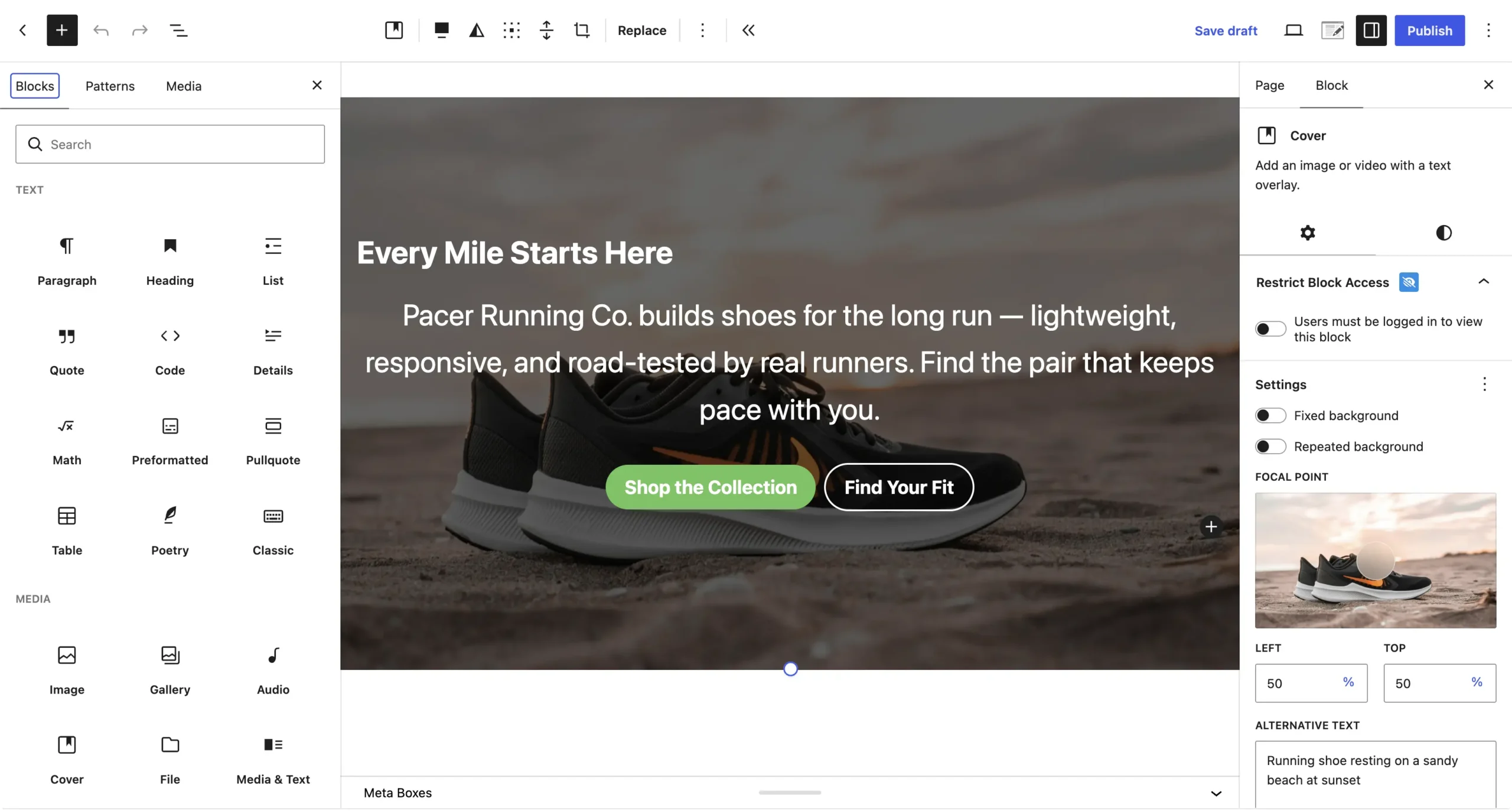
Runner-up: Bricks. Bricks was built performance-first. Its output is clean and semantic, and it’s the builder people reach for when they want a visual canvas without the weight that usually comes with one.
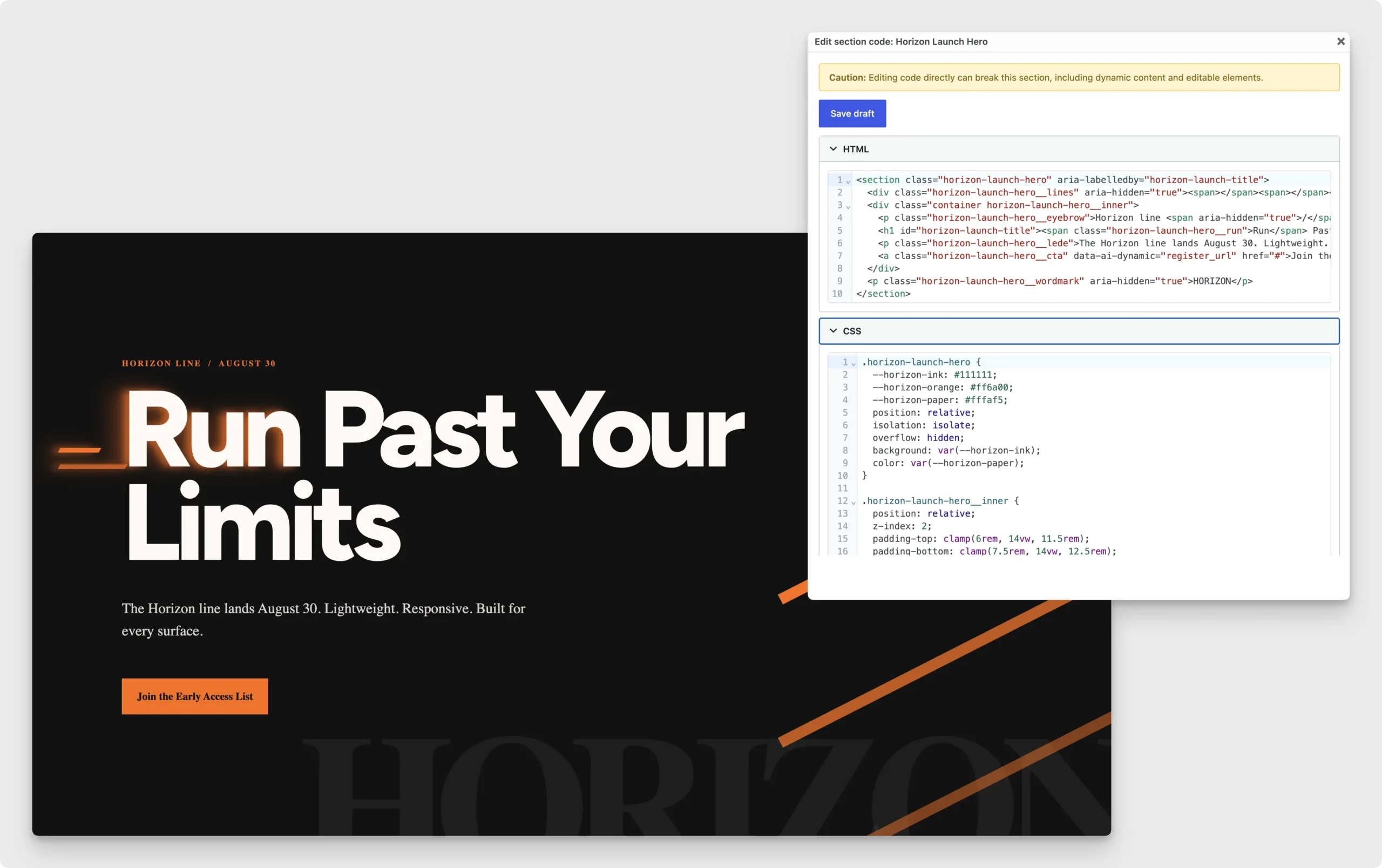
Honourable mentions: Uncanny Page Builder and Divi 5. Uncanny Page Builder outputs lean, standards-based HTML and CSS — there’s no builder engine re-processing shortcodes on every page view. Divi 5 deserves real credit too: the ground-up rebuild dropped the shortcode system that made older Divi pages heavy, and it’s a genuine leap over Divi 4. And if performance is your whole personality, Breakdance and Oxygen serve that crowd outside our six.
Ease of Use and Learning Curve
Drag-and-drop page building seems simple enough — until you drag and drop things into place. Every section, block, and widget hides a maze of settings panels. Spacing, alignment, styles, responsive elements… the list goes on. Unless you’re already a web developer, that’s a lot to learn.
Winner: Uncanny Page Builder. There’s no builder to learn here, because you don’t operate it — you brief it. Tell Uncanny Agent (Uncanny Automator’s AI assistant): “Create a landing page with a hero section, three feature cards, a testimonial slider, and a call-to-action.” It builds the page. This is prompt-to-page building — text-to-build, if you like the plainer term — and layout, content, and styling all arrive in one pass. You don’t need to bring design skills, either. Uncanny Agent supplies the design intelligence, making the layout, hierarchy, and styling calls for you.
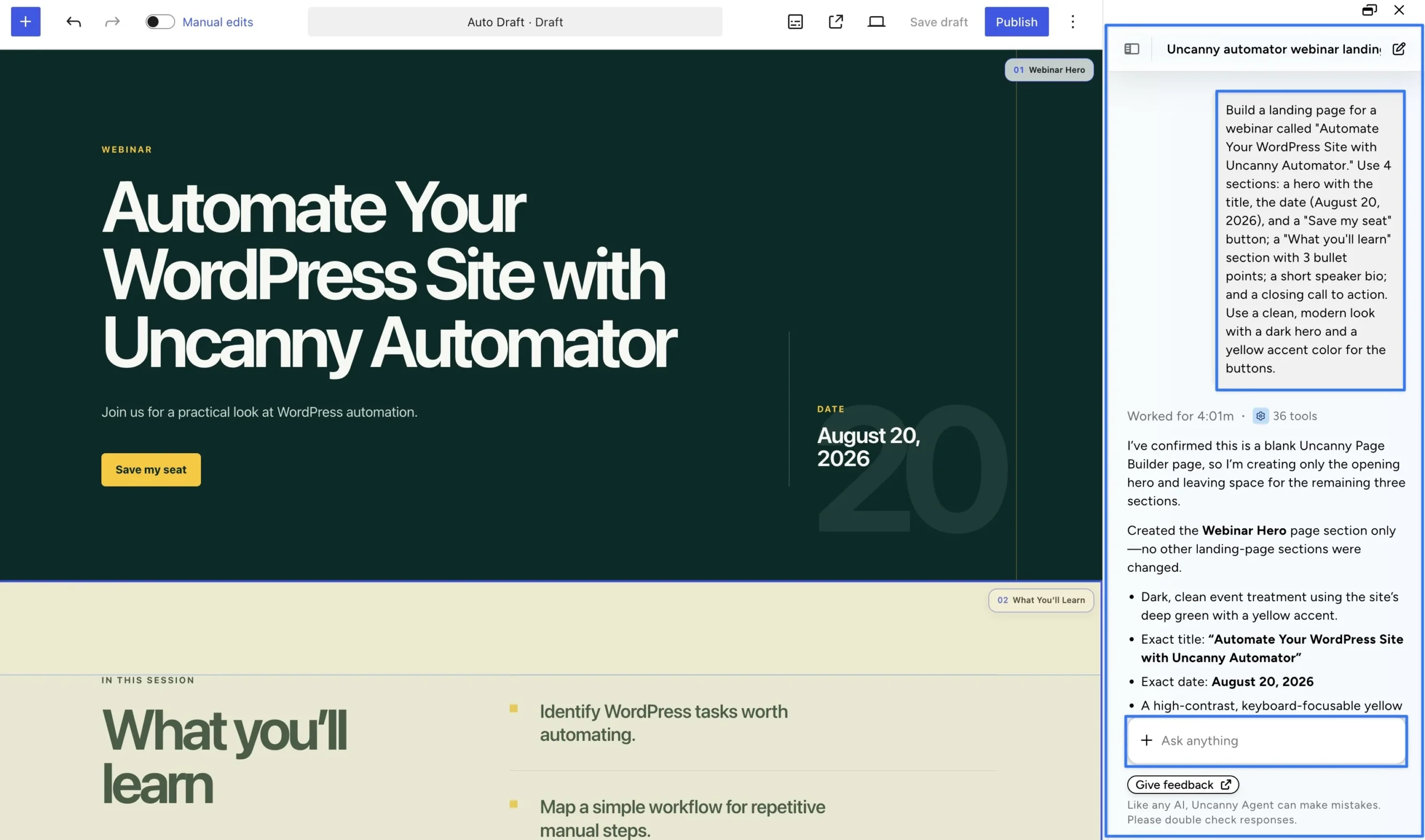
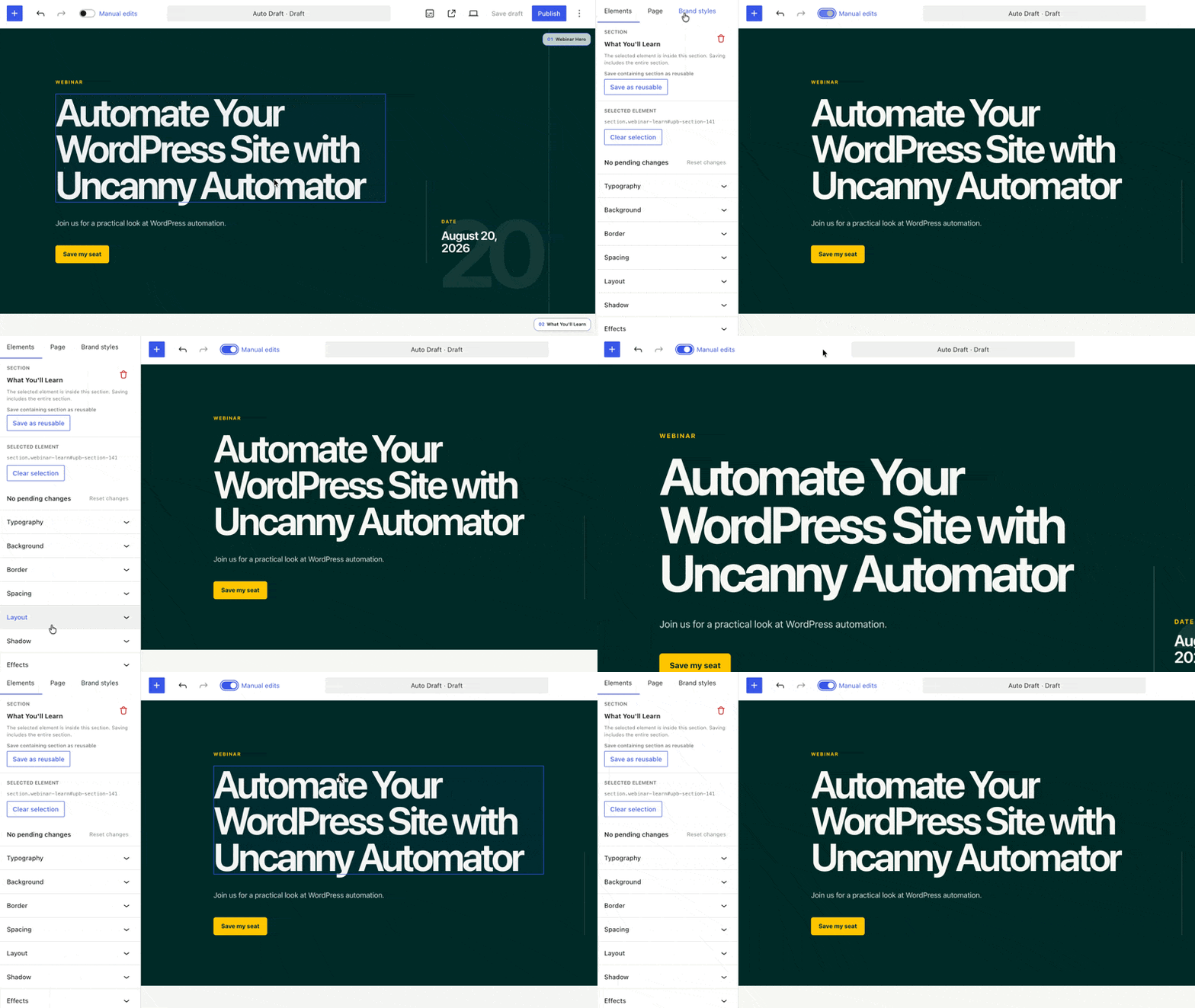
Refining works the same way. “Make the hero section taller.” “Add a FAQ section below the testimonials.” Done and done. And for quick fixes — a typo, a swapped photo — you don’t need a conversation. Click the text and edit it in place.
Runner-up: SeedProd. If you’d rather start from a template than a description, SeedProd is about as friendly as traditional building gets. It’s purpose-built for the pages beginners actually need — landing, coming-soon, maintenance. Additionally, its AI Theme Builder can generate a starting site inside its template system, which you then refine by drag-and-drop.
Honourable mention: Elementor. The canvas is familiar and the internet is stuffed with tutorials for it. The settings panels are still the settings panels, though.
Build your first page by describing it >>>
Pricing and Total Cost of Ownership
The sticker price isn’t the full cost of using a page builder. The real number includes the number of sites you want to build, your renewals, and your addons.
Winner: Divi 5. One membership, unlimited sites, $70 a year (when on sale). There’s also a $199 lifetime option, and layout packs are included. If you run more than a handful of sites, the per-site math is simply unbeatable. Divi AI is included with the Divi Pro bundle ($199/yr, with unlimited usage), and the core Divi membership stands on its own.
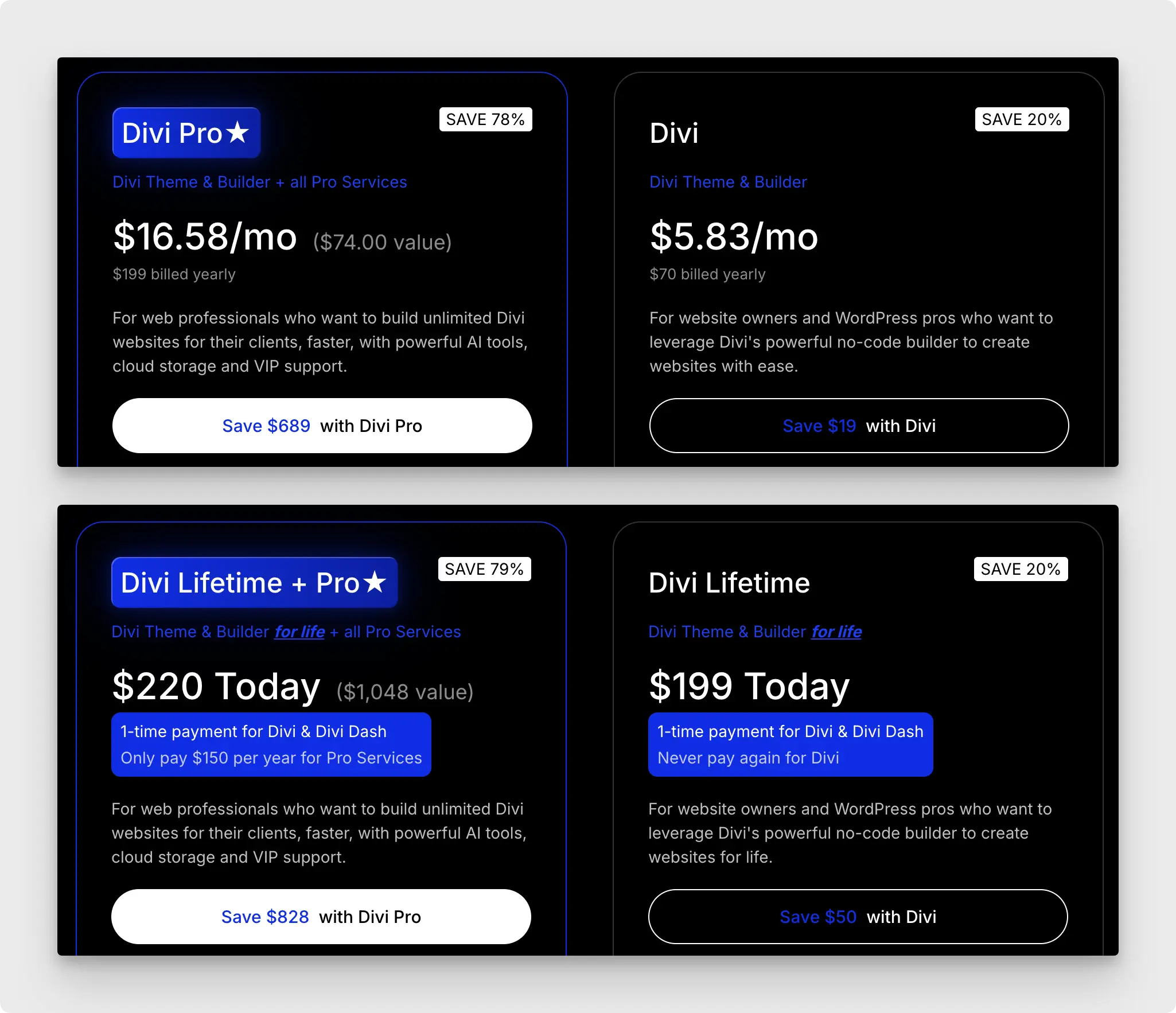
Runners-up: Bricks and Uncanny Page Builder. Bricks earns its spot with a $599 lifetime-unlimited deal and a refreshing policy: every plan gets every feature. Uncanny Page Builder earns its spot by bundling — one Uncanny Automator subscription covers page building, workflow automation, and an AI assistant. Recipe Builder, Uncanny Agent, and Page Builder are three capabilities of one plugin, which can replace two or three separate line items on your credit card statement.
Honourable mentions: Gutenberg and SeedProd. Gutenberg costs exactly $0 forever, which is the baseline every paid builder has to beat. SeedProd starts at $39.50/yr (regularly $79).
Design Flexibility vs. Templates
Traditional page building offers you a choice: start from a template and risk looking like everyone else, or design from scratch and hope you brought the skills.
Winner: Elementor. It covers both ends of that spectrum better than anyone. The template and kit library is the largest in WordPress, and the design controls run deep — theme building, popups, forms, motion effects, the works. Elementor AI adds generated copy, images, and layout suggestions right inside that workflow. Whatever you can picture, there’s probably a path to it in Elementor.
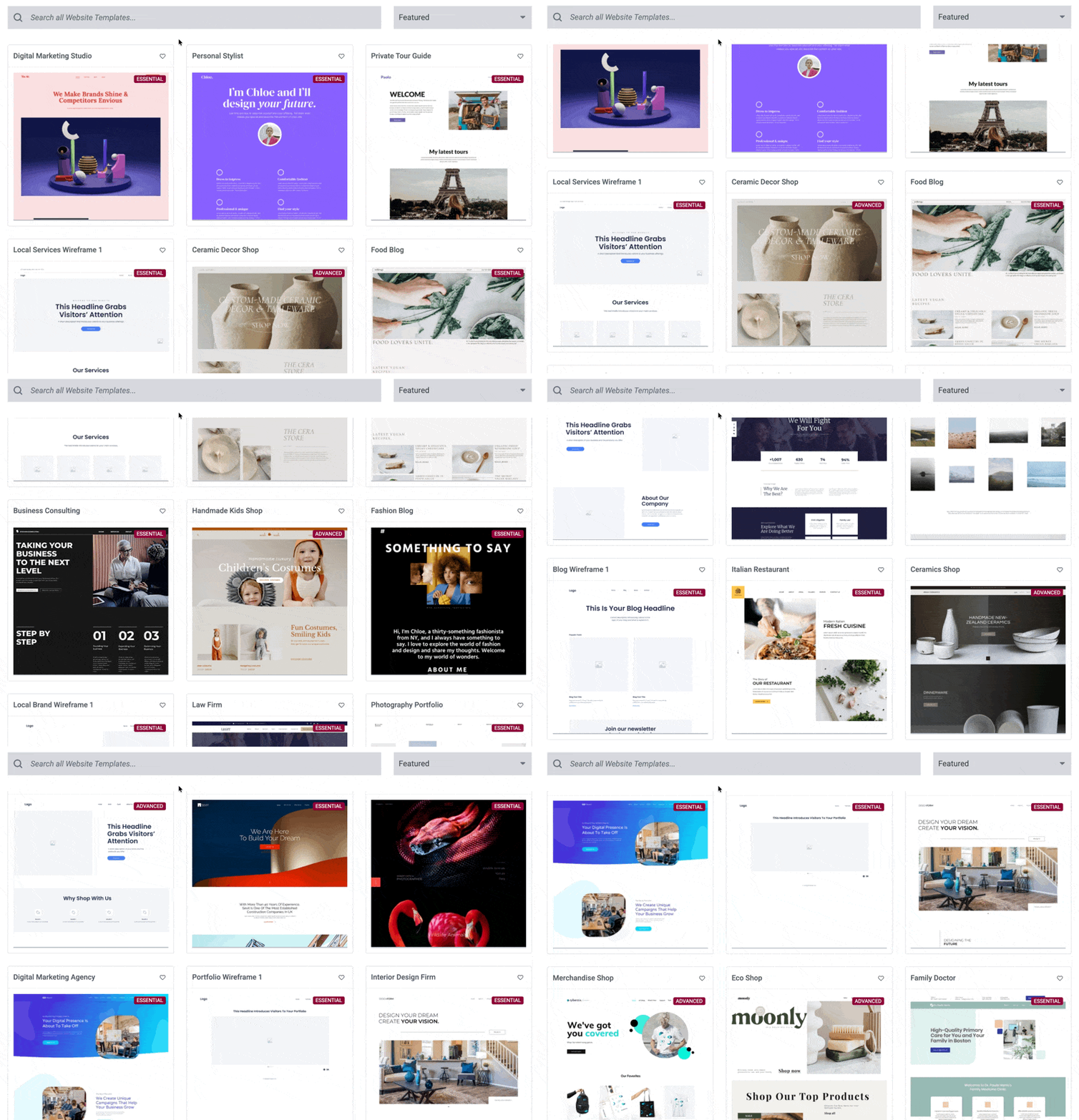
Runners-up: Bricks and Divi 5. Bricks gives technical builders total control — real flexbox and CSS grid layouts, conditions, and interactions. Divi 5 counters with an enormous layout pack library backed by global variables and design presets.
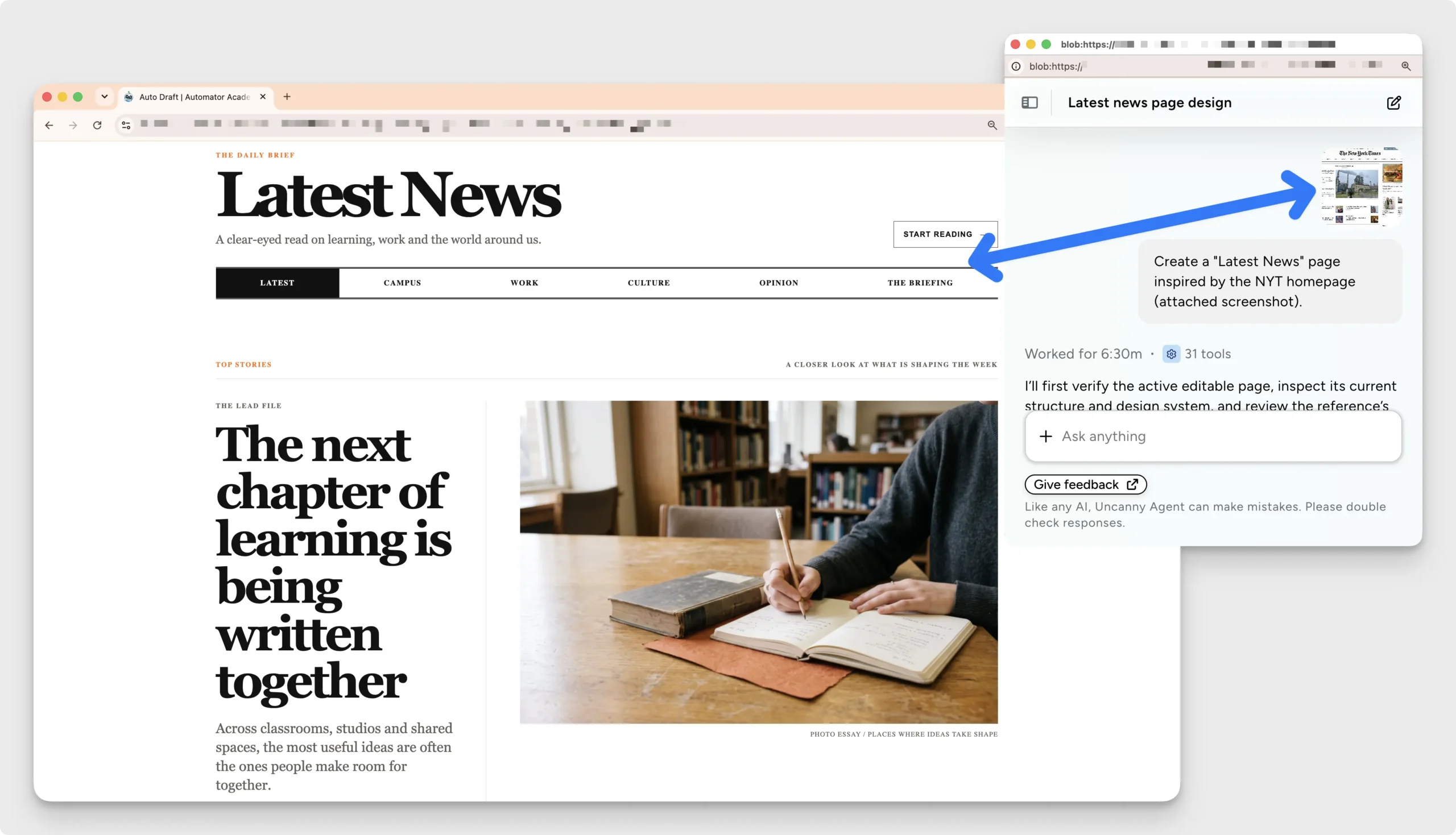
Honourable mention: Uncanny Page Builder. It quietly breaks the question, because you don’t browse templates or design from scratch. You tell Uncanny Agent what the page is for, and its design intelligence decides the layout, hierarchy, and styling. Seen a design you love somewhere? Upload a screenshot and Agent builds a page in that style. Set your brand values once — colors, fonts, logo, spacing, button styles — and every page comes out matching them. The design skills requirement drops to zero.
Vendor Lock-In and Portability
This is the category nobody thinks about until they’ve already handed over their credit card details. So think about it now: what happens to your pages when you deactivate your builder?
With most traditional builders, the answer is ugly. Proprietary shortcodes and builder-specific markup live inside your content. Leave, and you’re looking at broken layouts and a long rebuild.
Winner: Uncanny Page Builder. Its output is clean, standard HTML and CSS — no proprietary shortcodes, no builder-specific code. Deactivate the plugin and your page designs stay intact. Want to go further? Download any page as a standalone web file, complete with styling, and host it anywhere — even outside WordPress. You can export and import page source between sites, too. Independence isn’t a side effect of the design here. It is the design.
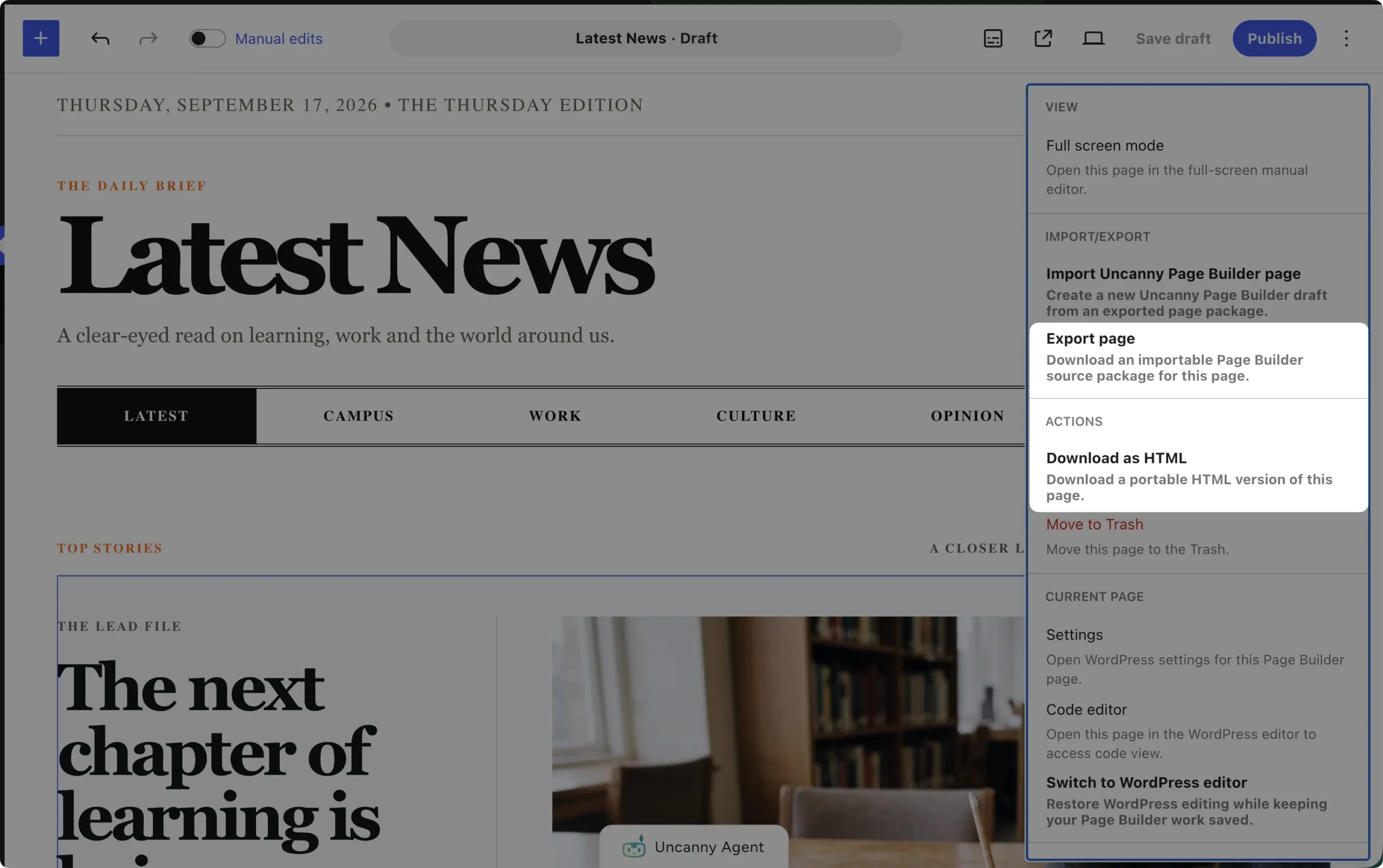
(One honest note on scope: live elements — the auto-updating parts we’ll meet in the last category — need Uncanny Automator active to render. The designs themselves survive without it.)
Runner-up: Gutenberg. Your content lives in WordPress core, so there’s no plugin to lose in the first place.
Own every page you build >>>
Who Will Maintain the Site?
A page builder decision outlives the build. Maybe you’re handing the site to a client. Maybe a teammate takes over content updates. Maybe it’s just future-you, six months from now, staring at a page and wondering what past-you was thinking.
Winner: Uncanny Page Builder. This one comes down to guardrails. Brand values are set once, and the critical ones can be locked — locked colors, fonts, and styles can’t be overridden on any page, by anyone. Not a teammate having a creative moment. Not even Uncanny Agent. The site stays on-brand no matter who inherits it.
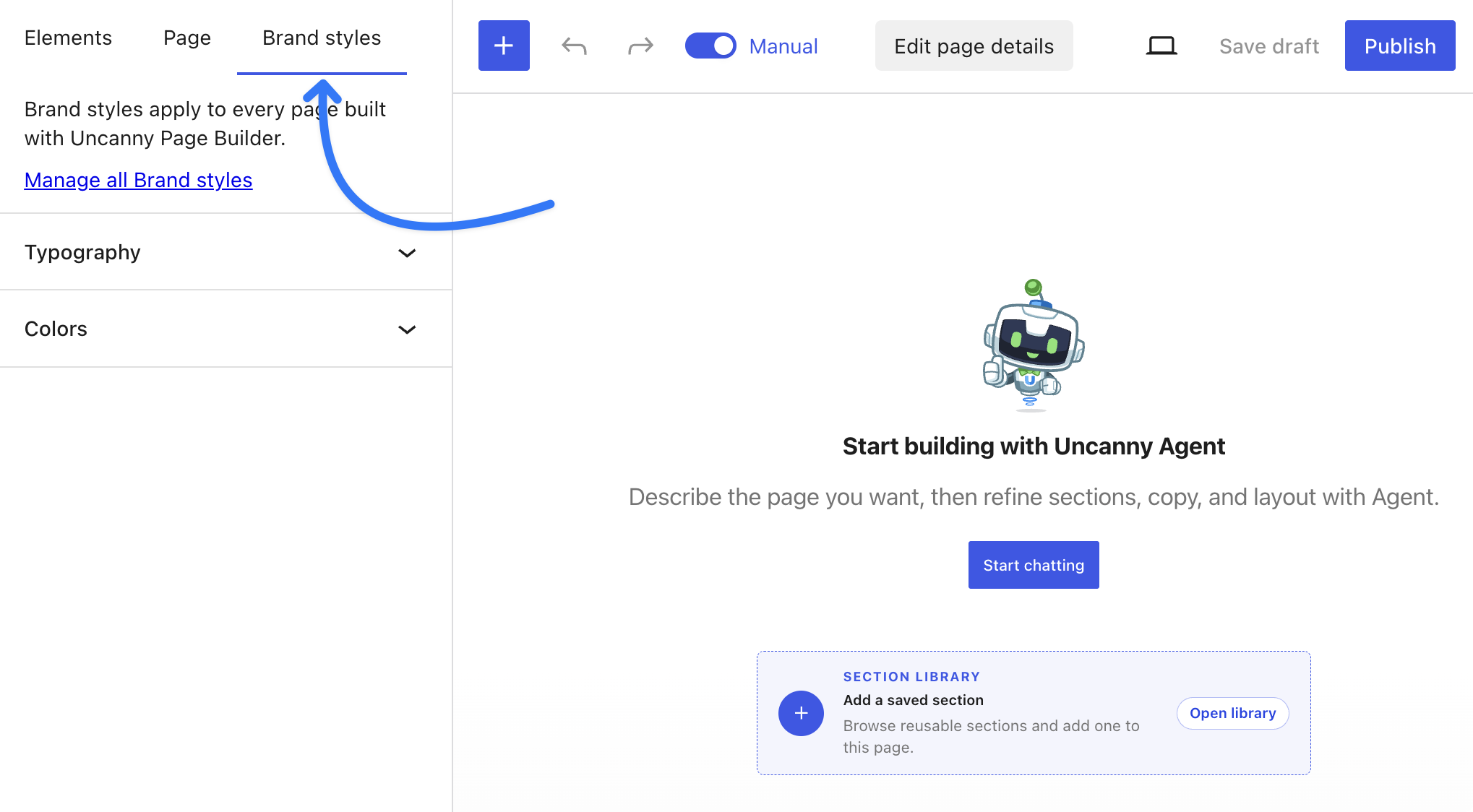
Day-to-day upkeep is just as forgiving. Whoever owns the site updates text and images with click-to-edit, and structural changes are a described request — “add a testimonials section” — rather than a settings-panel excavation. Best of all, when Uncanny Page Builder takes over an existing page, the original is saved automatically. Restore it any time, exactly as it was, at the same address. That’s a safety net most builders simply don’t have.
Runner-up: Gutenberg. Any WordPress user can edit content natively, and there’s no license to renew or transfer. Simple is maintainable.
Honourable mentions: Beaver Builder and Elementor. Beaver Builder built its whole reputation on stable client handoffs (a fine pick outside our six). And Elementor is everywhere, so a replacement maintainer is never hard to find — which brings us neatly to the next category.
Hand off your site with confidence — get Uncanny Page Builder >>>
Ecosystem, Support, and Hireability
Sooner or later you’ll need an add-on, an answer, or a human. This category asks: how easy is each to find?
Winner: Elementor. No contest here. It has the biggest third-party add-on ecosystem in WordPress, the deepest pile of tutorials and courses, and the largest talent pool. If you’re posting a job, “knows Elementor” is the easiest box a freelancer can tick.
Runners-up: Gutenberg and Divi. Gutenberg’s ecosystem is WordPress itself — every WordPress developer works with blocks, and block libraries like Kadence and Spectra extend the editor when you need more. Divi’s long-standing community and marketplace remain among the strongest in the space.
Honourable mention: Uncanny Page Builder. It’s the newest name on this list, and we won’t pretend it has Elementor’s ecosystem. What it has is the established team and support crew behind Uncanny Automator, plus documentation that covers all three capabilities in one place. You’re early, but you’re not alone.
Compatibility and Specific Use Cases
Ok, this is where it gets messy: every WordPress page builder has a niche. But some are more “niche-y” than others.
The quick map. SeedProd is the launch-funnel and coming-soon specialist — nothing here gets a campaign page live faster, which makes it our runner-up. Bricks is the natural pick for hand-built WooCommerce stores with a technical owner. Elementor anchors sites assembled from its add-on ecosystem. Divi shines on agency retainers. Gutenberg is at home on content-led sites. And beyond our six, funnel tools like Thrive Architect and beginner-friendly options like Brizy fill their own corners.
That’s why we’ve chosen Uncanny Page Builder as the winner of this category. While every other builder earns its place by specializing, Uncanny Page Builder covers almost any use case for the simplest reason imaginable: you just tell it what you need. A landing page for next week’s promo. A coming-soon page. A pricing page, a team page, a portfolio. If you can describe it, Uncanny Agent can build it.
And its 91 live elements (dynamic content, in SEO-speak) keep those pages current on their own — latest-posts grids that update themselves, greetings that welcome members by name, sections that appear only for logged-in visitors.
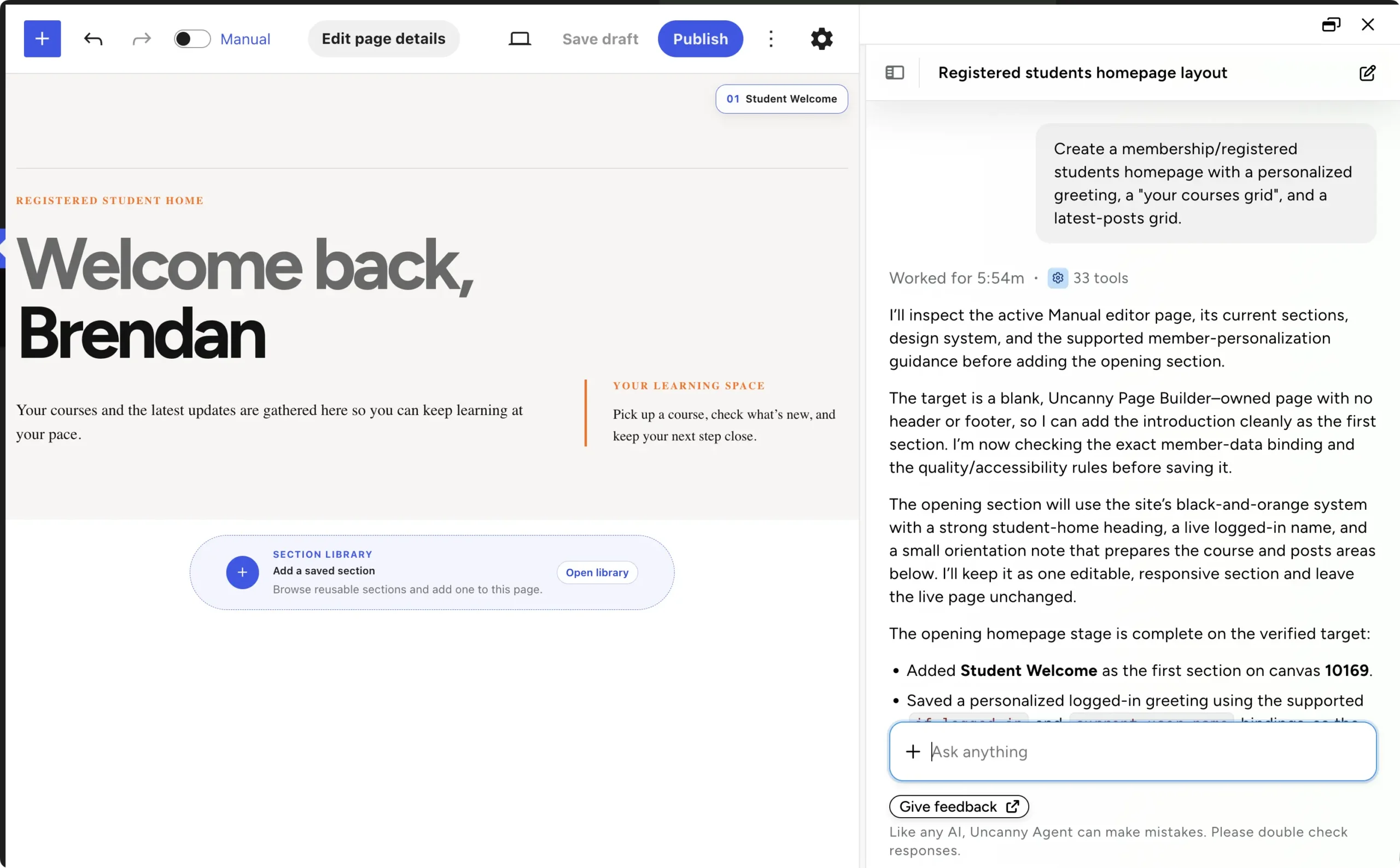
Just as important, it plays nicely with the site you already have. Keep your theme or design full pages — your choice, page by page. Adopt it one page at a time. It detects other builders so two editors never fight over the same page, and it runs happily alongside WooCommerce, LearnDash, and MemberPress. Multisite? Supported.
Whatever page you need next, just ask for it — get Uncanny Page Builder >>>
The Verdict: The Best WordPress Page Builder in 2026
Eight categories, four different winners — and that spread is the real finding. “Best” isn’t one trophy. It’s the match between what a builder does well and what your site actually needs.
Tally it up. Uncanny Page Builder takes ease of use, lock-in and portability, maintainability, and use-case fit. Gutenberg takes performance. Divi 5 takes total cost at scale. Elementor takes design range and ecosystem. Four categories out of eight, plus the argument that runs through all of them — describing a page beats configuring one — is why Uncanny Page Builder is our overall pick. (And yes, we said we’d show our work. We hope four honest losses count.)
If you want it by situation instead:
- Building for yourself, no design skills, no designer budget? Uncanny Page Builder. Describe it, refine it by conversation, done.
- Shipping campaign and landing pages every week? Uncanny Page Builder or Elementor, depending on whether you want conversation or canvas. Brand locks keep every page on-brand either way.
- Running many sites on one license? Divi 5 or Bricks.
- A developer who wants full control of the markup? Bricks.
- A budget of exactly $0? Gutenberg.
- Launch funnels and coming-soon pages? SeedProd.
And if you love building by hand, a traditional builder is still a great choice — now you know which one fits.
Get Uncanny Page Builder >>>
Build Your Next Page by Describing It
Here’s the thought we’ll leave you with. For a decade, “best page builder” meant the best canvas — the smoothest dragging, the nicest panels. In 2026, the best page builder might not be a better canvas at all. It might be no canvas.
Uncanny Page Builder is included with every Uncanny Automator plan, alongside the automation engine and the AI assistant you may already know. Check the plans on our pricing page, or read the full walkthrough in our launch post. Your first page is one sentence away.
What will you do with more time?
P.S. Want the deeper tour of how AI page building actually works? Start with our guide to creating a landing page in WordPress with AI.
Frequently Asked Questions
What is a page builder in WordPress?
A page builder is a tool that lets you design WordPress pages visually, without writing code. Traditional builders like Elementor and Divi use drag-and-drop blocks or modules. Gutenberg, the block editor built into WordPress, covers the basics for free. And the newest approach, the AI-first Uncanny Page Builder, lets you describe the page and have Uncanny Agent build it.
What is the best WordPress page builder?
It depends on which category you weight most. Gutenberg wins performance, Divi 5 wins value at scale, Elementor wins ecosystem and design range, and Uncanny Page Builder wins ease of use, portability, maintainability, and use-case fit — which is why it’s our overall pick for 2026.
Do I need a page builder for WordPress?
Not always. If your site is content-led — a blog, documentation, simple pages — Gutenberg may be all you need. Builders earn their keep when you want landing pages, custom layouts, live content, or a design standard your theme can’t deliver.
What is the best free WordPress page builder?
Gutenberg is free, built in, and improving every release. Elementor and SeedProd both offer capable free versions. And Uncanny Automator Lite comes with starter Uncanny Agent usage for building your first pages — full AI page building is included with every paid plan.
What is an AI page builder?
An AI page builder is one where AI does the building, not just the assisting. Tools like Elementor AI, Divi AI, and SeedProd’s AI Theme Builder generate content or layouts inside a traditional drag-and-drop system. Uncanny Page Builder is AI-first: Uncanny Agent constructs the whole page from your description — layout, content, and styling — and you refine it through conversation.
Which WordPress page builder doesn’t lock you in?
Uncanny Page Builder outputs clean, standard HTML and CSS, so your page designs stay intact even if the plugin is deactivated — and any page can be downloaded as a standalone file and hosted anywhere. Gutenberg is also a safe choice, since your content lives in WordPress core. (Live elements in Uncanny Page Builder pages do need the plugin active to render.)

Related Posts























































Comments (0)