

Every purchase on automatorplugin.com gives you a license and a subscription that renews it each year. This article explains the difference between the two and covers how renewal works and how to cancel or reactivate a subscription.
License and subscription
A license and a subscription are separate things. An active license gives you plugin updates and access to the support team. A subscription is the automatic annual payment that renews the license and keeps it active.
Renewing your license
When you buy a plugin, a subscription is created automatically so that your license renews without a gap in updates or support. The license renews one year after your purchase, and your original payment method is charged the renewal amount. If your license has already expired, see Renew your license.
Cancelling your subscription
Cancel any subscription from the Orders & Subscriptions page:
- Log in to your account.
- Go to Orders & Subscriptions.
- Find the subscription you want to cancel and click Cancel. You may be asked a few questions about why you are cancelling.
- Confirm the cancellation.
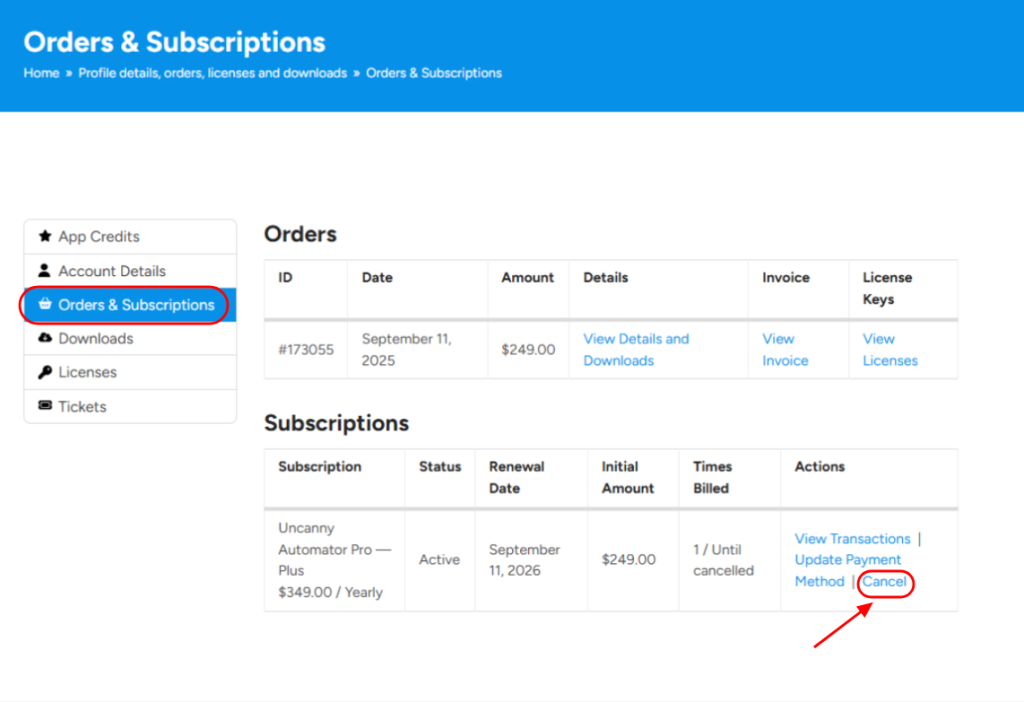
The subscription is cancelled at once, but your license stays valid until its expiration date, which is usually the date the subscription would have renewed. To check that the license is still active, go to the Licenses page. If you are within 14 days of a new purchase, you can request a refund instead.
Reactivating a cancelled subscription
- Log in to your account.
- Go to Orders & Subscriptions.
- Find the cancelled subscription and click Reactivate.
Note: If the license has already expired, your payment method is charged at once and the license is reactivated. If it has not expired yet, you aren’t charged until the subscription’s renewal date.
Related: Renew your license, Upgrade or downgrade your license, Request a refund, Download your plugins and get license keys

Comments (0)